
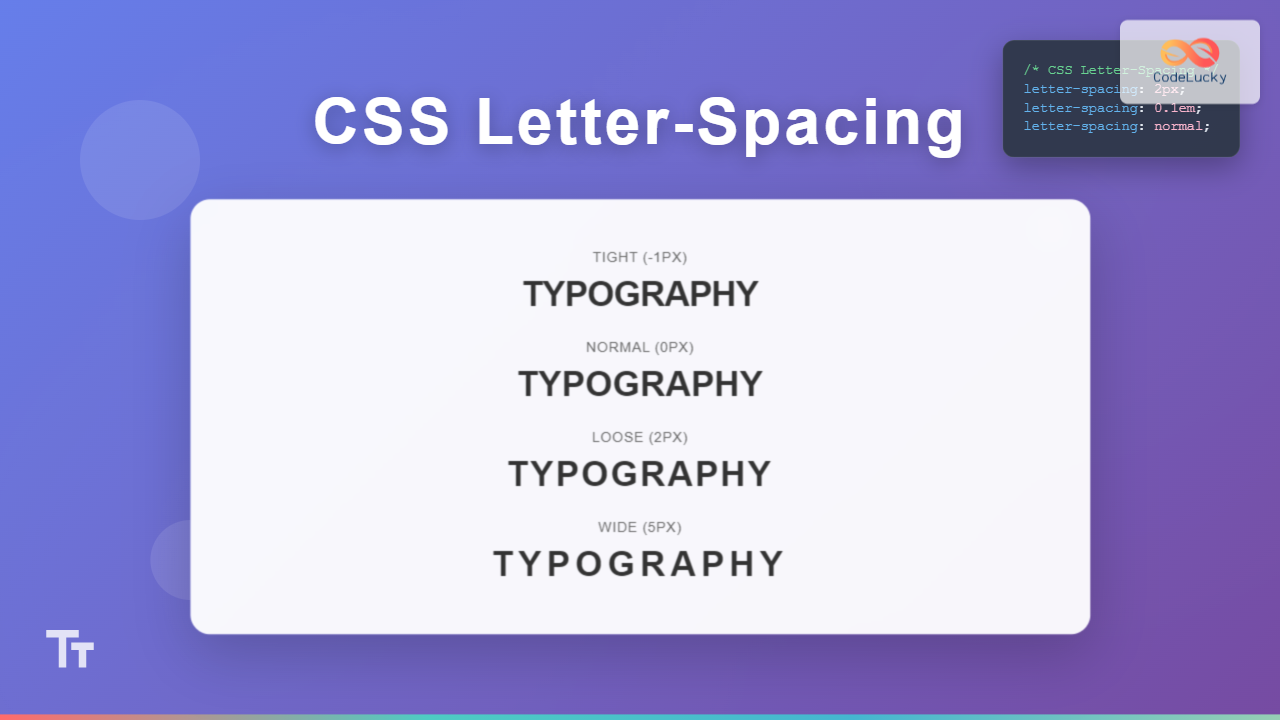
The letter-spacing property in CSS is a powerful typography tool that controls the horizontal space between characters in text. Whether you’re creating elegant headings, improving readability, or achieving specific design aesthetics, understanding letter-spacing is essential for modern web development.
What is CSS Letter-Spacing?
CSS letter-spacing defines the amount of space between characters (letters) in a text element. It allows you to increase or decrease the default spacing that browsers apply between individual characters, giving you precise control over text appearance and readability.
Basic Syntax
selector {
  letter-spacing: value;
}
Letter-Spacing Values and Units
The letter-spacing property accepts various types of values, each offering different levels of control and flexibility.
Length Values
You can specify letter-spacing using absolute or relative length units:
/* Pixels */
.spacing-px { letter-spacing: 2px; }

/* Em units (relative to font size) */
.spacing-em { letter-spacing: 0.1em; }

/* Rem units (relative to root font size) */
.spacing-rem { letter-spacing: 0.05rem; }

/* Other units */
.spacing-pt { letter-spacing: 1.5pt; }
.spacing-vh { letter-spacing: 0.2vh; }
Visual Examples:
This text has 2px letter spacing
This text has 0.1em letter spacing
This text has -1px letter spacing
Keyword Values
CSS provides keyword values for common letter-spacing scenarios:
/* Default browser spacing */
.normal { letter-spacing: normal; }

/* Inherits from parent element */
.inherit { letter-spacing: inherit; }

/* Uses initial computed value */
.initial { letter-spacing: initial; }

/* Uses computed value from cascade */
.unset { letter-spacing: unset; }
Practical Examples and Use Cases
Headings and Titles
Letter-spacing is commonly used to create impactful headings and titles:
.hero-title {
  font-size: 3rem;
  letter-spacing: 0.05em;
  text-transform: uppercase;
}

.section-heading {
  font-size: 2rem;
  letter-spacing: 2px;
  font-weight: 300;
}
HERO TITLE
Section Heading
Navigation Menus
Subtle letter-spacing can improve navigation readability:
.navigation {
  display: flex;
  gap: 2rem;
}

.nav-link {
  letter-spacing: 0.5px;
  text-transform: uppercase;
  font-size: 0.9rem;
  text-decoration: none;
  color: #333;
}Button Styling
Letter-spacing can enhance button text appearance:
.btn-primary {
  background: #007bff;
  color: white;
  padding: 12px 24px;
  border: none;
  border-radius: 5px;
  letter-spacing: 1px;
  text-transform: uppercase;
  font-weight: 600;
  cursor: pointer;
}Interactive Letter-Spacing Demo
Experiment with different letter-spacing values using this interactive demo:
The quick brown fox jumps over the lazy dog
Responsive Letter-Spacing
Letter-spacing can be adjusted across different screen sizes for optimal readability:
.responsive-heading {
  font-size: 2rem;
  letter-spacing: 1px;
}

/* Tablet */
@media (max-width: 768px) {
  .responsive-heading {
    font-size: 1.5rem;
    letter-spacing: 0.5px;
  }
}

/* Mobile */
@media (max-width: 480px) {
  .responsive-heading {
    font-size: 1.25rem;
    letter-spacing: 0.25px;
  }
}
Letter-Spacing with Different Font Families
Different fonts respond differently to letter-spacing adjustments:
Times New Roman with 2px spacing
Arial with 2px spacing
Courier New with 2px spacing
Advanced Techniques
CSS Custom Properties
Use CSS custom properties for consistent letter-spacing across your design:
:root {
  --spacing-tight: -0.5px;
  --spacing-normal: 0;
  --spacing-loose: 1px;
  --spacing-wide: 2px;
}

.heading { letter-spacing: var(--spacing-loose); }
.subheading { letter-spacing: var(--spacing-normal); }
.caption { letter-spacing: var(--spacing-tight); }
Animation and Transitions
Letter-spacing can be smoothly animated for interactive effects:
.animated-text {
  letter-spacing: 0px;
  transition: letter-spacing 0.3s ease;
}

.animated-text:hover {
  letter-spacing: 3px;
}
Hover over this text to see the animation
Best Practices and Guidelines
Readability Considerations
- Moderate adjustments: Small changes (0.5px to 2px) usually work better than extreme values
- Font size relationship: Larger fonts can handle more letter-spacing than smaller ones
- Content context: Consider whether the text is for reading or display purposes
- Line length: Longer lines may benefit from slightly increased letter-spacing
Performance Tips
- Use relative units (em, rem) for scalable designs
- Limit the number of different letter-spacing values in your design system
- Test across different devices and screen sizes
- Consider browser rendering differences
Common Mistakes to Avoid
⚠️ Watch Out For:
- Excessive letter-spacing that hurts readability
- Negative letter-spacing that causes character overlap
- Inconsistent spacing across similar text elements
- Not testing with different font sizes and families
- Ignoring accessibility guidelines for text spacing
Browser Support and Compatibility
The letter-spacing property has excellent browser support across all modern browsers:
Browser Support:
- ✅ Chrome: Full support since version 1
- ✅ Firefox: Full support since version 1
- ✅ Safari: Full support since version 1
- ✅ Edge: Full support since version 12
- ✅ Internet Explorer: Full support since version 4
Accessibility Considerations
When using letter-spacing, keep accessibility in mind:
- Ensure text remains readable for users with dyslexia or reading difficulties
- Test with screen readers to ensure proper text flow
- Follow WCAG guidelines for text spacing
- Provide sufficient contrast between text and background
Real-World Examples
Logo and Branding
.brand-logo {
  font-size: 2.5rem;
  font-weight: 300;
  letter-spacing: 0.1em;
  text-transform: uppercase;
  color: #2c3e50;
}Quote Styling
.blockquote {
  font-size: 1.25rem;
  font-style: italic;
  letter-spacing: 0.02em;
  line-height: 1.6;
  border-left: 4px solid #007bff;
  padding-left: 20px;
  margin: 20px 0;
}
“Typography is the craft of endowing human language with a durable visual form.”
Conclusion
CSS letter-spacing is a fundamental property for creating polished, readable, and visually appealing web typography. By understanding its various values, applications, and best practices, you can enhance your web designs and improve user experience. Remember to always test your letter-spacing choices across different devices and contexts to ensure optimal readability and accessibility.
Whether you’re creating elegant headings, improving navigation clarity, or establishing brand identity, mastering letter-spacing will give you precise control over your text presentation and help you create more professional web interfaces.
Related Posts
CSS Style letterSpacing Property: CSS Letter Spacing
CSS letter-spacing Property: A Comprehensive Guide The letter-spacing CSS property controls the horizontal spacing between text characters. It allows you...
CSS Word-Spacing: Master Text Spacing for Better Typography
The word-spacing property in CSS is a powerful tool for controlling the spacing between words in your text content. This...
CSS Style wordSpacing Property: CSS Word Spacing
Understanding CSS word-spacing Property The word-spacing property in CSS is used to specify the amount of space between words. This...
CSS Style paddingLeft Property: CSS Padding Left
CSS padding-left Property: A Comprehensive Guide The padding-left property in CSS is used to set the amount of padding space...
CSS ::first-letter Pseudo-Element: Complete Guide to Drop Caps and First Letter Styling
The CSS ::first-letter pseudo-element is a powerful tool for creating elegant typography effects, particularly the classic drop cap style where...
CSS Style fontSize Property: CSS Font Size
CSS fontSize Property: Controlling Text Size The fontSize property in CSS specifies the size of the font. This property is...
CSS Padding: Complete Guide to Top, Right, Bottom, Left Spacing Properties
CSS padding is one of the most fundamental properties for controlling spacing in web design. It creates space between an...
CSS White-Space: Complete Guide to Controlling Whitespace and Line Breaks
The CSS white-space property is a powerful tool that controls how browsers handle whitespace characters, line breaks, and text wrapping...
CSS Line-Height: Complete Guide to Controlling Text Spacing and Readability
The CSS line-height property is one of the most fundamental yet underutilized tools for creating readable, visually appealing typography on...
CSS Margin: Complete Guide to Element Spacing and Margin Collapse
Understanding CSS Margin: The Foundation of Element Spacing CSS margin is one of the most fundamental properties for controlling spacing...
CSS Font-Style: Complete Guide to Italic, Oblique and Normal Text Styling
The CSS font-style property is a fundamental typography tool that controls how text appears on your web pages. Whether you...
CSS Style padding Property: CSS Padding
CSS Padding Property: A Comprehensive Guide The CSS padding property is a fundamental tool in web development, allowing you to...





