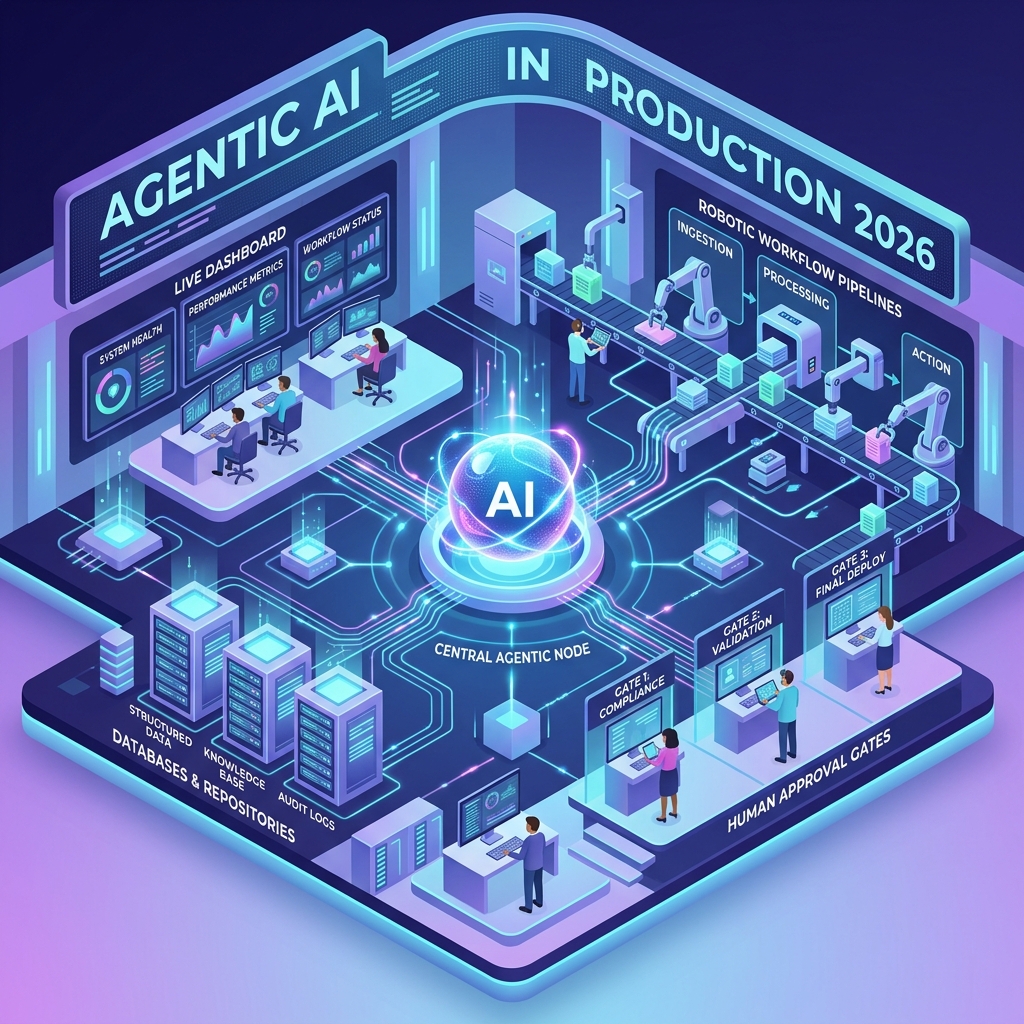
Two years ago, most enterprise AI projects looked the same: a chatbot bolted onto a knowledge base, a demo that wowed the boardroom, and a quiet death in the proof-of-concept graveyard. In 2026, the picture is different. Agentic AI — systems where a model plans, calls tools, checks its own work, and iterates until a task is done — has crossed from flashy demos into production pipelines that close support tickets, reconcile invoices, triage security alerts, and ship code reviews while the team sleeps.
That shift didn’t happen because models got marginally smarter. It happened because the infrastructure around them matured: standardized tool protocols, permission systems, evaluation harnesses, and observability tooling that let engineering leaders answer the question that killed earlier projects — “can we trust this thing with real work?” If you’re a developer or architect trying to move agentic AI from experiment to production, this guide walks through how enterprises actually do it, with working code, architecture patterns, and the mistakes that still sink deployments.
What Is Agentic AI?
Agentic AI is a class of AI systems in which a large language model operates in a loop: it receives a goal, decides which actions to take, executes those actions through tools or APIs, observes the results, and continues reasoning until the goal is met. Unlike a single prompt-and-response interaction, an agent autonomously manages multi-step work with limited human intervention.
The concept builds on decades of research into intelligent agents, but the modern version pairs a frontier language model with three practical ingredients:
- Tools — typed functions the model can call: querying a database, sending an email, running a shell command, or hitting an internal API.
- An orchestration loop — code that feeds tool results back to the model and decides when the task is finished.
- Context management — memory files, conversation compaction, and retrieval that keep long-running tasks coherent.
A useful analogy: a plain LLM call is like asking a brilliant consultant a question over email. An agent is like giving that consultant a laptop, system access, and a ticket queue — then reviewing their work at defined checkpoints.
Why Agentic AI Finally Reached Production in 2026
Three things changed between the demo era and today, and understanding them helps you avoid rebuilding solved problems.
Standardized tool connectivity
Early agents required custom glue code for every system they touched. The Model Context Protocol (MCP) changed that by giving models a standard way to discover and call external tools — the way USB standardized peripherals. By 2026, major SaaS platforms ship official MCP servers, so an agent can reach GitHub, Linear, Slack, or an internal data warehouse without bespoke integration work for each one.
Managed agent runtimes
Model providers now offer hosted agent infrastructure: versioned agent configurations, sandboxed execution containers, credential vaults that keep secrets out of the model’s reach, and event streams your application consumes. Teams that previously spent months building orchestration scaffolding can now focus on the part that’s actually unique to their business — the tools, the policies, and the definition of “done.”
Evaluation and guardrail maturity
The hardest production question was never “can the agent do the task?” but “how do we know when it didn’t?” Rubric-based grading loops, adversarial verification, and permission policies that pause an agent before irreversible actions turned agent behavior from a black box into something an engineering organization can monitor, audit, and improve. Frameworks like the NIST AI Risk Management Framework gave compliance teams shared vocabulary for approving these systems.
The Enterprise Agentic AI Stack
Production deployments converge on a layered architecture. Knowing the layers helps you decide what to build versus buy.
Layer 1: The model
The reasoning engine. Enterprises typically route work across model tiers — a frontier model for long-horizon, high-stakes tasks and smaller, faster models for classification, routing, and sub-tasks. Model choice is a cost lever, not just a quality lever.
Layer 2: The orchestration loop
The code that runs the agent: sending requests, executing tool calls, feeding results back, and stopping at the right moment. This can be a few dozen lines you own (shown below) or a managed runtime the provider operates.
Layer 3: Tools and data access
Typed tool definitions, MCP servers, and retrieval pipelines. The design rule that separates successful teams: promote any risky action to a dedicated tool. A generic shell tool gives the model maximum leverage but gives your platform nothing to gate. A dedicated issue_refund tool with a typed schema can be intercepted, logged, rate-limited, and routed for approval.
Layer 4: Guardrails and identity
Permission policies, human-in-the-loop approval gates, scoped credentials, and network egress controls. Agents get their own service identities with least-privilege access — never a shared admin key.
Layer 5: Observability and evaluation
Tracing every tool call, token, and decision so you can debug failures and measure quality over time. The OpenTelemetry semantic conventions for generative AI have become the common language here, letting agent traces flow into the same dashboards as the rest of your services.
Building a Production Agent Loop in Python
The clearest way to understand agentic AI is to read a real loop. The example below implements a customer-operations agent with two tools and a human approval gate on the risky one. It uses the Anthropic SDK, but the pattern is identical across providers: call the model, execute requested tools, return results, repeat.
import anthropic

client = anthropic.Anthropic()

TOOLS = [
    {
        "name": "lookup_order",
        "description": "Fetch an order record by ID. Call this whenever the "
                       "user references an order, before taking any action.",
        "input_schema": {
            "type": "object",
            "properties": {
                "order_id": {"type": "string", "description": "The order ID"}
            },
            "required": ["order_id"],
        },
    },
    {
        "name": "issue_refund",
        "description": "Issue a refund to a customer. Only call this after "
                       "verifying the order exists and is eligible.",
        "input_schema": {
            "type": "object",
            "properties": {
                "order_id": {"type": "string"},
                "amount": {"type": "number", "description": "Refund in USD"},
            },
            "required": ["order_id", "amount"],
        },
    },
]

# State-changing tools must be approved by a human before they run
REQUIRES_APPROVAL = {"issue_refund"}


def run_agent(user_input: str) -> str:
    messages = [{"role": "user", "content": user_input}]

    while True:
        response = client.messages.create(
            model="claude-opus-4-8",
            max_tokens=16000,
            tools=TOOLS,
            messages=messages,
        )

        # No more tool calls means the agent is done — return its answer
        if response.stop_reason != "tool_use":
            return next(b.text for b in response.content if b.type == "text")

        # Preserve the assistant turn, including its tool_use blocks
        messages.append({"role": "assistant", "content": response.content})

        results = []
        for block in response.content:
            if block.type != "tool_use":
                continue
            # Gate irreversible actions behind a human decision
            if block.name in REQUIRES_APPROVAL and not approved_by_human(block):
                results.append({
                    "type": "tool_result",
                    "tool_use_id": block.id,
                    "content": "Denied: a reviewer rejected this action.",
                    "is_error": True,
                })
                continue
            results.append({
                "type": "tool_result",
                "tool_use_id": block.id,
                "content": execute_tool(block.name, block.input),
            })

        # Tool results go back as a user message, and the loop continues
        messages.append({"role": "user", "content": results})
This loop captures the essence of every production agent: the model decides what to do, your code decides whether it’s allowed and how it executes. Notice that a denied action isn’t an exception — it’s returned as an error result so the agent can adapt, explain the denial to the user, or try a compliant alternative. The approved_by_human and execute_tool functions are yours to implement: the first might push a notification to a reviewer queue, while the second dispatches to your internal services.
Start at the simplest tier that meets the need. A single model call beats a workflow, and a workflow beats an autonomous agent — reach for full agency only when the task is genuinely multi-step and hard to specify in advance.
Orchestration Patterns: Choosing the Right Level of Autonomy
Not every task deserves an agent. Enterprises that succeed with agentic AI in production match the orchestration pattern to the task, and they’re disciplined about it because every step up the autonomy ladder adds cost, latency, and failure modes.
| Pattern | How it works | Best for | Watch out for |
|---|---|---|---|
| Single LLM call | One request, one response | Classification, extraction, summarization | No recovery if the output is wrong |
| Workflow | Code-defined steps with LLM calls inside | Predictable multi-step pipelines | Brittle when inputs vary widely |
| Single agent | Model-driven loop with tools | Open-ended tasks: debugging, research, triage | Cost and latency are variable per run |
| Multi-agent | Coordinator delegates to specialist agents | Work that fans out across independent items | Context isolation: subagents don’t share history |
A practical decision test used by platform teams: build an agent only when the task is complex (multi-step, hard to script), valuable (the outcome justifies the cost), viable (the model is demonstrably capable at this task type), and recoverable (errors can be caught through tests, review, or rollback). A “no” on any of the four means you should drop down a tier.
Guardrails: How Enterprises Keep AI Agents Safe
The difference between a demo and a deployment is almost entirely guardrails. Four controls show up in nearly every serious rollout.
Permission policies on tools
Each tool carries a policy: always_allow for read-only operations, always_ask for anything that changes state. When an agent hits an ask-gated tool, it pauses and waits for a human decision — exactly like the approval gate in the code above, but enforced by the platform rather than application code.
Scoped credentials outside the agent’s reach
Production systems never paste API keys into prompts. Secrets live in credential vaults and are injected into outbound requests after they leave the agent’s sandbox, so even a prompt-injected agent cannot read or exfiltrate them. If a tool needs host-side authentication, the orchestrator executes the call and hands the agent only the result.
Sandboxed execution with controlled egress
Agents that run code or shell commands do so in isolated containers with deny-by-default networking. The agent can reach the package registry and the three internal APIs it needs — and nothing else.
Blast-radius budgeting
Token budgets cap runaway loops, iteration limits bound retry cycles, and reversibility rules require that destructive operations (deletes, payments, external messages) either pass through approval or land in a staging state a human can undo. Treat reversibility as the criterion: anything hard to reverse gets a gate.
Measuring Agents: Evals, Rubrics, and Observability
You cannot improve what you don’t measure, and agent behavior is too variable for spot checks. Mature teams run three measurement layers.
Offline evals are graded test suites run before every prompt or model change: a set of representative tasks, each with explicit, independently checkable success criteria — “the CSV contains a numeric price column for every SKU,” not “the data looks good.” Vague rubrics produce noisy scores; concrete ones turn agent quality into a regression test.
Online grading evaluates real production runs. A common pattern is the outcome loop: define what “done” looks like as a rubric, let the agent iterate, and have a separate grader model — with its own fresh context — score each attempt and feed the gaps back. Independent graders consistently outperform asking an agent to critique its own work, because the agent’s blind spots travel with its context.
Operational telemetry tracks the boring-but-vital numbers: tokens per task, tool-call error rates, human-intervention frequency, end-to-end latency, and cost per completed task. These metrics tell you whether the agent is economically viable, and intervention frequency in particular is the early-warning signal — when humans start overriding the agent more often, quality has drifted even if your evals haven’t caught it yet.
Common Pitfalls When Deploying Agentic AI in Production
The same failure modes appear across industries. Check your design against each one.
- Automating the wrong task first. Teams pick their most painful process, which is usually also the highest-stakes one. Start with tasks that are tedious, frequent, and cheap to verify — invoice matching beats contract negotiation.
- Vague tool descriptions. The model decides when to call a tool based on its description. “Gets data” produces erratic behavior; “Call this when the user references an order ID, before taking any action” produces reliable behavior. Write trigger conditions into every description.
- Letting the context window rot. Long-running agents accumulate stale tool results until coherence degrades. Use compaction (summarizing older history) and context editing (pruning dead tool output), and give agents a memory file for durable facts.
- Skipping the failure path. Demos test the happy path. Production agents meet malformed data, timeouts, and permission errors daily. Return informative error results to the agent — it will route around failures you handle gracefully and flail on ones you don’t.
- No baseline before launch. If you don’t measure how long the human process takes and how often it errs, you can’t prove the agent helps — and the project dies in its first budget review.
- Trusting retrieved content. Anything an agent reads — web pages, tickets, emails — can contain adversarial instructions. Prompt injection is why credential isolation and tool gating are non-negotiable, not nice-to-haves.
Frequently Asked Questions About Agentic AI
What is the difference between agentic AI and generative AI?
Generative AI produces content from a prompt — text, images, code — in a single pass. Agentic AI wraps a generative model in a loop with tools and goals, so it can take actions, observe outcomes, and keep working across many steps. Every agent uses a generative model, but most generative AI use is not agentic.
Which tasks should enterprises automate with AI agents first?
Start with work that is frequent, well-bounded, and easy to verify: ticket triage, data reconciliation, report generation, code review assistance, and document processing. These tasks deliver measurable wins while errors stay cheap. Expand toward higher-stakes work only after your evaluation and approval infrastructure has proven itself.
How much does it cost to run AI agents in production?
Cost varies with task length and model tier, since agents consume tokens on every reasoning step and tool call — a complex run can use hundreds of times the tokens of a single chat reply. Teams control spend with token budgets per task, prompt caching for repeated context, and routing routine sub-tasks to smaller models. The metric that matters is cost per completed task versus the human equivalent, not cost per API call.
How do you stop an AI agent from taking harmful actions?
Layer your defenses: permission policies that pause before state-changing tools, human approval for irreversible operations, scoped credentials the agent can use but never read, sandboxed execution with restricted network egress, and audit logs of every action. No single control is sufficient — production safety comes from the combination.
Do AI agents replace human jobs?
In practice, 2026 deployments mostly restructure work rather than eliminate roles: agents absorb the repetitive middle of a job while humans shift to defining tasks, reviewing escalations, and handling exceptions. The new bottleneck skill is supervision — writing clear specifications and rubrics — which is why prompt and evaluation literacy now appears in ordinary engineering job descriptions.
What skills do developers need to build production agents?
Solid API and systems fundamentals come first: agents are distributed systems with all the usual concerns of retries, timeouts, and idempotency. On top of that, you need tool-schema design, prompt engineering for goal specification, evaluation design, and a security mindset around prompt injection and least privilege. Notably absent from the list: machine learning theory — you’re integrating models, not training them.
Conclusion
Agentic AI in production is no longer a bet on model intelligence — it’s an engineering discipline. The enterprises running real work through AI agents in 2026 share a recognizable playbook: they pick verifiable tasks, match autonomy to risk, promote dangerous actions to gated tools, keep credentials out of the model’s reach, and measure everything from rubric scores to cost per completed task.
If you’re starting now, the path is concrete. Build the simple loop from this article against one tedious, low-stakes workflow. Add an approval gate, a rubric, and tracing before you add a second tool. Let the agent earn autonomy the way a new hire does — through reviewed work and a track record. The teams winning with agentic AI didn’t deploy the smartest agents; they deployed the most accountable ones.