You have customer details sitting in one table and order records in another. On their own, each table answers almost nothing useful — you can list customers, or list orders, but you cannot easily ask “which customers actually bought something this month?” The bridge between those two tables is the SQL join, and once it clicks, half of database querying suddenly feels obvious.
The trouble is that most beginners memorize the syntax without understanding what each join keeps and what it throws away. That single gap is why people get duplicate rows, missing records, or mysterious NULL values they cannot explain. This guide fixes that. You will see exactly how INNER, LEFT, RIGHT, and FULL OUTER joins behave on real data, with runnable examples and a clear rule for when to reach for each one.
What Are SQL Joins?
A SQL join is an operation that combines rows from two or more tables based on a related column between them, usually a matching key. Instead of querying tables in isolation, a join lets you stitch related data together in a single result set — for example, pairing each order with the customer who placed it. The way rows are matched, and what happens to rows that have no match, is what separates the join types.
That related column is almost always a key. One table holds a primary key (a unique identifier like customer_id), and another table references it through a foreign key (the same customer_id stored alongside each order). Joins follow those relationships. If you want the official deep dive on the relational theory behind this, the Wikipedia article on SQL joins covers the set operations in detail.
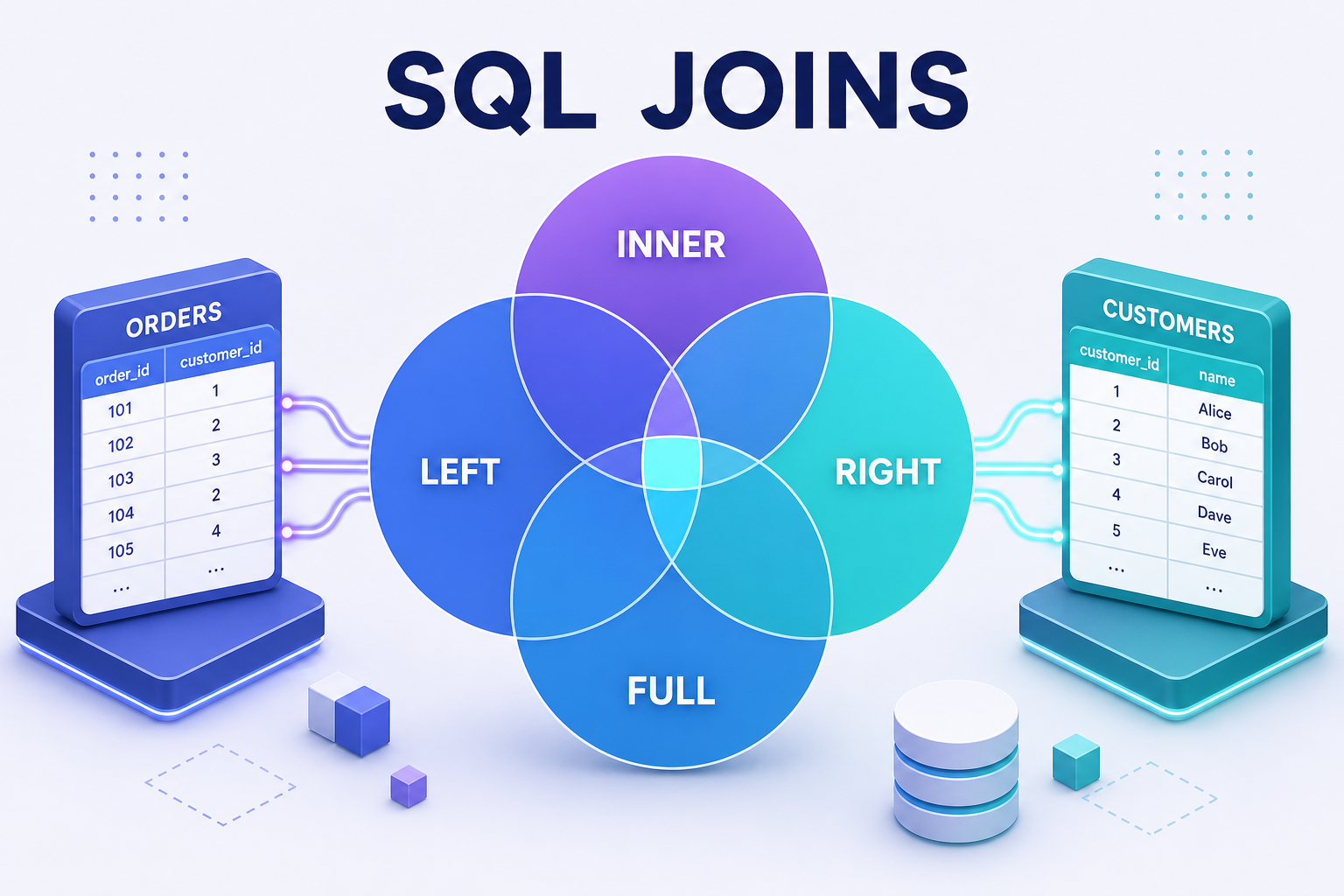
Think of two overlapping circles. One circle is the left table, the other is the right table, and the overlap is the set of rows where the join condition matches. Every join type you are about to learn is simply a different choice about which parts of those circles to return.
Setting Up the Sample Tables
Concrete data beats abstract diagrams every time, so let’s build two small tables and reuse them for every example. The first holds customers; the second holds their orders.
-- Customers table: one row per person
CREATE TABLE customers (
    customer_id INT PRIMARY KEY,
    name        VARCHAR(50)
);

-- Orders table: customer_id is the foreign key back to customers
CREATE TABLE orders (
    order_id    INT PRIMARY KEY,
    customer_id INT,
    amount      DECIMAL(8, 2)
);

INSERT INTO customers (customer_id, name) VALUES
    (1, 'Alice'),
    (2, 'Bob'),
    (3, 'Carol'),
    (4, 'Dan');     -- Dan never placed an order

INSERT INTO orders (order_id, customer_id, amount) VALUES
    (101, 1, 250.00),
    (102, 1, 90.00),
    (103, 2, 175.00),
    (104, 5, 60.00); -- customer_id 5 does not exist in customers
Notice the two deliberate edge cases. Dan (customer 4) has no matching order, and order 104 points to customer 5, who has no matching customer record — an orphan row. These mismatches are exactly what reveal the differences between join types. A table with perfectly matched data would make every join look identical.
INNER JOIN: Returning Only Matching Rows
An INNER JOIN returns only the rows where the join condition is satisfied in both tables. If a row on either side has no match, it is excluded. This is the most common join, and it is what you get by default when you write JOIN without a keyword in front of it.
SELECT c.name, o.order_id, o.amount
FROM customers c
INNER JOIN orders o
    ON c.customer_id = o.customer_id;
The ON clause defines the matching rule: pair a customer with an order only when their customer_id values are equal. The c and o are table aliases that keep the query short and remove ambiguity when both tables share a column name. Here is the result:
| name | order_id | amount |
|---|---|---|
| Alice | 101 | 250.00 |
| Alice | 102 | 90.00 |
| Bob | 103 | 175.00 |
Alice appears twice because she has two orders — that is correct, not a bug. Carol and Dan vanish because they have no orders, and order 104 vanishes because its customer does not exist. Reach for an inner join whenever you only care about records that have a counterpart on both sides, such as “customers who have placed at least one order.”
LEFT JOIN: Keeping Every Row from the Left Table
A LEFT JOIN (also written LEFT OUTER JOIN) returns every row from the left table, plus matching rows from the right table. When a left-table row has no match, the right-table columns are filled with NULL. The “left” table is simply the one named first, before the JOIN keyword.
SELECT c.name, o.order_id, o.amount
FROM customers c          -- left table: every customer is kept
LEFT JOIN orders o
ON c.customer_id = o.customer_id;| name | order_id | amount |
|---|---|---|
| Alice | 101 | 250.00 |
| Alice | 102 | 90.00 |
| Bob | 103 | 175.00 |
| Carol | NULL | NULL |
| Dan | NULL | NULL |
Now Carol and Dan appear with NULL order details, because the left join refuses to drop them just for lacking orders. The orphan order 104 is still excluded — it lives on the right side, which a left join does not preserve. This is the join you use to answer “show me all customers and their orders if they have any.”
A LEFT JOIN also gives you a clean way to find rows with no match. Filter for the NULL and you isolate the gaps:
-- Find customers who have never ordered anything
SELECT c.name
FROM customers c
LEFT JOIN orders o
    ON c.customer_id = o.customer_id
WHERE o.order_id IS NULL;
This returns Carol and Dan. The pattern — left join, then check for NULL on the right table’s key — is one of the most practical techniques in everyday SQL, used for everything from finding inactive users to detecting missing records.
Tip: Always test for “no match” with
IS NULLon a column that can never legitimately be null, such as the right table’s primary key. Testing a nullable column gives misleading results.
RIGHT JOIN: Keeping Every Row from the Right Table
A RIGHT JOIN (or RIGHT OUTER JOIN) is the mirror image of a left join: it keeps every row from the right table and fills in NULL for left-table columns that have no match. The right table is the one named after the JOIN keyword.
SELECT c.name, o.order_id, o.amount
FROM customers c
RIGHT JOIN orders o      -- right table: every order is kept
ON c.customer_id = o.customer_id;| name | order_id | amount |
|---|---|---|
| Alice | 101 | 250.00 |
| Alice | 102 | 90.00 |
| Bob | 103 | 175.00 |
| NULL | 104 | 60.00 |
This time the orphan order 104 survives, with a NULL name because no customer matches it. Carol and Dan disappear, since they live on the left side. In practice, most developers rarely write right joins — you can always rewrite a right join as a left join by swapping the table order, which usually reads more naturally. FROM orders o LEFT JOIN customers c produces the same rows as the query above.
FULL OUTER JOIN: Combining Both Sides
A FULL OUTER JOIN returns every row from both tables. Matched rows are paired up; unmatched rows from either side appear with NULL filling the missing columns. It is the union of a left join and a right join, so nothing is ever dropped.
SELECT c.name, o.order_id, o.amount
FROM customers c
FULL OUTER JOIN orders o
ON c.customer_id = o.customer_id;| name | order_id | amount |
|---|---|---|
| Alice | 101 | 250.00 |
| Alice | 102 | 90.00 |
| Bob | 103 | 175.00 |
| Carol | NULL | NULL |
| Dan | NULL | NULL |
| NULL | 104 | 60.00 |
Both edge cases now show up: the customers without orders and the order without a customer. Full outer joins shine in data-reconciliation tasks — comparing two datasets to spot what exists in one but not the other. One caveat worth knowing: MySQL does not support FULL OUTER JOIN directly. You emulate it by combining a left join and a right join with UNION:
-- FULL OUTER JOIN emulation for MySQL
SELECT c.name, o.order_id, o.amount
FROM customers c
LEFT JOIN orders o ON c.customer_id = o.customer_id
UNION
SELECT c.name, o.order_id, o.amount
FROM customers c
RIGHT JOIN orders o ON c.customer_id = o.customer_id;
PostgreSQL, SQL Server, Oracle, and SQLite all support native full outer joins. You can confirm the exact behavior for your engine in the PostgreSQL join documentation or the MySQL JOIN reference, since vendors differ on the edges.
SQL Join Types Compared at a Glance
When you strip away the syntax, choosing a join comes down to one question: which unmatched rows do you want to keep? This table summarizes the answer for all four SQL joins.
| Join Type | Keeps Matched Rows | Keeps Unmatched Left Rows | Keeps Unmatched Right Rows | Typical Use Case |
|---|---|---|---|---|
| INNER JOIN | Yes | No | No | Records that exist in both tables |
| LEFT JOIN | Yes | Yes | No | All left rows, with optional right data |
| RIGHT JOIN | Yes | No | Yes | All right rows, with optional left data |
| FULL OUTER JOIN | Yes | Yes | Yes | Everything from both, reconciliation |
Keep this mental model handy: INNER is the strict overlap, LEFT and RIGHT each protect one side, and FULL protects everything. If you can answer “which rows must never be dropped?” you already know which join to write.
Common SQL Join Mistakes to Avoid
Even experienced developers trip over the same handful of join issues. Knowing them in advance saves hours of debugging confusing result sets.
- Forgetting the
ONclause. Omitting the join condition produces a Cartesian product — every row from one table paired with every row from the other. Two tables of 1,000 rows become a million-row result. Always specify how the tables relate. - Filtering outer joins in the wrong place. If you put a condition on the right table inside the
WHEREclause of a LEFT JOIN, you silently turn it back into an inner join, becauseNULLrows fail the filter. Put right-table conditions in theONclause instead when you want to preserve unmatched rows. - Unexpected duplicate rows. If the join key is not unique on one side, matching rows multiply. Alice appearing twice earlier was intentional, but the same effect can inflate sums and counts if you are not aware of it. Aggregate carefully, or join on a unique key.
- Comparing
NULLwith=. In SQL,NULL = NULLis not true — it is unknown. Rows withNULLkeys never match in a join, which is usually what you want, but it surprises people debugging missing matches.
The WHERE-versus-ON distinction is the most common of these. Consider filtering orders over 100 on a left join. This version keeps customers without orders, because the filter sits in the ON clause:
-- Keeps all customers; only attaches orders above 100
SELECT c.name, o.amount
FROM customers c
LEFT JOIN orders o
    ON c.customer_id = o.customer_id
    AND o.amount > 100;
Move o.amount > 100 into a WHERE clause instead, and customers with no qualifying order disappear entirely, because their NULL amount fails the comparison. Same data, very different results — understanding why is what separates confident SQL writers from people who guess.
Frequently Asked Questions About SQL Joins
What is the difference between INNER JOIN and LEFT JOIN?
An INNER JOIN returns only rows with a match in both tables, dropping anything unmatched. A LEFT JOIN returns every row from the left table regardless of whether it matches, filling missing right-side columns with NULL. Use INNER when you need matches only; use LEFT when the left table’s rows must always appear.
Is LEFT JOIN the same as RIGHT JOIN?
They are mirror images, not identical. A LEFT JOIN preserves unmatched rows from the first (left) table, while a RIGHT JOIN preserves unmatched rows from the second (right) table. Any right join can be rewritten as a left join by swapping the table order, which is why most teams standardize on left joins for readability.
Which SQL join is the fastest?
No join type is inherently fastest — performance depends on indexes, table size, and the query planner. That said, INNER JOINs often run slightly faster because the database can discard non-matching rows early. The biggest performance win comes from indexing the columns used in your ON condition, not from the join type itself.
Why does my join return duplicate rows?
Duplicates appear when the join key matches multiple rows on one side. If one customer has three orders, an inner or left join produces three rows for that customer. This is expected relational behavior. To collapse them, aggregate with GROUP BY or join on a column that is unique in the related table.
Does MySQL support FULL OUTER JOIN?
No, MySQL does not have a native FULL OUTER JOIN keyword. You reproduce it by combining a LEFT JOIN and a RIGHT JOIN with UNION, as shown earlier. PostgreSQL, SQL Server, Oracle, and SQLite all support full outer joins directly.
Can I join more than two tables at once?
Yes. You can chain multiple joins in a single query, each with its own ON condition, to combine three or more tables. The database applies them in sequence, building up the result set step by step. Just keep the join conditions explicit so you avoid accidental Cartesian products.
Conclusion: Putting SQL Joins to Work
SQL joins turn isolated tables into answers. Once you internalize the core idea — that every join is a decision about which unmatched rows to keep — the four types stop being syntax to memorize and become tools you choose deliberately. INNER keeps only what overlaps, LEFT and RIGHT each protect one table, and FULL OUTER protects both.
The fastest way to make these SQL joins permanent is to run the sample tables yourself, then change the data and predict the output before you execute. Add an order, delete a customer, move a filter from WHERE to ON, and watch the result shift. That hands-on loop builds the intuition that no diagram alone can give you, and it is the same skill you will lean on for joining three, four, or a dozen tables in real applications. Master these four joins, and the rest of relational querying falls into place.