
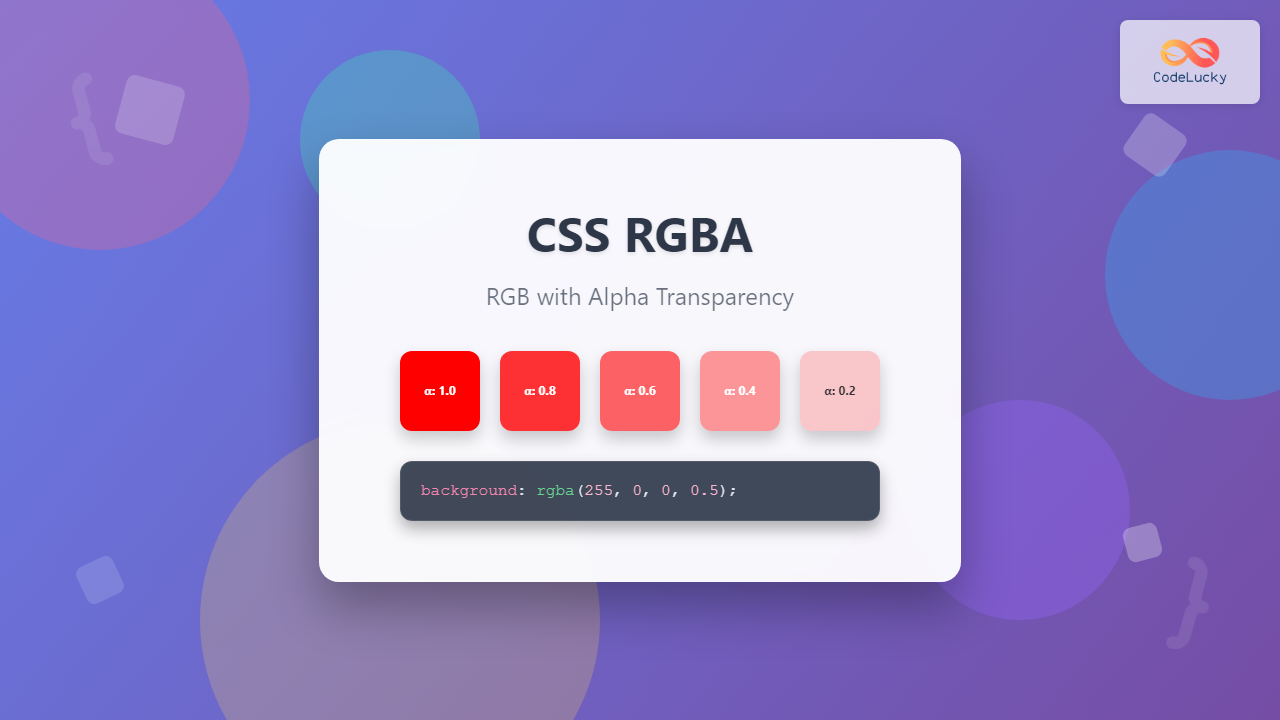
The CSS RGBA color function is a powerful tool that extends the traditional RGB color model by adding an alpha channel for transparency control. This comprehensive guide will walk you through everything you need to know about implementing RGBA colors in your web projects.
What is RGBA in CSS?
RGBA stands for Red, Green, Blue, Alpha. It’s a color notation that allows you to specify colors using red, green, and blue values (0-255) plus an alpha channel (0-1) that controls transparency. The alpha value determines how opaque or transparent the color appears, making it essential for creating modern, layered web designs.
Example of RGBA transparency in action
RGBA Syntax and Structure
The RGBA function follows a specific syntax pattern:
rgba(red, green, blue, alpha)Parameter Breakdown
- Red: Integer value from 0-255 or percentage (0%-100%)
- Green: Integer value from 0-255 or percentage (0%-100%)
- Blue: Integer value from 0-255 or percentage (0%-100%)
- Alpha: Decimal value from 0 (transparent) to 1 (opaque)
Syntax Examples
/* Integer notation */
rgba(255, 0, 0, 0.5)    /* Semi-transparent red */
rgba(0, 255, 0, 0.8)    /* Mostly opaque green */
rgba(0, 0, 255, 0.2)    /* Very transparent blue */

/* Percentage notation */
rgba(100%, 0%, 0%, 0.5)  /* Semi-transparent red */
rgba(0%, 100%, 0%, 0.8)  /* Mostly opaque green */
Understanding Alpha Transparency
The alpha channel is what sets RGBA apart from standard RGB. Understanding how alpha values work is crucial for effective color implementation:
Fully Opaque
80% Opaque
50% Opaque
20% Opaque
Fully Transparent
Practical RGBA Applications
Background Colors with Transparency
One of the most common uses of RGBA is creating semi-transparent backgrounds that allow underlying content to show through:
.overlay {
    background: rgba(0, 0, 0, 0.7);
    color: white;
    padding: 20px;
}Text Colors and Readability
RGBA can enhance text readability by providing subtle transparency effects:
.subtle-text {
    color: rgba(0, 0, 0, 0.7);
}

.highlight-text {
    background: rgba(255, 255, 0, 0.3);
    color: rgba(0, 0, 0, 0.9);
}
This text uses rgba(0, 0, 0, 0.7) for a subtle appearance
This text has a semi-transparent yellow background
Interactive Color Picker Example
Here’s an interactive example to help you understand how RGBA values affect color appearance:
Color Controls
Result
RGBA vs Other Color Formats
RGBA vs RGB
No transparency control
With transparency control
RGBA vs Opacity Property
It’s important to understand the difference between RGBA transparency and the CSS opacity property:
Affects entire element
Affects only background
Advanced RGBA Techniques
Gradient Overlays
Combine RGBA with gradients for sophisticated overlay effects:
.gradient-overlay {
    background: linear-gradient(
        to bottom,
        rgba(0, 0, 0, 0) 0%,
        rgba(0, 0, 0, 0.7) 100%
    );
}Layered Transparency Effects
Create depth by layering multiple RGBA elements:
.layered-effect {
    position: relative;
}

.layer-1 { background: rgba(255, 0, 0, 0.3); }
.layer-2 { background: rgba(0, 255, 0, 0.3); }
.layer-3 { background: rgba(0, 0, 255, 0.3); }
Browser Support and Compatibility
RGBA has excellent browser support across all modern browsers:
- Chrome: Full support since version 1.0
- Firefox: Full support since version 3.0
- Safari: Full support since version 3.1
- Edge: Full support since version 12
- Internet Explorer: Full support since version 9
Fallback Strategies
For legacy browser support, provide fallback colors:
.element {
    background: #ff0000; /* Fallback for older browsers */
    background: rgba(255, 0, 0, 0.5); /* Modern browsers */
}
Performance Considerations
While RGBA is generally performant, consider these optimization tips:
- Avoid excessive layering: Too many transparent layers can impact rendering performance
- Use hardware acceleration: Combine with CSS transforms for GPU acceleration
- Optimize alpha values: Extreme alpha values (very close to 0 or 1) may cause unnecessary calculations
Common Use Cases and Examples
Modal Overlays
.modal-overlay {
    position: fixed;
    top: 0;
    left: 0;
    width: 100%;
    height: 100%;
    background: rgba(0, 0, 0, 0.8);
    display: flex;
    align-items: center;
    justify-content: center;
}
Button Hover Effects
.button {
    background: rgba(59, 130, 246, 1);
    transition: background 0.3s ease;
}

.button:hover {
    background: rgba(59, 130, 246, 0.8);
}Image Overlays
.image-container {
    position: relative;
}

.image-overlay {
    position: absolute;
    top: 0;
    left: 0;
    width: 100%;
    height: 100%;
    background: rgba(0, 0, 0, 0.4);
    display: flex;
    align-items: center;
    justify-content: center;
    color: white;
    opacity: 0;
    transition: opacity 0.3s ease;
}

.image-container:hover .image-overlay {
    opacity: 1;
}
Best Practices for RGBA Usage
Design Consistency
- Establish a consistent alpha value system (e.g., 0.1, 0.3, 0.5, 0.7, 0.9)
- Use CSS custom properties for reusable RGBA values
- Document your transparency scale for team consistency
Accessibility Considerations
- Ensure sufficient color contrast when using transparency
- Test readability across different backgrounds
- Provide high-contrast alternatives for users with visual impairments
CSS Custom Properties with RGBA
:root {
    --primary-color: 59, 130, 246;
    --overlay-light: rgba(var(--primary-color), 0.1);
    --overlay-medium: rgba(var(--primary-color), 0.5);
    --overlay-dark: rgba(var(--primary-color), 0.9);
}
Troubleshooting Common Issues
Unexpected Color Mixing
When layering transparent elements, colors may mix unexpectedly. Use precise alpha values and test color combinations:
Performance with Complex Layouts
Minimize the number of transparent layers in complex layouts to maintain smooth performance, especially on mobile devices.
Future of RGBA and Color Functions
While RGBA remains a cornerstone of CSS color management, newer color functions like oklch() and color() are emerging. However, RGBA’s simplicity and universal support ensure its continued relevance in web development.
Conclusion
The CSS RGBA color function is an essential tool for modern web development, offering precise control over color transparency. By mastering RGBA syntax, understanding alpha channel behavior, and implementing best practices, you can create sophisticated, visually appealing designs that enhance user experience.
Whether you’re creating subtle hover effects, modal overlays, or complex layered designs, RGBA provides the flexibility and control needed for professional web development. Start experimenting with the interactive examples provided, and incorporate RGBA into your next project to see the difference transparency can make.
Related Posts
CSS RGB Color Function: Complete Guide to Red, Green, Blue Color Values
The CSS RGB color function is one of the most fundamental and widely-used methods for defining colors in web development....
CSS Color Values: Complete Guide to Named Colors, Hex, RGB, HSL, RGBA, HSLA
Colors are fundamental to web design, breathing life into otherwise plain HTML elements. CSS provides multiple ways to define colors,...

CSS HSLA Color Function: Complete Guide to HSL with Alpha Transparency
What is CSS HSLA Color Function? The HSLA color function in CSS is an extended version of the HSL color...
CSS Color Property: Complete Guide to Text Colors with Hex, RGB, HSL Values
The CSS color property is one of the most fundamental styling properties in web development, allowing you to control the...
CSS Style backgroundColor Property: CSS Background Color
CSS backgroundColor Property: Mastering Background Colors The backgroundColor property in CSS allows you to define the background color of an...
CSS Background-Color: Complete Guide to Setting Element Background Colors
The CSS background-color property is one of the most fundamental styling tools in web development, allowing you to set the...

CSS Linear-Gradient: Master Direction, Color Stops and Angles for Stunning Web Designs
CSS linear gradients are one of the most powerful tools for creating visually stunning backgrounds and design elements in modern...
CSS Style opacity Property: CSS Opacity
CSS Opacity Property: A Comprehensive Guide The CSS opacity property is a fundamental tool for controlling the transparency of elements...

CSS Opacity: Complete Guide to Controlling Element Transparency Levels
Understanding CSS Opacity Property The CSS opacity property is a fundamental styling tool that controls the transparency level of HTML...
CSS Style color Property: CSS Color
Understanding the CSS color Property: A Comprehensive Guide The CSS color property is fundamental for styling web pages. It specifies...
CSS Gradients: Complete Guide to Linear Gradient Background Creation
CSS gradients have revolutionized web design by allowing developers to create smooth color transitions without relying on images. Linear gradients,...
HTML Colors: A Comprehensive Guide to Using Colors in Web Development
Introduction Colors are the soul of web design. They evoke emotions, guide user attention, and establish brand identity. In web...





