
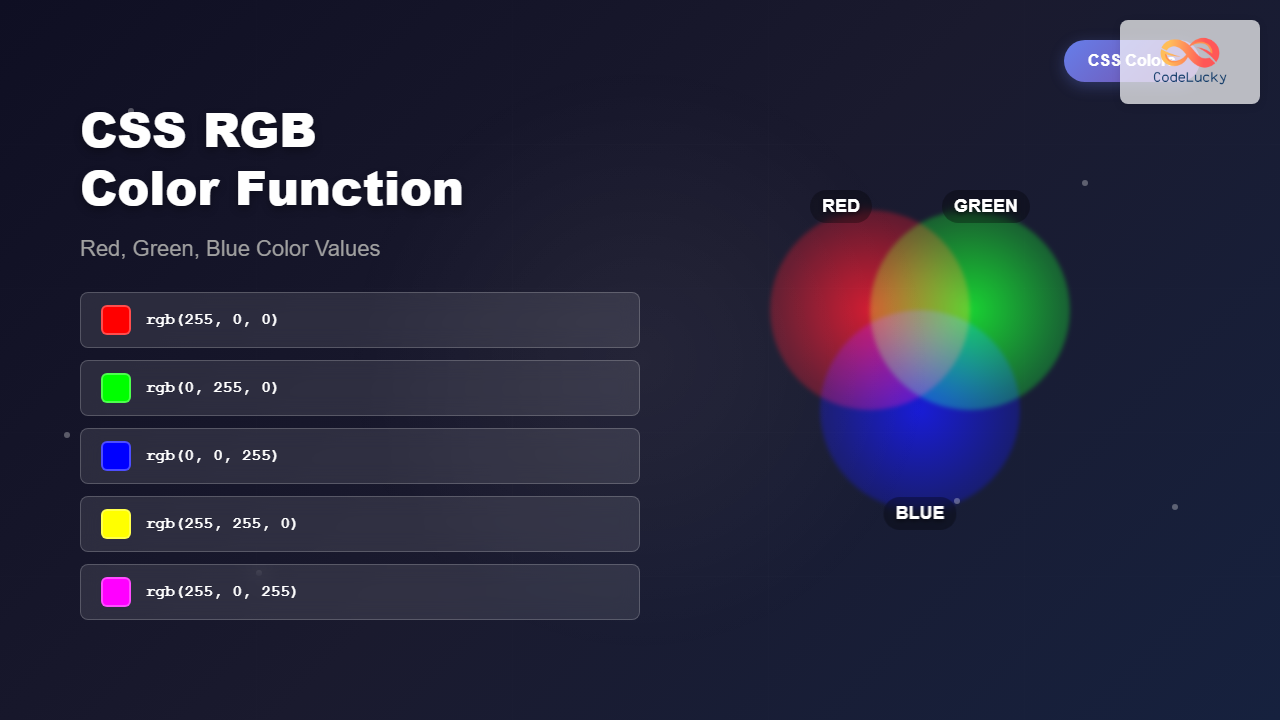
The CSS RGB color function is one of the most fundamental and widely-used methods for defining colors in web development. RGB stands for Red, Green, and Blue – the three primary colors of light that combine to create millions of different colors on digital displays.
Understanding how to effectively use RGB values gives you precise control over your website’s color palette, enabling you to create visually appealing designs that match your brand guidelines exactly.
What is the CSS RGB Color Function?
The RGB color function in CSS allows you to specify colors by defining the intensity of red, green, and blue light components. Each color channel accepts values from 0 to 255, where 0 represents no intensity (completely dark) and 255 represents full intensity (completely bright).
The basic syntax for the RGB function is:
rgb(red, green, blue)Where each parameter can be:
- Integer values: 0 to 255
- Percentage values: 0% to 100%
RGB Color Syntax and Examples
Basic RGB Syntax
Here are several ways to write RGB color values:
/* Integer values (0-255) */
color: rgb(255, 0, 0);     /* Pure red */
color: rgb(0, 255, 0);     /* Pure green */
color: rgb(0, 0, 255);     /* Pure blue */

/* Percentage values (0%-100%) */
color: rgb(100%, 0%, 0%);   /* Pure red */
color: rgb(50%, 50%, 50%);  /* Medium gray */
Common RGB Color Examples
Pure Red
Pure Green
Pure Blue
Yellow
Magenta
Cyan
RGB vs RGBA: Adding Transparency
The RGBA function extends RGB by adding an alpha channel for transparency control. The alpha value ranges from 0 (completely transparent) to 1 (completely opaque).
/* RGBA with alpha channel */
background-color: rgba(255, 0, 0, 0.5);    /* Semi-transparent red */
background-color: rgba(0, 128, 255, 0.8);  /* Semi-transparent blue */
background-color: rgba(0, 0, 0, 0.3);      /* Semi-transparent black */
RGBA Transparency Demonstration
Understanding RGB Color Values
How RGB Values Work
RGB follows the additive color model, where colors are created by adding light. When all three values are at maximum (255), you get white. When all are at minimum (0), you get black.
| Color | RGB Value | Description | Preview |
|---|---|---|---|
| Black | rgb(0, 0, 0) | No light | |
| White | rgb(255, 255, 255) | Maximum light | |
| Gray | rgb(128, 128, 128) | Equal amounts | |
| Orange | rgb(255, 165, 0) | High red, medium green | |
| Purple | rgb(128, 0, 128) | Equal red and blue |
Interactive RGB Color Mixer
Use the sliders below to experiment with RGB values and see how different combinations create various colors:
rgb(128, 128, 128)
Practical RGB Implementation Examples
Button Styling with RGB
.primary-button {
  background-color: rgb(0, 123, 255);
  color: rgb(255, 255, 255);
  border: 2px solid rgb(0, 86, 179);
  padding: 12px 24px;
  border-radius: 6px;
}

.primary-button:hover {
  background-color: rgb(0, 86, 179);
  border-color: rgb(0, 69, 143);
}Card Component with RGB Colors
.card {
  background-color: rgb(255, 255, 255);
  border: 1px solid rgb(222, 226, 230);
  box-shadow: 0 2px 4px rgba(0, 0, 0, 0.1);
  border-radius: 8px;
  padding: 20px;
}

.card-header {
  background-color: rgb(248, 249, 250);
  color: rgb(33, 37, 41);
  border-bottom: 1px solid rgb(222, 226, 230);
}
Card Header
This is an example card component using RGB color values for consistent styling. The header uses a light gray background, while the main content area uses pure white.
RGB Color Best Practices
Accessibility Considerations
When using RGB colors, always ensure sufficient contrast for accessibility. The Web Content Accessibility Guidelines (WCAG) recommend specific contrast ratios:
- Normal text: 4.5:1 contrast ratio minimum
- Large text: 3:1 contrast ratio minimum
- UI components: 3:1 contrast ratio minimum
Background: rgb(255, 255, 255)
Text: rgb(33, 37, 41)
Ratio: ~12.6:1
Background: rgb(240, 240, 240)
Text: rgb(200, 200, 200)
Ratio: ~1.6:1
Performance Tips
RGB colors are highly performant and well-supported across all browsers. Here are some optimization tips:
- Use RGB for solid colors and RGBA only when transparency is needed
- Consider using CSS custom properties for consistent color management
- Avoid overly complex calculations in RGB values
/* CSS Custom Properties with RGB */
:root {
  --primary-color: rgb(0, 123, 255);
  --secondary-color: rgb(108, 117, 125);
  --success-color: rgb(40, 167, 69);
  --danger-color: rgb(220, 53, 69);
}

.btn-primary {
  background-color: var(--primary-color);
  border-color: var(--primary-color);
}
Browser Support and Compatibility
RGB and RGBA functions have excellent browser support across all modern browsers:
| Feature | Chrome | Firefox | Safari | Edge |
|---|---|---|---|---|
| RGB function | ✓ All versions | ✓ All versions | ✓ All versions | ✓ All versions |
| RGBA function | ✓ 1.0+ | ✓ 3.0+ | ✓ 3.1+ | ✓ 9.0+ |
RGB vs Other Color Formats
Understanding when to use RGB versus other color formats helps you make informed decisions:
| Format | Best Use Case | Example |
|---|---|---|
| RGB | Precise control, calculations | rgb(255, 0, 0) |
| HEX | Compact notation, design tools | #ff0000 |
| HSL | Color harmonies, accessibility | hsl(0, 100%, 50%) |
| Named | Quick prototyping, basic colors | red |
Common RGB Color Combinations
Here are some popular RGB color palettes for different design styles:
Professional Business Theme
Modern Dark Theme
Troubleshooting Common RGB Issues
Color Not Displaying Correctly
If your RGB colors aren’t appearing as expected:
- Check that values are within the 0-255 range
- Ensure proper syntax with commas separating values
- Verify that parent elements aren’t overriding colors
- Test across different browsers and devices
Performance Issues
For better performance with RGB colors:
- Use CSS custom properties for frequently used colors
- Avoid dynamic RGB calculations in JavaScript when possible
- Consider using shorter hex notation for static colors
Conclusion
The CSS RGB color function provides precise, reliable color control for web development. By understanding how red, green, and blue values combine to create colors, you can create sophisticated color schemes that enhance user experience and maintain design consistency.
Whether you’re building a simple website or a complex web application, mastering RGB colors gives you the foundation for effective visual design. Remember to always consider accessibility, test across browsers, and use semantic color naming conventions for maintainable code.
Start experimenting with different RGB combinations in your projects to discover the endless possibilities this fundamental color system offers for modern web design.
Related Posts
CSS RGBA Color Function: Complete Guide to RGB with Alpha Transparency
The CSS RGBA color function is a powerful tool that extends the traditional RGB color model by adding an alpha...
HTML Colors: A Comprehensive Guide to Using Colors in Web Development
Introduction Colors are the soul of web design. They evoke emotions, guide user attention, and establish brand identity. In web...
CSS Color Values: Complete Guide to Named Colors, Hex, RGB, HSL, RGBA, HSLA
Colors are fundamental to web design, breathing life into otherwise plain HTML elements. CSS provides multiple ways to define colors,...
CSS Style color Property: CSS Color
Understanding the CSS color Property: A Comprehensive Guide The CSS color property is fundamental for styling web pages. It specifies...
CSS Color Property: Complete Guide to Text Colors with Hex, RGB, HSL Values
The CSS color property is one of the most fundamental styling properties in web development, allowing you to control the...

HTML Color type Property: Color Input Type
HTML Color type Property: Understanding the Color Input Type The HTML color input type, denoted by <input type="color">, allows users...
HTML Color value Property: Color Input Value
HTML Color value Property: Defining the Initial Color for Input The value attribute for the <input type="color"> element in HTML...
HTML DOM Color Object: Accessing Color Input Elements
HTML DOM Color Object: A Guide to Accessing Color Input Elements The HTML DOM color object provides an interface to...
CSS Saturate Filter: Complete Guide to Color Saturation Control
The CSS saturate() filter function is a powerful tool that allows you to control the color saturation of HTML elements....

CSS HSL Color Function: Complete Guide to Hue, Saturation, and Lightness
The HSL color function in CSS provides an intuitive way to define colors using Hue, Saturation, and Lightness values. Unlike...

CSS Invert Filter: Complete Guide to Inverting Element Colors and Visual Effects
The CSS invert() filter is a powerful visual effect that reverses the colors of HTML elements, creating striking contrast and...
CSS Style backgroundColor Property: CSS Background Color
CSS backgroundColor Property: Mastering Background Colors The backgroundColor property in CSS allows you to define the background color of an...





