
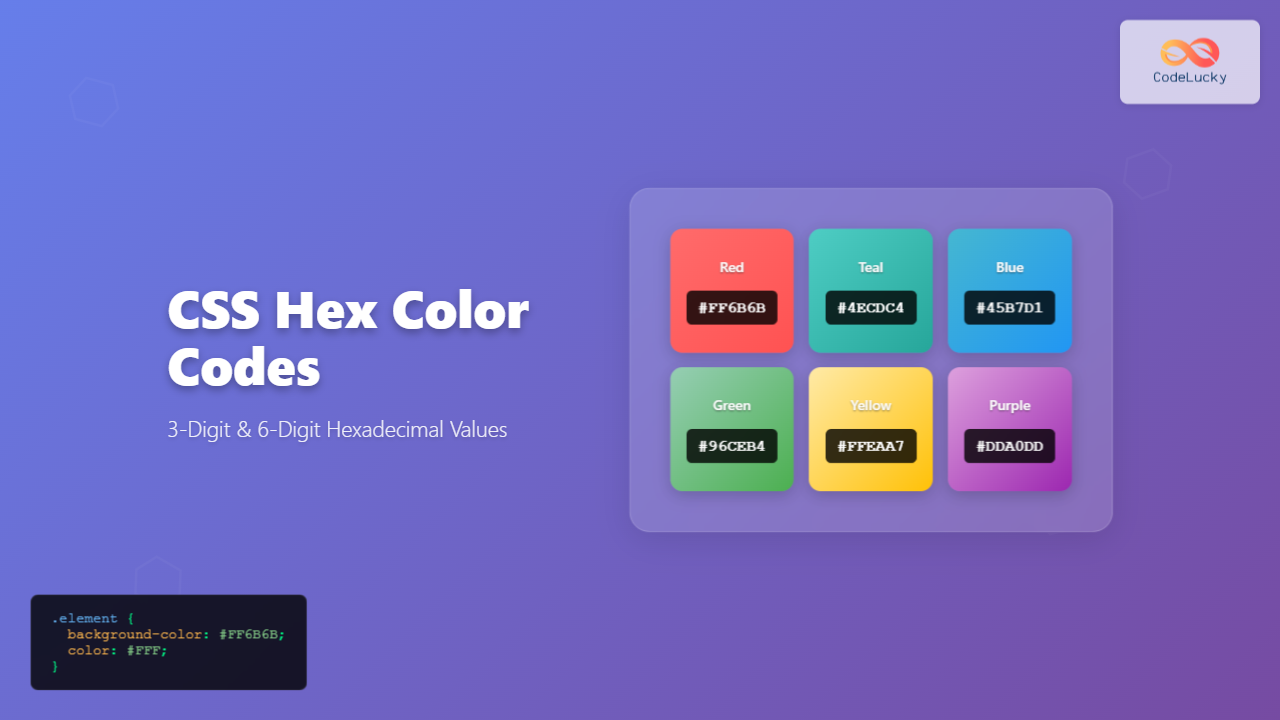
What Are CSS Hex Color Codes?
CSS hex color codes are hexadecimal representations of colors used in web development to define precise color values. These codes consist of a hash symbol (#) followed by either 3 or 6 alphanumeric characters that represent the red, green, and blue (RGB) components of a color.
Hex colors are one of the most popular methods for specifying colors in CSS due to their precision, compact format, and wide browser support. Understanding how to use both 3-digit and 6-digit hex codes effectively is essential for modern web development.
Understanding the Hexadecimal System
The hexadecimal system uses base-16 numbering, utilizing digits 0-9 and letters A-F to represent values from 0 to 15. In CSS hex colors:
- 0 represents the minimum intensity (0 in decimal)
- F represents the maximum intensity (255 in decimal)
- Each pair of hex digits represents one color channel (Red, Green, Blue)
Hex to Decimal Conversion Examples:
00= 0 (no color intensity)80= 128 (medium intensity)FF= 255 (maximum intensity)
6-Digit Hex Color Codes
The standard 6-digit hex format follows the pattern #RRGGBB, where:
- RR – Red component (00-FF)
- GG – Green component (00-FF)
- BB – Blue component (00-FF)
6-Digit Hex Examples
Pure Red
Pure Green
Pure Blue
White
Black
Gray
CSS Implementation Example
.primary-button {
  background-color: #3498db; /* Blue */
  color: #ffffff;            /* White text */
  border: 2px solid #2980b9; /* Darker blue border */
}

.success-message {
  background-color: #2ecc71; /* Green */
  color: #27ae60;            /* Darker green text */
}

.warning-alert {
  background-color: #f39c12; /* Orange */
  color: #ffffff;            /* White text */
}
3-Digit Hex Color Codes
The 3-digit hex format is a shorthand notation that follows the pattern #RGB. Each digit is automatically doubled by the browser to create the equivalent 6-digit code.
How 3-Digit Conversion Works
Conversion Rule: Each digit in a 3-digit hex code is duplicated to form the 6-digit equivalent.
#F00becomes#FF0000(Red)#0A0becomes#00AA00(Green)#00Bbecomes#0000BB(Blue)#FFFbecomes#FFFFFF(White)
3-Digit Hex Examples
Red (#FF0000)
Green (#00FF00)
Blue (#0000FF)
White (#FFFFFF)
Black (#000000)
Gray (#888888)
Interactive Hex Color Demonstrator
Try Different Hex Values
Enter any valid 3-digit (#F0A) or 6-digit (#FF00AA) hex color code to see it displayed above.
When to Use 3-Digit vs 6-Digit Hex Codes
Use 3-Digit Hex When:
- Code brevity matters: Shorter CSS files load faster
- Simple color schemes: Basic colors with repeated digit pairs
- Rapid prototyping: Quick color assignments during development
- Common colors:
#000(black),#FFF(white),#F00(red)
Use 6-Digit Hex When:
- Precise color control: Specific brand colors or custom palettes
- Gradient compatibility: Smooth color transitions require precision
- Professional projects: Client work requiring exact color matching
- Accessibility compliance: Meeting specific contrast ratios
Common Hex Color Patterns
Grayscale Colors
Popular Brand Colors
#1DA1F2#4267B2#FF0000#25D366Best Practices for Hex Colors
1. Consistency in Format
/* Good - Consistent uppercase */
.header { background-color: #3498DB; }
.footer { background-color: #2C3E50; }

/* Avoid - Mixed case */
.header { background-color: #3498db; }
.footer { background-color: #2c3E50; }
2. Use CSS Custom Properties
:root {
  --primary-color: #3498DB;
  --secondary-color: #2C3E50;
  --accent-color: #E74C3C;
}

.button {
  background-color: var(--primary-color);
  border-color: var(--secondary-color);
}
3. Consider Accessibility
Ensure sufficient contrast ratios for text readability:
- WCAG AA: Minimum 4.5:1 contrast ratio for normal text
- WCAG AAA: Minimum 7:1 contrast ratio for enhanced accessibility
- Large text: 3:1 ratio acceptable for 18pt+ or 14pt+ bold text
Hex Color Tools and Resources
Helpful Online Tools:
- Color Pickers: Browser developer tools, Adobe Color
- Contrast Checkers: WebAIM, Colour Contrast Analyser
- Palette Generators: Coolors.co, Paletton
- Conversion Tools: Hex to RGB/HSL converters
Common Hex Color Mistakes to Avoid
❌ Common Mistakes:
- Missing hash symbol:
FF0000instead of#FF0000 - Invalid characters: Using G-Z letters in hex codes
- Wrong length: Using 4 or 5 digit codes (invalid)
- Case inconsistency: Mixing uppercase and lowercase letters
Advanced Hex Color Techniques
Alpha Channel with Hex
Modern browsers support 8-digit hex codes that include alpha (transparency) values:
/* 8-digit hex with alpha channel */
.semi-transparent {
  background-color: #FF573380; /* 50% transparent */
}

/* Equivalent to rgba() */
.semi-transparent-rgba {
  background-color: rgba(255, 87, 51, 0.5);
}
CSS Hex Color Examples in Practice
Conclusion
CSS hex color codes are fundamental tools for web developers and designers. Understanding both 3-digit and 6-digit formats enables you to create visually appealing, accessible, and maintainable websites. The 3-digit format offers convenience and brevity for simple colors, while the 6-digit format provides precision for complex color schemes.
Remember to maintain consistency in your color choices, consider accessibility requirements, and leverage modern CSS features like custom properties to create scalable color systems. With practice, hex colors become an intuitive part of your web development workflow.
Whether you’re building a simple landing page or a complex web application, mastering hex color codes will enhance your ability to create polished, professional designs that engage users and communicate your brand effectively.
Related Posts
CSS Color Values: Complete Guide to Named Colors, Hex, RGB, HSL, RGBA, HSLA
Colors are fundamental to web design, breathing life into otherwise plain HTML elements. CSS provides multiple ways to define colors,...
CSS Color Property: Complete Guide to Text Colors with Hex, RGB, HSL Values
The CSS color property is one of the most fundamental styling properties in web development, allowing you to control the...
CSS Style color Property: CSS Color
Understanding the CSS color Property: A Comprehensive Guide The CSS color property is fundamental for styling web pages. It specifies...
CSS RGB Color Function: Complete Guide to Red, Green, Blue Color Values
The CSS RGB color function is one of the most fundamental and widely-used methods for defining colors in web development....
CSS Style backgroundColor Property: CSS Background Color
CSS backgroundColor Property: Mastering Background Colors The backgroundColor property in CSS allows you to define the background color of an...
HTML Color value Property: Color Input Value
HTML Color value Property: Defining the Initial Color for Input The value attribute for the <input type="color"> element in HTML...
HTML Colors: A Comprehensive Guide to Using Colors in Web Development
Introduction Colors are the soul of web design. They evoke emotions, guide user attention, and establish brand identity. In web...

CSS currentColor Keyword: Complete Guide to Dynamic Color Inheritance
The currentColor keyword in CSS is a powerful yet underutilized feature that allows elements to inherit the current computed value...

HTML Color type Property: Color Input Type
HTML Color type Property: Understanding the Color Input Type The HTML color input type, denoted by <input type="color">, allows users...

CSS HSLA Color Function: Complete Guide to HSL with Alpha Transparency
What is CSS HSLA Color Function? The HSLA color function in CSS is an extended version of the HSL color...

Excel HEX2DEC Function: Convert Hexadecimal to Decimal with Formula Examples
The HEX2DEC function in Microsoft Excel is a powerful engineering function that converts hexadecimal (base-16) numbers to their decimal (base-10)...

CSS HSL Color Function: Complete Guide to Hue, Saturation, and Lightness
The HSL color function in CSS provides an intuitive way to define colors using Hue, Saturation, and Lightness values. Unlike...
- What Are CSS Hex Color Codes?
- Understanding the Hexadecimal System
- 6-Digit Hex Color Codes
- 3-Digit Hex Color Codes
- Interactive Hex Color Demonstrator
- When to Use 3-Digit vs 6-Digit Hex Codes
- Common Hex Color Patterns
- Best Practices for Hex Colors
- Hex Color Tools and Resources
- Common Hex Color Mistakes to Avoid
- Advanced Hex Color Techniques
- Conclusion





