
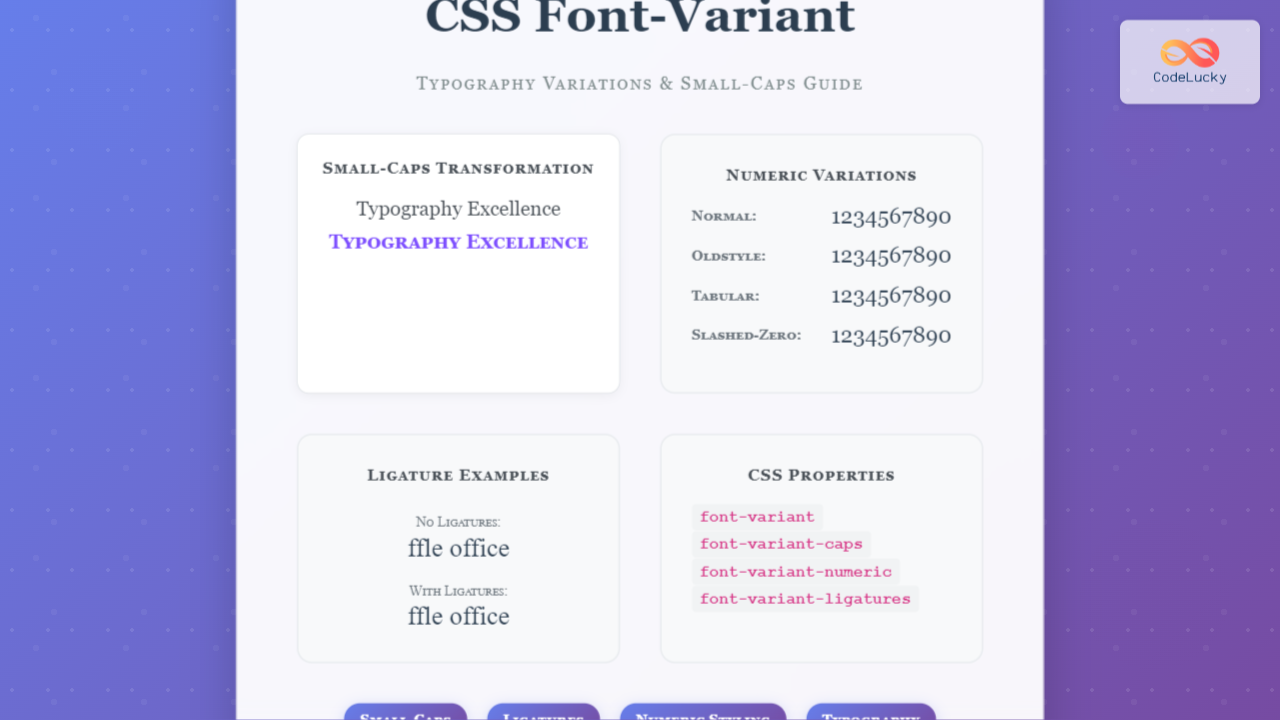
The font-variant property in CSS is a powerful typography tool that allows developers to control various aspects of font rendering, from creating elegant small-caps text to managing numeric styling and ligatures. This comprehensive guide explores all aspects of font-variant and its related properties.
Understanding CSS Font-Variant
CSS font-variant is a shorthand property that controls how text is displayed using alternative glyphs or character forms available in a font. It encompasses several sub-properties that give you fine-grained control over typography appearance.
Basic Syntax
font-variant: normal | small-caps | initial | inherit;Font-Variant Small-Caps: The Classic Typography Choice
Small-caps is the most commonly used value of font-variant, transforming lowercase letters into smaller versions of uppercase letters while maintaining normal-sized capital letters.
Small-Caps Example
The Quick Brown Fox Jumps Over the Lazy Dog
The Quick Brown Fox Jumps Over the Lazy Dog
When to Use Small-Caps
Small-caps work exceptionally well for:
- Headings and subheadings – Creates sophisticated, professional appearance
- Acronyms and abbreviations – Makes them less visually intrusive
- Author names and bylines – Adds elegance to credit lines
- Navigation menus – Provides subtle hierarchy
CSS Implementation
.small-caps-heading {
  font-variant: small-caps;
  font-weight: 600;
  letter-spacing: 0.5px;
}

.acronym {
  font-variant: small-caps;
  font-size: 0.9em;
}
Advanced Font-Variant Properties
Modern CSS provides granular control through specific font-variant sub-properties, each targeting different aspects of typography.
Font-Variant-Numeric
Controls the display of numbers, fractions, and ordinal indicators:
Numeric Variations Demo
Numeric Property Values
normal– Default numeric stylinglining-nums– Numbers align with capital lettersoldstyle-nums– Numbers with varying heightsproportional-nums– Variable-width numberstabular-nums– Fixed-width numbers for tablesdiagonal-fractions– Diagonal fraction stylingstacked-fractions– Vertical fraction stylingordinal– Ordinal indicators (1st, 2nd, 3rd)slashed-zero– Zero with diagonal slash
Font-Variant-Ligatures
Ligatures are special characters formed by combining two or more letters. They improve readability and add typographic sophistication.
Ligature Examples
Ligature Control Values
normal– Browser default ligature behaviornone– Disables all ligaturescommon-ligatures– Enables standard ligaturesno-common-ligatures– Disables common ligaturesdiscretionary-ligatures– Enables decorative ligaturesno-discretionary-ligatures– Disables decorative ligatureshistorical-ligatures– Enables historical formsno-historical-ligatures– Disables historical formscontextual– Context-dependent ligaturesno-contextual– Disables contextual ligatures
Font-Variant-Caps
Provides more sophisticated capital letter controls beyond basic small-caps:
Capital Variations
Interactive Font-Variant Playground
Try Different Font-Variant Properties
Preview Text:
The Quick Brown Fox Jumps Over 1234567890 ffle office
Browser Support and Fallbacks
Font-variant properties have excellent browser support, but it’s important to implement proper fallbacks:
Safe Implementation Strategy
/* Basic fallback */
.elegant-heading {
  font-variant: small-caps; /* Fallback for older browsers */
  font-variant-caps: small-caps; /* Modern syntax */
  font-feature-settings: "smcp"; /* OpenType fallback */
}

/* Feature detection */
@supports (font-variant-caps: small-caps) {
  .modern-caps {
    font-variant-caps: small-caps;
  }
}

@supports not (font-variant-caps: small-caps) {
  .modern-caps {
    font-variant: small-caps;
  }
}
Browser Compatibility Table
| Property | Chrome | Firefox | Safari | Edge |
|---|---|---|---|---|
font-variant |
✅ 1.0 | ✅ 1.0 | ✅ 1.0 | ✅ 12 |
font-variant-caps |
✅ 52 | ✅ 34 | ✅ 9.1 | ✅ 79 |
font-variant-numeric |
✅ 52 | ✅ 34 | ✅ 9.1 | ✅ 79 |
font-variant-ligatures |
✅ 31 | ✅ 34 | ✅ 7 | ✅ 79 |
Performance Considerations
Font-variant properties can impact rendering performance, especially with complex OpenType features:
Optimization Tips
- Font Loading: Use
font-display: swapto prevent layout shifts - Feature Subset: Only load fonts with necessary OpenType features
- Progressive Enhancement: Apply font-variant after font loads
- Testing: Test performance on low-end devices
Real-World Examples and Use Cases
Elegant Article Headers
Web Development
Mastering Modern CSS Typography
Published on
Professional Data Tables
| Product | Price | Quantity |
|---|---|---|
| MacBook Pro | $2,399.00 | 42 |
| iPad Air | $599.00 | 128 |
Common Pitfalls and Solutions
Font Support Issues
Not all fonts support all font-variant features. Always test with your chosen typeface and provide fallbacks:
/* Check font support before applying variants */
.small-caps-safe {
  font-family: 'Georgia', 'Times New Roman', serif;
  font-variant: small-caps;
}

/* Avoid with fonts that don't support small-caps */
.problematic {
  font-family: 'Comic Sans MS', cursive;
  font-variant: small-caps; /* May not work as expected */
}
Accessibility Considerations
Font-variant properties can affect readability for users with dyslexia or visual impairments:
- Contrast: Ensure sufficient color contrast with variant text
- Size: Small-caps may appear smaller, adjust font-size accordingly
- Context: Don’t rely solely on font-variant for semantic meaning
- Testing: Test with screen readers and accessibility tools
Future of Font-Variant
CSS font-variant continues evolving with new OpenType features and better browser support. Keep an eye on emerging properties like font-variant-alternates and font-variant-east-asian for advanced typography control.
Key Takeaways
- Font-variant provides powerful typography control beyond basic styling
- Small-caps remains the most widely used and supported variant
- Modern sub-properties offer granular control over numeric and ligature styling
- Always implement proper fallbacks and test font support
- Consider performance and accessibility when implementing font variants
Mastering CSS font-variant properties enables you to create more sophisticated, professional typography that enhances both the visual appeal and functionality of your web designs. Start with small-caps for immediate impact, then explore advanced properties as your typography skills develop.
Related Posts
CSS Style fontVariant Property: CSS Font Variant
CSS font-variant Property: A Comprehensive Guide The font-variant CSS property is a shorthand for setting various OpenType font properties, allowing...
CSS Font-Style: Complete Guide to Italic, Oblique and Normal Text Styling
The CSS font-style property is a fundamental typography tool that controls how text appears on your web pages. Whether you...

CSS Font-Family: Complete Guide to Typography and Font Stacks
Typography forms the backbone of web design, and the CSS font-family property is your primary tool for controlling how text...
CSS ::first-letter Pseudo-Element: Complete Guide to Drop Caps and First Letter Styling
The CSS ::first-letter pseudo-element is a powerful tool for creating elegant typography effects, particularly the classic drop cap style where...
CSS Style font Property: CSS Font
CSS font Property: A Comprehensive Guide The CSS font property is a shorthand property used to set several font-related styles...
CSS Style fontStyle Property: CSS Font Style
CSS font-style Property: A Comprehensive Guide The font-style property in CSS is used to specify the style of a font....
CSS Letter-Spacing: Complete Guide to Character Spacing Control
The letter-spacing property in CSS is a powerful typography tool that controls the horizontal space between characters in text. Whether...
CSS Style fontSize Property: CSS Font Size
CSS fontSize Property: Controlling Text Size The fontSize property in CSS specifies the size of the font. This property is...
CSS Font-Size: Complete Guide to Absolute, Relative and Keyword Sizing
Font sizing is one of the most fundamental aspects of web typography that directly impacts user experience and accessibility. Understanding...
CSS Font-Weight: Complete Guide to Bold, Normal and Numeric Values
The CSS font-weight property is fundamental to web typography, controlling how thick or thin your text appears. Whether you're creating...
CSS Style fontFamily Property: CSS Font Family
CSS font-family Property: Mastering Web Typography The CSS font-family property is a fundamental aspect of web design, allowing you to...
CSS Text-Transform: Complete Guide to Uppercase, Lowercase and Capitalize Text Styling
The CSS text-transform property is a powerful tool that allows developers to control the capitalization of text elements without modifying...





