
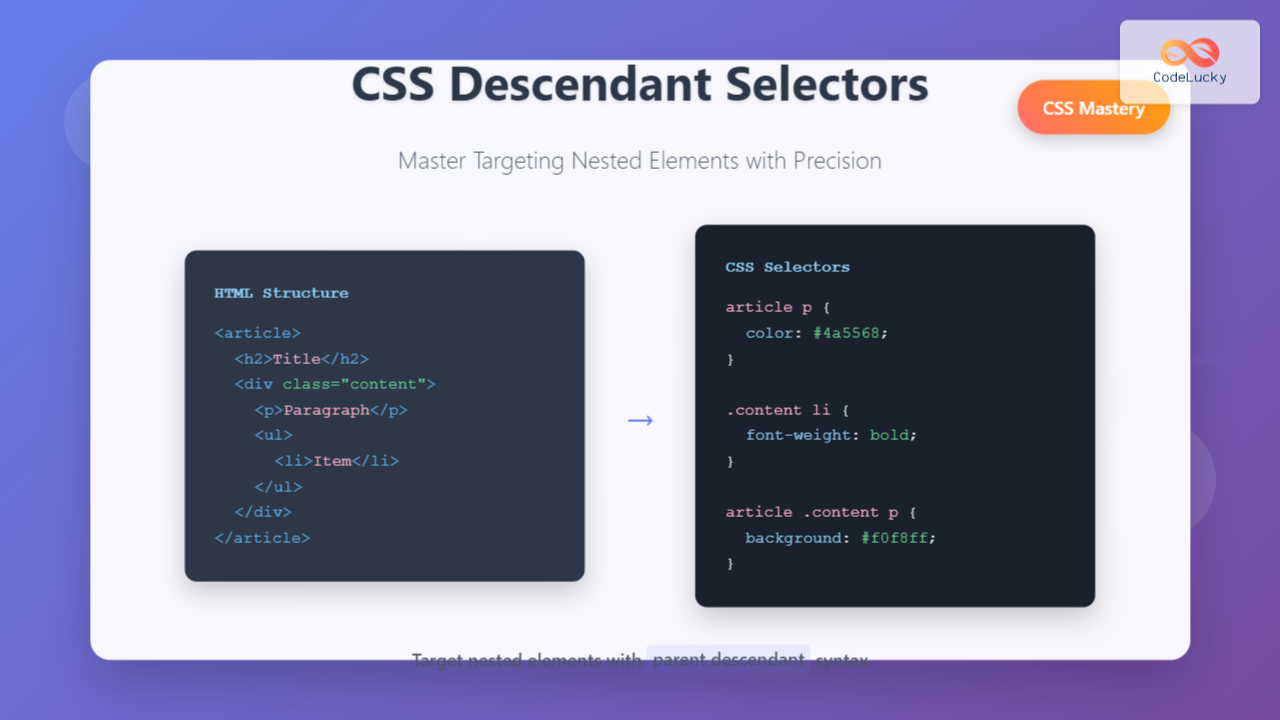
CSS descendant selectors are fundamental tools that allow you to target elements nested within other elements in your HTML structure. Understanding how to use descendant selectors effectively is crucial for writing clean, maintainable CSS code and creating precise styling rules.
What Are CSS Descendant Selectors?
A descendant selector targets elements that are descendants (children, grandchildren, or further nested) of a specified parent element. The descendant selector uses whitespace to separate the parent selector from the descendant selector, creating a hierarchical relationship in your CSS rules.
Basic Syntax
parent-selector descendant-selector {
    property: value;
}
Understanding the HTML Structure
Before diving into descendant selectors, let’s establish a clear HTML structure that we’ll use throughout our examples:
<article>
    <h2>Main Article Title</h2>
    <p>This is a paragraph in the article.</p>
    <div class="content">
        <p>This paragraph is inside a div.</p>
        <ul>
            <li>First list item</li>
            <li>Second list item</li>
            <li>
                <span>Nested span in list item</span>
            </li>
        </ul>
    </div>
</article>
Basic Descendant Selector Examples
Targeting All Paragraphs Within an Article
The most straightforward use of descendant selectors is targeting all elements of a specific type within a parent container:
article p {
    color: #4a5568;
    line-height: 1.6;
    margin-bottom: 16px;
}
This rule targets all <p> elements that are descendants of any <article> element, regardless of how deeply nested they are.
Class-Based Descendant Selectors
You can combine descendant selectors with class selectors for more specific targeting:
.content p {
    background-color: #edf2f7;
    padding: 12px;
    border-left: 4px solid #3182ce;
}
This targets only paragraphs that are descendants of elements with the class “content”.
Interactive Example: Descendant Selector Visualization
Live Demo
Demo Article
This paragraph is styled by: article p
This paragraph is styled by: .content p
- Regular list item
- Another list item
-
This span is styled by:
.content span
CSS Applied:
/* All paragraphs in articles */
article p {
    color: #4a5568;
    background-color: #e6fffa;
    padding: 10px;
    border-left: 4px solid #38b2ac;
}

/* Paragraphs specifically in .content divs */
.content p {
    background-color: #fed7e2;
    border-left-color: #e53e3e;
}

/* Spans in .content divs */
.content span {
    background-color: #fef5e7;
    color: #c05621;
    font-weight: bold;
}
Advanced Descendant Selector Techniques
Multiple Level Targeting
You can chain multiple selectors to target elements at specific nesting levels:
article .content ul li span {
    font-weight: bold;
    color: #e53e3e;
    text-transform: uppercase;
}
This targets <span> elements that are descendants of <li> elements, which are descendants of <ul> elements, within elements with class “content”, inside <article> elements.
Combining with Pseudo-selectors
Descendant selectors work seamlessly with pseudo-selectors for more dynamic styling:
article ul li:first-child {
    font-weight: bold;
    color: #2b6cb0;
}

article ul li:hover {
    background-color: #ebf8ff;
    cursor: pointer;
}

.content p:last-of-type {
    margin-bottom: 0;
    border-bottom: 2px solid #3182ce;
}
Common Use Cases and Patterns
Navigation Menu Styling
Descendant selectors are particularly useful for styling navigation menus:
nav ul {
    list-style: none;
    padding: 0;
    margin: 0;
}

nav ul li {
    display: inline-block;
    margin-right: 20px;
}

nav ul li a {
    text-decoration: none;
    color: #4a5568;
    padding: 8px 16px;
    border-radius: 4px;
    transition: background-color 0.3s;
}

nav ul li a:hover {
    background-color: #edf2f7;
    color: #2d3748;
}
Form Element Styling
Target form elements within specific containers:
.contact-form input[type="text"] {
    width: 100%;
    padding: 12px;
    border: 1px solid #cbd5e0;
    border-radius: 4px;
}

.contact-form textarea {
    width: 100%;
    min-height: 120px;
    padding: 12px;
    border: 1px solid #cbd5e0;
    border-radius: 4px;
    resize: vertical;
}

.contact-form button {
    background-color: #3182ce;
    color: white;
    padding: 12px 24px;
    border: none;
    border-radius: 4px;
    cursor: pointer;
}
Best Practices for Descendant Selectors
Keep Selectors Shallow
Avoid overly deep descendant selectors as they can impact performance and maintainability:
❌ Avoid:
html body main section article div.content ul li span.highlight {
    color: red;
}
✅ Better:
.content .highlight {
    color: red;
}
Use Semantic Class Names
Combine descendant selectors with meaningful class names for better maintainability:
.blog-post .author-info {
    background-color: #f7fafc;
    padding: 16px;
    border-radius: 8px;
}

.blog-post .author-info img {
    width: 48px;
    height: 48px;
    border-radius: 50%;
}

.blog-post .author-info .author-name {
    font-weight: 600;
    color: #2d3748;
}
Performance Considerations
Understanding how browsers process descendant selectors is crucial for writing efficient CSS:
Right-to-Left Processing
Browsers read CSS selectors from right to left. Consider this when writing complex selectors:
/* Browser first finds all spans, then checks if they're in .content */
.content span {
    color: blue;
}

/* More specific selectors can be more efficient */
.content .highlight-text {
    color: blue;
}
Optimize for Reusability
Create reusable patterns that can be applied across different contexts:
/* Reusable card pattern */
.card .card-header {
    background-color: #edf2f7;
    padding: 16px;
    border-bottom: 1px solid #e2e8f0;
}

.card .card-body {
    padding: 16px;
}

.card .card-footer {
    background-color: #f7fafc;
    padding: 12px 16px;
    border-top: 1px solid #e2e8f0;
}
Troubleshooting Common Issues
Specificity Conflicts
When descendant selectors don’t work as expected, check for specificity issues:
⚠️ Common Issue:
/* Lower specificity - might not apply */
article p {
    color: blue;
}

/* Higher specificity - will override */
.content p.special {
    color: red;
}
Unintended Targeting
Be careful about overly broad descendant selectors that might affect unintended elements:
/* This affects ALL paragraphs in the article */
article p {
    font-size: 18px;
}

/* More specific targeting */
article .main-content p {
    font-size: 18px;
}
Descendant Selectors vs. Child Selectors
Understanding the difference between descendant selectors and child selectors is important:
Descendant Selector (space)
/* Targets ALL span elements anywhere inside .container */
.container span {
    color: blue;
}
Child Selector (>)
/* Targets ONLY direct child span elements of .container */
.container > span {
    color: red;
}
Real-World Example: Blog Layout
Here’s a comprehensive example showing how descendant selectors can be used to style a complete blog layout:
.blog-container .post-header h1 {
    font-size: 2.5rem;
    color: #1a202c;
    margin-bottom: 0.5rem;
}

.blog-container .post-meta {
    color: #718096;
    font-size: 0.875rem;
    margin-bottom: 2rem;
}

.blog-container .post-content p {
    margin-bottom: 1.5rem;
    line-height: 1.7;
    color: #2d3748;
}

.blog-container .post-content blockquote {
    border-left: 4px solid #3182ce;
    padding-left: 1rem;
    margin: 2rem 0;
    font-style: italic;
    color: #4a5568;
}

.blog-container .post-content pre {
    background-color: #2d3748;
    color: #e2e8f0;
    padding: 1rem;
    border-radius: 0.5rem;
    overflow-x: auto;
}

.blog-container .post-content img {
    max-width: 100%;
    height: auto;
    border-radius: 0.5rem;
    margin: 1.5rem 0;
}
Conclusion
CSS descendant selectors are powerful tools for creating precise, maintainable styles. By understanding their syntax, use cases, and best practices, you can write more efficient CSS that scales well across different projects. Remember to keep your selectors reasonably shallow, use semantic class names, and always consider the performance implications of your selector choices.
The key to mastering descendant selectors is practice and understanding the document structure you’re working with. Start with simple examples and gradually build up to more complex scenarios as you become more comfortable with the concept.
Quick Reference
- Basic syntax:
parent descendant { property: value; } - Class targeting:
.parent .descendant { ... } - Multiple levels:
grandparent parent descendant { ... } - With pseudo-selectors:
parent descendant:hover { ... } - Best practice: Keep selectors shallow and use semantic class names
Related Posts
CSS Child Selectors: Master Direct Child Element Targeting for Better Web Design
CSS child selectors are essential tools for targeting specific child elements within parent containers. Unlike descendant selectors that target all...
CSS Adjacent Sibling Selectors: Complete Guide to Next Element Targeting
CSS adjacent sibling selectors are powerful tools that allow you to target elements based on their relationship to other elements...

CSS Grouping Selectors: Master Multiple Element Styling Techniques
CSS grouping selectors are a powerful feature that allows you to apply the same styles to multiple HTML elements simultaneously....

CSS Class Selectors: Master Targeting Elements with Class Attributes
What Are CSS Class Selectors? CSS class selectors are fundamental tools that allow you to target and style HTML elements...

CSS General Sibling Selectors: Master Advanced Element Targeting Techniques
CSS general sibling selectors provide a powerful way to target elements that share the same parent and appear after a...

CSS Margin: Complete Guide to Element Spacing and Margin Collapse
Understanding CSS Margin: The Foundation of Element Spacing CSS margin is one of the most fundamental properties for controlling spacing...
CSS :first-child and :last-child Pseudo-Classes: Complete Guide with Examples
CSS pseudo-classes are powerful tools that allow developers to select and style elements based on their position, state, or relationship...
CSS Color Property: Complete Guide to Text Colors with Hex, RGB, HSL Values
The CSS color property is one of the most fundamental styling properties in web development, allowing you to control the...
CSS Background-Color: Complete Guide to Setting Element Background Colors
The CSS background-color property is one of the most fundamental styling tools in web development, allowing you to set the...
CSS Border: Complete Guide to Width, Style and Color Properties
CSS borders are fundamental styling elements that define the visual boundaries of HTML elements. Understanding how to effectively use border-width,...

CSS Absolute Positioning: Master Element Placement with Containing Blocks
CSS absolute positioning is one of the most powerful tools for creating precise layouts and complex designs. Understanding how absolutely...
CSS Element Selectors: Complete Guide to Targeting HTML Tags by Name
CSS element selectors are the foundation of web styling, allowing developers to target HTML elements directly by their tag names....





