
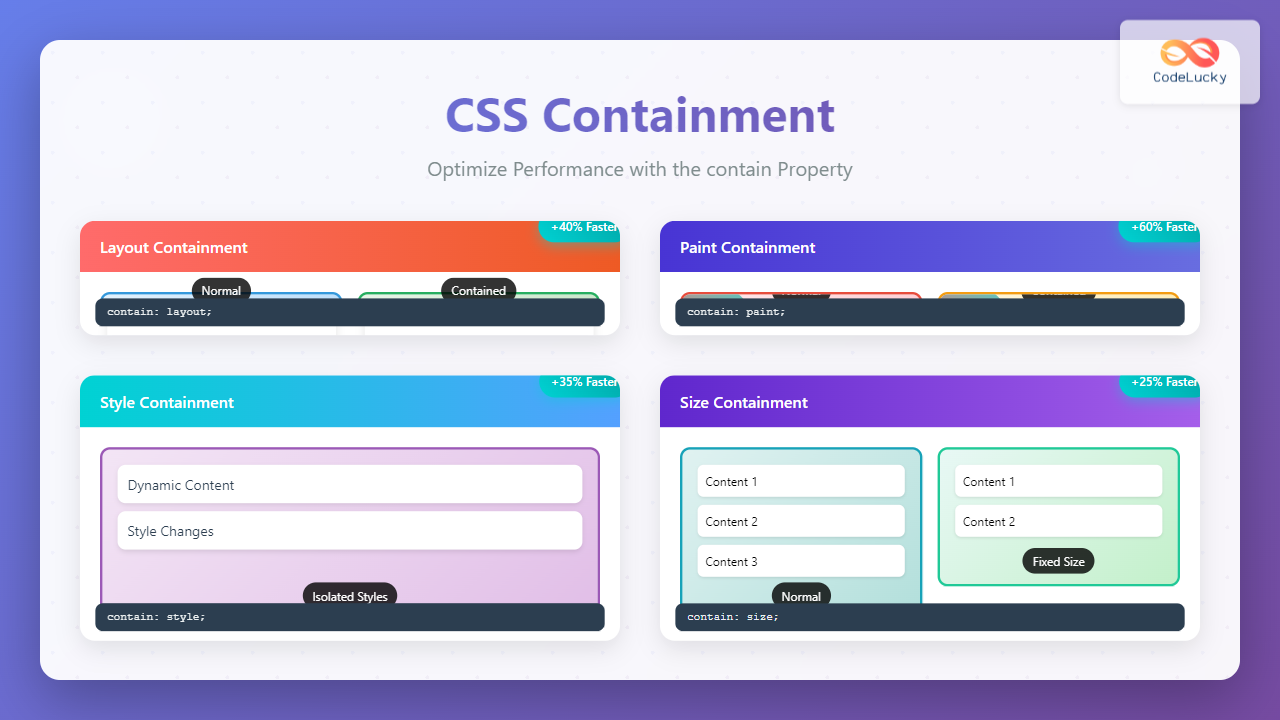
CSS containment is a powerful performance optimization technique that allows developers to isolate parts of the DOM tree, preventing unnecessary recalculations and improving rendering performance. The contain property tells the browser that an element’s subtree is independent from the rest of the page, enabling significant performance optimizations.
Understanding CSS Containment
When browsers render web pages, they often need to recalculate layouts, styles, and paint operations across the entire document. CSS containment breaks this dependency by creating isolation boundaries, allowing the browser to optimize rendering by limiting the scope of these expensive operations.
The contain property accepts several values that control different types of containment:
- layout – Contains layout calculations
- style – Contains style recalculations
- paint – Contains painting operations
- size – Contains size calculations
- inline-size – Contains inline size calculations
- block-size – Contains block size calculations
Layout Containment
Layout containment is one of the most impactful forms of containment. It ensures that changes within a contained element don’t affect the layout of elements outside it.
Example: Layout Containment
.container {
  contain: layout;
  /* Layout changes inside won't affect outside elements */
}

.content {
  /* These transformations are contained */
  transform: scale(1.1);
}
Paint Containment
Paint containment ensures that the contents of an element cannot be painted outside its bounds, creating a new stacking context and containing painting operations.
Example: Paint Containment
.container {
  contain: paint;
  /* Creates new stacking context */
  /* Painting operations are contained */
}

.animated-content {
  /* Paint operations won't affect outside elements */
  animation: rotate 3s linear infinite;
}
Style Containment
Style containment isolates style recalculations, preventing style changes from affecting elements outside the contained subtree. This is particularly useful for dynamic content.
Example: Style Containment
Without Style Containment
With Style Containment
.container {
  contain: style;
  /* Style recalculations are isolated */
}

.dynamic-content {
  /* Style changes won't trigger recalculation outside */
  color: var(--dynamic-color);
}
Size Containment
Size containment makes an element’s size calculation independent of its children’s content, treating the element as having no children for sizing purposes.
Example: Size Containment
Without Size Containment
With Size Containment
.container {
  contain: size;
  height: 200px; /* Must specify explicit size */
  /* Size calculations ignore children */
}

.dynamic-content {
  /* Adding content won't affect container size */
}
Compound Containment Values
You can combine multiple containment types for maximum optimization. The contain: strict and contain: content shorthand values provide common combinations.
Shorthand Values
/* Equivalent to: layout style paint size */
.strict-containment {
  contain: strict;
}

/* Equivalent to: layout style paint */
.content-containment {
  contain: content;
}

/* Custom combination */
.custom-containment {
  contain: layout paint;
}
Practical Use Cases
1. Card Components
Apply containment to card components to prevent their internal changes from affecting the overall layout:
.card {
  contain: content; /* layout + style + paint */
  /* Internal changes won't affect other cards */
}

.card:hover {
  transform: translateY(-5px);
  /* Transform is contained */
}
2. Infinite Scrolling Lists
For large lists with dynamic content, containment prevents performance degradation:
.list-item {
  contain: content;
  /* Each item is independently contained */
}

.virtual-scroller {
  contain: strict;
  height: 400px;
  overflow-y: auto;
  /* Scrolling performance is optimized */
}
3. Modal Dialogs
Modals benefit from paint containment to create proper stacking contexts:
.modal {
  contain: paint;
  /* Creates new stacking context */
  position: fixed;
  z-index: 1000;
}

.modal-content {
  contain: content;
  /* Internal layout is contained */
}
Performance Benefits
CSS containment provides several key performance benefits:
- Reduced Layout Thrashing: Layout containment prevents costly full-page reflows
- Optimized Paint Operations: Paint containment limits repainting to contained areas
- Style Isolation: Style containment prevents cascading recalculations
- Better Rendering Performance: Browser can optimize rendering pipeline
Browser Support and Considerations
CSS containment has excellent modern browser support:
- Chrome 52+ (full support)
- Firefox 69+ (full support)
- Safari 15.4+ (partial support)
- Edge 79+ (full support)
Best Practices
- Use size containment carefully: Always specify explicit dimensions when using size containment
- Test thoroughly: Containment can sometimes cause unexpected visual effects
- Start with content containment: It’s often the safest starting point
- Profile performance: Use browser dev tools to measure actual performance gains
- Consider progressive enhancement: Apply containment as an enhancement, not a requirement
Common Pitfalls
⚠️ Watch Out For:
- Size containment without explicit dimensions: Can cause elements to collapse
- Over-applying strict containment: May break expected layout behaviors
- Accessibility concerns: Ensure focus management isn’t affected
- Z-index stacking: Paint containment creates new stacking contexts
Measuring Performance Impact
To measure the effectiveness of CSS containment, use browser developer tools:
// Performance measurement example
const observer = new PerformanceObserver((list) => {
  for (const entry of list.getEntries()) {
    if (entry.entryType === 'measure') {
      console.log(`${entry.name}: ${entry.duration}ms`);
    }
  }
});

observer.observe({entryTypes: ['measure']});

// Measure layout performance
performance.mark('layout-start');
// ... trigger layout changes
performance.mark('layout-end');
performance.measure('layout-duration', 'layout-start', 'layout-end');
Future of CSS Containment
CSS containment continues to evolve with new features in development:
- Container Queries: Building on containment concepts for responsive design
- Enhanced size containment: More flexible sizing options
- Better debugging tools: Improved browser dev tools support
Conclusion
CSS containment is a powerful tool for optimizing web performance by creating isolation boundaries in the DOM. By strategically applying the contain property, you can significantly reduce layout thrashing, optimize paint operations, and improve overall rendering performance.
Start by identifying components that frequently change or animate, then apply appropriate containment values. Remember to test thoroughly and measure the actual performance impact to ensure you’re achieving the desired optimizations.
As web applications become more complex, CSS containment becomes increasingly valuable for maintaining smooth, performant user experiences. Master this technique to take your web performance optimization skills to the next level.
Related Posts
CSS Loading Strategies: Complete Guide to Render-Blocking and Non-Blocking Performance Optimization
CSS loading strategies are fundamental to web performance optimization, directly impacting user experience and search engine rankings. Understanding how different...

CSS Isolation Property: Isolate Styles for Reusable Components
CSS isolation Property: Isolating Styles for Reusable Components The CSS isolation property controls whether an element must create a new...

CSS Specificity: Complete Guide to Style Priority and Cascade Resolution
CSS specificity is one of the most crucial concepts every web developer must master. It determines which styles the browser...
CSS display Property: CSS Display
Understanding the CSS display Property: A Comprehensive Guide The display property in CSS is a cornerstone for controlling the layout...
CSS Child Selectors: Master Direct Child Element Targeting for Better Web Design
CSS child selectors are essential tools for targeting specific child elements within parent containers. Unlike descendant selectors that target all...
CSS Container Queries: Complete Guide to @container Rule and Containment Context
CSS Container Queries represent a revolutionary approach to responsive web design, allowing elements to respond to their container's size rather...
CSS Display Property: Complete Guide to Block, Inline, and Inline-Block Elements
The CSS display property is one of the most fundamental concepts in web development, controlling how elements are rendered and...

CSS Cascade: Understanding Style Priority and Inheritance Rules
The CSS cascade is the fundamental mechanism that determines which styles are applied to HTML elements when multiple CSS rules...

CSS Critical Path: Complete Guide to Above-Fold Optimization and Performance
The critical rendering path represents the sequence of steps browsers take to convert HTML, CSS, and JavaScript into pixels on...

HTML style Property: Element Style
HTML style Property: Element Style The HTML style property allows you to apply inline CSS styles directly to individual HTML...
CSS Introduction: Complete Guide to Styling HTML with Cascading Style Sheets
CSS (Cascading Style Sheets) is the cornerstone technology that transforms plain HTML documents into visually stunning, professional websites. While HTML...
CSS Syntax: Complete Guide to Rules, Selectors, Properties and Values
CSS (Cascading Style Sheets) is the cornerstone of web design, transforming plain HTML into visually stunning websites. Understanding CSS syntax...





