Picture this: it’s Friday afternoon, your code works perfectly on your laptop, and you push it to production. Twenty minutes later, the site is down, your phone is buzzing, and nobody can figure out why. Manual deployments are full of these landmines, and that pain is exactly why the CI/CD pipeline became one of the most important ideas in modern software development.
A well-built CI/CD pipeline turns the terrifying “big bang” release into a calm, automated, repeatable process. Whether you’re a solo developer or part of a hundred-person team, understanding how these pipelines work will change how you ship software. Let’s break it down from the ground up, with real configuration you can copy and adapt today.
What Is a CI/CD Pipeline?
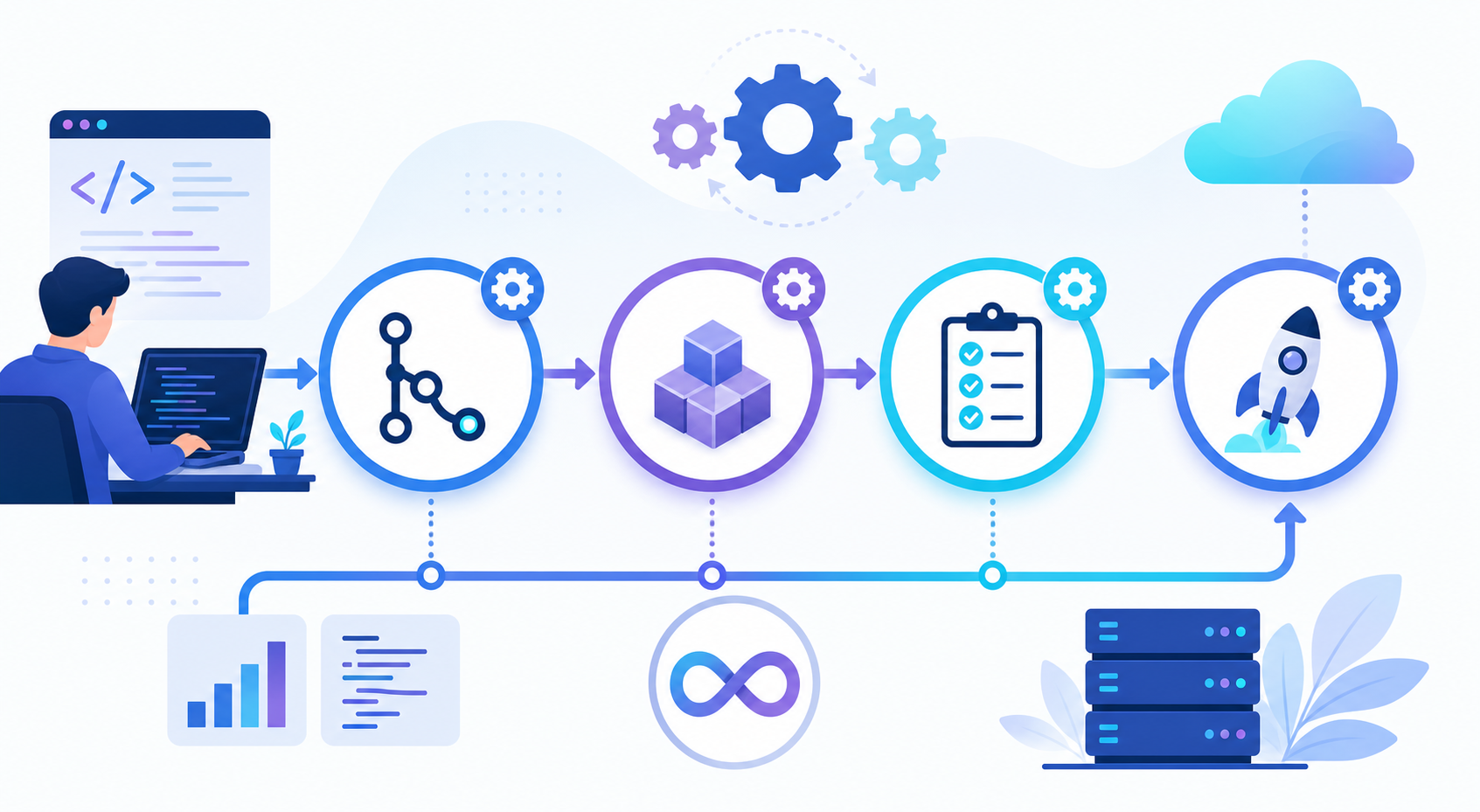
A CI/CD pipeline is an automated sequence of steps that takes your code from a commit in version control all the way to running software in a target environment. It builds your application, runs tests, and deploys the result without manual intervention, catching problems early and releasing changes faster and more reliably.
The acronym stands for Continuous Integration and Continuous Delivery (or Continuous Deployment). Think of it like an assembly line in a car factory. Raw parts go in one end, each station performs a specific job, automated quality checks reject defective units, and a finished car rolls out the other end. Your code is the raw material, and the pipeline is the assembly line.
Continuous Integration (CI)
Continuous integration is the practice of merging every developer’s code changes into a shared branch frequently, often several times a day. Each merge automatically triggers a build and a suite of tests. The goal is simple: find integration bugs within minutes of writing them, not weeks later when memory has faded and the change is buried under a hundred other commits.
Continuous Delivery vs. Continuous Deployment (CD)
The “CD” half causes the most confusion because it means two related but distinct things:
- Continuous Delivery automatically prepares every change for release and pushes it to a staging environment, but a human clicks the final button to ship to production.
- Continuous Deployment goes one step further: if every automated check passes, the change goes live in production with zero human approval.
Continuous delivery keeps a person in the loop for the final decision, which many regulated industries require. Continuous deployment removes that gate entirely for maximum speed. Both rely on the same underlying CI/CD pipeline; they only differ in who or what presses “go.”
Why a CI/CD Pipeline Matters
It’s easy to dismiss automation as overhead until you’ve felt the alternative. Here’s what a solid pipeline actually buys you, and why teams rarely go back once they adopt one.
- Faster feedback. You learn within minutes whether a change broke something, while the context is still fresh in your head.
- Fewer production incidents. Automated tests act as a safety net that never gets tired or skips a step before the weekend.
- Smaller, safer releases. Shipping tiny changes often is far less risky than one massive quarterly release.
- Repeatability. The pipeline runs the exact same steps every time, eliminating “it worked on my machine” surprises.
- Developer happiness. Engineers spend time building features instead of babysitting fragile manual deploys.
The point of a CI/CD pipeline isn’t to deploy more often for its own sake. It’s to make each deployment so small and so boring that releasing software stops being scary.
The Stages of a Typical CI/CD Pipeline
Most pipelines follow a recognizable progression. Each stage acts as a gate: if it fails, the pipeline stops and nothing downstream runs. This “fail fast” design is what keeps broken code away from your users.
- Source. A developer pushes a commit or opens a pull request, which triggers the pipeline.
- Build. The code is compiled or packaged, and dependencies are installed. If it can’t build, everything stops here.
- Test. Unit tests, integration tests, and linters run automatically. This is your primary quality gate.
- Release/Artifact. A deployable artifact (a Docker image, a JAR, a zipped bundle) is created and stored.
- Deploy. The artifact is pushed to staging and, eventually, production.
- Monitor. Once live, logs and metrics confirm the release is healthy, ready to roll back if not.
Notice how testing sits early in the flow. The cheapest bug to fix is the one caught before it ever reaches a server, so good pipelines push as many checks as possible to the left, closer to the moment the code is written.
Building Your First CI/CD Pipeline with GitHub Actions
Theory is fine, but let’s build something real. GitHub Actions is one of the most beginner-friendly tools because it lives right inside your repository, no extra server required. Pipelines are defined in YAML files placed in a .github/workflows/ directory.
Here’s a complete workflow for a Node.js project that installs dependencies, runs tests, and builds the app on every push and pull request to the main branch.
# .github/workflows/ci.yml
name: CI Pipeline

# Trigger the pipeline on pushes and pull requests to main
on:
  push:
    branches: [ main ]
  pull_request:
    branches: [ main ]

jobs:
  build-and-test:
    runs-on: ubuntu-latest   # Use a fresh Linux virtual machine

    steps:
      # Step 1: Pull the repository code onto the runner
      - name: Checkout code
        uses: actions/checkout@v4

      # Step 2: Install a specific Node.js version
      - name: Setup Node.js
        uses: actions/setup-node@v4
        with:
          node-version: '20'
          cache: 'npm'        # Cache dependencies to speed up runs

      # Step 3: Install project dependencies cleanly
      - name: Install dependencies
        run: npm ci

      # Step 4: Run the linter to catch style issues
      - name: Run linter
        run: npm run lint

      # Step 5: Run the automated test suite
      - name: Run tests
        run: npm test

      # Step 6: Build the production bundle
      - name: Build application
        run: npm run build
This file defines a single job called build-and-test that runs on a fresh Ubuntu virtual machine. Each step runs in order, and if any step exits with an error, the whole pipeline fails and GitHub marks the commit with a red X. The cache: 'npm' line is a small but meaningful optimization that reuses downloaded packages between runs to keep your pipeline fast.
Adding a Deployment Stage
Once your tests pass reliably, you can extend the pipeline to deploy. The job below only runs after the build succeeds and only on the main branch, so feature branches never accidentally ship to production.
  deploy:
    needs: build-and-test          # Wait for tests to pass first
    if: github.ref == 'refs/heads/main'
    runs-on: ubuntu-latest
    steps:
      - name: Checkout code
        uses: actions/checkout@v4

      - name: Deploy to production
        run: ./scripts/deploy.sh    # Your deployment command
        env:
          API_TOKEN: ${{ secrets.DEPLOY_TOKEN }}   # Stored securely
The needs: build-and-test line creates a dependency, so deployment is impossible unless the test job succeeds first. Notice the secret is injected through secrets.DEPLOY_TOKEN rather than hard-coded. Never commit credentials directly into your CI/CD pipeline configuration; every CI tool provides an encrypted secrets store for exactly this reason.
A Quick Look at Jenkins
GitHub Actions is great for projects already on GitHub, but Jenkins remains a powerhouse in enterprise environments where teams need full control over their own infrastructure. Jenkins uses a Jenkinsfile written in a Groovy-based syntax.
// Jenkinsfile
pipeline {
    agent any   // Run on any available Jenkins agent

    stages {
        stage('Build') {
            steps {
                sh 'npm ci'        // sh runs a shell command
            }
        }
        stage('Test') {
            steps {
                sh 'npm test'
            }
        }
        stage('Deploy') {
            when {
                branch 'main'      // Only deploy from main
            }
            steps {
                sh './scripts/deploy.sh'
            }
        }
    }
}
The structure mirrors the GitHub Actions example almost exactly: distinct stages for build, test, and deploy, with a condition that limits deployment to the main branch. This consistency is the takeaway. Once you understand the concept of a CI/CD pipeline, switching between tools is mostly a matter of learning new syntax, not new ideas.
Comparing Popular CI/CD Tools
The ecosystem is crowded, but a few tools dominate. This comparison should help you pick a starting point based on where your code already lives and how much control you need.
| Tool | Hosting | Best For | Config Format |
|---|---|---|---|
| GitHub Actions | Cloud (managed) | Teams already on GitHub wanting zero setup | YAML |
| GitLab CI/CD | Cloud or self-hosted | All-in-one DevOps platform users | YAML |
| Jenkins | Self-hosted | Enterprises needing full customization | Groovy |
| CircleCI | Cloud (managed) | Fast builds with flexible parallelism | YAML |
There’s no single “best” tool. If you’re just starting out and use GitHub, Actions is the path of least resistance. If your organization needs everything behind its own firewall, Jenkins or self-hosted GitLab makes more sense.
CI/CD Pipeline Best Practices
Setting up a pipeline is easy; keeping it healthy and trustworthy takes discipline. These practices separate pipelines that teams rely on from the ones everyone ignores.
- Keep it fast. A pipeline that takes 45 minutes kills momentum. Aim for under 10 minutes by caching dependencies and running tests in parallel.
- Make builds deterministic. Pin your dependency versions so the same commit always produces the same result.
- Fail fast and loudly. Put the quickest checks (linting, unit tests) first so failures surface in seconds, not minutes.
- Store secrets securely. Use your tool’s encrypted secrets manager; never paste tokens into the YAML.
- Treat pipeline config as code. Version it, review it in pull requests, and test changes like any other code.
- Automate rollbacks. A fast, reliable rollback path is just as important as the deploy itself.
Common Pitfalls to Avoid
Even experienced teams stumble on the same issues. Watch out for these mistakes when you build your CI/CD pipeline.
- Flaky tests. Tests that fail randomly train your team to ignore red builds, which defeats the entire purpose. Fix or quarantine them immediately.
- Skipping the staging environment. Deploying straight to production without a realistic staging step is asking for surprises.
- Doing too much at once. A 30-step monolithic job is hard to debug. Break work into clear, named stages.
- Ignoring pipeline maintenance. Outdated runner images and abandoned dependencies slowly rot a pipeline until it breaks unexpectedly.
- No notifications. If a broken build doesn’t alert anyone, it stays broken. Wire failures into Slack, email, or your chat tool.
Frequently Asked Questions About CI/CD Pipelines
What is the difference between CI and CD?
CI (continuous integration) focuses on automatically building and testing code every time changes are merged. CD (continuous delivery or deployment) extends that by automatically preparing and releasing those tested changes to staging or production. CI ensures code quality; CD handles getting it to users.
Do I need a CI/CD pipeline for a small project?
Even solo projects benefit. A basic pipeline that runs your tests on every push catches mistakes before they reach users and costs almost nothing to set up with free tiers from GitHub Actions or GitLab. The habit also pays off enormously as the project grows.
How long should a CI/CD pipeline take to run?
For fast feedback, aim to keep the core build-and-test cycle under 10 minutes. Longer pipelines discourage frequent commits. You can speed things up with dependency caching, parallel test execution, and by running slower end-to-end tests separately from quick unit tests.
Is CI/CD only for web applications?
No. CI/CD pipelines work for mobile apps, desktop software, machine learning models, infrastructure code, and even documentation sites. Any project where you build, test, and release artifacts can benefit from automation. The stages stay the same; only the specific commands change.
What does “shift left” mean in CI/CD?
Shifting left means moving testing and quality checks earlier in the development process, closer to when code is written. Catching a bug during a pull request is dramatically cheaper than catching it in production, so good pipelines run as many checks as possible at the start of the flow.
Conclusion
A CI/CD pipeline transforms software delivery from a stressful, error-prone event into a calm, automated routine. By continuously integrating changes, testing them automatically, and delivering them in small increments, you ship faster and with more confidence, a combination that once seemed impossible.
The key takeaways are straightforward: integrate code often, automate your tests, keep the pipeline fast, store secrets safely, and avoid the common traps like flaky tests and skipped staging environments. Start small. Even a single workflow that runs your tests on every push is a genuine CI/CD pipeline, and you can layer on builds, deployments, and monitoring as your needs grow.
Pick one tool, copy one of the examples above, and commit it to your repository today. Once you’ve watched your first green checkmark appear automatically, you’ll wonder how you ever shipped software without it.