Imagine you wrote a function that searches a list of 100 names and it returns instantly. You ship it, feel great, and then a customer uploads a list of 10 million names — and your app freezes. The code never changed. So what went wrong? The answer is almost always hiding in how your algorithm scales, and the language we use to describe that scaling is Big O notation.
Understanding Big O notation is one of those skills that separates developers who guess at performance from those who can predict it. It shows up in code reviews, technical interviews, and every time you choose one data structure over another. The good news is that the core idea is simpler than the intimidating math symbols suggest. By the time you finish reading, you will be able to look at a loop and say, with confidence, how fast it grows.
What Is Big O Notation?
Big O notation is a mathematical way to describe how the running time or memory usage of an algorithm grows as the size of its input increases. Instead of measuring exact seconds, it measures the rate of growth — how the work scales when the input doubles, triples, or grows to a million. It answers one question: how does this algorithm behave as the data gets large?
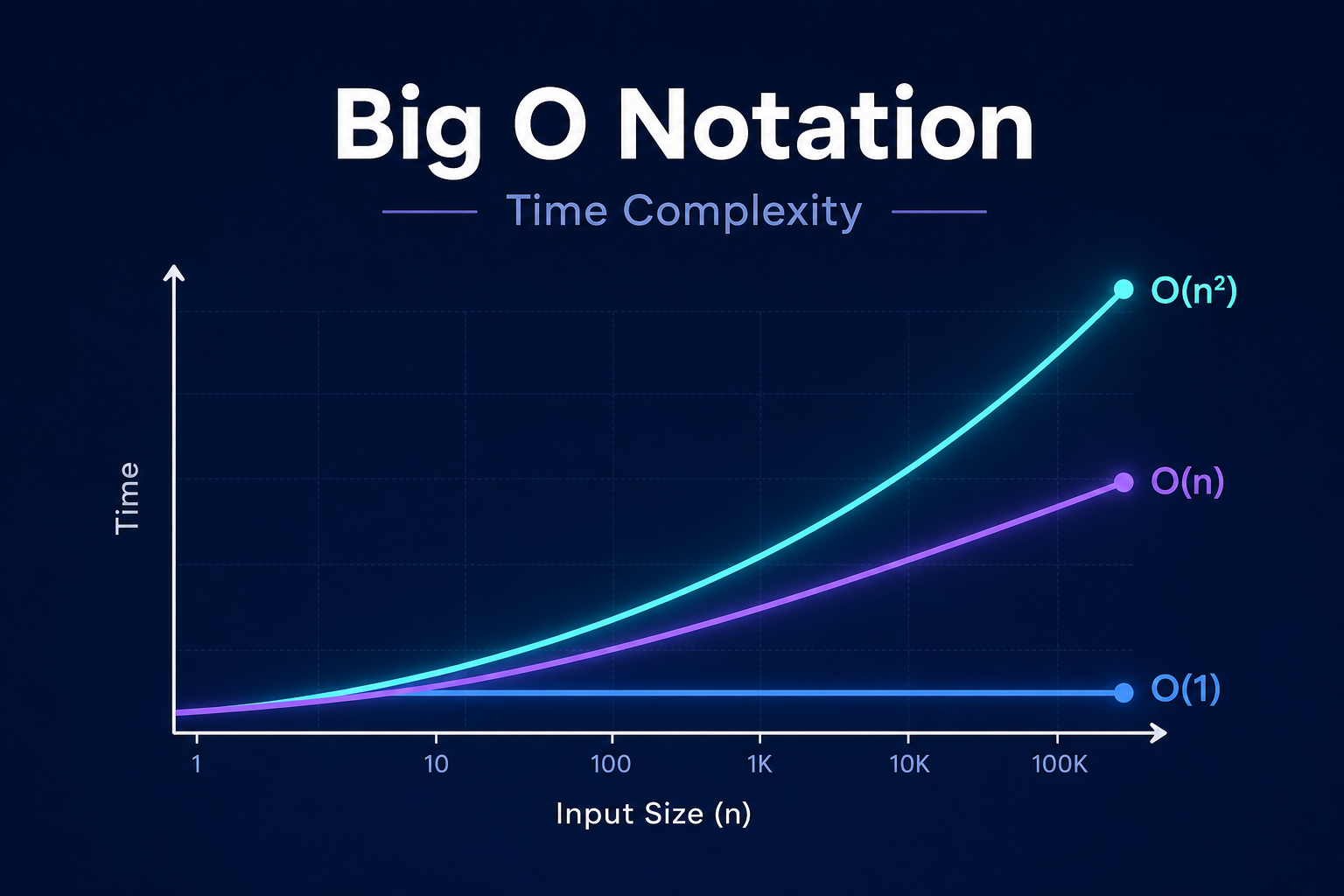
The key word there is growth. Big O does not care that your laptop is faster than mine, or that one programming language runs quicker than another. Those are constant factors that fade away at scale. What Big O captures is the shape of the curve — whether your algorithm stays flat, climbs gently, or explodes upward as the input size n increases.
Big O describes the worst-case upper bound on how an algorithm’s cost grows. It tells you the ceiling, so you know the limits of how slow things can get.
Why Time Complexity Actually Matters
You might be thinking: computers are fast, so why obsess over this? Because the difference between a good and a bad algorithm is not 10% — it can be the difference between a response that takes milliseconds and one that takes hours.
Consider searching for a value. A naive scan through a sorted list of one billion items checks items one by one. A binary search on the same list checks at most about 30 items. Same data, same hardware, wildly different outcomes. That gap is what time complexity measures, and it only widens as your data grows.
Time complexity also gives you a shared vocabulary. When a teammate says a function is O(n^2), every experienced developer instantly knows it will struggle with large inputs — no benchmarking required. It is a universal shorthand for performance, which is exactly why it dominates coding interviews.
How to Read Big O Notation
The notation looks like O(...) where the inside describes how the work scales with input size n. Here is how to interpret the most common expressions you will meet.
O(1)— constant time: the work never changes, no matter how big the input is.O(log n)— logarithmic time: the work grows slowly; doubling the input adds just one more step.O(n)— linear time: the work grows directly with the input. Double the data, double the work.O(n log n)— linearithmic time: slightly worse than linear; typical of efficient sorting algorithms.O(n^2)— quadratic time: work grows with the square of the input. Often a sign of nested loops.O(2^n)— exponential time: work doubles with each added element. Usually impractical beyond small inputs.
One rule trips up beginners constantly: Big O ignores constants and lower-order terms. An algorithm that runs in 5n + 100 steps is still O(n), because as n grows huge, the 5 and the 100 stop mattering. We only keep the dominant term and drop its coefficient.
The Big O Complexity Chart at a Glance
The table below shows roughly how many operations each complexity requires as the input grows. Notice how gentle the top rows stay and how violently the bottom rows explode.
| Notation | Name | n = 10 | n = 1,000 | Typical Example |
|---|---|---|---|---|
O(1) |
Constant | 1 | 1 | Accessing an array index |
O(log n) |
Logarithmic | ~3 | ~10 | Binary search |
O(n) |
Linear | 10 | 1,000 | Looping through a list |
O(n log n) |
Linearithmic | ~33 | ~10,000 | Merge sort, quicksort |
O(n^2) |
Quadratic | 100 | 1,000,000 | Nested loops, bubble sort |
O(2^n) |
Exponential | 1,024 | astronomical | Naive recursive Fibonacci |
Look at the quadratic row: at just 1,000 items it already needs a million operations. The exponential row becomes unusable far sooner. This is why algorithm choice matters more than raw hardware speed — a faster CPU cannot save a poorly scaling algorithm.
Big O Notation Explained Through Code Examples
Theory clicks faster when you see it running. Let us walk through each major complexity class with real, runnable code so you can recognize the patterns in your own work.
O(1) — Constant Time
# Return the first element of a list
def get_first(items):
    return items[0]  # one operation, regardless of list size

print(get_first([10, 20, 30]))  # 10
This function does the same amount of work whether the list has 3 elements or 3 million. Accessing an element by its index is a single step, so the cost is constant. Dictionary lookups in Python and hash map reads in most languages are also O(1) on average.
O(n) — Linear Time
# Find the maximum value by checking every element
def find_max(numbers):
    largest = numbers[0]
    for num in numbers:        # loop runs once per element
        if num > largest:
            largest = num
    return largest

print(find_max([3, 7, 2, 9, 4]))  # 9
Here the loop touches each element exactly once, so the work grows in direct proportion to the input size. If the list doubles, the loop runs twice as many times. This single-loop pattern is the signature of O(n) linear time.
O(n^2) — Quadratic Time
# Check every pair of elements for duplicates
def has_duplicate(items):
    for i in range(len(items)):       # outer loop: n times
        for j in range(i + 1, len(items)):  # inner loop: up to n times
            if items[i] == items[j]:
                return True
    return False

print(has_duplicate([1, 2, 3, 2]))  # True
A loop nested inside another loop is the classic red flag for quadratic time. For every element, you iterate over the others, so the operations grow with n multiplied by n. At small sizes this is fine, but it degrades quickly. Often you can replace it with a faster approach — for instance, using a set to detect duplicates in O(n) time.
O(log n) — Logarithmic Time
# Binary search on a sorted list
def binary_search(sorted_list, target):
    low, high = 0, len(sorted_list) - 1
    while low <= high:
        mid = (low + high) // 2     # halve the search space each step
        if sorted_list[mid] == target:
            return mid
        elif sorted_list[mid] < target:
            low = mid + 1
        else:
            high = mid - 1
    return -1  # not found

print(binary_search([1, 3, 5, 7, 9, 11], 7))  # 3
Each iteration throws away half of the remaining items, so even a list of a billion elements is searched in about 30 steps. Whenever an algorithm repeatedly divides the problem in half, you are looking at logarithmic time — one of the most efficient growth rates you can hope for.
Time Complexity vs. Space Complexity
Big O is not only about time. Space complexity uses the same notation to describe how much extra memory an algorithm needs as the input grows. The two often involve a trade-off: you can sometimes make an algorithm faster by using more memory, or shrink memory usage at the cost of speed.
For example, the find_max function above uses O(1) space — it only stores a single variable no matter how large the list is. But an algorithm that builds a new copy of the input, or fills a lookup table, would use O(n) space. When you evaluate an algorithm, get in the habit of asking both questions: how does its time scale, and how does its memory scale?
Faster is not always better. A solution that runs in
O(n)time but consumesO(n)memory may be the wrong choice on a memory-constrained device. Context decides.
Best Case, Worst Case, and Average Case
An algorithm does not always do the same amount of work for inputs of the same size. Searching a list might find your target on the first try or the very last. That is why we talk about three scenarios.
- Best case — the fewest operations possible (often written with Big Omega,
Ω). - Worst case — the most operations possible; this is what Big O usually describes.
- Average case — the expected performance across typical inputs (often written with Big Theta,
Θ).
In practice, engineers focus on the worst case because it sets a guarantee: your algorithm will never perform worse than this bound. When someone states a complexity without specifying the case, they almost always mean the worst case. You can read more about these formal definitions in the Wikipedia entry on Big O notation.
How to Calculate Big O: A Simple Method
You do not need a math degree to analyze most code. Follow these practical steps and you will get the right answer the vast majority of the time.
- Count the loops. A single loop over the input is usually
O(n). Two nested loops over the same input are usuallyO(n^2). - Look for halving. If the problem size is cut in half each step, suspect
O(log n). - Drop the constants. Turn
O(2n)intoO(n)andO(n + 5)intoO(n). - Keep only the dominant term. In
O(n^2 + n), then^2dominates, so it simplifies toO(n^2). - Add sequential blocks, multiply nested ones. Two separate loops are
O(n + n) = O(n); a loop inside a loop isO(n * n) = O(n^2).
Apply these rules in order and the right answer usually falls out. The trickiest part for beginners is remembering that constants disappear — a loop that runs 3n times and one that runs n times are both linear.
Common Pitfalls and Mistakes to Avoid
Even experienced developers stumble on a few recurring traps when reasoning about time complexity. Watch for these.
- Ignoring hidden loops. A call like
value in my_listin Python is itselfO(n). Put it inside a loop and you have accidentally createdO(n^2)code. - Confusing the variable. If an algorithm depends on two different inputs, use
O(n + m)orO(n * m)rather than forcing everything into a singlen. - Optimizing too early. For small, fixed inputs, an
O(n^2)solution can be perfectly fine and far easier to read. Measure before you optimize. - Forgetting space. A recursive function may look elegant but quietly use
O(n)stack memory through its call depth. - Assuming Big O equals real speed. Big O describes growth, not absolute timing. For tiny inputs, a “slower” algorithm with low overhead can win.
Keeping these in mind will save you from the most common analysis errors and from premature optimization, which the legendary computer scientist Donald Knuth famously called the root of much programming evil.
Frequently Asked Questions About Big O Notation
Is a lower Big O always faster in practice?
Not necessarily. Big O describes how an algorithm scales, not its exact speed. For small inputs, an algorithm with a “worse” Big O but lower overhead can outperform a theoretically faster one. Big O matters most when your data is large or growing.
What is the difference between Big O, Big Omega, and Big Theta?
Big O (O) describes the upper bound or worst case. Big Omega (Ω) describes the lower bound or best case. Big Theta (Θ) describes a tight bound, used when the best and worst cases grow at the same rate. In everyday conversation, most people say “Big O” to mean the worst case.
What is the most common time complexity in interviews?
You will see O(n), O(n log n), and O(n^2) most often. Interviewers frequently ask you to improve an O(n^2) brute-force solution into something better, usually by using a hash map to reach O(n) or by sorting to reach O(n log n).
Does O(2n) simplify to O(n)?
Yes. Big O ignores constant multipliers because they do not affect how an algorithm scales. Whether the work is 2n, 10n, or 0.5n, the growth is still linear, so all of them are written as O(n).
How do I get faster at analyzing complexity?
Practice on real code. Pick functions you have written and work out their Big O by counting loops and recursion depth. Sites like the Big-O Cheat Sheet list the complexities of common data structures and algorithms, which makes a handy reference while you build intuition.
Conclusion: Making Big O Notation Work for You
Big O notation is less a math hurdle and more a thinking tool. Once you can glance at a loop and estimate how it scales, you start writing code that survives contact with real-world data instead of buckling under it. The whole point of time complexity is to predict performance before you hit a wall, not after.
Keep the essentials close: count your loops, drop the constants, keep the dominant term, and always weigh time against space. Recognize the common shapes — constant, logarithmic, linear, linearithmic, quadratic, and exponential — and you will read algorithms the way a fluent speaker reads sentences. Mastering Big O notation will not just help you pass interviews; it will make every program you write more thoughtful and more scalable.
The best way to cement this knowledge is to apply it. Next time you write a loop, pause and ask yourself one question: what is the Big O of this? That small habit, repeated, turns into deep performance intuition over time.