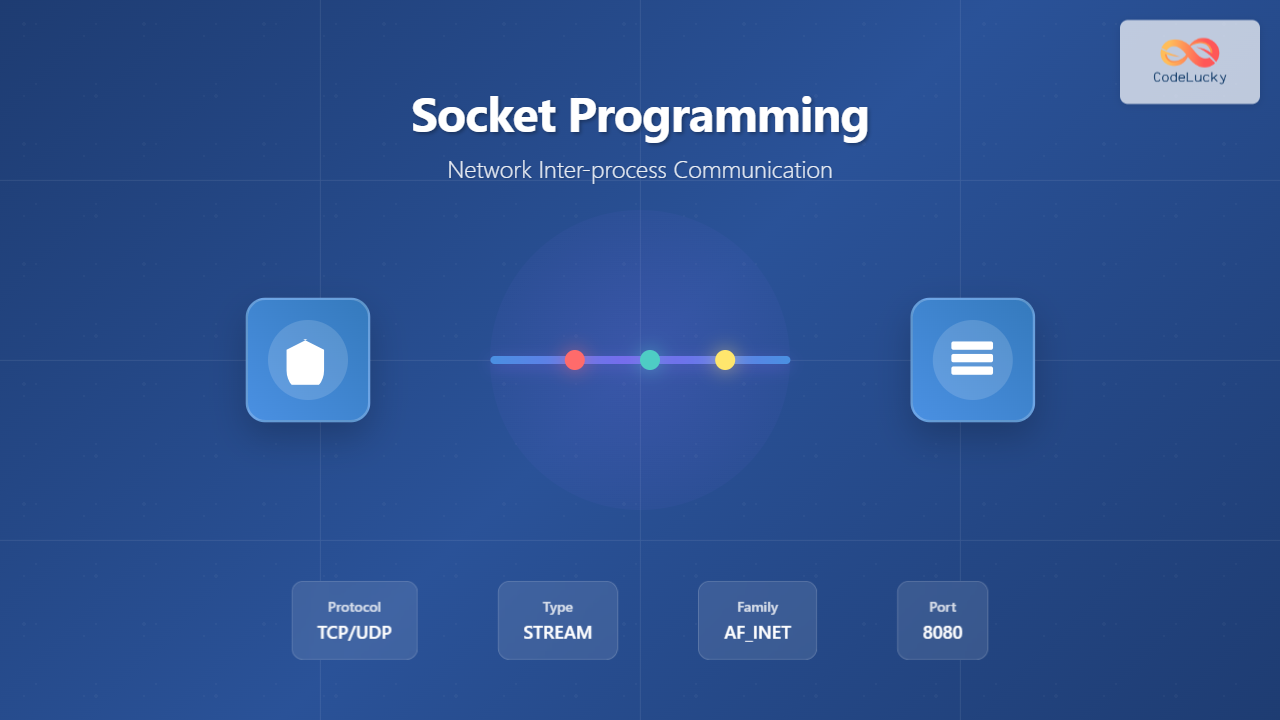
Socket programming forms the backbone of network communication in modern operating systems, enabling processes to communicate across different machines or within the same system. This comprehensive guide explores the fundamentals, implementation details, and practical applications of socket programming for network inter-process communication.
What is Socket Programming?
Socket programming is a method of communication between processes running on the same machine or different machines connected through a network. A socket serves as an endpoint for sending and receiving data across a network, acting as a bridge between application programs and the underlying network protocols.

Types of Sockets
Stream Sockets (TCP)
Stream sockets provide reliable, connection-oriented communication using the Transmission Control Protocol (TCP). They guarantee that data arrives in the correct order without duplication or loss.
Datagram Sockets (UDP)
Datagram sockets offer connectionless communication using the User Datagram Protocol (UDP). They’re faster but don’t guarantee delivery, order, or prevent duplication.
Raw Sockets
Raw sockets provide direct access to the underlying communication protocols, allowing custom protocol implementation and network analysis tools.
Socket Programming Workflow
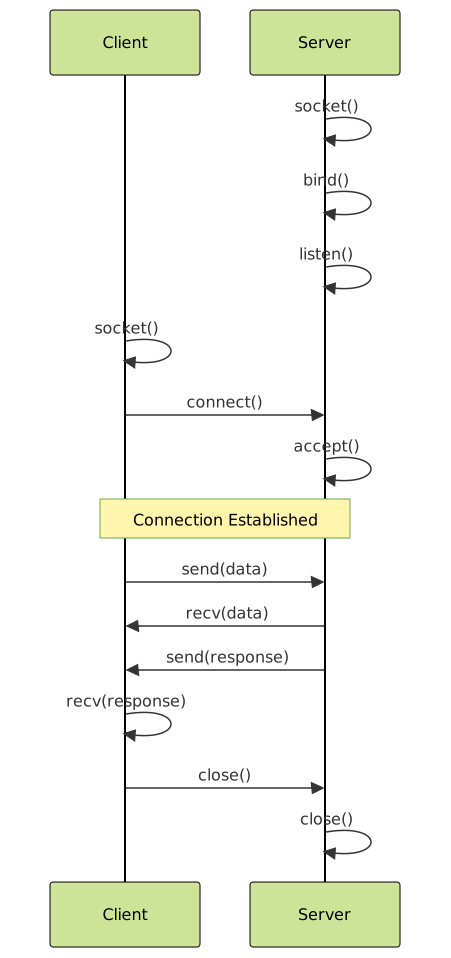
Essential Socket Functions
Server-Side Functions
1. socket() – Create Socket
int socket(int domain, int type, int protocol);

Example:
int server_socket = socket(AF_INET, SOCK_STREAM, 0);
2. bind() – Bind Socket to Address
int bind(int sockfd, const struct sockaddr *addr, socklen_t addrlen);

Example:
struct sockaddr_in server_addr;
server_addr.sin_family = AF_INET;
server_addr.sin_addr.s_addr = INADDR_ANY;
server_addr.sin_port = htons(8080);
bind(server_socket, (struct sockaddr*)&server_addr, sizeof(server_addr));
3. listen() – Listen for Connections
int listen(int sockfd, int backlog);

Example:
listen(server_socket, 5);
4. accept() – Accept Client Connection
int accept(int sockfd, struct sockaddr *addr, socklen_t *addrlen);

Example:
int client_socket = accept(server_socket, NULL, NULL);
Client-Side Functions
connect() – Connect to Server
int connect(int sockfd, const struct sockaddr *addr, socklen_t addrlen);

Example:
struct sockaddr_in server_addr;
server_addr.sin_family = AF_INET;
server_addr.sin_port = htons(8080);
server_addr.sin_addr.s_addr = inet_addr("127.0.0.1");
connect(client_socket, (struct sockaddr*)&server_addr, sizeof(server_addr));
Complete TCP Socket Example
TCP Server Implementation
#include <stdio.h>
#include <stdlib.h>
#include <string.h>
#include <unistd.h>
#include <sys/socket.h>
#include <netinet/in.h>

int main() {
    int server_socket, client_socket;
    struct sockaddr_in server_addr, client_addr;
    socklen_t client_len;
    char buffer[1024];

    // Create socket
    server_socket = socket(AF_INET, SOCK_STREAM, 0);
    if (server_socket == -1) {
        perror("Socket creation failed");
        exit(1);
    }

    // Configure server address
    server_addr.sin_family = AF_INET;
    server_addr.sin_addr.s_addr = INADDR_ANY;
    server_addr.sin_port = htons(8080);

    // Bind socket
    if (bind(server_socket, (struct sockaddr*)&server_addr, sizeof(server_addr)) == -1) {
        perror("Bind failed");
        exit(1);
    }

    // Listen for connections
    if (listen(server_socket, 5) == -1) {
        perror("Listen failed");
        exit(1);
    }

    printf("Server listening on port 8080...\n");

    // Accept client connection
    client_len = sizeof(client_addr);
    client_socket = accept(server_socket, (struct sockaddr*)&client_addr, &client_len);

    if (client_socket == -1) {
        perror("Accept failed");
        exit(1);
    }

    printf("Client connected!\n");

    // Receive and echo data
    while (1) {
        memset(buffer, 0, sizeof(buffer));
        int bytes_received = recv(client_socket, buffer, sizeof(buffer), 0);

        if (bytes_received <= 0) {
            break;
        }

        printf("Received: %s", buffer);
        send(client_socket, buffer, bytes_received, 0);
    }

    close(client_socket);
    close(server_socket);
    return 0;
}
TCP Client Implementation
#include <stdio.h>
#include <stdlib.h>
#include <string.h>
#include <unistd.h>
#include <sys/socket.h>
#include <netinet/in.h>
#include <arpa/inet.h>

int main() {
    int client_socket;
    struct sockaddr_in server_addr;
    char buffer[1024];

    // Create socket
    client_socket = socket(AF_INET, SOCK_STREAM, 0);
    if (client_socket == -1) {
        perror("Socket creation failed");
        exit(1);
    }

    // Configure server address
    server_addr.sin_family = AF_INET;
    server_addr.sin_port = htons(8080);
    server_addr.sin_addr.s_addr = inet_addr("127.0.0.1");

    // Connect to server
    if (connect(client_socket, (struct sockaddr*)&server_addr, sizeof(server_addr)) == -1) {
        perror("Connection failed");
        exit(1);
    }

    printf("Connected to server!\n");
    printf("Enter messages (type 'quit' to exit):\n");

    while (1) {
        printf("Client: ");
        fgets(buffer, sizeof(buffer), stdin);

        if (strncmp(buffer, "quit", 4) == 0) {
            break;
        }

        // Send message
        send(client_socket, buffer, strlen(buffer), 0);

        // Receive echo
        memset(buffer, 0, sizeof(buffer));
        recv(client_socket, buffer, sizeof(buffer), 0);
        printf("Server echo: %s", buffer);
    }

    close(client_socket);
    return 0;
}
Expected Output
Server Output:
Server listening on port 8080...
Client connected!
Received: Hello from client!
Received: How are you?
Received: quit

Client Output:
Connected to server!
Enter messages (type 'quit' to exit):
Client: Hello from client!
Server echo: Hello from client!
Client: How are you?
Server echo: How are you?
Client: quit
UDP Socket Programming
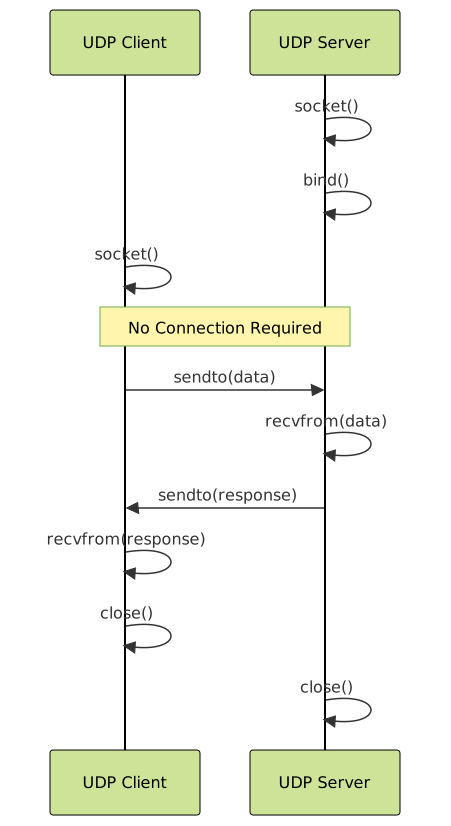
UDP Server Example
#include <stdio.h>
#include <stdlib.h>
#include <string.h>
#include <unistd.h>
#include <sys/socket.h>
#include <netinet/in.h>

int main() {
    int server_socket;
    struct sockaddr_in server_addr, client_addr;
    socklen_t client_len;
    char buffer[1024];

    // Create UDP socket
    server_socket = socket(AF_INET, SOCK_DGRAM, 0);

    // Configure server address
    server_addr.sin_family = AF_INET;
    server_addr.sin_addr.s_addr = INADDR_ANY;
    server_addr.sin_port = htons(8080);

    // Bind socket
    bind(server_socket, (struct sockaddr*)&server_addr, sizeof(server_addr));

    printf("UDP Server listening on port 8080...\n");

    while (1) {
        client_len = sizeof(client_addr);

        // Receive data
        int bytes_received = recvfrom(server_socket, buffer, sizeof(buffer), 0,
                                     (struct sockaddr*)&client_addr, &client_len);

        buffer[bytes_received] = '\0';
        printf("Received: %s\n", buffer);

        // Send response
        sendto(server_socket, buffer, bytes_received, 0,
               (struct sockaddr*)&client_addr, client_len);
    }

    close(server_socket);
    return 0;
}
Advanced Socket Concepts
Socket Options
Socket options allow fine-tuning of socket behavior:
// Reuse address option
int opt = 1;
setsockopt(server_socket, SOL_SOCKET, SO_REUSEADDR, &opt, sizeof(opt));

// Set receive timeout
struct timeval timeout;
timeout.tv_sec = 5;
timeout.tv_usec = 0;
setsockopt(client_socket, SOL_SOCKET, SO_RCVTIMEO, &timeout, sizeof(timeout));
Non-blocking Sockets
Non-blocking sockets prevent blocking operations:
#include <fcntl.h>

// Make socket non-blocking
int flags = fcntl(socket_fd, F_GETFL, 0);
fcntl(socket_fd, F_SETFL, flags | O_NONBLOCK);
Multiplexing with select()
Handle multiple sockets simultaneously:
fd_set read_fds;
int max_fd;

while (1) {
    FD_ZERO(&read_fds);
    FD_SET(server_socket, &read_fds);
    max_fd = server_socket;

    // Add client sockets to set
    for (int i = 0; i < max_clients; i++) {
        if (client_sockets[i] > 0) {
            FD_SET(client_sockets[i], &read_fds);
            max_fd = max(max_fd, client_sockets[i]);
        }
    }

    // Wait for activity
    int activity = select(max_fd + 1, &read_fds, NULL, NULL, NULL);

    // Handle new connections
    if (FD_ISSET(server_socket, &read_fds)) {
        // Accept new connection
        int new_socket = accept(server_socket, NULL, NULL);
        // Add to client array
    }

    // Handle client data
    for (int i = 0; i < max_clients; i++) {
        if (FD_ISSET(client_sockets[i], &read_fds)) {
            // Handle client data
        }
    }
}
Socket Programming Best Practices
Error Handling
Always check return values and handle errors appropriately:
int result = socket(AF_INET, SOCK_STREAM, 0);
if (result == -1) {
    perror("Socket creation failed");
    exit(EXIT_FAILURE);
}
Resource Management
Properly close sockets and free resources:
void cleanup() {
    if (client_socket != -1) {
        close(client_socket);
    }
    if (server_socket != -1) {
        close(server_socket);
    }
}

// Register cleanup function
atexit(cleanup);
Signal Handling
Handle signals gracefully:
#include <signal.h>

void signal_handler(int sig) {
    printf("\nShutting down server...\n");
    cleanup();
    exit(0);
}

int main() {
    signal(SIGINT, signal_handler);
    signal(SIGTERM, signal_handler);
    // ... rest of server code
}
Common Socket Programming Pitfalls
Performance Optimization Techniques
1. Buffer Size Optimization
// Set optimal buffer sizes
int send_buffer_size = 65536;
int recv_buffer_size = 65536;

setsockopt(socket_fd, SOL_SOCKET, SO_SNDBUF, &send_buffer_size, sizeof(send_buffer_size));
setsockopt(socket_fd, SOL_SOCKET, SO_RCVBUF, &recv_buffer_size, sizeof(recv_buffer_size));
2. TCP_NODELAY for Low Latency
int flag = 1;
setsockopt(socket_fd, IPPROTO_TCP, TCP_NODELAY, &flag, sizeof(flag));
3. Connection Pooling
Maintain a pool of persistent connections to reduce connection overhead for frequently communicating processes.
Security Considerations
Input Validation
// Always validate received data
if (bytes_received > 0 && bytes_received < sizeof(buffer)) {
    buffer[bytes_received] = '\0';  // Null terminate
    // Process data safely
}
Access Control
// Bind to specific interface instead of INADDR_ANY
server_addr.sin_addr.s_addr = inet_addr("127.0.0.1");  // Localhost only
Debugging Socket Programs
Using netstat
# Check listening ports
netstat -tuln

# Check established connections
netstat -tun

# Check specific port
netstat -tuln | grep 8080
Using tcpdump
# Monitor traffic on specific port
tcpdump -i lo port 8080

# Monitor TCP traffic
tcpdump -i any tcp port 8080
Conclusion
Socket programming is a fundamental skill for system programmers and network application developers. Understanding the concepts, implementation patterns, and best practices covered in this guide provides a solid foundation for building robust network applications. Whether implementing simple client-server architectures or complex distributed systems, mastering socket programming enables efficient inter-process communication across networks.
Remember to always handle errors gracefully, manage resources properly, and consider security implications when developing socket-based applications. With practice and attention to these principles, you can build reliable and efficient network communication systems.
Related Posts

C Socket Programming: Network Communication Basics
In the world of modern computing, network communication is the backbone of countless applications and services. Whether you're building a...

Java Networking: Socket Programming
Java's robust networking capabilities make it an excellent choice for developing distributed applications. At the heart of Java's networking prowess...
Message Passing: Complete Guide to Inter-Process Communication in Operating Systems
Message passing is a fundamental inter-process communication (IPC) mechanism that enables processes to exchange data and synchronize their activities in...

PHP Socket Programming: Network Communication
In the world of web development, understanding network communication is crucial. PHP, a versatile server-side scripting language, offers powerful tools...
Pipes in Operating System: Complete Guide to Anonymous and Named Pipes
Pipes are one of the most fundamental and widely used Inter-Process Communication (IPC) mechanisms in Unix-like operating systems. They provide...

Remote Procedure Call: Complete Guide to Distributed System Communication
Remote Procedure Call (RPC) is a fundamental communication protocol that enables programs to execute procedures or functions on remote systems...

Shared Memory: Complete Guide to IPC Through Memory Segments
Introduction to Shared Memory IPC Shared Memory is one of the most efficient Inter-Process Communication (IPC) mechanisms available in modern...
Distributed Operating System: Complete Guide to Network-based OS Architecture
What is a Distributed Operating System? A distributed operating system is a sophisticated software system that manages and coordinates multiple...
Multithreading in Operating Systems: Benefits, Challenges, and Implementation Guide
What is Multithreading in Operating Systems? Multithreading is a fundamental concept in modern operating systems that allows a single process...
Thread vs Process: Complete Guide to Differences and When to Use Each
Understanding the fundamental differences between threads and processes is crucial for system programming, application design, and performance optimization. While both...
ss Command Linux: Complete Guide to Modern Socket Statistics and Network Analysis
The ss command is a powerful and modern utility for investigating sockets and network connections in Linux systems. As the...
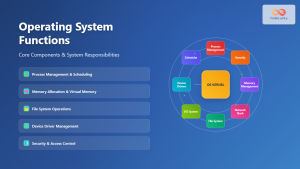
Operating System Functions: Core Components and System Responsibilities
An operating system (OS) serves as the fundamental software layer that manages computer hardware resources and provides essential services to...