
The Secure Boot process with Trusted Platform Module (TPM) represents a fundamental shift in computer security, providing hardware-based protection against malicious software during system startup. This comprehensive security mechanism ensures that only verified, digitally signed software can execute during the boot process, creating a chain of trust from hardware to operating system.
Understanding Secure Boot Fundamentals
Secure Boot is a security standard developed by members of the PC industry to help ensure that a device boots using only software that is trusted by the Original Equipment Manufacturer (OEM). When the PC starts, the firmware checks the signature of each piece of boot software, including UEFI firmware drivers, EFI applications, and the operating system.

The process relies on digital certificates and cryptographic signatures to verify the authenticity and integrity of boot components. Each component in the boot chain must be signed by a trusted authority, creating an unbroken chain of trust.
Trusted Platform Module (TPM) Architecture
The Trusted Platform Module is a dedicated microcontroller designed to secure hardware through integrated cryptographic keys. TPM provides several critical security functions:
- Secure key generation and storage
- Platform authentication
- Attestation capabilities
- Secure boot measurement and verification
TPM Components and Functionality

The TPM stores measurements of boot components in Platform Configuration Registers (PCRs), which are special storage locations that can only be extended, not directly written. This creates a tamper-evident record of the boot process.
Secure Boot Implementation Process
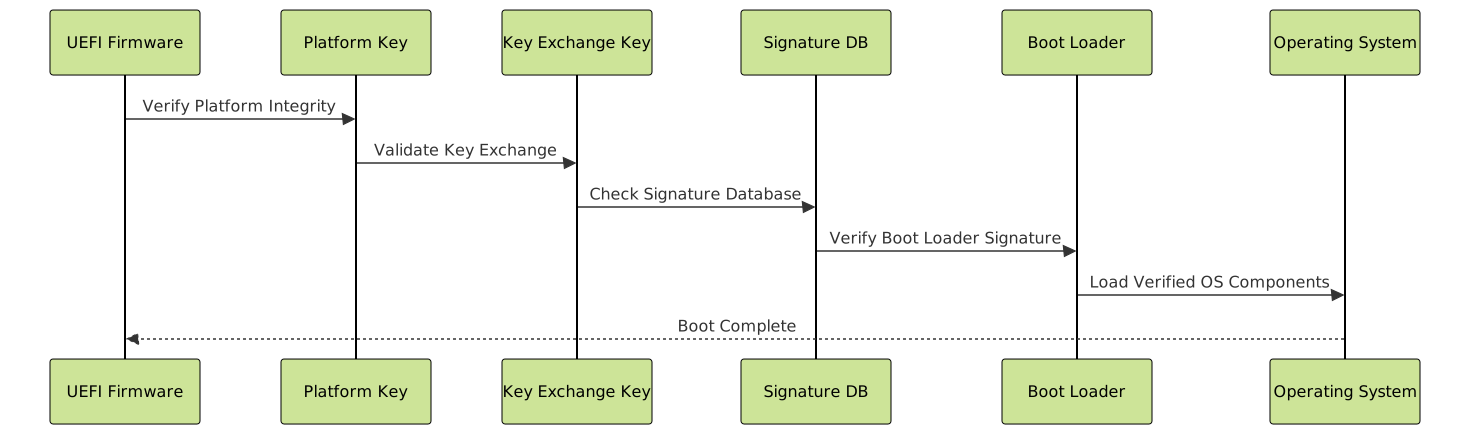
The secure boot implementation follows a structured approach involving multiple verification stages:
Stage 1: Platform Key (PK) Verification
The Platform Key serves as the root of trust for the secure boot process. It’s installed by the platform manufacturer and controls access to the signature databases.
# Example: Checking Platform Key status in Linux
sudo mokutil --pk

# Output example:
# Platform Key is enabled
# Platform Key fingerprint: 12:34:56:78:9a:bc:de:f0
Stage 2: Key Exchange Key (KEK) Database
The KEK database contains keys that can sign updates to the signature databases. This provides a mechanism for authorized updates to the boot authorization system.
Stage 3: Signature Database Verification
Two primary databases control boot authorization:
- db (Signature Database): Contains allowed signatures and certificates
- dbx (Forbidden Signature Database): Contains revoked signatures and certificates
TPM-Enhanced Security Measurements
The TPM extends secure boot by maintaining cryptographic measurements of the boot process. These measurements are stored in Platform Configuration Registers (PCRs).
PCR Usage in Secure Boot
| PCR Index | Purpose | Description |
|---|---|---|
| 0 | Core System Firmware | UEFI firmware and embedded drivers |
| 1 | Platform Configuration | Platform-specific configuration data |
| 2 | Option ROM Code | Expansion card firmware |
| 4 | Boot Manager | Boot manager code and configuration |
| 7 | Secure Boot Policy | Secure boot configuration measurements |
Measurement Process Example
# Reading TPM PCR values in Linux
sudo tpm2_pcrread

# Example output:
# sha256:
#   0 : 0x3d458cfe55cc03ea1f443f1562beec8df51c75e14a9fcf9a7234a13f198e7969
#   1 : 0x0000000000000000000000000000000000000000000000000000000000000000
#   2 : 0x3d458cfe55cc03ea1f443f1562beec8df51c75e14a9fcf9a7234a13f198e7969
#   4 : 0x9834d9fb4c4b923ca97e5f3b89e21a6d7cb1a55b49b54db2b3c87b4e8c6d7e23
Secure Boot Configuration and Management
Proper configuration of secure boot requires careful management of certificates and keys. Organizations must balance security with operational flexibility.
Custom Certificate Management
For enterprise environments, custom certificates enable organizations to maintain control over their boot environment:
# PowerShell example: Adding custom certificate to secure boot
$cert = Get-PfxCertificate -FilePath "C:\Certificates\CustomBoot.pfx"
Set-SecureBootPolicy -Name "CustomPolicy" -Certificate $cert

# Verify secure boot status
Get-SecureBootPolicy
Linux Secure Boot Implementation
Linux distributions implement secure boot through signed kernels and boot loaders:
# Ubuntu secure boot status check
sudo mokutil --sb-state

# Example output:
# SecureBoot enabled

# List enrolled keys
sudo mokutil --list-enrolled

# Check if custom keys are needed
sudo mokutil --test-key /path/to/custom.der
Advanced TPM Features for Enterprise Security
Modern TPM implementations provide sophisticated security features beyond basic secure boot:
Remote Attestation
Remote attestation allows systems to prove their trustworthiness to remote parties by providing cryptographic evidence of their current state.

Sealed Storage
TPM sealed storage binds encrypted data to specific platform states, ensuring data can only be decrypted when the system is in a trusted configuration.
# Example: Sealing data with TPM
sudo tpm2_createprimary -C o -g sha256 -G rsa -c primary.ctx
sudo tpm2_create -g sha256 -G keyedhash -u seal.pub -r seal.priv \
-C primary.ctx -L policy.dat -i secret.txt
# Unsealing requires matching PCR values
sudo tpm2_unseal -c seal.ctx -p pcr:sha256:0,2,4,7 -o unsealed.txt
Common Implementation Challenges and Solutions
Organizations implementing secure boot with TPM often encounter several challenges:
Legacy System Compatibility
Challenge: Older systems may not support UEFI or TPM 2.0
Solution: Gradual migration strategy with hybrid environments during transition periods
Certificate Management Complexity
Challenge: Managing multiple certificates across large deployments
Solution: Automated certificate lifecycle management tools and centralized policy distribution
Debugging Boot Failures
When secure boot fails, systematic troubleshooting is essential:
# Check secure boot logs in Linux
sudo journalctl | grep -i "secure boot"
# Examine UEFI event logs
sudo efibootmgr -v
# TPM event log analysis
sudo tpm2_eventlog /sys/kernel/security/tpm0/binary_bios_measurements
Best Practices and Security Recommendations
Implementing secure boot with TPM effectively requires following established best practices:
- Regular key rotation: Implement automated certificate renewal processes
- Monitoring and alerting: Deploy systems to detect unauthorized boot attempts
- Backup and recovery: Maintain secure backups of critical keys and certificates
- Testing procedures: Establish comprehensive testing for boot configuration changes
- Documentation: Maintain detailed records of certificate authorities and trust relationships
Security Monitoring Implementation
# Python example: TPM monitoring script
import subprocess
import hashlib
import logging
def check_pcr_integrity():
"""Monitor PCR values for unexpected changes"""
try:
result = subprocess.run(['tpm2_pcrread'],
capture_output=True, text=True)
current_pcrs = result.stdout
# Compare with known good values
pcr_hash = hashlib.sha256(current_pcrs.encode()).hexdigest()
with open('/var/log/tpm_baseline.hash', 'r') as f:
baseline_hash = f.read().strip()
if pcr_hash != baseline_hash:
logging.warning("PCR values have changed - possible security event")
return False
return True
except Exception as e:
logging.error(f"PCR check failed: {e}")
return False
# Schedule regular integrity checks
if __name__ == "__main__":
if not check_pcr_integrity():
# Trigger security alert
pass

Future Developments and Industry Trends
The secure boot and TPM landscape continues evolving with emerging technologies and threat vectors:
- TPM 2.0 adoption: Increased standardization and cloud integration capabilities
- Hardware security modules: Integration with dedicated security processors
- Zero-trust architectures: Continuous verification throughout system operation
- Quantum-resistant cryptography: Preparation for post-quantum security requirements
Understanding and implementing secure boot with TPM provides organizations with robust protection against sophisticated boot-level attacks. This hardware-based security foundation creates multiple layers of verification, ensuring system integrity from the moment power is applied until the operating system is fully operational. As cyber threats continue to evolve, the combination of secure boot processes and TPM technology remains essential for maintaining enterprise security posture.
The investment in proper secure boot implementation pays dividends in reduced security incidents, improved compliance posture, and enhanced user trust in system reliability. Organizations should prioritize this foundational security technology as part of their comprehensive cybersecurity strategy.

Related Posts
Trusted Computing Base: Security Kernel Design Fundamentals and Implementation
In the realm of operating system security, the Trusted Computing Base (TCB) represents the foundation upon which all system security...
efibootmgr Command Linux: Complete Guide to EFI Boot Manager Control
The efibootmgr command is an essential Linux utility for managing EFI (Extensible Firmware Interface) boot entries on UEFI-enabled systems. This...
Security in Operating System: Complete Guide to Access Control and Authentication
Introduction to Operating System Security Operating system security forms the foundation of computer security, protecting system resources and user data...
Encryption in Operating System: Complete Guide to Data Protection Methods
Operating system encryption serves as the cornerstone of modern data protection, safeguarding sensitive information from unauthorized access, data breaches, and...
tiger Command Linux: Complete Security Audit and Intrusion Detection Guide
The tiger command is a powerful security auditing tool designed specifically for Unix-like systems, including Linux distributions. This comprehensive security...
Memory Protection: Hardware and Software Mechanisms for Secure Computing
Understanding Memory Protection in Modern Computing Memory protection is a fundamental security mechanism that prevents programs from accessing memory regions...
cryptsetup Command Linux: Complete Guide to LUKS Disk Encryption
The cryptsetup command is a powerful Linux utility that provides disk encryption capabilities through the Linux Unified Key Setup (LUKS)...

Agile Security: Complete Guide to DevSecOps Integration and Implementation
Introduction to Agile Security and DevSecOps In today's rapidly evolving digital landscape, traditional security approaches often clash with the speed...
s6 Linux: Complete Guide to Small and Secure Service Manager
The s6 service manager represents a revolutionary approach to Linux process supervision, offering a lightweight and secure alternative to traditional...
update-initramfs Command Linux: Complete Guide to Initial RAM Filesystem Management
The update-initramfs command is a crucial Linux system administration tool that manages the initial RAM filesystem (initramfs). This command creates,...
mkinitrd Command Linux: Complete Guide to Creating Initial RAM Disks
The mkinitrd command is a crucial Linux utility that creates initial RAM disk (initrd) images, which are essential for the...
devtmpfs Linux: Complete Guide to Device Temporary Filesystem Management
The devtmpfs (Device Temporary Filesystem) is a crucial component of modern Linux systems that revolutionizes how device nodes are managed...





