What is a Process in Operating System?
A process is a program in execution that consists of the program code along with its current activity. When you run a program on your computer, the operating system creates a process for that program. Unlike a program which is a passive entity stored on disk, a process is an active entity that consumes system resources like CPU time, memory, and I/O devices.
Each process has its own memory space, which includes:
- Text Section: The executable code
- Data Section: Global variables and static variables
- Heap Section: Dynamically allocated memory
- Stack Section: Function parameters, return addresses, and local variables
Process vs Program: Key Differences
| Aspect | Program | Process |
|---|---|---|
| Nature | Passive entity | Active entity |
| Storage | Stored on disk | Loaded in memory |
| Resource Usage | No resources consumed | Consumes CPU, memory, I/O |
| Lifespan | Permanent until deleted | Temporary during execution |
| Multiple Instances | One copy on disk | Multiple processes from one program |
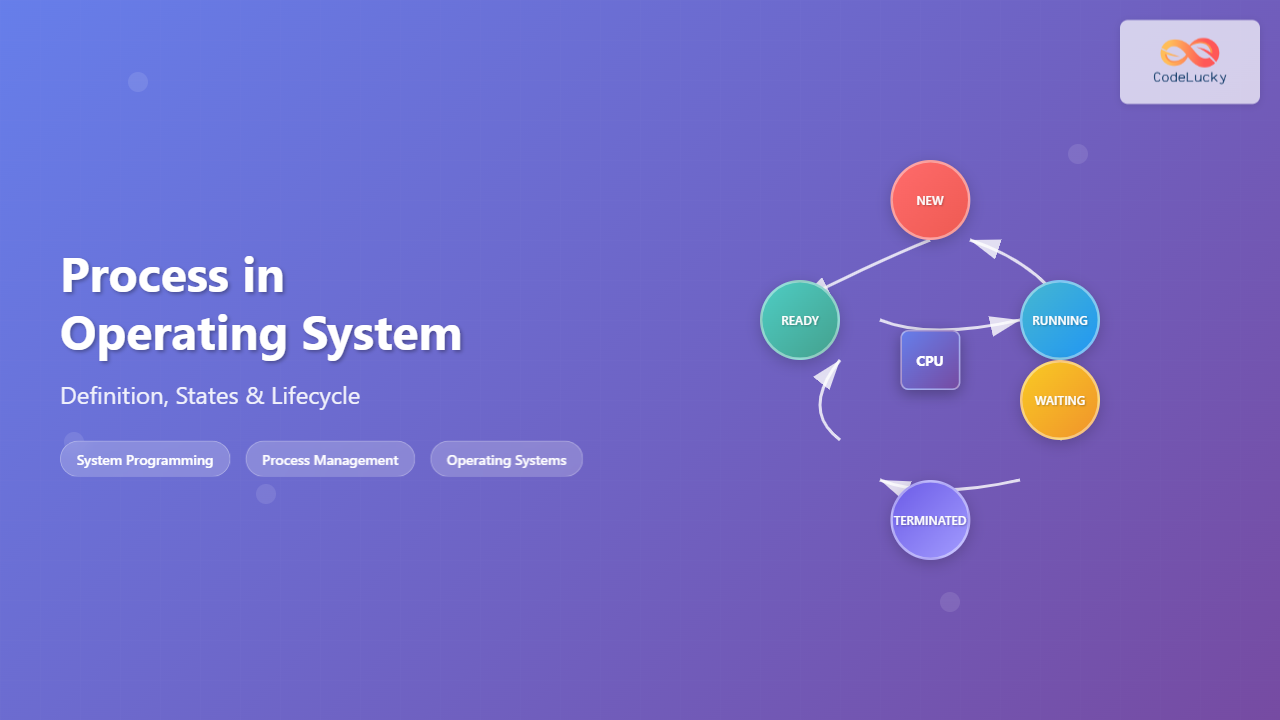
Process States in Operating System
A process can exist in several states during its lifecycle. Understanding these states is crucial for comprehending how operating systems manage processes efficiently.

1. New State
When a process is first created, it enters the New state. In this state, the process is being created and the operating system is setting up the process control block (PCB) and allocating initial resources.
2. Ready State
A process in the Ready state has all the resources it needs to run except the CPU. Multiple processes can be in the ready state simultaneously, waiting in a queue for their turn to execute.
3. Running State
In the Running state, the process is currently being executed by the CPU. In a single-core system, only one process can be in the running state at any given time.
4. Waiting/Blocked State
A process enters the Waiting or Blocked state when it requires a resource that is not immediately available, such as:
- I/O operations (reading from disk, network communication)
- User input
- Access to a shared resource protected by a semaphore
- Completion of a child process
5. Terminated State
The Terminated state indicates that the process has completed its execution or has been killed by the operating system. The process’s resources are being deallocated and cleaned up.
Process State Transitions
Processes transition between states based on various events and conditions:

Common State Transitions:
- New → Ready: Process creation is complete, admitted to ready queue
- Ready → Running: Process scheduler selects the process for execution
- Running → Ready: Time quantum expires or higher priority process arrives
- Running → Waiting: Process requests I/O operation or waits for an event
- Waiting → Ready: I/O operation completes or waited event occurs
- Running → Terminated: Process completes execution or encounters an error
Process Control Block (PCB)
The Process Control Block (PCB) is a data structure that contains all the information needed to manage a process. Each process has its own PCB.
PCB Components:
- Process ID (PID): Unique identifier for the process
- Process State: Current state of the process
- Program Counter: Address of the next instruction to execute
- CPU Registers: Contents of processor registers
- Memory Management Information: Page tables, segment tables
- I/O Status Information: List of I/O devices, open files
- Accounting Information: CPU time used, time limits
Process Creation and Termination
Process Creation
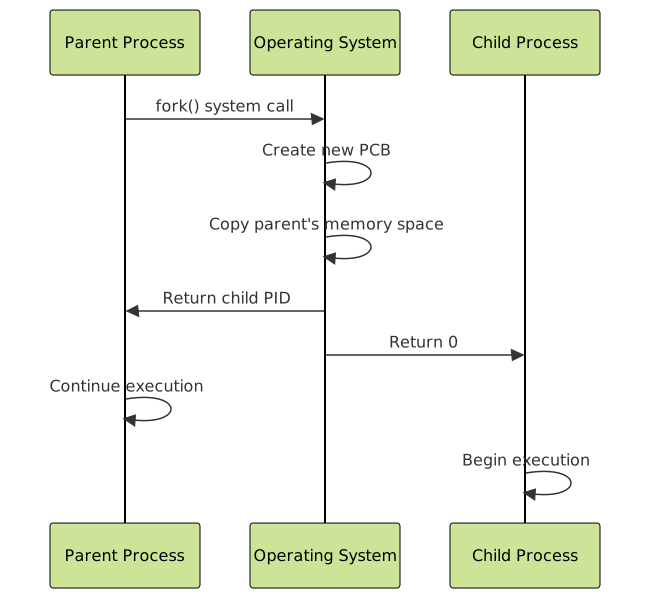
Processes are created through system calls. In Unix-like systems, the most common methods are:
Fork() System Call Example:
#include <stdio.h>
#include <unistd.h>
#include <sys/wait.h>

int main() {
    pid_t pid = fork();

    if (pid == 0) {
        // Child process
        printf("Child process: PID = %d, Parent PID = %d\n",
               getpid(), getppid());
    } else if (pid > 0) {
        // Parent process
        printf("Parent process: PID = %d, Child PID = %d\n",
               getpid(), pid);
        wait(NULL); // Wait for child to complete
    } else {
        // Fork failed
        printf("Fork failed!\n");
        return 1;
    }

    return 0;
}
Expected Output:
Parent process: PID = 1234, Child PID = 1235
Child process: PID = 1235, Parent PID = 1234
Process Termination
Processes can terminate in several ways:
- Normal Termination: Process completes its execution
- Error Termination: Process encounters a fatal error
- External Termination: Process is killed by another process or user
Exit() System Call Example:
#include <stdio.h>
#include <stdlib.h>

int main() {
    printf("Process starting...\n");
    printf("Performing some work...\n");

    // Normal termination with exit code 0
    printf("Process terminating normally...\n");
    exit(0);

    // This line will never execute
    printf("This won't be printed\n");
    return 0;
}
Process Scheduling
Process scheduling is the mechanism by which the operating system decides which process should run at any given time. The scheduler maintains different queues for processes in different states.

Types of Schedulers:
- Long-term Scheduler: Decides which processes to admit to the ready queue
- Short-term Scheduler: Decides which ready process gets the CPU next
- Medium-term Scheduler: Handles swapping of processes between memory and disk
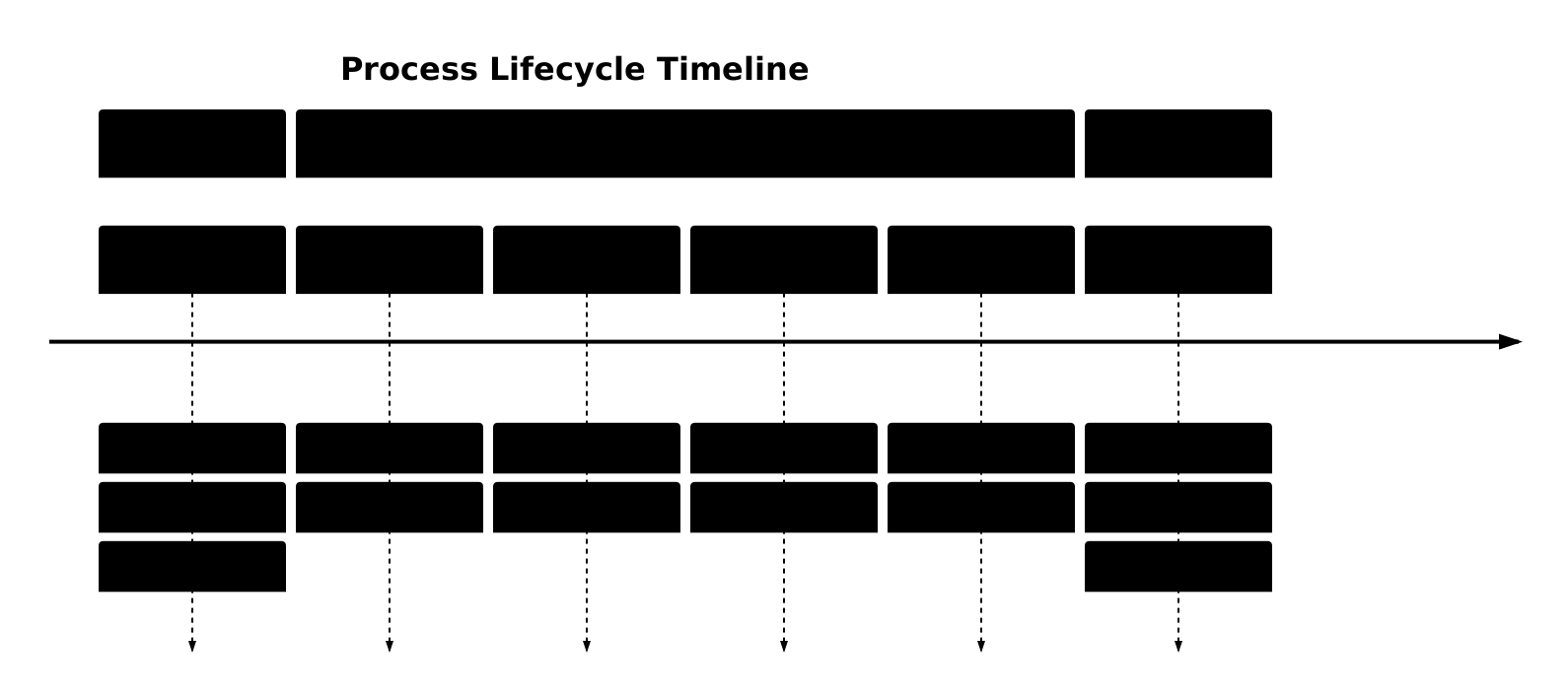
Process Lifecycle Example
Let’s trace through a complete process lifecycle with a practical example:
#include <stdio.h>
#include <unistd.h>
#include <fcntl.h>

int main() {
    printf("Process created - PID: %d\n", getpid());  // NEW → READY → RUNNING

    printf("Performing CPU-intensive calculation...\n");
    int sum = 0;
    for (int i = 0; i < 1000000; i++) {  // RUNNING
        sum += i;
    }

    printf("Opening file for reading...\n");  // RUNNING → WAITING
    int fd = open("example.txt", O_RDONLY);
    if (fd != -1) {
        char buffer[100];
        read(fd, buffer, 100);  // WAITING (I/O operation)
        close(fd);  // WAITING → READY → RUNNING
    }

    printf("Calculation result: %d\n", sum);  // RUNNING
    printf("Process completing...\n");  // RUNNING → TERMINATED

    return 0;
}
Process Management Commands
Operating systems provide various commands to monitor and manage processes:
Linux/Unix Commands:
- ps: Display running processes
- top/htop: Real-time process monitoring
- kill: Terminate a process
- jobs: Display active jobs
- nohup: Run process immune to hangups
Example Commands:
# List all processes
ps -aux

# Real-time process monitoring
top

# Kill a process by PID
kill 1234

# Kill a process by name
killall firefox

# Run process in background
./myprogram &

# List background jobs
jobs
Interprocess Communication (IPC)
Processes often need to communicate with each other. Operating systems provide several IPC mechanisms:
- Pipes: Communication between parent and child processes
- Message Queues: Structured message passing
- Shared Memory: Direct memory sharing
- Semaphores: Synchronization primitives
- Sockets: Network and local communication
Pipe Example:
#include <stdio.h>
#include <unistd.h>
#include <string.h>

int main() {
    int pipefd[2];
    pid_t pid;
    char write_msg[] = "Hello from parent!";
    char read_msg[100];

    // Create pipe
    if (pipe(pipefd) == -1) {
        perror("pipe");
        return 1;
    }

    pid = fork();

    if (pid == 0) {
        // Child process - reader
        close(pipefd[1]); // Close write end
        read(pipefd[0], read_msg, sizeof(read_msg));
        printf("Child received: %s\n", read_msg);
        close(pipefd[0]);
    } else {
        // Parent process - writer
        close(pipefd[0]); // Close read end
        write(pipefd[1], write_msg, strlen(write_msg) + 1);
        close(pipefd[1]);
    }

    return 0;
}
Process Synchronization
When multiple processes access shared resources, synchronization becomes crucial to maintain data consistency and prevent race conditions.
Common Synchronization Problems:
- Race Condition: Multiple processes accessing shared data simultaneously
- Critical Section: Code segment accessing shared resources
- Deadlock: Processes waiting indefinitely for resources
- Starvation: Process never gets required resources
Conclusion
Understanding processes is fundamental to operating system concepts. Processes are the basic unit of execution, transitioning through various states during their lifecycle. The operating system manages these processes through scheduling algorithms, maintains their information in Process Control Blocks, and provides mechanisms for creation, termination, and communication.
Key takeaways include:
- Processes are active entities with defined states and transitions
- The PCB contains all necessary information for process management
- Process scheduling ensures efficient CPU utilization
- IPC mechanisms enable process cooperation
- Synchronization prevents conflicts in shared resource access
This knowledge forms the foundation for understanding more advanced operating system topics like threads, memory management, and distributed systems.
Related Posts
Thread vs Process: Complete Guide to Differences and When to Use Each
Understanding the fundamental differences between threads and processes is crucial for system programming, application design, and performance optimization. While both...
Process Creation in OS: Fork, Exec and Process Spawning Complete Guide
Introduction to Process Creation in Operating Systems Process creation is one of the fundamental concepts in operating systems that enables...
Operating System Functions: Core Components and System Responsibilities
An operating system (OS) serves as the fundamental software layer that manages computer hardware resources and provides essential services to...
Garbage Collection in Operating System: Complete Guide to Automatic Memory Management
What is Garbage Collection in Operating Systems? Garbage collection is an automatic memory management technique used by operating systems and...
Operating System Basics: Complete Guide to What is an OS and How it Works
An operating system (OS) is the fundamental software that manages computer hardware and software resources, acting as an intermediary between...
Memory Management in Operating System: Virtual and Physical Memory Fundamentals
Introduction to Memory Management Memory management is one of the most critical functions of an operating system, responsible for efficiently...
Multithreading in Operating Systems: Benefits, Challenges, and Implementation Guide
What is Multithreading in Operating Systems? Multithreading is a fundamental concept in modern operating systems that allows a single process...
Thread in Operating System: Lightweight Processes and Multithreading Explained
What are Threads in Operating Systems? A thread is the smallest unit of execution within a process that can be...
Windows Process Management: Complete Guide to Task Manager and Services
Windows process management is a fundamental aspect of system administration that every IT professional and power user should master. At...
Virtual Memory in OS: Complete Guide to Paging, Segmentation and Address Translation
Virtual memory is one of the most fundamental concepts in modern operating systems, enabling efficient memory management and providing crucial...

Memory Allocation Techniques: Contiguous vs Non-contiguous Management Strategies
Memory allocation is a fundamental aspect of operating system design that determines how programs and data are stored and accessed...
getrlimit Command Linux: Complete Guide to System Resource Limits Management
The getrlimit system call in Linux is a fundamental tool for retrieving information about resource limits imposed on processes. Understanding...