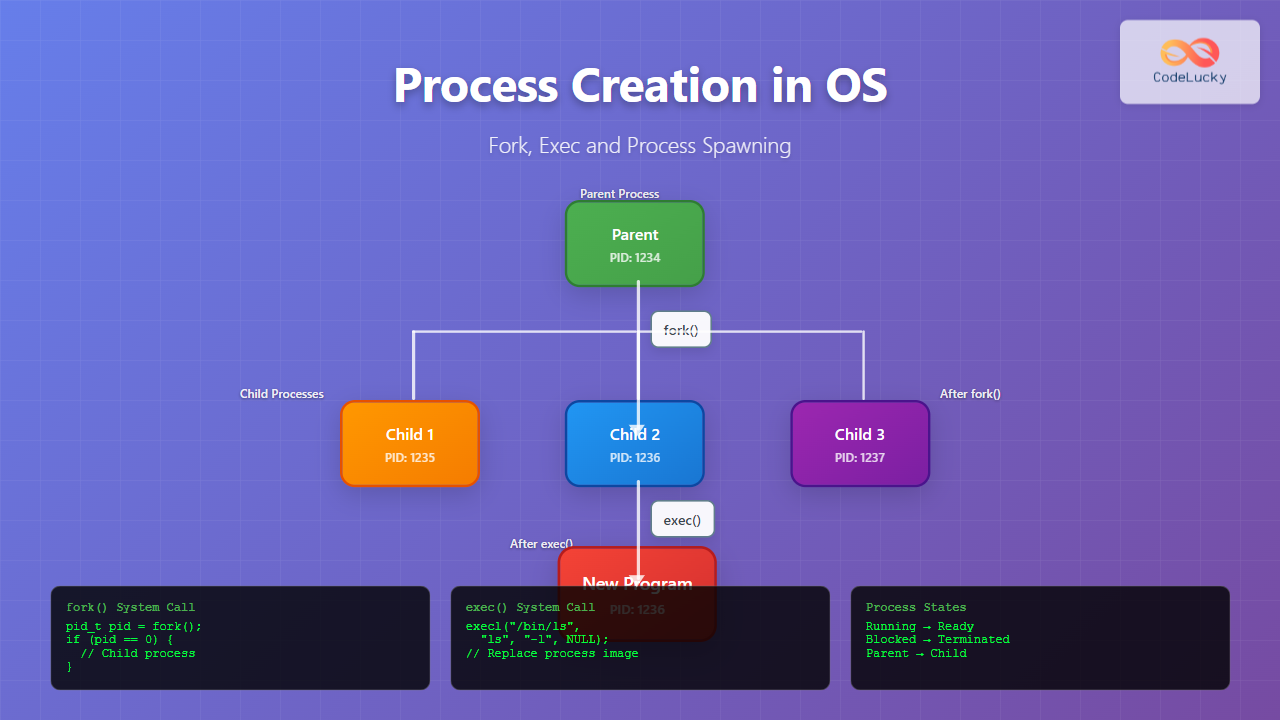
Introduction to Process Creation in Operating Systems
Process creation is one of the fundamental concepts in operating systems that enables multitasking and concurrent execution of programs. Understanding how operating systems create and manage processes is crucial for system programmers, developers, and anyone working with Unix-like systems. This comprehensive guide explores the core mechanisms of process creation, focusing on the fork() and exec() system calls that form the foundation of process spawning in Unix and Linux systems.
In modern operating systems, processes don’t just appear out of thin air. They are created through well-defined mechanisms that ensure proper resource allocation, memory management, and process hierarchy maintenance. The process creation model in Unix-like systems follows a unique approach that combines process duplication with program execution, providing flexibility and efficiency in process management.
Understanding Processes and Process Hierarchy
Before diving into process creation mechanisms, it’s essential to understand what constitutes a process and how processes are organized within an operating system. A process is an instance of a program in execution, complete with its own memory space, file descriptors, and execution context.
Process Characteristics
Every process in a Unix-like system has several key characteristics:
- Process ID (PID): A unique identifier assigned to each process
- Parent Process ID (PPID): The PID of the process that created this process
- Memory Space: Virtual memory allocated to the process including code, data, heap, and stack segments
- File Descriptors: Open files and I/O streams associated with the process
- Environment Variables: Key-value pairs that define the process environment
- Working Directory: The current directory from which the process operates

Process States
Processes in an operating system can exist in several states throughout their lifecycle:
- Running: Currently executing on the CPU
- Ready: Waiting to be scheduled for execution
- Blocked/Waiting: Waiting for an event (I/O completion, signal, etc.)
- Terminated/Zombie: Finished execution but not yet cleaned up by parent
The Fork System Call: Process Duplication
The fork() system call is the primary mechanism for creating new processes in Unix-like operating systems. Unlike other operating systems that create processes by loading a new program directly, Unix uses a two-step approach: first duplicate the current process, then optionally replace its program image.
How Fork Works
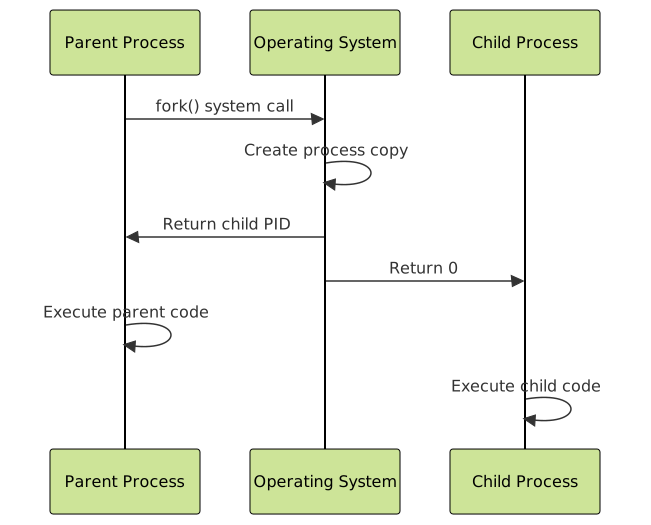
When a process calls fork(), the operating system creates an exact copy of the calling process. This includes:
- Memory contents (code, data, heap, stack)
- Open file descriptors
- Environment variables
- Current working directory
- Process attributes (except PID and PPID)
Fork Return Values
The fork() system call has a unique characteristic: it returns twice. After the fork operation:
- In the parent process: fork() returns the PID of the newly created child process
- In the child process: fork() returns 0
- On error: fork() returns -1 and no child process is created
Basic Fork Example
Here’s a simple example demonstrating the fork() system call:
#include <stdio.h>
#include <unistd.h>
#include <sys/types.h>

int main() {
    pid_t pid;

    printf("Before fork: PID = %d\n", getpid());

    pid = fork();

    if (pid == -1) {
        // Fork failed
        perror("fork failed");
        return 1;
    } else if (pid == 0) {
        // Child process
        printf("Child process: PID = %d, PPID = %d\n", getpid(), getppid());
    } else {
        // Parent process
        printf("Parent process: PID = %d, Child PID = %d\n", getpid(), pid);
    }

    printf("This line is executed by both processes\n");
    return 0;
}
Expected Output:
Before fork: PID = 1234
Parent process: PID = 1234, Child PID = 1235
Child process: PID = 1235, PPID = 1234
This line is executed by both processes
This line is executed by both processes
The Exec Family: Program Execution
While fork() creates a copy of the current process, the exec family of system calls replaces the current process image with a new program. The exec family includes several variations, each with different parameter passing mechanisms.
Exec Family Functions
The exec family consists of several functions, all of which perform the same basic operation but differ in how they accept parameters:
- execl(): Takes arguments as a list
- execv(): Takes arguments as an array
- execle(): Like execl() but accepts environment
- execve(): Like execv() but accepts environment
- execlp(): Like execl() but searches PATH
- execvp(): Like execv() but searches PATH
What Happens During Exec
When an exec function is called successfully:
- The current process image is completely replaced
- New program code is loaded into memory
- Process PID remains the same
- Open file descriptors may be closed (depending on close-on-exec flag)
- Memory layout is reinitialized
- The function never returns (on success)
Exec Example
Here’s an example demonstrating the exec system call:
#include <stdio.h>
#include <unistd.h>
#include <sys/wait.h>

int main() {
    pid_t pid;

    pid = fork();

    if (pid == -1) {
        perror("fork failed");
        return 1;
    } else if (pid == 0) {
        // Child process - execute new program
        printf("Child: About to exec 'ls' command\n");
        execl("/bin/ls", "ls", "-l", "/tmp", NULL);

        // This line should never be reached if exec succeeds
        printf("Child: exec failed!\n");
        return 1;
    } else {
        // Parent process
        int status;
        printf("Parent: Waiting for child to complete\n");
        wait(&status);
        printf("Parent: Child completed with status %d\n", status);
    }

    return 0;
}
Expected Output:
Parent: Waiting for child to complete
Child: About to exec 'ls' command
total 0
drwx------ 2 user user 40 Aug 27 10:30 systemd-private-abc123
drwx------ 2 user user 40 Aug 27 10:30 tmp.xyz789
Parent: Child completed with status 0
Combining Fork and Exec: Complete Process Creation
The power of Unix process creation lies in combining fork() and exec(). This combination allows for flexible process creation where:
- Fork creates a child process identical to the parent
- Child process can modify its environment, file descriptors, or other attributes
- Child process then execs to replace its image with the desired program
- Parent process can continue independently or wait for child completion
Advanced Fork-Exec Example
Here’s a more comprehensive example showing process creation with environment modification:
#include <stdio.h>
#include <stdlib.h>
#include <unistd.h>
#include <sys/wait.h>
#include <string.h>

int main() {
    pid_t pid;
    int pipe_fd[2];

    // Create pipe for parent-child communication
    if (pipe(pipe_fd) == -1) {
        perror("pipe failed");
        return 1;
    }

    pid = fork();

    if (pid == -1) {
        perror("fork failed");
        return 1;
    } else if (pid == 0) {
        // Child process
        close(pipe_fd[1]); // Close write end

        // Redirect stdin to read from pipe
        dup2(pipe_fd[0], STDIN_FILENO);
        close(pipe_fd[0]);

        // Set environment variable
        setenv("CHILD_VAR", "Hello from child", 1);

        // Execute grep command
        execl("/bin/grep", "grep", "important", NULL);

        perror("exec failed");
        return 1;
    } else {
        // Parent process
        close(pipe_fd[0]); // Close read end

        // Send data to child through pipe
        const char* data = "This is important data\nThis is not\nAnother important line\n";
        write(pipe_fd[1], data, strlen(data));
        close(pipe_fd[1]);

        // Wait for child to complete
        int status;
        wait(&status);
        printf("Parent: Child completed with status %d\n", WEXITSTATUS(status));
    }

    return 0;
}
Process Spawning Variations
Different operating systems and programming environments provide various mechanisms for process creation. Understanding these variations helps in writing portable code and choosing the right approach for specific scenarios.
System() Function
The system() function provides a higher-level interface for executing shell commands:
#include <stdio.h>
#include <stdlib.h>

int main() {
    int result;

    printf("Executing 'date' command:\n");
    result = system("date");

    printf("Command returned: %d\n", result);

    // Execute multiple commands
    printf("\nExecuting pipeline:\n");
    result = system("echo 'Hello World' | wc -w");

    return 0;
}
Popen() for Process Communication
The popen() function creates a process and establishes a pipe for communication:
#include <stdio.h>
#include <stdlib.h>

int main() {
    FILE *fp;
    char buffer[128];

    // Open process for reading
    fp = popen("ps aux | head -5", "r");
    if (fp == NULL) {
        perror("popen failed");
        return 1;
    }

    // Read output from process
    printf("Process list:\n");
    while (fgets(buffer, sizeof(buffer), fp) != NULL) {
        printf("%s", buffer);
    }

    // Close process pipe
    int status = pclose(fp);
    printf("Process exited with status: %d\n", status);

    return 0;
}
Process Creation in Different Operating Systems
While this article focuses on Unix-like systems, it’s worth understanding how other operating systems approach process creation:
Windows Process Creation
Windows uses the CreateProcess() API, which directly creates a new process with a specified program:
- No fork-exec model
- Direct program loading
- More parameters for process configuration
- Different security and inheritance models
Process Creation Comparison
| Aspect | Unix/Linux (fork+exec) | Windows (CreateProcess) |
|---|---|---|
| Creation Model | Two-step: duplicate then replace | Direct program loading |
| Memory Efficiency | Copy-on-write optimization | Direct allocation |
| Flexibility | High (modify before exec) | Moderate (parameters at creation) |
| Inheritance | Automatic (with selective override) | Explicit specification |
Advanced Process Creation Concepts
Copy-on-Write (COW)
Modern operating systems optimize fork() using copy-on-write technology. Initially, parent and child processes share the same physical memory pages. Pages are only copied when one process attempts to modify them, significantly reducing memory usage and improving performance.
vfork() System Call
The vfork() system call is an optimization of fork() for cases where exec() follows immediately:
#include <stdio.h>
#include <unistd.h>
#include <sys/wait.h>

int main() {
    pid_t pid;

    pid = vfork();

    if (pid == 0) {
        // Child process - must exec or _exit immediately
        execl("/bin/echo", "echo", "Hello from vfork child", NULL);
        _exit(1); // Use _exit, not exit
    } else if (pid > 0) {
        // Parent process
        int status;
        wait(&status);
        printf("Parent: vfork child completed\n");
    } else {
        perror("vfork failed");
        return 1;
    }

    return 0;
}
Process Groups and Sessions
Processes can be organized into groups and sessions for job control and signal management:
#include <stdio.h>
#include <unistd.h>
#include <sys/wait.h>

int main() {
    pid_t pid, pgid;

    pid = fork();

    if (pid == 0) {
        // Child process
        // Create new process group
        setpgid(0, 0);
        pgid = getpgrp();
        printf("Child: PID=%d, PGID=%d\n", getpid(), pgid);

        // Create session (if not group leader)
        if (setsid() != -1) {
            printf("Child: New session created, SID=%d\n", getsid(0));
        }

        sleep(2);
    } else if (pid > 0) {
        // Parent process
        pgid = getpgrp();
        printf("Parent: PID=%d, PGID=%d\n", getpid(), pgid);
        wait(NULL);
    } else {
        perror("fork failed");
        return 1;
    }

    return 0;
}

Error Handling and Best Practices
Proper error handling is crucial when working with process creation. Here are key best practices:
Fork Error Handling
#include <stdio.h>
#include <stdlib.h>
#include <unistd.h>
#include <errno.h>
#include <string.h>
#include <sys/wait.h>

int safe_fork() {
    pid_t pid;
    int retry_count = 0;
    const int max_retries = 3;

    while (retry_count < max_retries) {
        pid = fork();

        if (pid >= 0) {
            return pid; // Success
        }

        if (errno == EAGAIN || errno == ENOMEM) {
            // Temporary failure - retry after delay
            retry_count++;
            printf("Fork failed (attempt %d): %s\n", retry_count, strerror(errno));
            sleep(1);
        } else {
            // Permanent failure
            break;
        }
    }

    return -1; // All retries failed
}

int main() {
    pid_t pid = safe_fork();

    if (pid == -1) {
        fprintf(stderr, "Failed to create process: %s\n", strerror(errno));
        return 1;
    } else if (pid == 0) {
        // Child process
        printf("Child process created successfully\n");
        exit(0);
    } else {
        // Parent process
        int status;
        if (waitpid(pid, &status, 0) == -1) {
            perror("waitpid failed");
        } else {
            printf("Child exited with status: %d\n", WEXITSTATUS(status));
        }
    }

    return 0;
}
Resource Cleanup
Always ensure proper cleanup of resources when creating processes:
- Close unused file descriptors in child processes
- Wait for child processes to prevent zombie processes
- Handle signals appropriately for process termination
- Free allocated memory before exec calls
Performance Considerations
Process creation can be expensive in terms of system resources. Consider these optimization strategies:
Process Pooling
For applications that frequently create processes, maintaining a pool of pre-created processes can improve performance:
#include <stdio.h>
#include <stdlib.h>
#include <unistd.h>
#include <sys/wait.h>

#define POOL_SIZE 5

struct process_pool {
    pid_t pids[POOL_SIZE];
    int available[POOL_SIZE];
    int count;
};

void init_pool(struct process_pool *pool) {
    pool->count = 0;
    for (int i = 0; i < POOL_SIZE; i++) {
        pool->available[i] = 1;
        pool->pids[i] = -1;
    }
}

pid_t get_process(struct process_pool *pool) {
    for (int i = 0; i < POOL_SIZE; i++) {
        if (pool->available[i]) {
            pid_t pid = fork();
            if (pid == 0) {
                // Child process - wait for work
                // Implementation depends on specific requirements
                exit(0);
            } else if (pid > 0) {
                pool->pids[i] = pid;
                pool->available[i] = 0;
                return pid;
            }
        }
    }
    return -1; // Pool exhausted
}

void return_process(struct process_pool *pool, pid_t pid) {
    for (int i = 0; i < POOL_SIZE; i++) {
        if (pool->pids[i] == pid) {
            pool->available[i] = 1;
            break;
        }
    }
}
Thread vs Process Considerations
Consider using threads instead of processes when:
- Tasks share significant amounts of data
- Communication overhead is a concern
- Memory usage needs to be minimized
- Context switching performance is critical
Use processes when:
- Fault isolation is required
- Different privilege levels are needed
- Running different programs
- Distributed computing is involved
Debugging Process Creation
Debugging process creation issues requires specific tools and techniques:
Using strace
The strace command can trace system calls made by a process:
# Trace fork and exec calls
strace -e trace=fork,execve ./my_program

# Trace all system calls with timestamps
strace -tt -o trace.log ./my_program
Process Monitoring
Monitor process creation in real-time:
# Monitor process tree
watch -n 1 'ps axjf'

# Monitor process creation events
sudo auditctl -a always,exit -F arch=b64 -S fork,vfork,clone
Security Implications
Process creation has important security implications that developers must consider:
Privilege Escalation Prevention
#include <stdio.h>
#include <stdlib.h>
#include <unistd.h>
#include <sys/types.h>
#include <pwd.h>

int safe_exec_as_user(const char *username, const char *program) {
    struct passwd *pw;
    pid_t pid;

    // Look up user information
    pw = getpwnam(username);
    if (pw == NULL) {
        fprintf(stderr, "User %s not found\n", username);
        return -1;
    }

    pid = fork();
    if (pid == 0) {
        // Child process - drop privileges
        if (setuid(pw->pw_uid) != 0) {
            perror("setuid failed");
            exit(1);
        }

        if (setgid(pw->pw_gid) != 0) {
            perror("setgid failed");
            exit(1);
        }

        // Execute program with reduced privileges
        execl(program, program, NULL);
        perror("exec failed");
        exit(1);
    }

    return pid;
}
Input Validation
Always validate input when constructing command lines for exec calls:
#include <stdio.h>
#include <stdlib.h>
#include <string.h>
#include <ctype.h>

int is_safe_filename(const char *filename) {
    // Check for null or empty string
    if (filename == NULL || strlen(filename) == 0) {
        return 0;
    }

    // Check for dangerous characters
    const char *dangerous = ";|&`$(){}[]<>";
    if (strpbrk(filename, dangerous) != NULL) {
        return 0;
    }

    // Check for path traversal
    if (strstr(filename, "..") != NULL) {
        return 0;
    }

    return 1;
}

int safe_exec_file(const char *filename) {
    if (!is_safe_filename(filename)) {
        fprintf(stderr, "Unsafe filename: %s\n", filename);
        return -1;
    }

    pid_t pid = fork();
    if (pid == 0) {
        execl("/bin/cat", "cat", filename, NULL);
        perror("exec failed");
        exit(1);
    }

    return pid;
}

Modern Alternatives and Container Technologies
While traditional process creation remains fundamental, modern computing introduces new paradigms:
Containers and Process Isolation
Container technologies like Docker use advanced Linux features for process isolation:
- Namespaces: Isolate process views of system resources
- Control Groups (cgroups): Limit and monitor resource usage
- Union Filesystems: Layer filesystem changes
- Capabilities: Fine-grained privilege control
Systemd and Modern Init Systems
Modern Linux distributions use sophisticated init systems that go beyond traditional process creation:
# Create a simple systemd service
sudo systemctl edit --force --full my-service.service

# Service file content:
[Unit]
Description=My Custom Service
After=network.target

[Service]
Type=simple
ExecStart=/usr/local/bin/my-program
Restart=always
User=myuser
Group=mygroup

[Install]
WantedBy=multi-user.target
Conclusion
Process creation in operating systems, particularly through the fork() and exec() system calls, represents one of the most elegant and powerful design patterns in computer science. The Unix philosophy of “do one thing and do it well” is perfectly embodied in this two-step process creation model that separates process duplication from program execution.
Understanding these mechanisms is crucial for system programmers, as they form the foundation of process management in Unix-like systems. The flexibility offered by the fork-exec model enables sophisticated process hierarchies, inter-process communication, and resource management that continue to power modern computing systems.
As computing evolves toward containerization and microservices, the fundamental concepts of process creation remain relevant. Whether you’re developing system software, writing shell scripts, or architecting distributed systems, mastering process creation mechanisms will enhance your ability to build robust, efficient, and secure applications.
The key to effective process creation lies in understanding not just the mechanics of system calls, but also the implications for security, performance, and system design. By following best practices for error handling, resource management, and security considerations, developers can harness the full power of process creation while maintaining system stability and security.
Related Posts
Process in Operating System: Complete Guide to Definition, States and Lifecycle
What is a Process in Operating System? A process is a program in execution that consists of the program code...
Operating System Functions: Core Components and System Responsibilities
An operating system (OS) serves as the fundamental software layer that manages computer hardware resources and provides essential services to...
Thread vs Process: Complete Guide to Differences and When to Use Each
Understanding the fundamental differences between threads and processes is crucial for system programming, application design, and performance optimization. While both...
Multithreading in Operating Systems: Benefits, Challenges, and Implementation Guide
What is Multithreading in Operating Systems? Multithreading is a fundamental concept in modern operating systems that allows a single process...
Thread in Operating System: Lightweight Processes and Multithreading Explained
What are Threads in Operating Systems? A thread is the smallest unit of execution within a process that can be...
Operating System Basics: Complete Guide to What is an OS and How it Works
An operating system (OS) is the fundamental software that manages computer hardware and software resources, acting as an intermediary between...

Process Synchronization: Critical Sections and Race Conditions in Operating Systems
Introduction to Process Synchronization Process synchronization is a fundamental concept in operating systems that ensures multiple processes can safely access...
Operating System Architecture: Monolithic vs Microkernel Design Patterns
Introduction to Operating System Architecture Operating system architecture defines how the core components of an OS are organized and interact...
Garbage Collection in Operating System: Complete Guide to Automatic Memory Management
What is Garbage Collection in Operating Systems? Garbage collection is an automatic memory management technique used by operating systems and...
Preemptive vs Non-Preemptive Scheduling: Complete Guide to CPU Scheduling in Operating Systems
Understanding CPU Scheduling in Operating Systems CPU scheduling is one of the most critical functions of an operating system, determining...
System Calls in Operating System: Complete Guide to User-Kernel Interface
System calls serve as the fundamental bridge between user applications and the operating system kernel, enabling programs to request services...
Multilevel Queue Scheduling: Multiple Priority Levels in Operating Systems
Introduction to Multilevel Queue Scheduling Multilevel queue scheduling is a sophisticated CPU scheduling algorithm used in operating systems to manage...
- Introduction to Process Creation in Operating Systems
- Understanding Processes and Process Hierarchy
- The Fork System Call: Process Duplication
- The Exec Family: Program Execution
- Combining Fork and Exec: Complete Process Creation
- Process Spawning Variations
- Process Creation in Different Operating Systems
- Advanced Process Creation Concepts
- Error Handling and Best Practices
- Performance Considerations
- Debugging Process Creation
- Security Implications
- Modern Alternatives and Container Technologies
- Conclusion