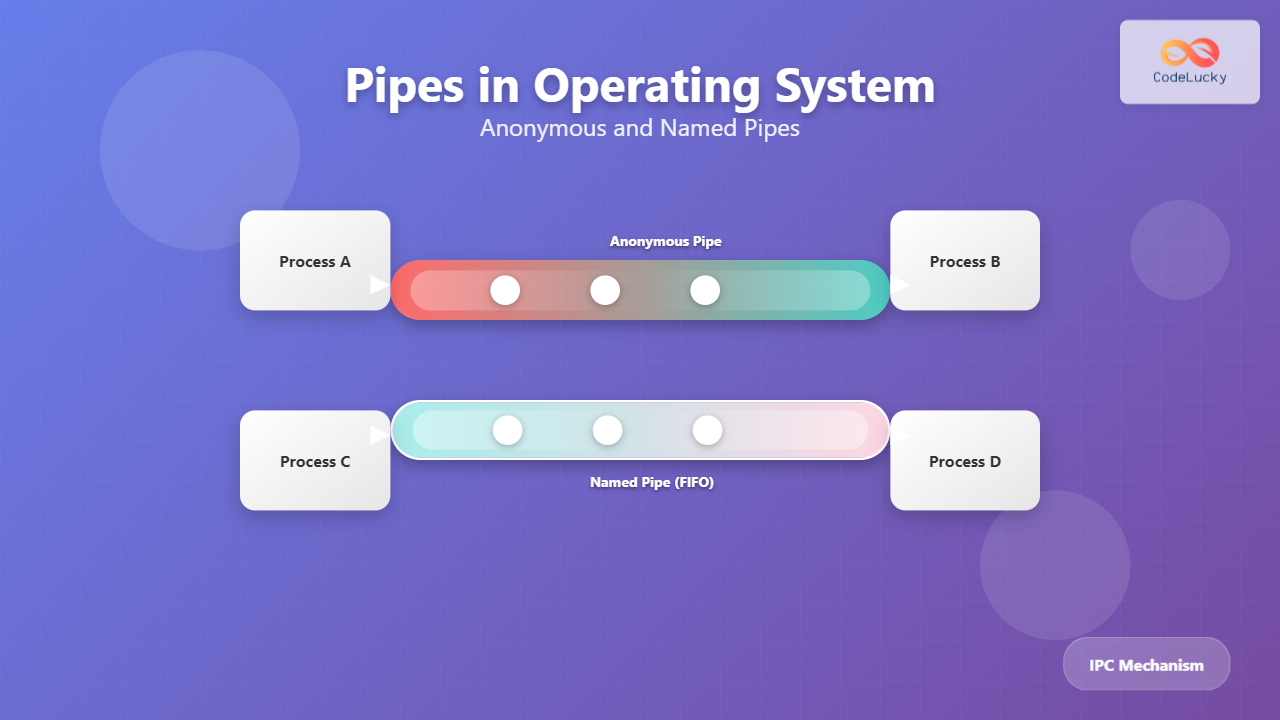
Pipes are one of the most fundamental and widely used Inter-Process Communication (IPC) mechanisms in Unix-like operating systems. They provide a simple yet powerful way for processes to communicate by allowing data to flow from one process to another in a unidirectional manner.
In this comprehensive guide, we’ll explore both anonymous pipes and named pipes, their implementation, use cases, and provide practical examples to help you understand when and how to use each type effectively.
What are Pipes in Operating Systems?
A pipe is a communication channel that connects the output of one process to the input of another process. Think of it as a virtual tube through which data flows from a producer process to a consumer process. Pipes follow the FIFO (First In, First Out) principle, meaning data written first will be read first.

Key Characteristics of Pipes
- Unidirectional: Data flows in only one direction
- Buffered: Operating system provides a buffer to store data temporarily
- Blocking: Read operations block when no data is available; write operations block when buffer is full
- Atomic: Small writes (typically under PIPE_BUF bytes) are atomic
Anonymous Pipes (Unnamed Pipes)
Anonymous pipes are the simplest form of pipes, created using the pipe() system call. They exist only in memory and are automatically destroyed when all processes using them terminate. These pipes can only be used between related processes (parent and child processes).
Creating Anonymous Pipes
Here’s how to create and use anonymous pipes in C:
#include <stdio.h>
#include <unistd.h>
#include <sys/wait.h>
#include <string.h>

int main() {
    int pipefd[2];  // Array to hold pipe file descriptors
    pid_t pid;
    char write_msg[] = "Hello from parent process!";
    char read_msg[100];

    // Create pipe
    if (pipe(pipefd) == -1) {
        perror("pipe failed");
        return 1;
    }

    // Create child process
    pid = fork();

    if (pid == 0) {
        // Child process - reader
        close(pipefd[1]);  // Close write end

        // Read from pipe
        read(pipefd[0], read_msg, sizeof(read_msg));
        printf("Child received: %s\n", read_msg);

        close(pipefd[0]);  // Close read end
    } else {
        // Parent process - writer
        close(pipefd[0]);  // Close read end

        // Write to pipe
        write(pipefd[1], write_msg, strlen(write_msg) + 1);
        printf("Parent sent: %s\n", write_msg);

        close(pipefd[1]);  // Close write end
        wait(NULL);        // Wait for child to complete
    }

    return 0;
}
Output:
Parent sent: Hello from parent process!
Child received: Hello from parent process!
Pipe File Descriptors
The pipe() system call creates two file descriptors:
- pipefd[0]: Read end of the pipe
- pipefd[1]: Write end of the pipe
It’s crucial to close unused ends of the pipe in each process to avoid issues like hanging reads or writes.
Bidirectional Communication with Anonymous Pipes
For bidirectional communication, you need to create two pipes:
#include <stdio.h>
#include <unistd.h>
#include <string.h>
#include <sys/wait.h>

int main() {
    int pipe1[2], pipe2[2];  // Two pipes for bidirectional communication
    pid_t pid;
    char parent_msg[] = "Message from parent";
    char child_msg[] = "Message from child";
    char buffer[100];

    // Create both pipes
    if (pipe(pipe1) == -1 || pipe(pipe2) == -1) {
        perror("pipe creation failed");
        return 1;
    }

    pid = fork();

    if (pid == 0) {
        // Child process
        close(pipe1[1]);  // Close write end of pipe1
        close(pipe2[0]);  // Close read end of pipe2

        // Read from parent
        read(pipe1[0], buffer, sizeof(buffer));
        printf("Child received: %s\n", buffer);

        // Send response to parent
        write(pipe2[1], child_msg, strlen(child_msg) + 1);

        close(pipe1[0]);
        close(pipe2[1]);
    } else {
        // Parent process
        close(pipe1[0]);  // Close read end of pipe1
        close(pipe2[1]);  // Close write end of pipe2

        // Send message to child
        write(pipe1[1], parent_msg, strlen(parent_msg) + 1);

        // Read response from child
        read(pipe2[0], buffer, sizeof(buffer));
        printf("Parent received: %s\n", buffer);

        close(pipe1[1]);
        close(pipe2[0]);
        wait(NULL);
    }

    return 0;
}
Named Pipes (FIFOs)
Named pipes, also called FIFOs (First In, First Out), are a more advanced form of pipes that exist as special files in the filesystem. Unlike anonymous pipes, named pipes can be used for communication between unrelated processes and persist until explicitly deleted.
Creating Named Pipes
Named pipes can be created using the mkfifo() system call or the mkfifo command:
# Command line creation
mkfifo /tmp/mypipe

# Check the created FIFO
ls -l /tmp/mypipe
# Output: prw-rw-r-- 1 user user 0 Aug 28 14:30 /tmp/mypipe
# Note the 'p' at the beginning indicating it's a pipe
Named Pipe Implementation
Writer Process (producer.c):
#include <stdio.h>
#include <fcntl.h>
#include <unistd.h>
#include <string.h>

int main() {
    const char *fifo_path = "/tmp/mypipe";
    int fd;
    char message[] = "Hello from producer process!";

    // Create FIFO if it doesn't exist
    mkfifo(fifo_path, 0666);

    // Open FIFO for writing
    printf("Opening FIFO for writing...\n");
    fd = open(fifo_path, O_WRONLY);

    if (fd == -1) {
        perror("Failed to open FIFO");
        return 1;
    }

    // Write message
    printf("Writing: %s\n", message);
    write(fd, message, strlen(message) + 1);

    close(fd);
    printf("Producer finished.\n");
    return 0;
}
Reader Process (consumer.c):
#include <stdio.h>
#include <fcntl.h>
#include <unistd.h>

int main() {
    const char *fifo_path = "/tmp/mypipe";
    int fd;
    char buffer[100];

    // Open FIFO for reading
    printf("Opening FIFO for reading...\n");
    fd = open(fifo_path, O_RDONLY);

    if (fd == -1) {
        perror("Failed to open FIFO");
        return 1;
    }

    // Read message
    read(fd, buffer, sizeof(buffer));
    printf("Consumer received: %s\n", buffer);

    close(fd);
    printf("Consumer finished.\n");
    return 0;
}
Compilation and Execution:
# Compile both programs
gcc -o producer producer.c
gcc -o consumer consumer.c

# Run consumer in background (it will wait for data)
./consumer &

# Run producer
./producer

# Output:
# Opening FIFO for reading...
# Opening FIFO for writing...
# Writing: Hello from producer process!
# Consumer received: Hello from producer process!
# Producer finished.
# Consumer finished.

Anonymous Pipes vs Named Pipes
| Feature | Anonymous Pipes | Named Pipes (FIFOs) |
|---|---|---|
| Creation | pipe() system call | mkfifo() system call or command |
| Visibility | Only between related processes | Any process with appropriate permissions |
| Persistence | Exists only while processes are running | Persists in filesystem until deleted |
| Location | Memory only | Filesystem entry |
| Use Case | Parent-child communication | Unrelated process communication |
| Performance | Faster (no filesystem overhead) | Slightly slower due to filesystem access |
Advanced Pipe Concepts
Non-blocking Pipes
By default, pipe operations are blocking. You can make them non-blocking using the O_NONBLOCK flag:
#include <stdio.h>
#include <fcntl.h>
#include <unistd.h>
#include <errno.h>

int main() {
    int pipefd[2];
    char buffer[100];
    int flags;

    pipe(pipefd);

    // Make read end non-blocking
    flags = fcntl(pipefd[0], F_GETFL);
    fcntl(pipefd[0], F_SETFL, flags | O_NONBLOCK);

    // Try to read from empty pipe
    if (read(pipefd[0], buffer, sizeof(buffer)) == -1) {
        if (errno == EAGAIN) {
            printf("No data available - would block\n");
        }
    }

    close(pipefd[0]);
    close(pipefd[1]);
    return 0;
}
Pipe Capacity and PIPE_BUF
Pipes have a finite capacity (usually 64KB on Linux). The PIPE_BUF constant defines the maximum number of bytes that can be written atomically:
#include <stdio.h>
#include <limits.h>
#include <unistd.h>

int main() {
    printf("PIPE_BUF: %ld bytes\n", (long)PIPE_BUF);

    // Get pipe capacity (Linux-specific)
    int pipefd[2];
    pipe(pipefd);

    long capacity = fpathconf(pipefd[1], _PC_PIPE_BUF);
    printf("Pipe buffer size: %ld bytes\n", capacity);

    close(pipefd[0]);
    close(pipefd[1]);
    return 0;
}
Practical Applications and Use Cases
Shell Command Piping
The most common use of pipes is in shell command chaining:
# List files, filter for .txt files, count them
ls -la | grep ".txt" | wc -l

# Find processes and search for specific ones
ps aux | grep "python" | head -5

Producer-Consumer Pattern
Named pipes are excellent for implementing producer-consumer patterns where multiple processes generate and consume data:
// Log aggregator using named pipe
#include <stdio.h>
#include <fcntl.h>
#include <unistd.h>
#include <time.h>
#include <string.h>

// Logger process
void logger_process() {
    const char *log_pipe = "/tmp/logpipe";
    int fd;
    char log_entry[256];
    time_t now;

    mkfifo(log_pipe, 0666);

    while (1) {
        fd = open(log_pipe, O_RDONLY);
        if (read(fd, log_entry, sizeof(log_entry)) > 0) {
            time(&now);
            printf("[%s] %s", ctime(&now), log_entry);
        }
        close(fd);
    }
}

// Application sending logs
void send_log(const char *message) {
    int fd = open("/tmp/logpipe", O_WRONLY);
    write(fd, message, strlen(message));
    close(fd);
}
Error Handling and Best Practices
Common Pitfalls and Solutions
- Broken Pipe (SIGPIPE): Occurs when writing to a pipe with no readers
- Deadlocks: Can happen with bidirectional communication if not handled properly
- Buffer Overflow: Writing more data than pipe capacity without proper flow control
#include <signal.h>
#include <stdio.h>
#include <unistd.h>

void handle_sigpipe(int sig) {
    printf("Received SIGPIPE - reader has closed the pipe\n");
}

int main() {
    // Handle SIGPIPE signal
    signal(SIGPIPE, handle_sigpipe);

    int pipefd[2];
    pipe(pipefd);

    // Close read end to simulate broken pipe
    close(pipefd[0]);

    // This write will generate SIGPIPE
    if (write(pipefd[1], "data", 4) == -1) {
        perror("Write failed");
    }

    close(pipefd[1]);
    return 0;
}
Best Practices
- Always close unused pipe ends to prevent hanging processes
- Handle SIGPIPE signal appropriately in your applications
- Use error checking for all pipe operations
- Consider buffer sizes and implement flow control for large data transfers
- Clean up named pipes when no longer needed
Performance Considerations
Pipes are highly optimized for local inter-process communication:
- Zero-copy operations: Data is transferred through kernel buffers without unnecessary copying
- Efficient blocking: Processes are suspended efficiently when waiting for data
- Automatic synchronization: No need for explicit locking mechanisms
However, for high-throughput applications, consider alternatives like shared memory with semaphores or message queues.
Conclusion
Pipes are fundamental building blocks for inter-process communication in Unix-like systems. Anonymous pipes provide a simple, efficient method for parent-child process communication, while named pipes offer more flexibility for communication between unrelated processes.
Understanding when to use each type of pipe, their limitations, and best practices will help you build robust, efficient applications that leverage the power of process communication. Whether you’re building simple command-line tools or complex multi-process applications, pipes remain an essential tool in the system programmer’s toolkit.
The key to successful pipe implementation lies in proper resource management, error handling, and understanding the blocking nature of pipe operations. With these concepts mastered, you’ll be able to create efficient, communicating processes that form the backbone of many Unix applications.
Related Posts
pipe Command Linux: Complete Guide to Connecting Commands with Pipes
The pipe command in Linux is one of the most powerful and fundamental concepts that allows you to connect multiple...
stdin stdout stderr Linux: Complete Guide to Standard Streams and Redirection
Linux standard streams form the foundation of command-line communication, enabling programs to receive input and send output in a structured...

Socket Programming: Complete Guide to Network Inter-process Communication in Operating Systems
Socket programming forms the backbone of network communication in modern operating systems, enabling processes to communicate across different machines or...

C++ Stream Methods: I/O Stream Operations
C++ provides powerful stream classes for input and output operations. These classes offer a wide range of methods to manipulate...

Message Passing: Complete Guide to Inter-Process Communication in Operating Systems
Message passing is a fundamental inter-process communication (IPC) mechanism that enables processes to exchange data and synchronize their activities in...

C Socket Programming: Network Communication Basics
In the world of modern computing, network communication is the backbone of countless applications and services. Whether you're building a...
tee Command Linux: Write Output to Multiple Destinations Simultaneously
The tee command in Linux is a powerful utility that reads from standard input and writes the output to both...
Process Creation in OS: Fork, Exec and Process Spawning Complete Guide
Introduction to Process Creation in Operating Systems Process creation is one of the fundamental concepts in operating systems that enables...

Thread vs Process: Complete Guide to Differences and When to Use Each
Understanding the fundamental differences between threads and processes is crucial for system programming, application design, and performance optimization. While both...

Shared Memory: Complete Guide to IPC Through Memory Segments
Introduction to Shared Memory IPC Shared Memory is one of the most efficient Inter-Process Communication (IPC) mechanisms available in modern...
redirect Command Linux: Complete Input Output Redirection Guide
Linux redirection is a powerful feature that allows you to control where command input comes from and where output goes....
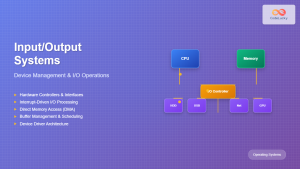
Input Output Systems: Complete Guide to Device Management and I/O Operations
Input/Output (I/O) systems form the critical bridge between a computer's internal processing capabilities and the external world. These systems manage...