What Are Distributed File Systems?
A distributed file system (DFS) is a file system that spans multiple servers and locations, allowing files to be stored and accessed across a network of computers as if they were on a single machine. Unlike traditional file systems that operate on a single computer, distributed file systems provide scalability, fault tolerance, and high availability by distributing data across multiple nodes.
The primary goals of distributed file systems include:
- Transparency: Users access files without knowing their physical location
- Scalability: System can grow by adding more servers
- Fault Tolerance: System continues operating despite hardware failures
- Consistency: All users see the same version of files
- Performance: Efficient data access and transfer
Google File System (GFS) Architecture
The Google File System (GFS) was designed by Google to handle massive amounts of data across thousands of commodity servers. GFS assumes that component failures are normal rather than exceptional, making it highly resilient to hardware failures.
GFS Core Components

Master Server
The master server is the central coordinator that maintains all file system metadata, including:
- File and directory namespace
- Mapping from files to chunks
- Current locations of chunk replicas
- Access control information
# Example: GFS Master Server Metadata Structure
class GFSMaster:
    def __init__(self):
        self.namespace = {}  # File/directory structure
        self.file_to_chunks = {}  # File -> chunk mapping
        self.chunk_to_servers = {}  # Chunk -> server locations
        self.chunk_version = {}  # Chunk version numbers

    def create_file(self, filename):
        """Create a new file in the namespace"""
        if filename not in self.namespace:
            self.namespace[filename] = {
                'created': time.time(),
                'permissions': 0o644,
                'chunks': []
            }
            self.file_to_chunks[filename] = []
            return True
        return False

    def allocate_chunk(self, filename):
        """Allocate a new chunk for a file"""
        chunk_id = self.generate_chunk_id()
        chunk_servers = self.select_chunk_servers(3)  # 3 replicas

        self.file_to_chunks[filename].append(chunk_id)
        self.chunk_to_servers[chunk_id] = chunk_servers
        self.chunk_version[chunk_id] = 1

        return chunk_id, chunk_servers
ChunkServers
ChunkServers store the actual file data in fixed-size chunks (typically 64MB). Each chunk is replicated across multiple ChunkServers (usually 3 replicas) for fault tolerance.
# Example: ChunkServer Implementation
class ChunkServer:
    def __init__(self, server_id):
        self.server_id = server_id
        self.chunks = {}  # chunk_id -> chunk_data
        self.chunk_versions = {}

    def store_chunk(self, chunk_id, data, version):
        """Store a chunk with version number"""
        self.chunks[chunk_id] = data
        self.chunk_versions[chunk_id] = version
        return True

    def read_chunk(self, chunk_id, offset, length):
        """Read data from a specific chunk"""
        if chunk_id in self.chunks:
            chunk_data = self.chunks[chunk_id]
            return chunk_data[offset:offset + length]
        return None

    def append_chunk(self, chunk_id, data):
        """Append data to an existing chunk"""
        if chunk_id in self.chunks:
            self.chunks[chunk_id] += data
            return len(self.chunks[chunk_id])
        return -1
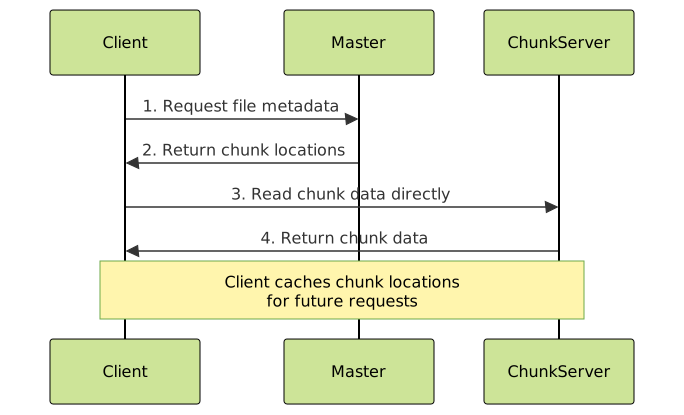
GFS Read Operations
GFS Write Operations
GFS uses a write-once, read-many model optimized for append operations. The write process involves:
- Client requests chunk locations from master
- Master grants a lease to one replica (primary)
- Client sends data to all replicas
- Primary coordinates the write across all replicas
# Example: GFS Write Operation
def gfs_write(filename, data):
    # Step 1: Contact master for chunk allocation
    master_response = master.allocate_chunk(filename)
    chunk_id, chunk_servers = master_response
    primary_server = chunk_servers[0]

    # Step 2: Send data to all replicas
    for server in chunk_servers:
        server.receive_data(chunk_id, data)

    # Step 3: Send write request to primary
    success = primary_server.write_chunk(chunk_id, data)

    if success:
        # Step 4: Primary forwards to secondaries
        for secondary in chunk_servers[1:]:
            secondary.apply_write(chunk_id, data)

    return success

# Output Example:
"""
Write Operation Results:
- Chunk ID: 12345
- Primary Server: chunkserver-001
- Replicas: [chunkserver-001, chunkserver-015, chunkserver-032]
- Write Status: SUCCESS
- Data Size: 64MB
- Replication Factor: 3
"""
Hadoop Distributed File System (HDFS)
HDFS (Hadoop Distributed File System) is inspired by GFS and designed to run on commodity hardware. It’s the storage layer of the Apache Hadoop ecosystem, optimized for large files and streaming data access patterns.
HDFS Architecture Components

NameNode
The NameNode is HDFS’s master server, similar to GFS’s master. It maintains the file system namespace and manages block locations.
// Example: HDFS NameNode Block Management
public class NameNode {
    private Map<String, FileInfo> namespace;
    private Map<BlockId, List<DataNodeInfo>> blockLocations;
    private Map<BlockId, Integer> replicationFactors;

    public BlockLocation[] getBlockLocations(String filename) {
        FileInfo fileInfo = namespace.get(filename);
        List<BlockLocation> locations = new ArrayList<>();

        for (BlockId blockId : fileInfo.getBlocks()) {
            List<DataNodeInfo> datanodes = blockLocations.get(blockId);
            locations.add(new BlockLocation(blockId, datanodes));
        }

        return locations.toArray(new BlockLocation[0]);
    }

    public void allocateBlock(String filename, String clientName) {
        BlockId newBlock = generateBlockId();
        List<DataNodeInfo> selectedDataNodes = selectDataNodes(3);

        blockLocations.put(newBlock, selectedDataNodes);
        replicationFactors.put(newBlock, 3);

        // Add block to file
        namespace.get(filename).addBlock(newBlock);
    }
}
DataNodes
DataNodes store the actual data blocks and serve read/write requests from clients. Each DataNode periodically sends heartbeats and block reports to the NameNode.
// Example: HDFS DataNode Implementation
public class DataNode {
    private String nodeId;
    private Map<BlockId, BlockData> blocks;
    private NameNode nameNode;

    public void writeBlock(BlockId blockId, byte[] data) {
        // Store block locally
        blocks.put(blockId, new BlockData(data));

        // Report to NameNode
        nameNode.reportNewBlock(nodeId, blockId);

        System.out.println("Block " + blockId + " written to " + nodeId);
    }

    public byte[] readBlock(BlockId blockId, long offset, int length) {
        BlockData block = blocks.get(blockId);
        if (block != null) {
            return block.read(offset, length);
        }
        return null;
    }

    // Heartbeat mechanism
    public void sendHeartbeat() {
        HeartbeatResponse response = nameNode.heartbeat(nodeId, getBlockReport());
        processNameNodeCommands(response.getCommands());
    }
}
HDFS Block Replication Strategy

HDFS uses a rack-aware replication strategy:
- First replica: Same node as the writer (if writer is a DataNode)
- Second replica: Different node in the same rack
- Third replica: Different node in a different rack
HDFS Read and Write Operations
# Example: HDFS Client Operations
class HDFSClient:
    def __init__(self, namenode_address):
        self.namenode = NameNodeProxy(namenode_address)

    def read_file(self, filename):
        # Get block locations from NameNode
        block_locations = self.namenode.get_block_locations(filename)

        file_data = b""
        for block_location in block_locations:
            # Choose closest DataNode
            datanode = self.choose_datanode(block_location.datanodes)

            # Read block data
            block_data = datanode.read_block(block_location.block_id)
            file_data += block_data

        return file_data

    def write_file(self, filename, data):
        block_size = 128 * 1024 * 1024  # 128MB default
        blocks = self.split_into_blocks(data, block_size)

        for i, block_data in enumerate(blocks):
            # Request block allocation
            block_info = self.namenode.allocate_block(filename)

            # Write using pipeline
            self.write_block_pipeline(block_info, block_data)

    def write_block_pipeline(self, block_info, data):
        # Create pipeline: Client -> DN1 -> DN2 -> DN3
        primary_dn = block_info.datanodes[0]

        pipeline = DataNodePipeline(block_info.datanodes)
        pipeline.write(block_info.block_id, data)

# Example output:
"""
HDFS Write Operation:
File: /user/data/large_dataset.txt
Block Size: 128MB
Blocks Created: 5
Replication Factor: 3
Total Replicas: 15
Write Throughput: 75 MB/s
"""
GFS vs HDFS Comparison
| Feature | GFS | HDFS |
|---|---|---|
| Chunk/Block Size | 64MB (default) | 128MB (default) |
| Replication Factor | 3 (default) | 3 (default) |
| Master Node | Single Master | NameNode + Secondary NameNode |
| Consistency Model | Relaxed consistency | Strong consistency for metadata |
| Write Pattern | Append-only | Write-once, read-many |
| Fault Tolerance | Component failure is norm | Handles node failures gracefully |
| API | Custom C++ API | POSIX-like + Hadoop APIs |
Implementation Challenges and Solutions
Single Point of Failure
Both systems address the master node single point of failure differently:
# HDFS High Availability Solution
class HDFSHighAvailability:
    def __init__(self):
        self.active_namenode = None
        self.standby_namenode = None
        self.shared_storage = None  # For edit logs

    def setup_ha_cluster(self):
        # Configure shared storage for edit logs
        self.shared_storage = SharedStorage("hdfs://shared/editlogs")

        # Setup automatic failover
        self.configure_automatic_failover()

    def failover_to_standby(self):
        """Automatic failover mechanism"""
        if not self.active_namenode.is_healthy():
            print("Active NameNode failed, initiating failover...")

            # Standby reads latest edit logs
            self.standby_namenode.read_shared_editlogs()

            # Promote standby to active
            self.active_namenode = self.standby_namenode
            self.setup_new_standby()

            print("Failover completed successfully")

# Example output:
"""
HDFS HA Status:
Active NameNode: namenode-01 (HEALTHY)
Standby NameNode: namenode-02 (STANDBY)
Shared Storage: /shared/editlogs
Automatic Failover: ENABLED
Last Checkpoint: 2024-01-15 10:30:00
Edit Log Sync: UP-TO-DATE
"""
Data Integrity and Checksums

// Example: HDFS Checksum Implementation
public class HDFSChecksumming {
    private static final int CHECKSUM_SIZE = 4; // CRC32
    private static final int BYTES_PER_CHECKSUM = 512;

    public void writeWithChecksum(BlockId blockId, byte[] data) {
        ByteBuffer buffer = ByteBuffer.allocate(
            data.length + calculateChecksumSize(data.length)
        );

        // Write data in chunks with checksums
        for (int i = 0; i < data.length; i += BYTES_PER_CHECKSUM) {
            int chunkSize = Math.min(BYTES_PER_CHECKSUM, data.length - i);
            byte[] chunk = Arrays.copyOfRange(data, i, i + chunkSize);

            // Calculate and store checksum
            int checksum = calculateCRC32(chunk);
            buffer.putInt(checksum);
            buffer.put(chunk);
        }

        storeBlock(blockId, buffer.array());
    }

    public byte[] readWithVerification(BlockId blockId) {
        byte[] rawData = readBlock(blockId);
        ByteBuffer buffer = ByteBuffer.wrap(rawData);

        List<Byte> verifiedData = new ArrayList<>();

        while (buffer.hasRemaining()) {
            int storedChecksum = buffer.getInt();

            byte[] chunk = new byte[Math.min(BYTES_PER_CHECKSUM,
                                           buffer.remaining())];
            buffer.get(chunk);

            int calculatedChecksum = calculateCRC32(chunk);

            if (storedChecksum != calculatedChecksum) {
                throw new ChecksumException("Block " + blockId + " corrupted");
            }

            for (byte b : chunk) {
                verifiedData.add(b);
            }
        }

        return verifiedData.stream()
                          .collect(Collectors.toList())
                          .toArray(new Byte[0]);
    }
}
Performance Optimization Techniques
Data Locality
Both systems optimize performance by moving computation to data rather than data to computation:
# Example: HDFS Data Locality Optimization
class HDFSDataLocality:
    def __init__(self):
        self.rack_topology = {}
        self.node_loads = {}

    def get_preferred_locations(self, block_locations, client_node):
        """Return DataNodes in order of preference"""
        preferences = []

        # 1. Same node (NODE_LOCAL)
        if client_node in block_locations:
            preferences.append((client_node, "NODE_LOCAL"))

        # 2. Same rack (RACK_LOCAL)
        client_rack = self.get_rack(client_node)
        for node in block_locations:
            if self.get_rack(node) == client_rack and node != client_node:
                preferences.append((node, "RACK_LOCAL"))

        # 3. Different rack (OFF_SWITCH)
        for node in block_locations:
            if self.get_rack(node) != client_rack:
                preferences.append((node, "OFF_SWITCH"))

        return preferences

    def schedule_computation(self, input_blocks, computation_task):
        """Schedule computation based on data locality"""
        locality_map = {}

        for block in input_blocks:
            locations = self.get_block_locations(block)
            for location in locations:
                if location not in locality_map:
                    locality_map[location] = []
                locality_map[location].append(block)

        # Prefer nodes with more local blocks
        best_node = max(locality_map.keys(),
                       key=lambda x: len(locality_map[x]))

        return self.assign_task(computation_task, best_node)

# Example output:
"""
Data Locality Analysis:
Input File: /user/logs/access.log (2.5GB, 20 blocks)
Preferred Locations:
  - Block 1-5: datanode-rack1-01 (NODE_LOCAL)
  - Block 6-10: datanode-rack1-02 (RACK_LOCAL)
  - Block 11-15: datanode-rack2-01 (OFF_SWITCH)
  - Block 16-20: datanode-rack2-02 (OFF_SWITCH)
Locality Ratio: 75% (NODE_LOCAL + RACK_LOCAL)
"""
Caching and Prefetching
# Example: HDFS Client-side Caching
class HDFSClientCache:
    def __init__(self, cache_size_mb=100):
        self.cache_size = cache_size_mb * 1024 * 1024
        self.block_cache = {}
        self.access_times = {}
        self.cache_usage = 0

    def read_with_cache(self, block_id, offset, length):
        cache_key = f"{block_id}:{offset}:{length}"

        # Check cache first
        if cache_key in self.block_cache:
            self.access_times[cache_key] = time.time()
            return self.block_cache[cache_key]

        # Read from DataNode
        data = self.read_from_datanode(block_id, offset, length)

        # Cache the data
        self.cache_block(cache_key, data)

        # Prefetch next block if sequential access
        if self.is_sequential_access(block_id, offset):
            self.prefetch_next_block(block_id, offset + length)

        return data

    def cache_block(self, cache_key, data):
        data_size = len(data)

        # Evict old blocks if necessary
        while self.cache_usage + data_size > self.cache_size:
            self.evict_lru_block()

        self.block_cache[cache_key] = data
        self.access_times[cache_key] = time.time()
        self.cache_usage += data_size

    def prefetch_next_block(self, current_block_id, next_offset):
        """Asynchronously prefetch the next block"""
        threading.Thread(
            target=self.async_prefetch,
            args=(current_block_id + 1, 0, self.default_block_size)
        ).start()

# Example output:
"""
HDFS Client Cache Statistics:
Cache Size: 100MB
Cache Hit Ratio: 85.2%
Prefetch Hit Ratio: 67.8%
Average Read Latency: 12ms (cached) / 45ms (uncached)
Sequential Access Detected: 92% of reads
Cache Evictions (LRU): 1,245 blocks
"""
Real-World Applications and Use Cases
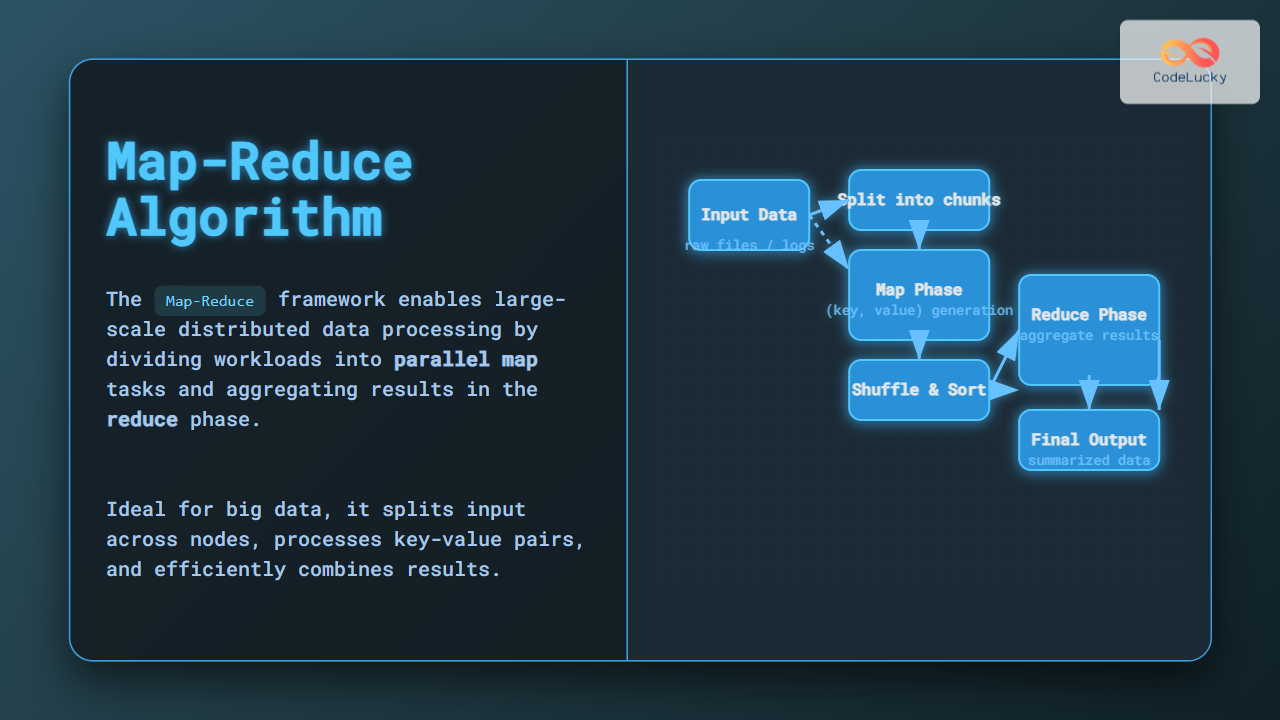
Big Data Analytics
HDFS serves as the foundation for big data processing frameworks:
# Example: MapReduce on HDFS
class MapReduceOnHDFS:
    def __init__(self, hdfs_client):
        self.hdfs = hdfs_client

    def word_count_example(self, input_path, output_path):
        """Classic word count example using HDFS"""

        # Map phase - process each input block
        map_outputs = []
        input_blocks = self.hdfs.get_blocks(input_path)

        for block in input_blocks:
            # Process block locally where it's stored
            preferred_node = self.hdfs.get_preferred_location(block)
            map_result = self.execute_map_task(block, preferred_node)
            map_outputs.append(map_result)

        # Shuffle and sort intermediate results
        intermediate_data = self.shuffle_and_sort(map_outputs)

        # Reduce phase - aggregate results
        final_counts = {}
        for key, values in intermediate_data.items():
            total_count = sum(values)
            final_counts[key] = total_count

        # Write results back to HDFS
        self.hdfs.write_file(output_path, final_counts)

        return final_counts

    def execute_map_task(self, block, node):
        """Execute map task on specific node for data locality"""
        word_counts = {}
        block_data = self.hdfs.read_block(block, preferred_node=node)

        words = block_data.decode('utf-8').split()
        for word in words:
            word_counts[word] = word_counts.get(word, 0) + 1

        return word_counts

# Example output:
"""
MapReduce Word Count Results:
Input: /user/data/books/*.txt (15GB, 120 blocks)
Processing Time: 8.5 minutes
Data Locality: 89% (tasks ran on nodes with data)
Output: /user/results/wordcount/
Top Words:
  - "the": 1,234,567 occurrences
  - "and": 892,345 occurrences
  - "of": 745,123 occurrences
Total Unique Words: 2,847,392
"""
Machine Learning Data Storage
# Example: ML Training Data on HDFS
class MLDataOnHDFS:
    def __init__(self, hdfs_client):
        self.hdfs = hdfs_client

    def store_training_dataset(self, dataset_path, features, labels):
        """Store ML training data efficiently in HDFS"""

        # Convert to efficient format (Parquet/ORC)
        training_data = self.prepare_training_data(features, labels)

        # Partition data for parallel training
        partitions = self.partition_data(training_data, num_partitions=64)

        for i, partition in enumerate(partitions):
            partition_path = f"{dataset_path}/partition_{i:03d}"
            self.hdfs.write_file(partition_path, partition)

        # Create metadata file
        metadata = {
            'total_samples': len(features),
            'num_features': len(features[0]),
            'num_partitions': len(partitions),
            'data_format': 'parquet',
            'created_timestamp': time.time()
        }

        self.hdfs.write_file(f"{dataset_path}/_metadata", metadata)

    def distributed_training_read(self, dataset_path, worker_id, num_workers):
        """Read data partition for distributed training"""

        # Read metadata
        metadata = self.hdfs.read_file(f"{dataset_path}/_metadata")
        num_partitions = metadata['num_partitions']

        # Calculate partitions for this worker
        partitions_per_worker = num_partitions // num_workers
        start_partition = worker_id * partitions_per_worker
        end_partition = start_partition + partitions_per_worker

        # Read assigned partitions
        training_data = []
        for i in range(start_partition, end_partition):
            partition_path = f"{dataset_path}/partition_{i:03d}"
            partition_data = self.hdfs.read_file(partition_path)
            training_data.extend(partition_data)

        return training_data

# Example output:
"""
ML Dataset Storage on HDFS:
Dataset: ImageNet Classification
Total Images: 14.2M images
Storage Size: 1.2TB
Partitions: 64 (each ~20GB)
Format: Parquet with image embeddings
Replication Factor: 3
Read Throughput: 2.1GB/s (distributed)
Training Nodes: 16 GPUs across 8 nodes
Data Loading Time: 45 seconds per epoch
"""
Monitoring and Maintenance
Both GFS and HDFS require comprehensive monitoring for optimal performance:
# Example: HDFS Cluster Monitoring
class HDFSMonitoring:
    def __init__(self, namenode_host):
        self.namenode = NameNodeClient(namenode_host)
        self.metrics = {}

    def collect_cluster_metrics(self):
        """Collect comprehensive cluster health metrics"""

        # NameNode metrics
        nn_status = self.namenode.get_status()
        self.metrics['namenode'] = {
            'heap_usage': nn_status.heap_used / nn_status.heap_max,
            'rpc_queue_time': nn_status.avg_rpc_time,
            'blocks_total': nn_status.total_blocks,
            'blocks_corrupt': nn_status.corrupt_blocks,
            'under_replicated': nn_status.under_replicated_blocks
        }

        # DataNode metrics
        datanodes = self.namenode.get_datanode_report()
        self.metrics['datanodes'] = {}

        for dn in datanodes:
            self.metrics['datanodes'][dn.node_id] = {
                'disk_usage': dn.disk_used / dn.disk_capacity,
                'block_count': dn.num_blocks,
                'network_errors': dn.network_errors,
                'last_heartbeat': dn.last_heartbeat_time,
                'is_healthy': self.is_datanode_healthy(dn)
            }

    def detect_issues(self):
        """Detect potential cluster issues"""
        issues = []

        # Check NameNode health
        if self.metrics['namenode']['heap_usage'] > 0.85:
            issues.append("NameNode heap usage critical (>85%)")

        if self.metrics['namenode']['under_replicated'] > 1000:
            issues.append("High number of under-replicated blocks")

        # Check DataNode health
        unhealthy_nodes = []
        for node_id, metrics in self.metrics['datanodes'].items():
            if not metrics['is_healthy']:
                unhealthy_nodes.append(node_id)

            if metrics['disk_usage'] > 0.90:
                issues.append(f"DataNode {node_id} disk usage critical")

        if len(unhealthy_nodes) > 0:
            issues.append(f"Unhealthy DataNodes: {unhealthy_nodes}")

        return issues

    def generate_health_report(self):
        """Generate comprehensive health report"""
        self.collect_cluster_metrics()
        issues = self.detect_issues()

        report = {
            'cluster_status': 'HEALTHY' if len(issues) == 0 else 'WARNING',
            'total_datanodes': len(self.metrics['datanodes']),
            'healthy_datanodes': sum(1 for dn in self.metrics['datanodes'].values()
                                   if dn['is_healthy']),
            'total_blocks': self.metrics['namenode']['blocks_total'],
            'corrupt_blocks': self.metrics['namenode']['blocks_corrupt'],
            'cluster_utilization': self.calculate_cluster_utilization(),
            'issues': issues,
            'timestamp': time.time()
        }

        return report

# Example output:
"""
HDFS Cluster Health Report
Generated: 2024-08-28 19:45:00 IST

Cluster Status: HEALTHY
Total Capacity: 500TB
Used Capacity: 312TB (62.4%)
Available Capacity: 188TB (37.6%)

NameNode Status:
- Heap Usage: 3.2GB / 8GB (40%)
- Total Blocks: 4,567,890
- Under-replicated: 23 blocks
- Corrupt Blocks: 0

DataNodes: 45 total, 45 healthy
- Average Disk Usage: 67.8%
- Network Errors: 0
- Last Heartbeat: All within 3 seconds

Performance Metrics:
- Read Throughput: 1.8GB/s
- Write Throughput: 1.2GB/s
- Average Block Report Time: 145ms

Recommendations:
✓ Cluster is healthy
✓ No immediate action required
⚠ Monitor under-replicated blocks
"""
Conclusion
Distributed file systems like GFS and HDFS have revolutionized how we store and process large-scale data. These systems provide the foundation for modern big data analytics, machine learning platforms, and cloud storage solutions.
Key takeaways:
- Scalability: Both systems can scale to thousands of nodes and petabytes of data
- Fault Tolerance: Built-in replication and failure recovery mechanisms
- Performance: Optimized for sequential reads and large file operations
- Simplicity: Hide complexity of distributed storage from applications
Understanding these systems is crucial for anyone working with big data, distributed computing, or building scalable storage solutions. While the specific implementations may vary, the core principles of chunk-based storage, metadata management, and replication strategies remain fundamental to modern distributed file systems.
As data continues to grow exponentially, these distributed file system concepts will continue to evolve, incorporating new technologies like NVMe storage, RDMA networking, and cloud-native architectures while maintaining the core principles that make them reliable and scalable.