
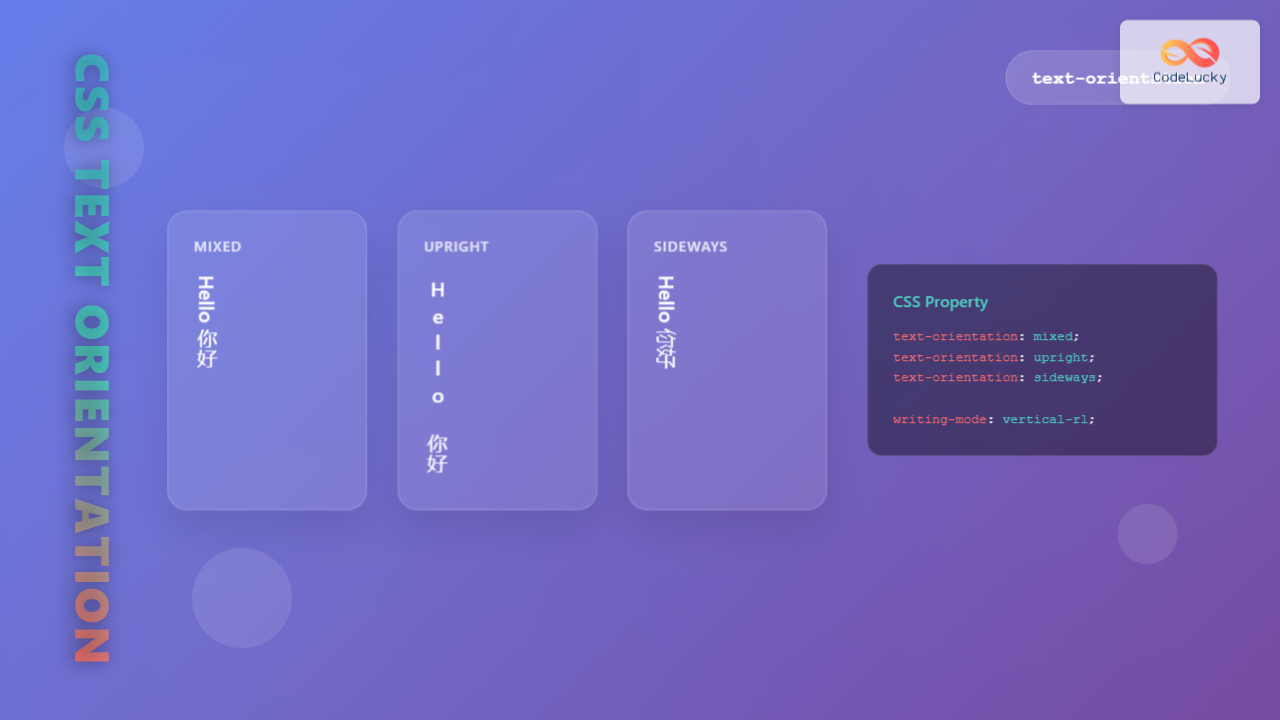
The CSS text-orientation property controls how individual characters are oriented within vertical text layouts. This powerful property becomes essential when working with vertical writing modes, allowing you to fine-tune character display for better readability and aesthetic appeal.
Understanding Text-Orientation Property
The text-orientation property specifically affects text that flows vertically, working in conjunction with the writing-mode property. It determines whether characters should be rotated, remain upright, or follow their natural orientation within vertical text flows.
Syntax and Values
The property accepts several keyword values that define different character orientation behaviors:
text-orientation: mixed | upright | sideways | sideways-right | use-glyph-orientation;Available Values Explained
- mixed (default): Characters are rotated 90° clockwise for horizontal scripts, while vertical scripts remain upright
- upright: Forces all characters to remain in their natural upright position
- sideways: Rotates the entire line 90° clockwise
- sideways-right: Similar to sideways but specifically for right-to-left languages
- use-glyph-orientation: Uses SVG glyph orientation values (deprecated)
Practical Implementation Examples
Let’s explore how different text-orientation values affect vertical text display with practical examples:
Mixed (Default)
Hello World! 你好世界
Upright
Hello World! 你好世界
Sideways
Hello World! 你好世界
CSS Code Examples
Here’s the CSS code used to create the above examples:
/* Mixed orientation (default) */
.text-mixed {
  writing-mode: vertical-rl;
  text-orientation: mixed;
}

/* Upright orientation */
.text-upright {
  writing-mode: vertical-rl;
  text-orientation: upright;
}

/* Sideways orientation */
.text-sideways {
  writing-mode: vertical-rl;
  text-orientation: sideways;
}
Interactive Demonstration
Experiment with different text-orientation values using this interactive demo:
Browser Support and Compatibility
The text-orientation property enjoys good modern browser support:
| Browser | Version | Notes |
|---|---|---|
| Chrome | 48+ | Full support |
| Firefox | 41+ | Full support |
| Safari | 14+ | Full support |
| Edge | 79+ | Full support |
Real-World Use Cases
1. Magazine Layouts
Creating magazine-style layouts with vertical text elements for headers and captions:
This layout demonstrates how text-orientation can create visually appealing magazine-style designs with vertical headers alongside horizontal content.
2. Asian Language Support
Proper handling of mixed scripts in vertical layouts:
日本語とEnglishが混在するテキストの表示例です。Mixed orientationを使用することで、それぞれの文字が適切な向きで表示されます。
3. Creative Typography
Using upright orientation for artistic text effects:
Common Pitfalls and Solutions
Problem 1: Unexpected Character Rotation
When characters don’t rotate as expected, ensure you’re using the correct writing-mode value:
/* Incorrect - text-orientation has no effect without vertical writing mode */
.incorrect {
  text-orientation: upright;
}

/* Correct - combine with writing-mode */
.correct {
  writing-mode: vertical-rl;
  text-orientation: upright;
}
Problem 2: Browser Compatibility Issues
For older browser support, consider using feature detection:
@supports (text-orientation: mixed) {
  .vertical-text {
    writing-mode: vertical-rl;
    text-orientation: mixed;
  }
}

@supports not (text-orientation: mixed) {
  .vertical-text {
    /* Fallback styles */
    transform: rotate(90deg);
  }
}
Advanced Techniques
Combining with CSS Grid
Create complex layouts mixing horizontal and vertical text:
Main Content Area
This demonstrates how text-orientation works within CSS Grid layouts, creating dynamic page structures with mixed text orientations.
Responsive Considerations
Adjust text orientation based on screen size:
@media (max-width: 768px) {
  .responsive-vertical {
    writing-mode: horizontal-tb;
    text-orientation: initial;
  }
}

@media (min-width: 769px) {
  .responsive-vertical {
    writing-mode: vertical-rl;
    text-orientation: mixed;
  }
}
Performance Considerations
The text-orientation property is generally performant, but consider these optimization tips:
- Avoid frequent changes to text-orientation via JavaScript for better performance
- Use CSS transforms as fallbacks only when necessary
- Test rendering performance with large amounts of vertical text
- Consider font loading implications when using custom fonts with vertical text
Accessibility Guidelines
When implementing vertical text layouts, ensure accessibility:
- Provide alternative horizontal layouts for users with reading difficulties
- Test with screen readers to ensure proper text flow
- Maintain sufficient contrast ratios regardless of text orientation
- Consider reading patterns and cultural context for your audience
Conclusion
The CSS text-orientation property provides powerful control over character orientation in vertical text layouts. By understanding its values and proper implementation techniques, you can create sophisticated typography effects while maintaining cross-browser compatibility and accessibility.
Whether you’re building magazine-style layouts, supporting multilingual content, or creating unique design elements, mastering text-orientation opens up new possibilities for creative and functional web typography. Remember to always test across different browsers and consider fallback options for older browser versions.
Start experimenting with the interactive examples above to see how different text-orientation values can enhance your web designs and improve user experience across various languages and writing systems.
Related Posts
CSS Writing-Mode Property: Master Horizontal and Vertical Text Direction Control
The CSS writing-mode property is a powerful tool that controls the direction and orientation of text flow on web pages....
CSS Style letterSpacing Property: CSS Letter Spacing
CSS letter-spacing Property: A Comprehensive Guide The letter-spacing CSS property controls the horizontal spacing between text characters. It allows you...
CSS Direction Property: Complete Guide to LTR and RTL Text Direction
Introduction to CSS Direction Property The CSS direction property is a fundamental tool for controlling text flow and layout direction...
CSS Style direction Property: CSS Direction
Understanding the CSS direction Property The CSS direction property specifies the text direction/writing direction. It is used to set the...
CSS Font-Style: Complete Guide to Italic, Oblique and Normal Text Styling
The CSS font-style property is a fundamental typography tool that controls how text appears on your web pages. Whether you...
CSS vertical-align Property: CSS Vertical Align
CSS vertical-align Property: Mastering Vertical Alignment The CSS vertical-align property specifies the vertical alignment of an inline or table-cell box....
HTML Canvas direction Property: Text Direction
HTML Canvas direction Property: Controlling Text Direction The HTML Canvas direction property allows you to specify the text direction when...
CSS Style textOverflow Property: CSS Text Overflow
CSS text-overflow Property: Managing Overflowing Text The CSS text-overflow property specifies how overflowed content that is not displayed should be...
CSS Letter-Spacing: Complete Guide to Character Spacing Control
The letter-spacing property in CSS is a powerful typography tool that controls the horizontal space between characters in text. Whether...
CSS Style textAlign Property: CSS Text Align
Understanding the CSS textAlign Property: Aligning Text in Web Layouts The textAlign property in CSS specifies the horizontal alignment of...
HTML dir Property: Element Text Direction
HTML dir Property: Controlling Element Text Direction The HTML dir property specifies the text direction for the content within an...
CSS text-decoration-style Property: CSS Text Decoration Style
CSS text-decoration-style Property: Styling Text Decorations The CSS text-decoration-style property specifies the style of the line applied to text by...





