
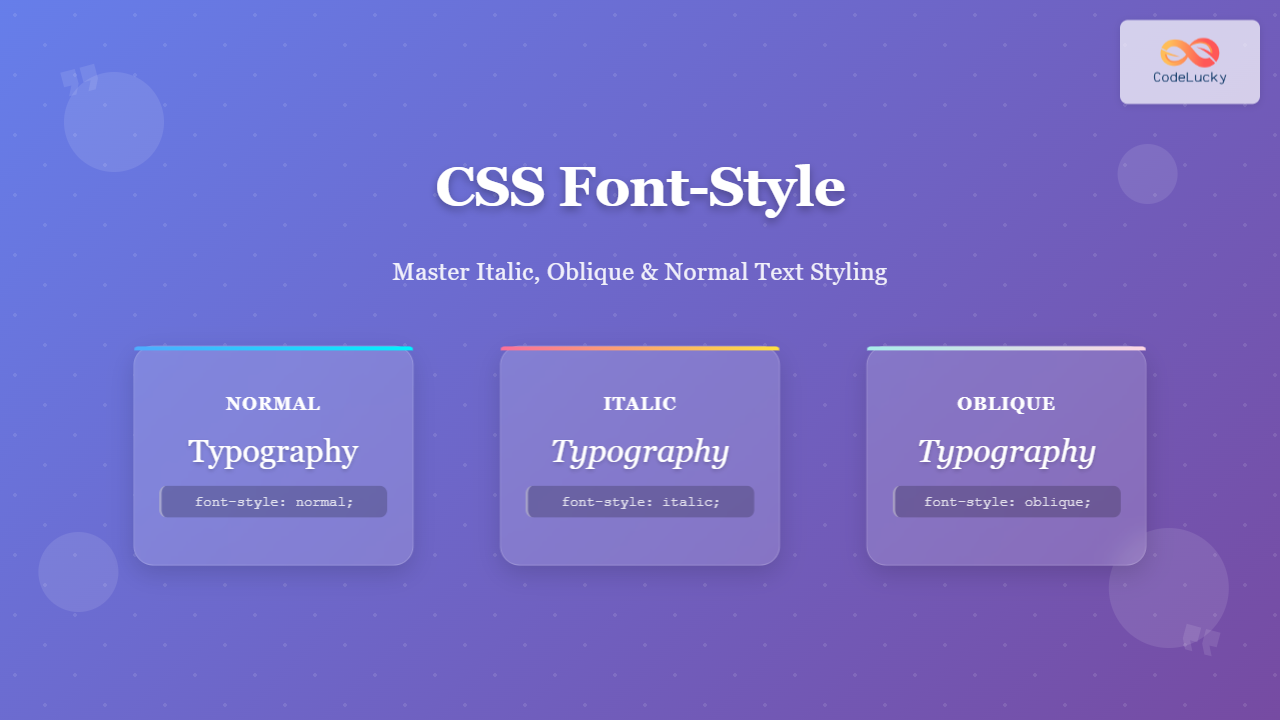
The CSS font-style property is a fundamental typography tool that controls how text appears on your web pages. Whether you want to emphasize certain words, create visual hierarchy, or match specific design requirements, understanding font-style is essential for effective web typography.
What is CSS Font-Style?
The font-style property specifies the style of a font, primarily controlling whether text appears in normal, italic, or oblique form. This property is part of the CSS font shorthand and plays a crucial role in text presentation and readability.
font-style: normal | italic | oblique [angle];
Font-Style Values Explained
1. Normal (Default)
The normal value displays text in its standard, upright form without any slanting or styling modifications.
Example:
.normal-text {
  font-style: normal;
}
This text uses font-style: normal and appears in standard upright form.
2. Italic
The italic value displays text using the italic version of the font family. True italic fonts are specifically designed with slanted characters and often have unique letterforms that differ from simply slanted normal text.
Example:
.italic-text {
  font-style: italic;
}
This text uses font-style: italic and appears with elegant slanted letterforms.
3. Oblique
The oblique value creates slanted text by artificially tilting the normal font. Unlike italic, oblique simply skews the regular letterforms without using specially designed italic characters.
Example:
.oblique-text {
  font-style: oblique;
}
This text uses font-style: oblique and appears mechanically slanted.
4. Oblique with Angle (CSS3)
Modern browsers support specifying a custom angle for oblique text, allowing precise control over the slant degree.
Example:
.oblique-angle {
  font-style: oblique 15deg;
}
This text uses font-style: oblique 15deg for custom slanting.
Interactive Font-Style Comparison
Try Different Font-Style Values:
The quick brown fox jumps over the lazy dog. This sample text demonstrates the selected font-style property in action.
font-style: normal;
Italic vs Oblique: Understanding the Difference
While both italic and oblique create slanted text, they achieve this effect differently:
Italic
- Uses specially designed italic font faces
- Letters have unique shapes and curves
- Better readability and aesthetics
- Preferred for emphasis and design
Oblique
- Mechanically slants normal characters
- Maintains original letter shapes
- Used when italic fonts aren’t available
- Can specify custom angles in modern browsers
Practical Use Cases
Emphasis and Highlighting
.emphasis {
  font-style: italic;
  color: #666;
}

.highlight {
  font-style: italic;
  background-color: #fff3cd;
  padding: 2px 4px;
}
This paragraph contains emphasized text and highlighted content using italic styling.
Citations and References
.citation {
  font-style: italic;
  color: #555;
  border-left: 3px solid #007bff;
  padding-left: 15px;
  margin: 20px 0;
}
“The best way to learn CSS is through practice and experimentation.” – Web Development Best Practices
Navigation and UI Elements
.nav-inactive {
  font-style: oblique;
  color: #aaa;
  opacity: 0.7;
}

.nav-active {
  font-style: normal;
  color: #007bff;
  font-weight: bold;
}Browser Support and Compatibility
✅ Excellent Browser Support
The font-style property has universal browser support:
- Chrome: All versions
- Firefox: All versions
- Safari: All versions
- Edge: All versions
- Internet Explorer: 5.5+
⚠️ Note on Oblique Angles
The oblique with angle syntax is supported in modern browsers but may not work in older versions. Always provide fallbacks for better compatibility.
Best Practices and Tips
1. Choose Italic Over Oblique When Possible
Italic fonts are specifically designed and offer better readability and aesthetic appeal compared to mechanically slanted oblique text.
2. Use Font-Style for Semantic Emphasis
/* Good: Semantic HTML with CSS styling */
em {
  font-style: italic;
  color: #d73527;
}

/* Better than using <i> tags everywhere */
Use emphasis tags with proper CSS styling for better semantics and accessibility.
3. Test Across Different Fonts
Different font families handle italic and oblique styling differently. Always test your design across various font stacks to ensure consistency.
4. Consider Performance
Loading italic font variants adds to page weight. Use font-display: swap to improve loading performance:
@font-face {
  font-family: 'CustomFont';
  src: url('font-italic.woff2') format('woff2');
  font-style: italic;
  font-display: swap;
}
Advanced Techniques
Combining with CSS Transforms
.fancy-italic {
  font-style: italic;
  transform: skew(-10deg);
  display: inline-block;
  transition: transform 0.3s ease;
}

.fancy-italic:hover {
  transform: skew(0deg) scale(1.05);
}Responsive Font-Style
/* Mobile-first approach */
.responsive-text {
  font-style: normal;
}

@media (min-width: 768px) {
  .responsive-text {
    font-style: italic;
  }
}

@media (min-width: 1024px) {
  .responsive-text {
    font-style: oblique 12deg;
  }
}
Common Mistakes to Avoid
❌ Common Mistakes
- Overusing italic text, which can reduce readability
- Not providing fallbacks for oblique angles
- Using font-style on block elements unnecessarily
- Mixing too many font styles in a single design
- Ignoring accessibility considerations for emphasized text
Accessibility Considerations
When using font-style for emphasis, consider screen readers and accessibility:
/* Good: Combines visual and semantic emphasis */
.important {
  font-style: italic;
  font-weight: 600;
  color: #d73527;
}

/* Use with proper HTML structure */
<p>This is <em class="important">very important</em> information.</p>
Conclusion
The CSS font-style property is a powerful tool for creating engaging typography on the web. By understanding the differences between normal, italic, and oblique values, you can make informed decisions about text styling that enhance both aesthetics and user experience.
Remember to prioritize readability, test across different devices and browsers, and consider accessibility when implementing font-style in your projects. With proper usage, font-style can significantly improve your website’s visual hierarchy and user engagement.
💡 Key Takeaways
- Use
italicfor designed slanted fonts,obliquefor mechanical slanting - Modern browsers support custom angles with
oblique - Combine font-style with semantic HTML for better accessibility
- Test your typography across different font families and devices
- Consider performance implications when loading italic font variants
Related Posts
CSS Style fontStyle Property: CSS Font Style
CSS font-style Property: A Comprehensive Guide The font-style property in CSS is used to specify the style of a font....
CSS Style font Property: CSS Font
CSS font Property: A Comprehensive Guide The CSS font property is a shorthand property used to set several font-related styles...
CSS Style fontFamily Property: CSS Font Family
CSS font-family Property: Mastering Web Typography The CSS font-family property is a fundamental aspect of web design, allowing you to...

CSS Font-Family: Complete Guide to Typography and Font Stacks
Typography forms the backbone of web design, and the CSS font-family property is your primary tool for controlling how text...
CSS Font-Variant: Small-Caps and Typography Variations Guide
The font-variant property in CSS is a powerful typography tool that allows developers to control various aspects of font rendering,...
CSS Style fontSize Property: CSS Font Size
CSS fontSize Property: Controlling Text Size The fontSize property in CSS specifies the size of the font. This property is...
CSS Font-Weight: Complete Guide to Bold, Normal and Numeric Values
The CSS font-weight property is fundamental to web typography, controlling how thick or thin your text appears. Whether you're creating...
CSS Style fontVariant Property: CSS Font Variant
CSS font-variant Property: A Comprehensive Guide The font-variant CSS property is a shorthand for setting various OpenType font properties, allowing...
CSS text-decoration-style Property: CSS Text Decoration Style
CSS text-decoration-style Property: Styling Text Decorations The CSS text-decoration-style property specifies the style of the line applied to text by...

CSS Style fontWeight Property: CSS Font Weight
CSS Style fontWeight Property: Mastering CSS Font Weight The fontWeight property in CSS is used to specify the weight, or...
CSS Font-Size: Complete Guide to Absolute, Relative and Keyword Sizing
Font sizing is one of the most fundamental aspects of web typography that directly impacts user experience and accessibility. Understanding...
CSS Text-Decoration: Complete Guide to Underline, Overline and Strikethrough Effects
CSS text-decoration is a fundamental property that allows developers to add visual emphasis and styling to text through decorative lines....





