
The xfs_check command is a crucial system administration tool in Linux for verifying the consistency and integrity of XFS filesystems. As XFS has become increasingly popular in enterprise environments due to its high performance and scalability, understanding how to properly check and maintain XFS filesystems is essential for system administrators and Linux users.
What is xfs_check Command?
The xfs_check command is a read-only utility that examines XFS filesystem metadata for consistency without making any modifications to the filesystem. It performs comprehensive checks on various XFS structures including inodes, directory entries, free space maps, and allocation group headers to ensure the filesystem is in a healthy state.
Key characteristics of xfs_check:
- Read-only operation – never modifies filesystem data
- Can run on mounted or unmounted filesystems
- Provides detailed diagnostic information
- Part of the xfsprogs package
- Complementary to xfs_repair for filesystem maintenance
Installation and Prerequisites
Before using xfs_check, ensure the xfsprogs package is installed on your system:
Ubuntu/Debian:
sudo apt update
sudo apt install xfsprogs
CentOS/RHEL/Fedora:
sudo yum install xfsprogs
# or for newer versions
sudo dnf install xfsprogs
Arch Linux:
sudo pacman -S xfsprogsBasic Syntax and Options
The basic syntax for the xfs_check command is:
xfs_check [options] deviceEssential Command Options:
| Option | Description |
|---|---|
-f |
Force check even if filesystem appears clean |
-i ino |
Check specific inode number |
-v |
Verbose output with detailed information |
-s |
Show progress during the check |
-b |
Skip checking of free space |
Practical Examples and Usage
Example 1: Basic Filesystem Check
To perform a basic check on an XFS filesystem:
sudo xfs_check /dev/sdb1Sample Output:
Phase 1: Check superblock...
Phase 2: Check allocation group headers...
Phase 3: Check inode allocation maps...
Phase 4: Check directory entries...
Phase 5: Check connectivity...
Phase 6: Check free space...
No errors found.
Example 2: Verbose Check with Detailed Output
For comprehensive diagnostic information:
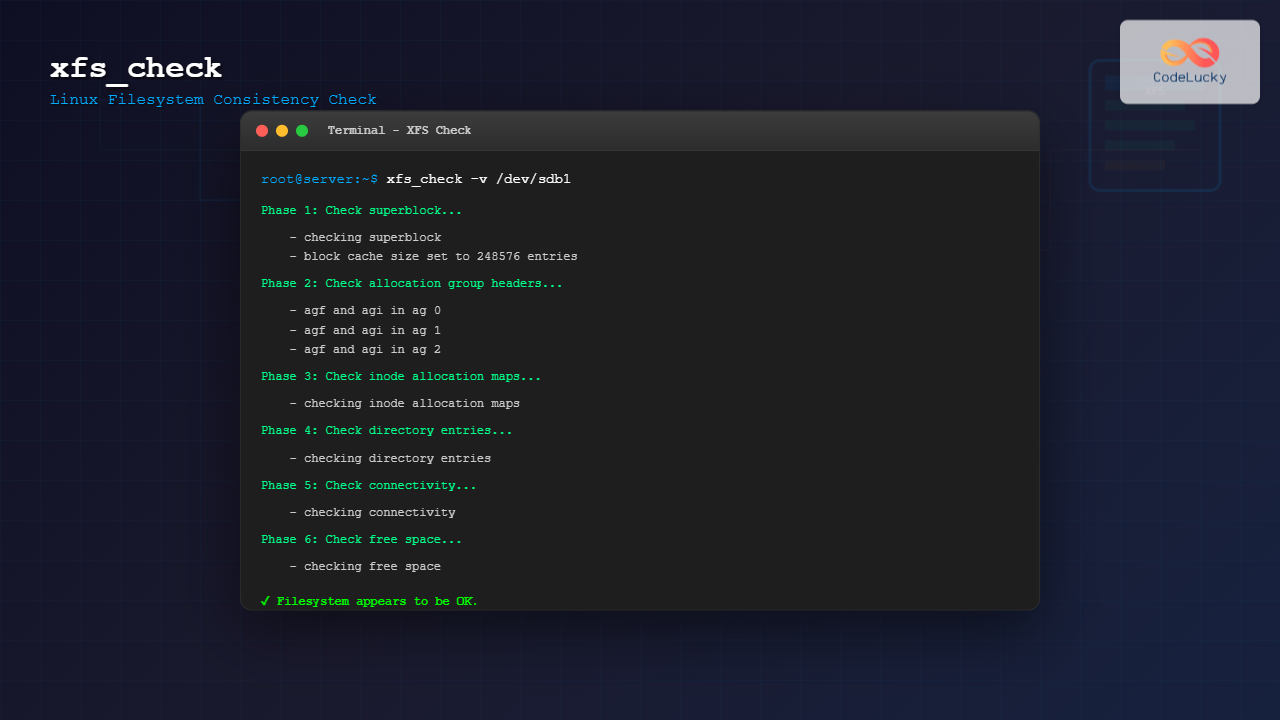
sudo xfs_check -v /dev/sdb1Sample Verbose Output:
Phase 1: Check superblock...
        - checking superblock
        - block cache size set to 248576 entries
Phase 2: Check allocation group headers...
        - agf and agi in ag 0
        - agf and agi in ag 1
        - agf and agi in ag 2
        - agf and agi in ag 3
Phase 3: Check inode allocation maps...
        - checking inode allocation maps
Phase 4: Check directory entries...
        - checking directory entries
Phase 5: Check connectivity...
        - checking connectivity
Phase 6: Check free space...
        - checking free space
Filesystem appears to be OK.
Example 3: Checking Specific Inode
To check a specific inode for corruption:
sudo xfs_check -i 12345 /dev/sdb1Sample Output:
Checking inode 12345...
Inode 12345 appears to be OK.
Links: 1
Size: 4096 bytes
Blocks: 1
Example 4: Force Check on Clean Filesystem
To force a check even when the filesystem appears clean:
sudo xfs_check -f /dev/sdb1Understanding xfs_check Output
The xfs_check command performs its analysis in six distinct phases:
Phase 1: Superblock Verification
- Validates filesystem magic numbers
- Checks superblock consistency
- Verifies filesystem geometry
Phase 2: Allocation Group Headers
- Examines AGF (Allocation Group Free space) headers
- Verifies AGI (Allocation Group Inode) headers
- Checks allocation group consistency
Phase 3: Inode Allocation Maps
- Validates inode allocation bitmaps
- Checks for orphaned inodes
- Verifies inode count consistency
Phase 4: Directory Entries
- Examines directory structure integrity
- Validates directory entry formats
- Checks for corrupted directory blocks
Phase 5: Connectivity
- Verifies filesystem tree connectivity
- Checks for unreachable files
- Validates parent-child relationships
Phase 6: Free Space
- Examines free space maps
- Validates allocation consistency
- Checks for space leaks
Error Detection and Interpretation
When xfs_check detects issues, it provides specific error messages. Here are common error types and their meanings:
Common Error Messages:
# Corrupted superblock
ERROR: bad magic number 0x42494e41 in superblock

# Inode corruption
ERROR: inode 67890 has bad magic number

# Directory corruption
ERROR: directory inode 12345 has bad entry at offset 128

# Free space inconsistency
ERROR: free space count mismatch in AG 2
Best Practices and Safety Guidelines
When to Use xfs_check
- Regular maintenance: Schedule periodic filesystem checks
- After system crashes: Verify integrity after unexpected shutdowns
- Before backups: Ensure filesystem health before critical backups
- Storage issues: Diagnose hardware-related problems
- Performance problems: Check for filesystem-related bottlenecks
Safety Considerations
- Always unmount the filesystem when possible for accurate results
- Use read-only checks on production systems
- Combine with hardware diagnostics for comprehensive analysis
- Keep regular backups before running any filesystem utilities
Advanced Usage Scenarios
Checking Multiple Filesystems
Create a script to check multiple XFS filesystems:
#!/bin/bash
# Script to check multiple XFS filesystems

DEVICES=("/dev/sdb1" "/dev/sdc1" "/dev/sdd1")

for device in "${DEVICES[@]}"; do
    echo "Checking $device..."
    xfs_check "$device"
    echo "Check complete for $device"
    echo "------------------------"
done
Automated Health Monitoring
Implement automated XFS health monitoring:
#!/bin/bash
# XFS health monitoring script

LOG_FILE="/var/log/xfs_health.log"
DEVICE="/dev/sdb1"

{
    echo "$(date): Starting XFS check for $DEVICE"
    if xfs_check "$DEVICE" >&1; then
        echo "$(date): XFS check completed successfully"
    else
        echo "$(date): XFS check found errors - immediate attention required"
        # Send alert notification
        echo "XFS errors detected on $DEVICE" | mail -s "XFS Alert" [email protected]
    fi
} >> "$LOG_FILE"
Integration with System Monitoring
Cron Job for Regular Checks
Set up automated weekly XFS checks:
# Add to crontab (crontab -e)
0 2 * * 0 /usr/sbin/xfs_check /dev/sdb1 >> /var/log/xfs_weekly_check.log 2>&1
Systemd Service for XFS Monitoring
Create a systemd service for XFS health monitoring:
# /etc/systemd/system/xfs-check.service
[Unit]
Description=XFS Filesystem Check
After=multi-user.target

[Service]
Type=oneshot
ExecStart=/usr/sbin/xfs_check /dev/sdb1
User=root
StandardOutput=journal

[Install]
WantedBy=multi-user.target
Troubleshooting Common Issues
Permission Denied Errors
Ensure you have root privileges or use sudo:
sudo xfs_check /dev/sdb1Device Busy Errors
If the filesystem is mounted, either unmount it or use the force option:
sudo umount /dev/sdb1
sudo xfs_check /dev/sdb1
Memory Issues on Large Filesystems
For very large filesystems, monitor system resources during checks and consider running during low-activity periods.
Comparison with Other Filesystem Check Tools
| Tool | Filesystem | Repair Capability | Online Check |
|---|---|---|---|
xfs_check |
XFS | No (read-only) | Yes |
xfs_repair |
XFS | Yes | No |
fsck.ext4 |
ext4 | Yes | Limited |
btrfs check |
Btrfs | Limited | No |
Performance Considerations
The xfs_check command’s performance depends on several factors:
- Filesystem size: Larger filesystems require more time
- Number of files: More inodes increase check duration
- Storage speed: SSD vs HDD significantly affects performance
- System load: I/O intensive operations slow down checks
- Available memory: More RAM allows for better caching
Security and Access Control
Important security considerations when using xfs_check:
- Requires root access or appropriate sudo permissions
- Can reveal filesystem structure information
- Should be logged for audit purposes
- Output may contain sensitive path information
Conclusion
The xfs_check command is an invaluable tool for maintaining XFS filesystem health and integrity. Its read-only nature makes it safe for regular use in production environments, while its comprehensive checking capabilities help identify potential issues before they become critical problems.
By incorporating regular xfs_check operations into your system maintenance routine, you can proactively monitor filesystem health, detect corruption early, and maintain optimal system performance. Remember to combine xfs_check with complementary tools like xfs_repair and hardware diagnostics for comprehensive storage system management.
Whether you’re managing a single server or a large-scale infrastructure, mastering the xfs_check command will help ensure your XFS filesystems remain reliable and performant throughout their operational lifetime.
Related Posts

xfs_repair Command Linux: Complete Guide to Fix and Repair XFS Filesystems
The xfs_repair command is a powerful utility in Linux designed specifically for checking and repairing XFS filesystems. As XFS is...
xfs_info Command Linux: Complete Guide to Display XFS Filesystem Information
The xfs_info command is a powerful utility in Linux systems that provides comprehensive information about XFS filesystems. This command is...

fsck Command Linux: Complete Guide to Filesystem Check and Repair
The fsck (file system check) command is one of the most crucial system administration tools in Linux, designed to check...

e2fsck Command Linux: Complete Guide to Check and Repair Ext2/3/4 Filesystems
The e2fsck command is a critical system administration tool in Linux designed to check and repair Ext2, Ext3, and Ext4...

tune2fs Command Linux: Complete Guide to Ext2/3/4 Filesystem Tuning
The tune2fs command is a powerful Linux utility that allows system administrators to modify and tune various parameters of ext2,...

File System Types: FAT32, NTFS, ext4 and Modern Linux Filesystems Explained
Understanding File Systems: The Foundation of Data Storage A file system is the method and data structure that an operating...

zfs Command Linux: Complete Guide to ZFS Filesystem Administration
The ZFS (Zettabyte File System) is a revolutionary filesystem that combines traditional filesystem capabilities with logical volume management, RAID functionality,...
dumpe2fs Command Linux: Complete Guide to Display Ext2/3/4 Filesystem Information
The dumpe2fs command is a powerful Linux utility that displays detailed information about ext2, ext3, and ext4 filesystems. This essential...
xattr Command Linux: Complete Guide to Extended File Attributes Management
Extended file attributes in Linux provide a powerful mechanism to store additional metadata beyond traditional file permissions and ownership. The...

File System in Operating System: Complete Guide to Structure and Organization
Introduction to File Systems A file system is a fundamental component of any operating system that provides a structured way...

stat Command Linux: Complete Guide to Display File and Filesystem Status Information
The stat command is a powerful Linux utility that displays detailed information about files and filesystems. Unlike basic commands like...

File System Implementation: Boot Block, Super Block and Inodes Explained
Understanding File System Implementation File system implementation is a critical component of operating systems that manages how data is stored,...





