Introduction to Windows Virtual Memory
Windows virtual memory is a sophisticated memory management system that allows programs to use more memory than physically available in RAM. This system creates an illusion of having unlimited memory by using a combination of physical RAM and disk storage, enabling multiple applications to run simultaneously without memory conflicts.
Virtual memory implementation in Windows is crucial for system stability, performance, and multitasking capabilities. Understanding how it works helps developers optimize applications and system administrators tune system performance.
How Virtual Memory Works in Windows
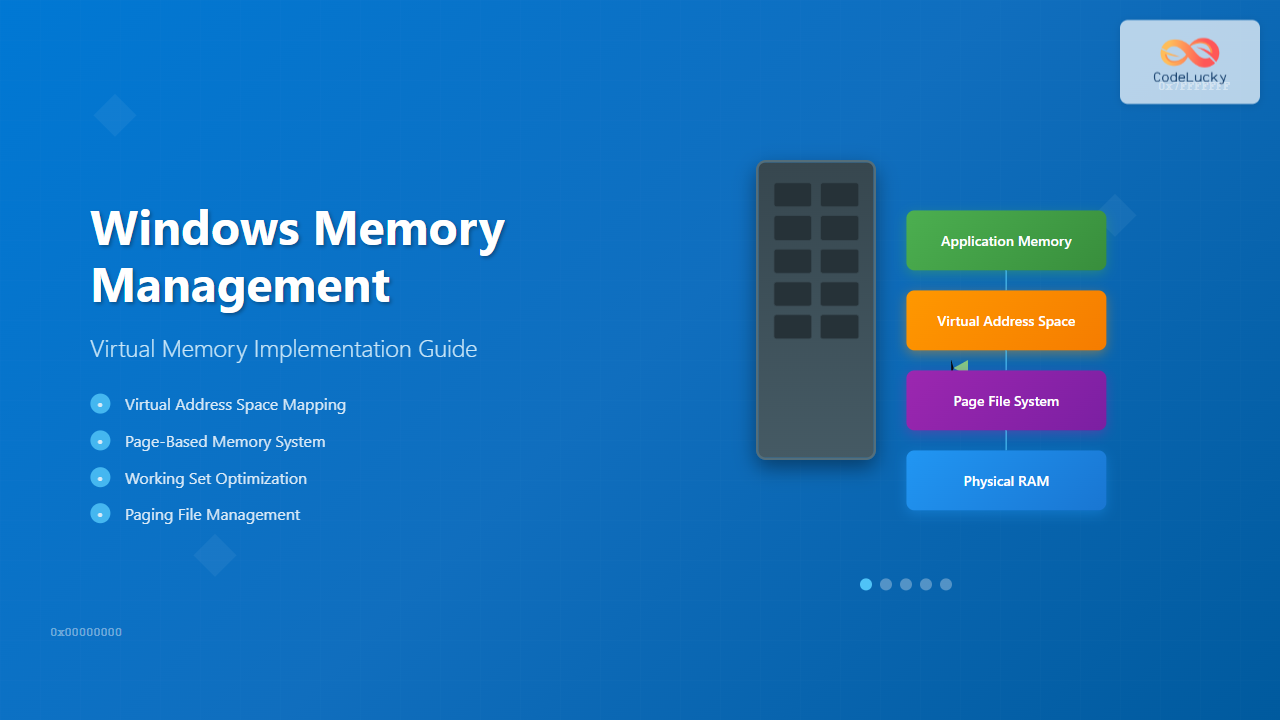
Windows virtual memory operates on the principle of memory abstraction. Each process receives its own virtual address space, typically 4GB on 32-bit systems and up to 128TB on 64-bit systems. This virtual address space is mapped to physical memory and disk storage through a complex system of tables and algorithms.

Virtual Address Space Layout
Windows organizes virtual memory into distinct regions:
- User Space (0x00000000 to 0x7FFFFFFF): Available to applications
- System Space (0x80000000 to 0xFFFFFFFF): Reserved for kernel and system components
- Shared Memory Regions: For inter-process communication
- Memory-Mapped Files: Direct file access through memory
Page-Based Memory Management
Windows implements virtual memory through a paging system. Memory is divided into fixed-size blocks called pages (typically 4KB on x86/x64 systems). This granular approach enables efficient memory allocation and protection.
Page States and Transitions
Windows memory pages exist in several states:

Page State Definitions
- Free: Available for allocation, content zeroed
- Standby: Previously used, available for reallocation
- Active: Currently in use by a process
- Modified: Contains data that needs to be written to disk
- Transition: Being moved between states
Windows Memory Manager Architecture
The Windows Memory Manager (MM) is a kernel-mode component responsible for virtual memory implementation. It handles memory allocation, deallocation, protection, and paging operations.
Key Components

Address Translation Process
Windows uses hardware-assisted address translation through page tables:
// Simplified address translation example
typedef struct _PTE {
    ULONG64 Valid : 1;
    ULONG64 Write : 1;
    ULONG64 Owner : 1;
    ULONG64 WriteThrough : 1;
    ULONG64 CacheDisable : 1;
    ULONG64 Accessed : 1;
    ULONG64 Dirty : 1;
    ULONG64 LargePage : 1;
    ULONG64 Global : 1;
    ULONG64 CopyOnWrite : 1;
    ULONG64 Prototype : 1;
    ULONG64 Reserved : 1;
    ULONG64 PageFrameNumber : 36;
    ULONG64 Reserved1 : 16;
} PTE, *PPTE;
Paging File Implementation
The paging file (pagefile.sys) serves as an extension of physical memory, storing pages that are not currently needed in RAM. Windows can manage multiple paging files across different drives for improved performance.
Paging File Configuration
Windows determines paging file size based on several factors:
- Initial Size: Minimum space allocated
- Maximum Size: Upper limit for automatic growth
- System Managed: Windows automatically adjusts size
- Custom Size: User-defined fixed or variable size
Optimal Paging File Configuration
# PowerShell script to configure paging file
$ComputerSystem = Get-WmiObject -Class Win32_ComputerSystem
$AutomaticManagedPagefile = $ComputerSystem.AutomaticManagedPagefile
$ComputerSystem.AutomaticManagedPagefile = $False
$ComputerSystem.Put()

$PageFileSetting = Get-WmiObject -Class Win32_PageFileSetting
if ($PageFileSetting) {
    $PageFileSetting.Delete()
}

Set-WmiInstance -Class Win32_PageFileSetting -Arguments @{
    Name = "C:\pagefile.sys"
    InitialSize = 4096  # 4GB
    MaximumSize = 8192  # 8GB
}
Working Set Management
A process’s working set represents the pages currently resident in physical memory. Windows continuously monitors and adjusts working sets to optimize memory usage across all running processes.

Working Set Tuning
Developers can influence working set behavior through API calls:
#include
#include

// Set working set size limits
BOOL SetProcessWorkingSetSize(
    HANDLE hProcess,
    SIZE_T dwMinimumWorkingSetSize,
    SIZE_T dwMaximumWorkingSetSize
);

// Example usage
int main() {
    HANDLE hProcess = GetCurrentProcess();

    // Set minimum working set to 10MB, maximum to 50MB
    if (SetProcessWorkingSetSize(hProcess, 10 * 1024 * 1024, 50 * 1024 * 1024)) {
        printf("Working set size configured successfully\n");
    }

    return 0;
}
Memory Allocation Strategies
Windows provides multiple memory allocation mechanisms, each optimized for different scenarios:
Virtual Memory Allocation
#include

int main() {
    // Reserve virtual address space
    LPVOID lpReserved = VirtualAlloc(
        NULL,                    // Let system choose address
        1024 * 1024,            // 1MB
        MEM_RESERVE,            // Reserve only
        PAGE_READWRITE          // Protection
    );

    if (lpReserved) {
        printf("Reserved 1MB at address: %p\n", lpReserved);

        // Commit physical storage
        LPVOID lpCommitted = VirtualAlloc(
            lpReserved,         // Use reserved address
            4096,               // Commit 4KB page
            MEM_COMMIT,         // Commit storage
            PAGE_READWRITE      // Protection
        );

        if (lpCommitted) {
            printf("Committed 4KB at address: %p\n", lpCommitted);

            // Use the memory
            strcpy((char*)lpCommitted, "Hello, Virtual Memory!");
            printf("Data written: %s\n", (char*)lpCommitted);
        }

        // Cleanup
        VirtualFree(lpReserved, 0, MEM_RELEASE);
    }

    return 0;
}
Heap Allocation
Windows provides process heaps for dynamic memory allocation:
#include

int main() {
    // Get process heap
    HANDLE hHeap = GetProcessHeap();

    // Allocate memory from heap
    LPVOID lpMemory = HeapAlloc(hHeap, HEAP_ZERO_MEMORY, 1024);

    if (lpMemory) {
        printf("Allocated 1KB from process heap: %p\n", lpMemory);

        // Use the memory
        strcpy((char*)lpMemory, "Heap allocated memory");
        printf("Data: %s\n", (char*)lpMemory);

        // Free memory
        HeapFree(hHeap, 0, lpMemory);
    }

    return 0;
}
Memory Protection and Security
Windows implements comprehensive memory protection to prevent unauthorized access and maintain system stability:
Memory Protection Attributes
- PAGE_READONLY: Read-only access
- PAGE_READWRITE: Read and write access
- PAGE_EXECUTE: Execute-only access
- PAGE_EXECUTE_READ: Execute and read access
- PAGE_EXECUTE_READWRITE: Full access
- PAGE_NOACCESS: No access allowed
Data Execution Prevention (DEP)
DEP prevents code execution from data pages, enhancing security against buffer overflow attacks:
// Check DEP status
BOOL IsProcessDEPEnabled() {
    BOOL bPermanent;
    DWORD dwFlags;

    if (GetProcessDEPPolicy(GetCurrentProcess(), &dwFlags, &bPermanent)) {
        return (dwFlags & PROCESS_DEP_ENABLE) != 0;
    }

    return FALSE;
}
Performance Monitoring and Optimization
Monitoring virtual memory performance is crucial for system optimization. Windows provides various tools and APIs for memory analysis:
Memory Performance Counters
#include
#include

void DisplayMemoryInfo() {
    MEMORYSTATUSEX memStatus;
    memStatus.dwLength = sizeof(memStatus);

    if (GlobalMemoryStatusEx(&memStatus)) {
        printf("Memory Load: %ld%%\n", memStatus.dwMemoryLoad);
        printf("Total Physical: %lld MB\n", memStatus.ullTotalPhys / (1024 * 1024));
        printf("Available Physical: %lld MB\n", memStatus.ullAvailPhys / (1024 * 1024));
        printf("Total Virtual: %lld MB\n", memStatus.ullTotalVirtual / (1024 * 1024));
        printf("Available Virtual: %lld MB\n", memStatus.ullAvailVirtual / (1024 * 1024));
        printf("Total Page File: %lld MB\n", memStatus.ullTotalPageFile / (1024 * 1024));
        printf("Available Page File: %lld MB\n", memStatus.ullAvailPageFile / (1024 * 1024));
    }
}
Process Memory Information
void DisplayProcessMemoryInfo(HANDLE hProcess) {
    PROCESS_MEMORY_COUNTERS_EX pmc;

    if (GetProcessMemoryInfo(hProcess, (PROCESS_MEMORY_COUNTERS*)&pmc, sizeof(pmc))) {
        printf("Working Set Size: %lld KB\n", pmc.WorkingSetSize / 1024);
        printf("Peak Working Set: %lld KB\n", pmc.PeakWorkingSetSize / 1024);
        printf("Private Usage: %lld KB\n", pmc.PrivateUsage / 1024);
        printf("Page Fault Count: %ld\n", pmc.PageFaultCount);
    }
}
Advanced Virtual Memory Techniques
Memory-Mapped Files
Memory-mapped files provide efficient file I/O through virtual memory:
#include

int main() {
    // Create/open file
    HANDLE hFile = CreateFile(
        L"test.dat",
        GENERIC_READ | GENERIC_WRITE,
        0,
        NULL,
        CREATE_ALWAYS,
        FILE_ATTRIBUTE_NORMAL,
        NULL
    );

    if (hFile != INVALID_HANDLE_VALUE) {
        // Set file size
        SetFilePointer(hFile, 1024 * 1024, NULL, FILE_BEGIN);
        SetEndOfFile(hFile);

        // Create file mapping
        HANDLE hMapping = CreateFileMapping(
            hFile,
            NULL,
            PAGE_READWRITE,
            0,
            1024 * 1024,
            NULL
        );

        if (hMapping) {
            // Map view of file
            LPVOID lpView = MapViewOfFile(
                hMapping,
                FILE_MAP_ALL_ACCESS,
                0,
                0,
                1024 * 1024
            );

            if (lpView) {
                printf("File mapped to memory at: %p\n", lpView);

                // Write data directly to memory (and file)
                strcpy((char*)lpView, "Memory-mapped file content");

                // Cleanup
                UnmapViewOfFile(lpView);
            }

            CloseHandle(hMapping);
        }

        CloseHandle(hFile);
    }

    return 0;
}
Large Page Support
Large pages (2MB or 1GB) can improve performance for memory-intensive applications:
#include

BOOL EnableLockMemoryPrivilege() {
    HANDLE hToken;
    TOKEN_PRIVILEGES tp;

    if (!OpenProcessToken(GetCurrentProcess(), TOKEN_ADJUST_PRIVILEGES, &hToken)) {
        return FALSE;
    }

    tp.PrivilegeCount = 1;
    tp.Privileges[0].Attributes = SE_PRIVILEGE_ENABLED;

    if (!LookupPrivilegeValue(NULL, SE_LOCK_MEMORY_NAME, &tp.Privileges[0].Luid)) {
        CloseHandle(hToken);
        return FALSE;
    }

    BOOL result = AdjustTokenPrivileges(hToken, FALSE, &tp, 0, NULL, NULL);
    CloseHandle(hToken);

    return result && GetLastError() == ERROR_SUCCESS;
}

int main() {
    if (EnableLockMemoryPrivilege()) {
        SIZE_T largePageSize = GetLargePageMinimum();

        if (largePageSize > 0) {
            LPVOID lpLargePage = VirtualAlloc(
                NULL,
                largePageSize,
                MEM_COMMIT | MEM_RESERVE | MEM_LARGE_PAGES,
                PAGE_READWRITE
            );

            if (lpLargePage) {
                printf("Large page allocated: %p (Size: %lld MB)\n",
                       lpLargePage, largePageSize / (1024 * 1024));

                VirtualFree(lpLargePage, 0, MEM_RELEASE);
            }
        }
    }

    return 0;
}
Troubleshooting Memory Issues
Common virtual memory problems and their solutions:
Memory Leaks Detection
#ifdef _DEBUG
#define _CRTDBG_MAP_ALLOC
#include
#endif

int main() {
#ifdef _DEBUG
    _CrtSetDbgFlag(_CRTDBG_ALLOC_MEM_DF | _CRTDBG_LEAK_CHECK_DF);
#endif

    // Your application code here
    char* leak = (char*)malloc(1024);  // Intentional leak for demonstration

    return 0;  // Memory leak will be reported at program exit
}
Fragmentation Mitigation
- Use appropriate heap flags: HEAP_NO_SERIALIZE, HEAP_LOW_FRAG
- Pool allocation: Pre-allocate blocks of memory
- Memory alignment: Align allocations to page boundaries
- Regular defragmentation: Use HeapCompact() periodically
Best Practices for Virtual Memory Management
Application Development Guidelines
- Minimize working set: Use memory efficiently
- Handle page faults gracefully: Implement proper error handling
- Use appropriate allocation methods: Choose between heap, virtual, and mapped memory
- Implement memory pooling: Reduce allocation overhead
- Monitor memory usage: Regular performance profiling
System Administration Best Practices
- Configure adequate paging file size: 1.5x to 3x physical RAM
- Place paging files strategically: Use fastest available drives
- Monitor memory pressure: Use Performance Monitor regularly
- Keep drivers updated: Prevent memory leaks in kernel mode
- Regular system maintenance: Clear temporary files and restart services
Understanding Windows virtual memory implementation enables developers to create more efficient applications and helps system administrators optimize system performance. The sophisticated memory management system in Windows continues to evolve, providing better performance, security, and reliability for modern computing environments.
Related Posts
Memory Management in Operating System: Virtual and Physical Memory Fundamentals
Introduction to Memory Management Memory management is one of the most critical functions of an operating system, responsible for efficiently...
Virtual Memory in Virtualization: Memory Overcommitment Strategies and Implementation
Introduction to Memory Overcommitment Memory overcommitment is a fundamental virtualization technique that allows hypervisors to allocate more virtual memory to...

Virtual Memory in OS: Complete Guide to Paging, Segmentation and Address Translation
Virtual memory is one of the most fundamental concepts in modern operating systems, enabling efficient memory management and providing crucial...
Memory Allocation Techniques: Contiguous vs Non-contiguous Management Strategies
Memory allocation is a fundamental aspect of operating system design that determines how programs and data are stored and accessed...
Memory Protection: Hardware and Software Mechanisms for Secure Computing
Understanding Memory Protection in Modern Computing Memory protection is a fundamental security mechanism that prevents programs from accessing memory regions...
Paging in Operating System: Complete Guide to Memory Management and Page Tables
What is Paging in Operating Systems? Paging is a memory management scheme that allows the operating system to store and...

Garbage Collection in Operating System: Complete Guide to Automatic Memory Management
What is Garbage Collection in Operating Systems? Garbage collection is an automatic memory management technique used by operating systems and...

Demand Paging: Loading Pages on Demand for Efficiency
Introduction to Demand Paging Demand paging is a sophisticated memory management technique used by modern operating systems to optimize memory...

Process in Operating System: Complete Guide to Definition, States and Lifecycle
What is a Process in Operating System? A process is a program in execution that consists of the program code...

C Memory Management: Advanced Techniques and Best Practices
Memory management is a critical aspect of C programming that can make or break your application's performance and reliability. In...
Storage Virtualization: Complete Guide to Abstract Storage Resources in Modern Computing
Storage virtualization represents one of the most critical technologies in modern computing infrastructure, enabling organizations to abstract physical storage resources...

Segmentation in OS: Memory Management Through Logical Address Space Division
Introduction to Segmentation in Operating Systems Segmentation is a fundamental memory management technique in operating systems that divides the logical...