

Introduction to Virtual Private Networks
A Virtual Private Network (VPN) creates a secure, encrypted connection between your device and a remote server, effectively creating a private tunnel through the public internet. This technology enables secure remote access, protects sensitive data transmission, and maintains privacy by masking your real IP address and location.
VPNs operate by establishing an encrypted tunnel between the client and server, routing all network traffic through this secure connection. When properly configured, VPNs provide confidentiality, integrity, and authentication for network communications.

Types of VPN Protocols
OpenVPN
OpenVPN is an open-source VPN solution that uses SSL/TLS protocols for encryption. It’s highly configurable and works across multiple platforms, making it one of the most popular VPN implementations.
Key Features:
- Cross-platform compatibility
- Strong encryption (AES-256)
- Flexible authentication methods
- NAT firewall traversal
WireGuard
WireGuard is a modern VPN protocol designed for simplicity and performance. It uses state-of-the-art cryptography and aims to be faster and more secure than traditional VPN protocols.
Advantages:
- Minimal codebase (easier to audit)
- Superior performance
- Built-in roaming support
- Modern cryptographic primitives
IPSec (Internet Protocol Security)
IPSec is a protocol suite that provides security at the IP layer. It’s commonly used in site-to-site VPN connections and is built into most operating systems.
Components:
- Authentication Header (AH)
- Encapsulating Security Payload (ESP)
- Internet Key Exchange (IKE)
OpenVPN Server Setup
Linux Server Configuration
Setting up an OpenVPN server on Ubuntu/Debian requires installing the OpenVPN package and configuring certificates.
Installation:
sudo apt update
sudo apt install openvpn easy-rsa
Certificate Authority Setup:
# Create CA directory
make-cadir ~/openvpn-ca
cd ~/openvpn-ca

# Configure variables
nano vars

# Build the CA
source vars
./clean-all
./build-ca
Server Certificate Generation:
# Generate server certificate
./build-key-server server

# Generate Diffie-Hellman parameters
./build-dh

# Generate HMAC key
openvpn --genkey --secret keys/ta.key
Server Configuration File (/etc/openvpn/server.conf):
port 1194
proto udp
dev tun

ca ca.crt
cert server.crt
key server.key
dh dh2048.pem

server 10.8.0.0 255.255.255.0
ifconfig-pool-persist ipp.txt

push "redirect-gateway def1 bypass-dhcp"
push "dhcp-option DNS 8.8.8.8"
push "dhcp-option DNS 8.8.4.4"

client-to-client
keepalive 10 120
tls-auth ta.key 0
comp-lzo
user nobody
group nogroup
persist-key
persist-tun

status openvpn-status.log
verb 3
explicit-exit-notify 1
Firewall and Routing Configuration
Enable IP Forwarding:
# Edit sysctl.conf
echo 'net.ipv4.ip_forward=1' >> /etc/sysctl.conf
sysctl -p
Configure iptables:
# Allow VPN traffic
iptables -A INPUT -p udp --dport 1194 -j ACCEPT
iptables -A FORWARD -i tun+ -j ACCEPT
iptables -A FORWARD -i tun+ -o eth0 -m state --state RELATED,ESTABLISHED -j ACCEPT
iptables -A FORWARD -i eth0 -o tun+ -m state --state RELATED,ESTABLISHED -j ACCEPT
iptables -t nat -A POSTROUTING -s 10.8.0.0/24 -o eth0 -j MASQUERADE

Client Configuration
Windows Client Setup
Client Certificate Generation:
# On the server, generate client certificate
./build-key client1
Client Configuration File (client.ovpn):
client
dev tun
proto udp
remote your-server-ip 1194
resolv-retry infinite
nobind
user nobody
group nobody
persist-key
persist-tun
ca ca.crt
cert client1.crt
key client1.key
tls-auth ta.key 1
comp-lzo
verb 3
Linux Client Configuration
Install OpenVPN Client:
sudo apt install openvpn
Connect to VPN:
sudo openvpn --config client.ovpn
macOS Client Setup
Using Tunnelblick:
- Download and install Tunnelblick
- Import the .ovpn configuration file
- Connect through the Tunnelblick interface
WireGuard Implementation
Server Setup
Installation on Ubuntu:
sudo apt update
sudo apt install wireguard
Key Generation:
# Generate server keys
wg genkey | tee server_private_key | wg pubkey > server_public_key

# Generate client keys
wg genkey | tee client_private_key | wg pubkey > client_public_key
Server Configuration (/etc/wireguard/wg0.conf):
[Interface]
PrivateKey = SERVER_PRIVATE_KEY
Address = 10.0.0.1/24
ListenPort = 51820
SaveConfig = true

PostUp = iptables -A FORWARD -i wg0 -j ACCEPT; iptables -t nat -A POSTROUTING -o eth0 -j MASQUERADE
PostDown = iptables -D FORWARD -i wg0 -j ACCEPT; iptables -t nat -D POSTROUTING -o eth0 -j MASQUERADE

[Peer]
PublicKey = CLIENT_PUBLIC_KEY
AllowedIPs = 10.0.0.2/32
Client Configuration
Client Configuration File:
[Interface]
PrivateKey = CLIENT_PRIVATE_KEY
Address = 10.0.0.2/24
DNS = 8.8.8.8

[Peer]
PublicKey = SERVER_PUBLIC_KEY
Endpoint = your-server-ip:51820
AllowedIPs = 0.0.0.0/0
PersistentKeepalive = 25
Start WireGuard:
# Server
sudo wg-quick up wg0
sudo systemctl enable wg-quick@wg0

# Client
sudo wg-quick up wg0
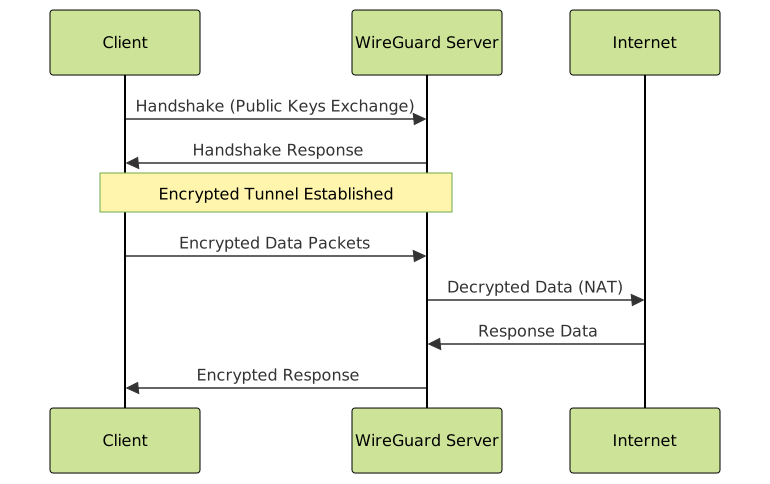
IPSec VPN Configuration
Site-to-Site IPSec Setup
strongSwan Installation:
sudo apt install strongswan strongswan-pki
IPSec Configuration (/etc/ipsec.conf):
config setup
    charondebug="ike 1, knl 1, cfg 0"
    uniqueids=no

conn %default
    ikelifetime=60m
    keylife=20m
    rekeymargin=3m
    keyingtries=1
    keyexchange=ikev2

conn site-to-site
    left=192.168.1.1
    leftsubnet=192.168.1.0/24
    leftid=@site1
    leftauth=psk
    right=192.168.2.1
    rightsubnet=192.168.2.0/24
    rightid=@site2
    rightauth=psk
    auto=start
Pre-Shared Key (/etc/ipsec.secrets):
@site1 @site2 : PSK "your-strong-preshared-key"
Advanced VPN Features
Multi-Factor Authentication
Google Authenticator Integration with OpenVPN:
# Install PAM module
sudo apt install libpam-google-authenticator

# Configure OpenVPN
echo "plugin /usr/lib/openvpn/openvpn-plugin-auth-pam.so openvpn" >> /etc/openvpn/server.conf
Load Balancing and Failover
Client Configuration for Multiple Servers:
remote server1.example.com 1194
remote server2.example.com 1194
remote server3.example.com 1194
remote-random
Traffic Splitting
Route Specific Traffic Through VPN:
# Only route specific networks through VPN
route 192.168.100.0 255.255.255.0
route 10.0.0.0 255.255.255.0

Performance Optimization
Bandwidth and Latency Tuning
TCP/UDP Buffer Optimization:
# Increase buffer sizes
echo 'net.core.rmem_default = 262144' >> /etc/sysctl.conf
echo 'net.core.rmem_max = 16777216' >> /etc/sysctl.conf
echo 'net.core.wmem_default = 262144' >> /etc/sysctl.conf
echo 'net.core.wmem_max = 16777216' >> /etc/sysctl.conf
OpenVPN Performance Settings:
# Optimize for speed
fast-io
sndbuf 393216
rcvbuf 393216
push "sndbuf 393216"
push "rcvbuf 393216"
Compression and Encryption Balance
Adaptive Compression:
# Use adaptive LZO compression
comp-lzo adaptive
Cipher Selection:
# Balance security and performance
cipher AES-256-GCM
auth SHA256
Monitoring and Troubleshooting
Connection Monitoring
OpenVPN Status Monitoring:
# Check OpenVPN status
systemctl status openvpn@server
cat /etc/openvpn/openvpn-status.log
WireGuard Monitoring:
# Show WireGuard interface status
wg show
Common Issues and Solutions
DNS Resolution Problems:
# Test DNS resolution
nslookup google.com
dig @8.8.8.8 google.com

# Fix DNS in OpenVPN
push "dhcp-option DNS 1.1.1.1"
push "dhcp-option DNS 1.0.0.1"
Firewall Troubleshooting:
# Check iptables rules
iptables -L -n -v
iptables -t nat -L -n -v

# Test connectivity
traceroute 8.8.8.8
Log Analysis
OpenVPN Logs:
# Check OpenVPN logs
journalctl -u openvpn@server -f
tail -f /var/log/openvpn/openvpn.log
Authentication Failures:
# Debug authentication
grep "AUTH-FAILED" /var/log/openvpn/openvpn.log
grep "TLS Error" /var/log/openvpn/openvpn.log
Security Best Practices
Certificate Management
Certificate Revocation:
# Revoke client certificate
./revoke-full client1
cp keys/crl.pem /etc/openvpn/

# Add to server config
crl-verify crl.pem
Access Control
Client-Specific Rules:
# Create client config directory
mkdir /etc/openvpn/ccd

# Client-specific config
echo "ifconfig-push 10.8.0.100 255.255.255.0" > /etc/openvpn/ccd/client1
echo "push \"route 192.168.1.0 255.255.255.0\"" >> /etc/openvpn/ccd/client1
Hardening Guidelines
Server Hardening:
- Use strong encryption algorithms
- Implement certificate pinning
- Regular security updates
- Monitor connection logs
- Implement fail2ban for brute force protection
Network Segmentation:
# Isolate VPN clients
iptables -A FORWARD -i tun0 -o tun0 -j DROP
Conclusion
Setting up a VPN requires careful consideration of protocol choice, security requirements, and performance needs. OpenVPN offers maximum compatibility and flexibility, WireGuard provides modern performance and simplicity, while IPSec delivers enterprise-grade site-to-site connectivity.
Proper configuration includes secure certificate management, appropriate firewall rules, and ongoing monitoring. Regular security audits and updates ensure your VPN infrastructure remains secure and performant. Consider your specific use case requirements when choosing between protocols and implement appropriate security measures based on your threat model.





