
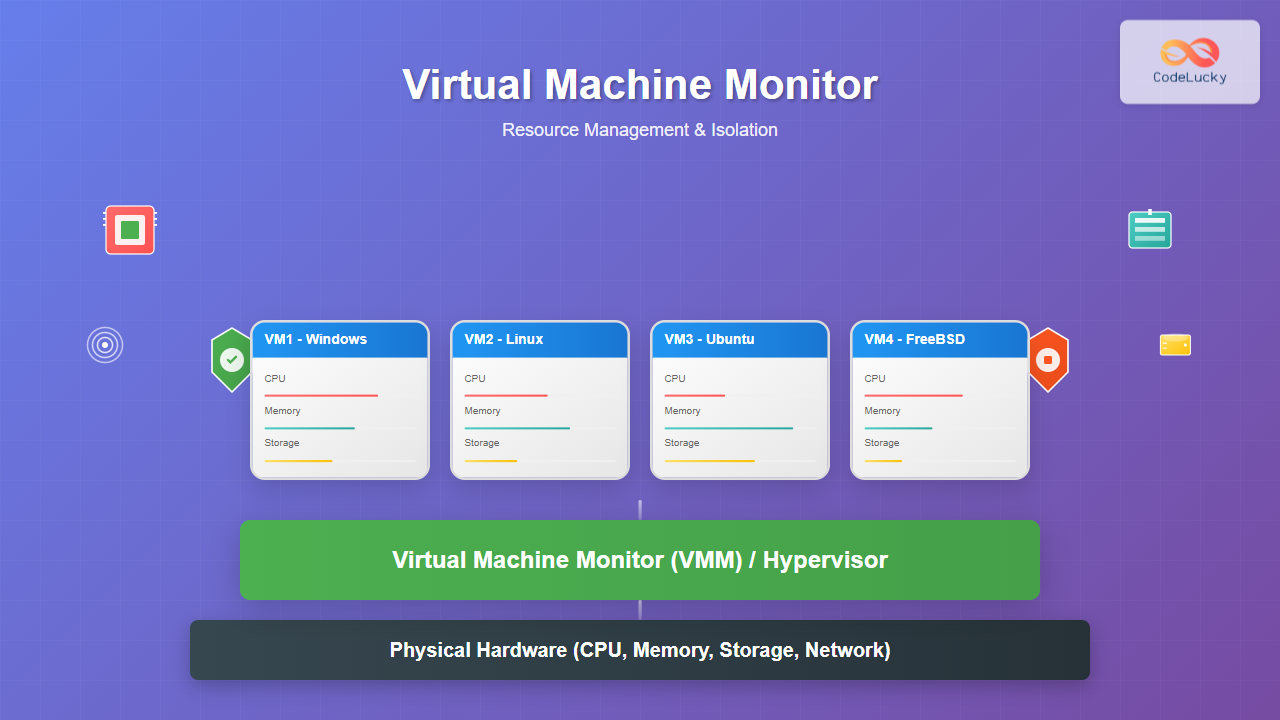
A Virtual Machine Monitor (VMM), also known as a hypervisor, is a critical software layer that creates and manages virtual machines by abstracting physical hardware resources. It enables multiple operating systems to run simultaneously on a single physical machine while maintaining complete isolation between them.
Understanding Virtual Machine Monitors
The VMM acts as an intermediary between guest operating systems and physical hardware, providing resource virtualization and security isolation. It’s responsible for allocating CPU time, memory, storage, and network resources to each virtual machine while ensuring no VM can access another’s resources without permission.

Types of Virtual Machine Monitors
Type 1 Hypervisors (Bare-Metal)
Type 1 hypervisors run directly on physical hardware without a host operating system. They provide superior performance and security by eliminating the overhead of a host OS layer.
Examples:
- VMware vSphere/ESXi
- Microsoft Hyper-V
- Citrix XenServer
- KVM (Kernel-based Virtual Machine)
Type 2 Hypervisors (Hosted)
Type 2 hypervisors run as applications on top of a host operating system. While easier to install and manage, they introduce additional overhead through the host OS layer.
Examples:
- VMware Workstation
- Oracle VirtualBox
- Parallels Desktop
- QEMU

Resource Management in VMM
CPU Resource Management
The VMM implements CPU scheduling algorithms to distribute processing time among virtual machines. Modern VMMs use sophisticated techniques like:
- Proportional Share Scheduling: Allocates CPU based on assigned weights
- Credit-based Scheduling: Uses credit systems for fair resource distribution
- Gang Scheduling: Coordinates scheduling across multiple CPUs
CPU Overcommitment
VMMs can allocate more virtual CPUs than physical cores available, relying on the fact that not all VMs will use their full CPU allocation simultaneously. This technique, called CPU overcommitment, maximizes hardware utilization.
# Example: Checking CPU allocation in VMware
esxtop
# Press 'c' for CPU view
# Look at %USED and %RDY columns for overcommitment indicators
Memory Management
Memory management in VMMs involves several advanced techniques to optimize RAM usage across multiple virtual machines:
Memory Overcommitment Techniques
- Ballooning: Guest OS returns unused memory to the hypervisor
- Memory Compression: Compresses less-frequently used pages
- Memory Deduplication: Identifies and merges identical memory pages
- Swapping: Moves VM memory to disk storage

Memory Ballooning Example
# Pseudo-code for memory balloon driver
class BalloonDriver:
    def __init__(self, vmm_interface):
        self.vmm = vmm_interface
        self.balloon_size = 0

    def inflate_balloon(self, target_size):
        """Request more memory from guest OS"""
        pages_to_allocate = target_size - self.balloon_size
        allocated_pages = self.allocate_guest_pages(pages_to_allocate)
        self.vmm.return_pages_to_hypervisor(allocated_pages)
        self.balloon_size = target_size

    def deflate_balloon(self, target_size):
        """Return memory to guest OS"""
        pages_to_return = self.balloon_size - target_size
        self.vmm.request_pages_from_hypervisor(pages_to_return)
        self.balloon_size = target_size
Storage Resource Management
VMMs manage storage through virtual disk abstraction, providing each VM with what appears to be dedicated storage while actually sharing underlying physical storage resources.
Virtual Disk Formats
- Thick Provisioned: Pre-allocates entire disk space
- Thin Provisioned: Allocates space on-demand
- Linked Clones: Share common base disk images
Storage Performance Optimization
# VMware storage configuration example
storage_policies:
  high_performance:
    disk_type: "SSD"
    raid_level: "RAID-10"
    cache_policy: "write-back"

  cost_optimized:
    disk_type: "HDD"
    raid_level: "RAID-5"
    cache_policy: "write-through"
    thin_provisioning: true
Network Resource Management
Network virtualization in VMMs creates virtual switches and virtual network adapters, enabling complex network topologies within the virtualized environment.
Network Quality of Service (QoS)
- Bandwidth Allocation: Guaranteed minimum and maximum bandwidth
- Traffic Shaping: Controls packet flow rates
- Priority Queuing: Prioritizes critical network traffic
Isolation Mechanisms
Hardware-Assisted Virtualization
Modern processors include hardware virtualization extensions that enhance VMM isolation capabilities:
- Intel VT-x/AMD-V: CPU virtualization extensions
- Intel VT-d/AMD-Vi: I/O virtualization extensions
- SLAT (Second Level Address Translation): Memory virtualization enhancement
Security Isolation
VMMs implement multiple layers of security isolation to prevent VMs from accessing each other’s resources or compromising the host system:

Resource Quotas and Limits
VMMs enforce strict resource quotas to prevent any single VM from monopolizing system resources:
        4
        1000
        4000
        2000


        8192
        2048
        16384


        100
        1000
Performance Monitoring and Optimization
Resource Utilization Metrics
Effective VMM management requires continuous monitoring of key performance indicators:
- CPU Ready Time: Time VMs wait for CPU access
- Memory Balloon Size: Amount of memory reclaimed from VMs
- Storage Latency: Disk I/O response times
- Network Throughput: Data transfer rates
Automated Resource Management
Modern VMMs include automated resource management features:
- Dynamic Resource Scheduling (DRS): Automatically migrates VMs for load balancing
- High Availability (HA): Automatically restarts VMs on hardware failure
- Fault Tolerance: Maintains synchronized VM copies
# Example automated resource management logic
class ResourceManager:
    def __init__(self, cluster):
        self.cluster = cluster
        self.threshold_cpu = 80  # CPU utilization threshold

    def monitor_and_balance(self):
        overloaded_hosts = self.find_overloaded_hosts()
        underutilized_hosts = self.find_underutilized_hosts()

        for host in overloaded_hosts:
            candidate_vms = self.get_migration_candidates(host)
            target_host = self.find_best_target(underutilized_hosts)

            if target_host:
                self.migrate_vm(candidate_vms[0], target_host)
                self.log_migration_event(candidate_vms[0], host, target_host)

    def find_overloaded_hosts(self):
        return [host for host in self.cluster.hosts
                if host.cpu_utilization > self.threshold_cpu]
Advanced VMM Features
Live Migration
Live migration allows moving running VMs between physical hosts without downtime, enabling:
- Hardware maintenance without service interruption
- Load balancing across cluster nodes
- Energy optimization by consolidating workloads
Nested Virtualization
Nested virtualization enables running hypervisors inside virtual machines, useful for:
- Development and testing environments
- Cloud provider multi-tenancy
- Hypervisor research and development
Container Integration
Modern VMMs increasingly integrate with container technologies, providing:
- VM-level isolation for container clusters
- Hybrid virtualization architectures
- Enhanced security for containerized workloads

Best Practices for VMM Implementation
Resource Planning
- Right-sizing: Allocate appropriate resources based on actual workload requirements
- Overcommitment Ratios: Maintain safe CPU (2:1-4:1) and memory (1.5:1-2:1) ratios
- Performance Baselines: Establish baseline metrics before virtualization
Security Hardening
- Minimal Attack Surface: Disable unnecessary services and features
- Network Segmentation: Isolate management and VM traffic
- Regular Updates: Keep hypervisor and guest OS patches current
Disaster Recovery
- Regular Backups: Implement automated VM backup schedules
- Replication: Maintain copies at remote sites
- Testing: Regularly test recovery procedures
Virtual Machine Monitors represent a fundamental technology enabling modern cloud computing, server consolidation, and efficient resource utilization. By understanding resource management principles and isolation mechanisms, administrators can build robust, secure, and high-performing virtualized environments that meet diverse organizational needs while optimizing infrastructure investments.
The continuous evolution of VMM technology, including integration with containers, software-defined networking, and artificial intelligence-driven automation, ensures that virtualization remains at the forefront of enterprise IT infrastructure strategies.
Related Posts
Full Virtualization: Complete Hardware Abstraction and Implementation Guide
Full virtualization represents one of the most significant breakthroughs in modern computing, enabling complete hardware abstraction that allows multiple operating...
Hypervisor Types: Complete Guide to Type 1 and Type 2 Virtualization
Virtualization has revolutionized modern computing, allowing multiple operating systems to run simultaneously on a single physical machine. At the heart...
Virtual Machine in Operating System: Complete Guide to Hardware Virtualization Technology
What is a Virtual Machine in Operating System? A Virtual Machine (VM) is a software-based emulation of a physical computer...
Virtual I/O: Complete Guide to Device Virtualization Techniques and Implementation
Introduction to Virtual I/O and Device Virtualization Virtual Input/Output (Virtual I/O) represents one of the most critical components in modern...
Application Virtualization: Complete Guide to Software Isolation and Virtual Environments
Application virtualization represents one of the most significant advances in modern computing, enabling organizations to run software applications in isolated...
Server Virtualization: Complete Guide to Consolidation and Resource Optimization
Introduction to Server Virtualization Server virtualization is a revolutionary technology that enables multiple virtual machines (VMs) to run on a...
Container Virtualization: Complete Guide to OS-level Virtualization Technology
Container virtualization represents a revolutionary approach to application deployment and resource management through OS-level virtualization. Unlike traditional hardware virtualization, containers...
Desktop Virtualization: Complete VDI Implementation Guide for Modern Enterprises
Introduction to Desktop Virtualization Desktop virtualization represents a paradigm shift in how organizations deliver computing resources to end users. By...
Virtual CPU Scheduling: Complete Guide to Time-sharing Physical Processors
Virtual CPU scheduling is the cornerstone of modern operating systems, enabling multiple processes to share limited physical processors efficiently. This...
Virtual Memory in Virtualization: Memory Overcommitment Strategies and Implementation
Introduction to Memory Overcommitment Memory overcommitment is a fundamental virtualization technique that allows hypervisors to allocate more virtual memory to...
Paravirtualization: Modified Guest Operating System Architecture and Implementation
What is Paravirtualization? Paravirtualization is a virtualization technique where the guest operating system is modified to be aware that it's...
Cloud Operating System: Complete Guide to Virtualized Infrastructure Management
Cloud Operating Systems represent a paradigm shift in how we manage and orchestrate computing resources across distributed environments. Unlike traditional...





