
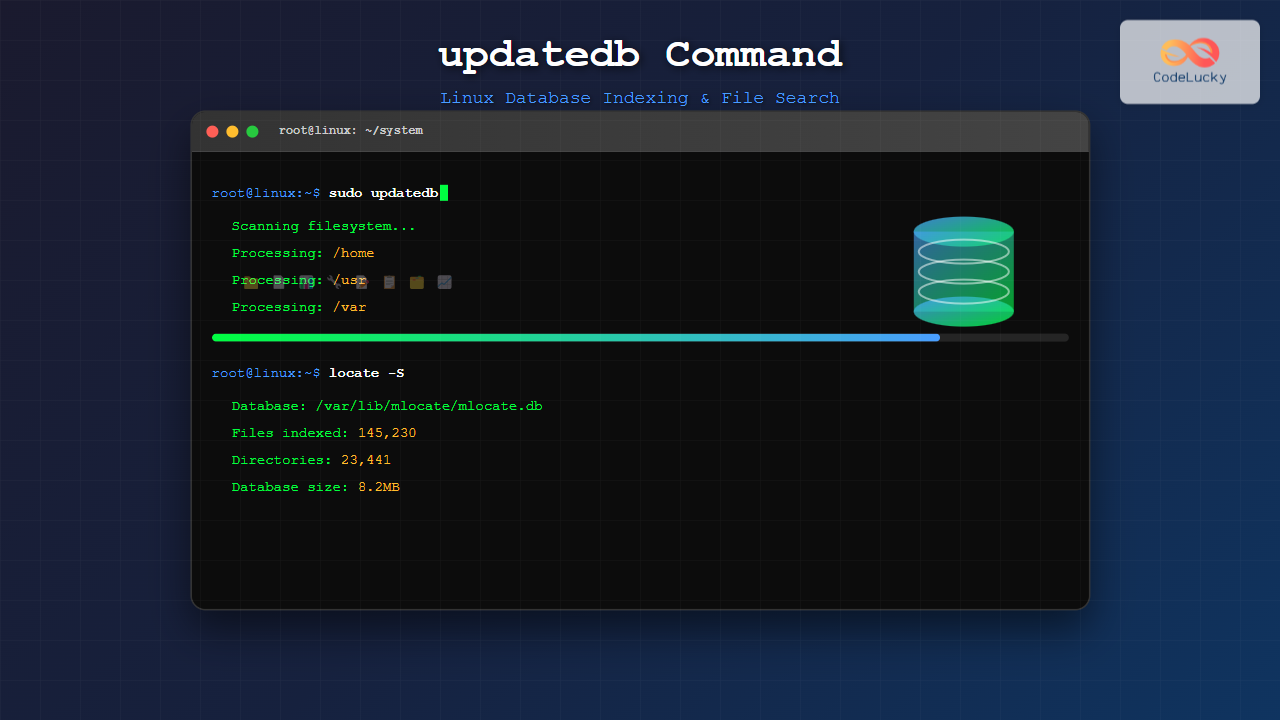
The updatedb command is a crucial system utility in Linux that updates the database used by the locate command for fast file searching. This powerful tool indexes file and directory names across your entire filesystem, creating a searchable database that dramatically speeds up file location operations.
What is updatedb Command?
The updatedb command is part of the GNU findutils package and serves as the backend database updater for the locate command. It scans your entire filesystem and creates an indexed database of all files and directories, which is then stored in /var/lib/mlocate/mlocate.db or /var/lib/locatedb depending on your system configuration.
Basic Syntax
The basic syntax of the updatedb command is straightforward:
updatedb [OPTIONS]In most cases, you’ll run updatedb without any options:
sudo updatedbWhy Use updatedb?
- Speed: Makes file searching extremely fast through the locate command
- Efficiency: Pre-indexed database eliminates the need for real-time filesystem scanning
- System Integration: Automatically scheduled via cron jobs on most Linux distributions
- Resource Management: Runs during low-activity periods to minimize system impact
Common Options and Parameters
–localpaths
Specifies which directories to include in the database:
sudo updatedb --localpaths="/home /usr /opt"–prunepaths
Excludes specific directories from indexing:
sudo updatedb --prunepaths="/tmp /var/tmp /proc"–output
Specifies a custom output file for the database:
sudo updatedb --output=/home/user/custom.db–require-visibility
Ensures only files visible to the user running locate are included:
sudo updatedb --require-visibility=1–debug-pruning
Shows which directories are being pruned during the scan:
sudo updatedb --debug-pruningPractical Examples
Example 1: Basic Database Update
The most common usage is running updatedb with sudo privileges:
$ sudo updatedbOutput:
# No output typically displayed, runs silently
# Database updated in background
Example 2: Updating with Verbose Output
To see what updatedb is doing, you can redirect stderr:
$ sudo updatedb 2>&1 | head -10Output:
updatedb: can't stat `/proc/1/task/1/fd/4': Permission denied (os error 13)
updatedb: can't stat `/proc/1/task/1/fd/5': Permission denied (os error 13)
Scanning /home...
Scanning /usr...
Scanning /var...
Example 3: Custom Database Location
Create a personal locate database:
$ updatedb --localpaths="/home/$USER" --output="$HOME/personal.db"Usage with custom database:
$ locate -d "$HOME/personal.db" "*.pdf"Example 4: Excluding Directories
Update database while excluding temporary and cache directories:
$ sudo updatedb --prunepaths="/tmp /var/tmp /var/cache /home/*/.cache"Configuration File
The updatedb command reads its configuration from /etc/updatedb.conf. Here’s a typical configuration:
# /etc/updatedb.conf
PRUNE_BIND_MOUNTS="yes"
PRUNENAMES=".git .bzr .hg .svn"
PRUNEPATHS="/tmp /var/spool /media /var/lib/os-prober /var/lib/ceph"
PRUNEFS="NFS nfs nfs4 rpc_pipefs afs binfmt_misc proc sysfs usbfs autofs"
Configuration Parameters Explained:
- PRUNE_BIND_MOUNTS: Skip bind mounts when set to “yes”
- PRUNENAMES: Directory names to skip entirely
- PRUNEPATHS: Specific paths to exclude from indexing
- PRUNEFS: Filesystem types to skip
Automatic Scheduling
Most Linux distributions automatically schedule updatedb to run daily. Check your cron configuration:
$ cat /etc/cron.daily/mlocateTypical cron job content:
#!/bin/bash
/usr/bin/updatedb
To check if it’s scheduled in systemd:
$ systemctl list-timers | grep updatedbPerformance Considerations
System Impact
Running updatedb can be I/O intensive. Monitor system load:
$ sudo nice -n 19 ionice -c 3 updatedbThis runs updatedb with:
- nice -n 19: Lowest CPU priority
- ionice -c 3: Idle I/O scheduling class
Checking Database Status
View current database information:
$ locate -SOutput:
Database /var/lib/mlocate/mlocate.db:
    21,132 directories
    136,530 files
    7,823,933 bytes used to store database
Troubleshooting Common Issues
Permission Denied Errors
If you encounter permission errors:
$ sudo updatedb --debug-pruning 2>&1 | grep "Permission denied" | head -5These are typically normal for system directories that regular users shouldn’t access.
Database Not Found
If locate reports “database not found”:
$ sudo updatedb
$ locate --database=/var/lib/mlocate/mlocate.db test
Slow Performance
For large filesystems, consider excluding unnecessary directories:
$ sudo updatedb --prunepaths="/mnt /media /backup"Security Considerations
File Visibility
The locate database may contain filenames that should be private. Modern implementations use the --require-visibility option by default, ensuring users can only find files they have permission to access.
Sensitive Directories
Always exclude sensitive directories from indexing:
PRUNEPATHS="/home/*/.ssh /home/*/.gnupg /root"Integration with Other Commands
Using with locate
After updating the database, use locate to find files:
$ sudo updatedb
$ locate "*.conf" | head -5
Output:
/etc/systemd/system.conf
/etc/systemd/user.conf
/etc/fonts/fonts.conf
/etc/host.conf
/etc/nsswitch.conf
Scripting with updatedb
Create a script for regular maintenance:
#!/bin/bash
# Update locate database with custom settings
echo "Updating locate database..."
sudo updatedb --prunepaths="/tmp /var/tmp /media /mnt" \
              --prunenames=".git .svn node_modules"
echo "Database update completed"
locate -S
Alternative Implementations
mlocate vs slocate vs GNU locate
- mlocate: Most common, security-aware implementation
- slocate: Secure locate, predecessor to mlocate
- GNU locate: Original implementation from findutils
Check your implementation:
$ updatedb --versionBest Practices
- Regular Updates: Keep the database current with daily automatic updates
- Exclude Temporary Files: Configure appropriate PRUNEPATHS to avoid indexing temporary data
- Monitor Performance: Use nice and ionice for background execution
- Security Awareness: Ensure sensitive directories are excluded from indexing
- Custom Databases: Create specialized databases for specific use cases
Conclusion
The updatedb command is an essential tool for maintaining an efficient file search system in Linux. By understanding its options, configuration, and best practices, you can optimize your system’s file indexing to balance search speed with system performance and security. Regular database updates ensure that the locate command remains a powerful tool for quick file discovery across your Linux filesystem.
Remember to configure updatedb appropriately for your system’s needs, exclude unnecessary directories to improve performance, and maintain security by preventing indexing of sensitive locations. With proper setup and maintenance, updatedb provides the foundation for lightning-fast file searches across even the largest Linux filesystems.
Related Posts

locate Command Advanced Linux: Database Search Optimization Techniques
The locate command is one of Linux's most powerful file search utilities, offering lightning-fast file discovery through its pre-built database...

locate Command in Linux: Fast File Search Using Database Indexing
The locate command is one of Linux's most efficient file search utilities, offering lightning-fast results by leveraging a pre-built database...

mlocate Command Linux: Complete Guide to Secure File Search and Database Management
The mlocate command is a powerful and secure implementation of the traditional locate utility in Linux systems. Unlike its predecessor,...

whereis Command Linux: Complete Guide to Locate Binary, Source and Manual Pages
The whereis command is a powerful Linux utility that helps system administrators and developers quickly locate binary executables, source files,...
find Command Linux: Ultimate Guide to Search Files and Directories by Name, Size, and Attributes
The find command is one of the most powerful and versatile tools in Linux for searching files and directories. Whether...
find Command Advanced Linux: Master Complex Search Patterns and Powerful Operations
The find command is one of the most powerful and versatile tools in the Linux arsenal, capable of performing complex...
which Command Linux: Complete Guide to Finding Executable File Locations
The which command is one of the most fundamental utilities in Linux and Unix-like systems, designed to help users locate...
ranlib Command Linux: Complete Guide to Generate Archive Index Files
The ranlib command is a crucial utility in Linux systems for managing static library archives. It generates an index for...
which Command Linux: Complete Guide to Locating Executable Commands in PATH
The which command is a fundamental Linux utility that helps you locate executable files in your system's PATH environment variable....
ldconfig Command Linux: Complete Guide to Dynamic Linker Configuration
The ldconfig command is a fundamental Linux system administration tool that configures the dynamic linker's runtime bindings for shared libraries....
MySQL Update Statement: Modifying Your Data Safely & Efficiently
The UPDATE statement is your primary tool for modifying existing data in a MySQL database. Whether you need to correct...
cd Command Linux: Complete Guide to Directory Navigation in Terminal
The cd command is one of the most fundamental and frequently used commands in Linux and Unix-like operating systems. Standing...





