
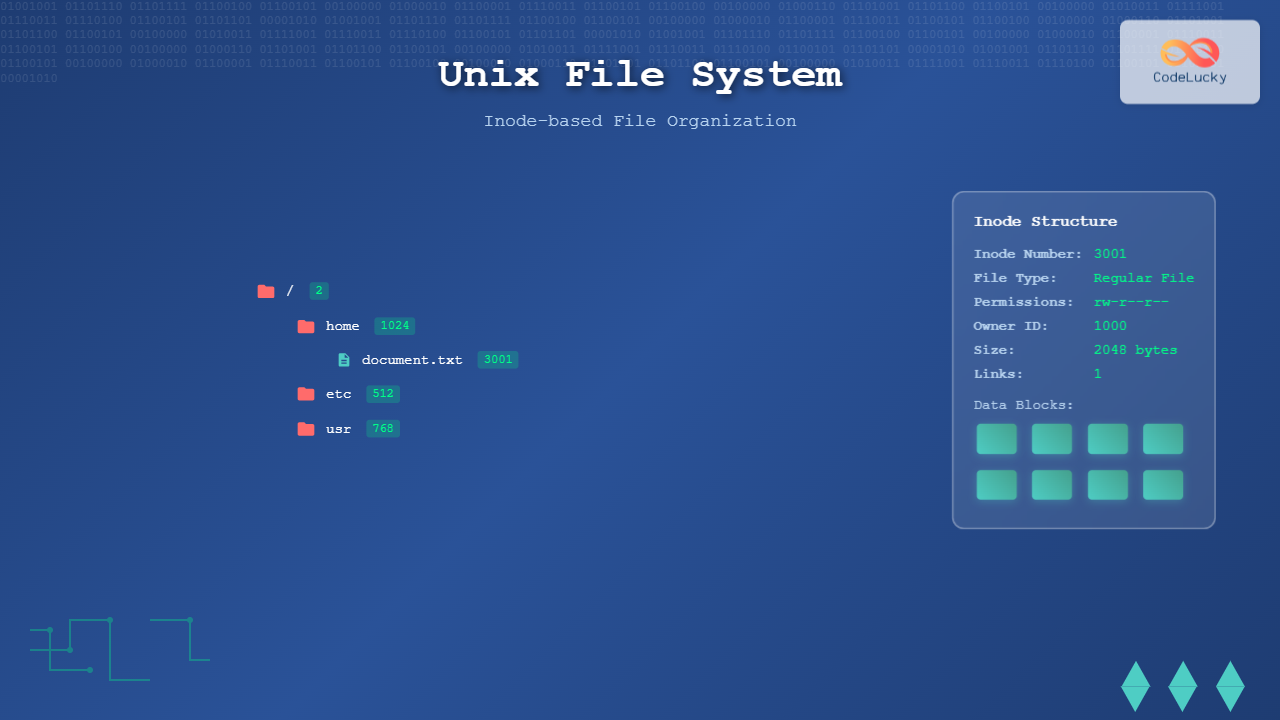
The Unix file system represents one of the most elegant and enduring designs in computer science, fundamentally shaping how modern operating systems organize and manage data. At its core lies the inode (index node) structure, a revolutionary approach that separates file metadata from actual data content, enabling efficient file management and robust system performance.
Understanding the Inode Architecture
An inode is a data structure that stores essential metadata about files and directories in Unix-like systems. Unlike other file systems that embed metadata within directory entries, Unix maintains a clear separation between file names (stored in directories) and file attributes (stored in inodes).

Core Inode Components
Each inode contains critical file information:
- File type and permissions – Defines access rights and file classification
- Owner and group IDs – Security and access control information
- File size – Exact byte count of file content
- Timestamps – Access, modification, and change times
- Link count – Number of hard links pointing to this inode
- Data block pointers – References to actual file content locations
File Allocation Strategy
The Unix file system employs a sophisticated multi-level indexing scheme for data block allocation, optimizing both small and large file storage efficiently.

Block Allocation Hierarchy
The allocation strategy accommodates files of varying sizes:
- Direct blocks (0-11) – Point directly to data blocks, ideal for small files up to 48KB
- Single indirect – Points to a block containing data block addresses, supporting medium files
- Double indirect – Two-level indirection for larger files up to several megabytes
- Triple indirect – Three-level indirection enabling massive file support
Directory Structure Implementation
Unix directories are special files containing mappings between filenames and inode numbers. This design enables powerful features like hard links and efficient file system navigation.

Directory Entry Format
Each directory entry typically contains:
struct dirent {
    ino_t d_ino;           // Inode number
    off_t d_off;           // Offset to next record
    unsigned short d_reclen; // Length of this record
    char d_name[];         // Null-terminated filename
};
Hard Links vs Symbolic Links
The inode system enables two distinct linking mechanisms, each serving different purposes in file system organization.
Hard Links
Hard links create multiple directory entries pointing to the same inode, effectively giving one file multiple names without duplicating data.
$ echo "Hello World" > original.txt
$ ln original.txt hardlink.txt
$ ls -li original.txt hardlink.txt
3001 -rw-r--r-- 2 user group 12 Aug 28 18:30 original.txt
3001 -rw-r--r-- 2 user group 12 Aug 28 18:30 hardlink.txt
Notice both files share the same inode number (3001) and link count (2).
Symbolic Links
Symbolic links create separate inodes containing paths to target files, functioning as shortcuts or aliases.
$ ln -s original.txt symlink.txt
$ ls -li original.txt symlink.txt
3001 -rw-r--r-- 2 user group 12 Aug 28 18:30 original.txt
3002 lrwxrwxrwx 1 user group 12 Aug 28 18:31 symlink.txt -> original.txt
File System Hierarchy and Navigation
The Unix file system organizes everything in a single rooted tree structure, starting from the root directory (/) and branching into a hierarchical organization.
Standard Directory Structure
Unix follows established conventions for system organization:
- /bin – Essential system binaries and commands
- /etc – System configuration files
- /home – User home directories
- /usr – User programs and applications
- /var – Variable data like logs and databases
- /tmp – Temporary files and directories
Practical File System Operations
Viewing Inode Information
The stat command provides comprehensive inode details:
$ stat example.txt
  File: example.txt
  Size: 2048        Blocks: 8          IO Block: 4096   regular file
Device: 801h/2049d  Inode: 12345      Links: 1
Access: (0644/-rw-r--r--)  Uid: (1000/   user)   Gid: (1000/   user)
Access: 2025-08-28 18:30:15.123456789 +0530
Modify: 2025-08-28 18:29:45.987654321 +0530
Change: 2025-08-28 18:29:45.987654321 +0530
Finding Files by Inode
Locate files using specific inode numbers:
$ find /home -inum 12345
/home/user/documents/example.txt
/home/user/backup/example_backup.txt
Monitoring File System Usage
Check inode utilization across mounted file systems:
$ df -i
Filesystem      Inodes   IUsed   IFree IUse% Mounted on
/dev/sda1      1310720   95432 1215288    8% /
/dev/sda2       655360   12845  642515    2% /home
Advanced Inode Concepts
Inode Exhaustion
File systems can run out of inodes before running out of disk space, preventing new file creation even with available storage. This occurs when creating many small files that consume inodes faster than disk space.
# Creating many small files can exhaust inodes
$ for i in {1..1000000}; do touch "file_$i.txt"; done
touch: cannot touch 'file_500001.txt': No space left on device
$ df -h .
/dev/sda1  10G  2.1G  7.4G  22% /tmp
$ df -i .
/dev/sda1  500000  500000  0  100% /tmp
File Deletion Process
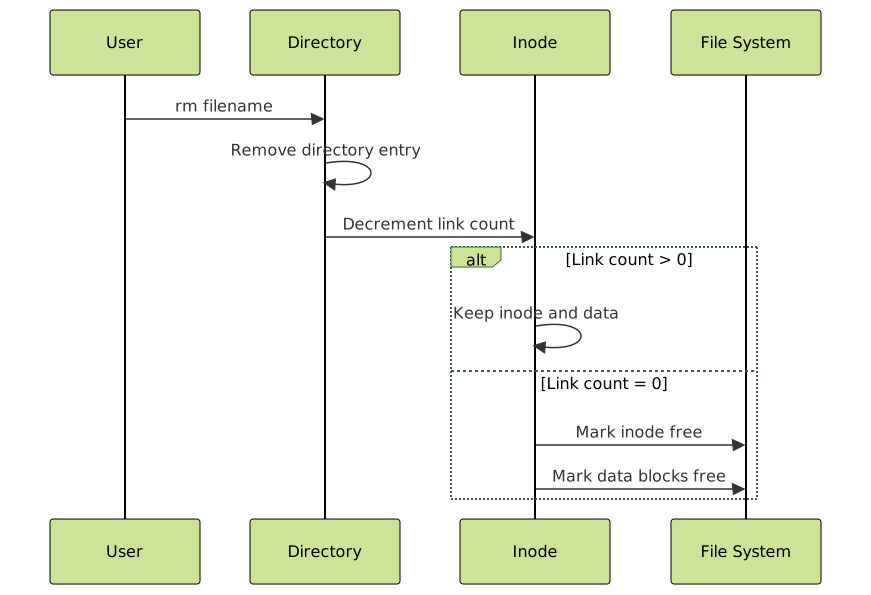
Understanding how Unix handles file deletion reveals the power of inode-based organization:
- Directory entry removal – Filename disappears from directory listing
- Link count decrement – Inode link count decreases by one
- Inode cleanup – When link count reaches zero, inode and data blocks are freed
- Space reclamation – Storage becomes available for new files
Performance Implications and Optimization
Access Pattern Optimization
The inode structure influences file system performance through several mechanisms:
- Locality of reference – Inodes are typically stored together, improving cache efficiency
- Direct access – No need to traverse directory structures for file metadata
- Efficient allocation – Block pointers enable optimized data placement
File System Fragmentation
Inode-based systems can experience fragmentation when:
- Data blocks become scattered across the disk
- Frequent file creation and deletion leave gaps
- Large files require non-contiguous block allocation
Modern Implementations and Variations
Contemporary Unix-like systems have evolved the basic inode concept:
Extended Attributes
Modern file systems support additional metadata beyond traditional inode fields:
$ setfattr -n user.author -v "John Doe" document.txt
$ getfattr -n user.author document.txt
# file: document.txt
user.author="John Doe"
File System Specific Enhancements
- ext4 – Extends inode structure with nanosecond timestamps and large file support
- XFS – Dynamic inode allocation and advanced extent-based allocation
- Btrfs – Copy-on-write semantics with advanced inode management
- ZFS – Integrated volume management with sophisticated inode handling
Troubleshooting Common Issues
Debugging File System Problems
When encountering file system issues, inode information provides valuable diagnostic data:
# Check for corruption
$ fsck -f /dev/sda1

# Examine suspicious inodes
$ debugfs /dev/sda1
debugfs: stat <12345>

# Monitor real-time file operations
$ inotifywait -m /path/to/directory
Recovery Techniques
Understanding inode structure aids in data recovery scenarios:
- Undelete operations – Recover files by reconstructing inode linkages
- Consistency checking – Verify inode table integrity and repair corruption
- Backup strategies – Preserve both data and metadata for complete restoration
Security Considerations
The inode system provides several security features and considerations:
Permission Model
Unix permissions operate at the inode level, providing granular access control:
# Octal notation: owner/group/other permissions
$ chmod 755 script.sh    # rwxr-xr-x
$ chmod 644 document.txt # rw-r--r--

# Symbolic notation for specific changes
$ chmod u+x,g-w,o-r file.txt
Access Control Lists (ACLs)
Extended permission systems build upon basic inode permissions:
$ setfacl -m u:alice:rw- confidential.txt
$ getfacl confidential.txt
# file: confidential.txt
# owner: user
# group: group
user::rw-
user:alice:rw-
group::r--
mask::rw-
other::---
The Unix file system’s inode-based architecture represents a masterful balance of simplicity and power, providing the foundation for reliable, efficient file management across decades of computing evolution. Its influence extends far beyond Unix itself, inspiring design principles in modern file systems and continuing to shape how we organize and access digital information.
Understanding inodes empowers system administrators, developers, and power users to work more effectively with Unix-like systems, troubleshoot problems efficiently, and appreciate the elegant engineering that makes modern computing possible.





