
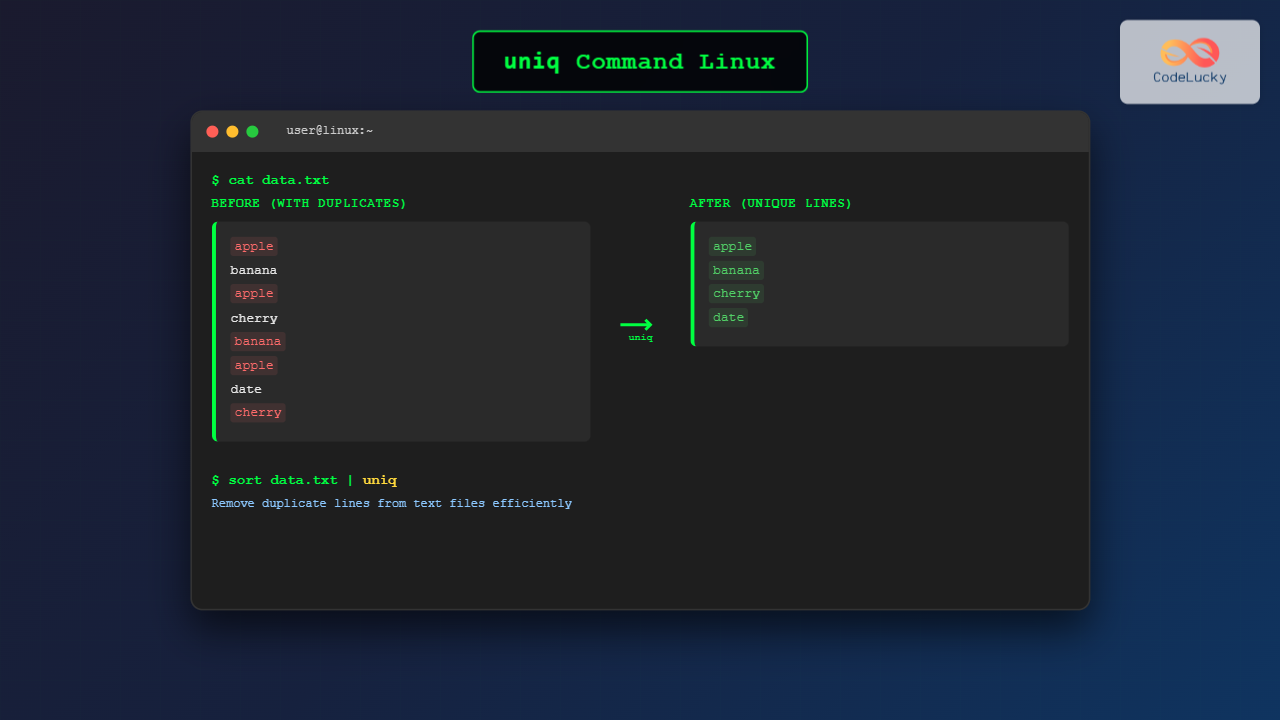
The uniq command is a powerful Linux utility designed to remove duplicate lines from text files or input streams. Whether you’re cleaning up log files, processing data, or filtering output from other commands, uniq provides an efficient solution for handling duplicate content in your text processing workflows.
What is the uniq Command?
The uniq command filters out repeated lines in a file or input stream, keeping only unique entries. It’s particularly useful for data processing, log analysis, and text manipulation tasks where duplicate entries need to be eliminated or counted.
Key characteristics of the uniq command:
- Only removes consecutive duplicate lines by default
- Requires sorted input for complete duplicate removal
- Can count occurrences of duplicate lines
- Offers various options for customized filtering
Basic Syntax
uniq [OPTIONS] [INPUT_FILE] [OUTPUT_FILE]Where:
OPTIONS: Various flags to modify behaviorINPUT_FILE: Source file to process (stdin if omitted)OUTPUT_FILE: Destination file (stdout if omitted)
Common Options and Flags
| Option | Description |
|---|---|
-c |
Count occurrences of each line |
-d |
Show only duplicate lines |
-u |
Show only unique lines (no duplicates) |
-i |
Case-insensitive comparison |
-f N |
Skip first N fields when comparing |
-s N |
Skip first N characters when comparing |
-w N |
Compare only first N characters |
Basic Examples
Example 1: Simple Duplicate Removal
Let’s create a sample file with duplicate lines:
$ cat > sample.txt
apple
banana
apple
cherry
banana
apple
Using uniq on this file:
$ uniq sample.txt
apple
banana
apple
cherry
banana
apple
Output: No change because duplicates aren’t consecutive. The uniq command only removes consecutive duplicate lines.
Example 2: Using uniq with sort
To remove all duplicates, first sort the file:
$ sort sample.txt | uniq
apple
banana
cherry
Output: All duplicate lines are removed, showing only unique entries.
Example 3: Counting Occurrences
Use the -c option to count duplicate occurrences:
$ sort sample.txt | uniq -c
      3 apple
      2 banana
      1 cherry
Output: Each line is prefixed with its occurrence count.
Advanced Usage Examples
Example 4: Show Only Duplicate Lines
Use -d to display only lines that appear more than once:
$ sort sample.txt | uniq -d
apple
banana
Output: Only lines with duplicates are shown.
Example 5: Show Only Unique Lines
Use -u to display only lines that appear exactly once:
$ sort sample.txt | uniq -u
cherry
Output: Only unique lines (no duplicates) are displayed.
Example 6: Case-Insensitive Comparison
Create a file with mixed case:
$ cat > mixed_case.txt
Apple
apple
APPLE
Banana
banana
Using case-insensitive comparison:
$ sort mixed_case.txt | uniq -i
Apple
Banana
Output: Case variations are treated as duplicates.
Example 7: Skip Fields When Comparing
Create a file with multiple fields:
$ cat > fields.txt
1 apple red
2 apple green
3 banana yellow
4 banana yellow
5 cherry red
Skip the first field when comparing:
$ sort -k2 fields.txt | uniq -f 1
2 apple green
3 banana yellow
5 cherry red
Output: Comparison starts from the second field onwards.
Example 8: Skip Characters When Comparing
Skip first 2 characters when comparing:
$ cat > chars.txt
xxapple
yyapple
zzbanana
wwbanana
$ sort chars.txt | uniq -s 2
xxapple
zzbananaOutput: First two characters are ignored during comparison.
Practical Use Cases
Use Case 1: Log File Analysis
Find unique IP addresses in access logs:
$ cat access.log | cut -d' ' -f1 | sort | uniq -c | sort -nr
    245 192.168.1.100
    123 10.0.0.1
     89 172.16.0.50
This command extracts IP addresses, counts their occurrences, and sorts by frequency.
Use Case 2: Email List Cleanup
Remove duplicate email addresses:
$ sort email_list.txt | uniq > clean_email_list.txtThis creates a clean list without duplicate entries.
Use Case 3: Configuration File Validation
Find duplicate configuration entries:
$ sort config.conf | uniq -dThis shows only duplicate configuration lines that might cause issues.
Combining uniq with Other Commands
Pipeline Example 1: Process Command Output
$ ps aux | grep apache | awk '{print $1}' | sort | uniq -cCount unique users running Apache processes.
Pipeline Example 2: Text Processing
$ cat document.txt | tr ' ' '\n' | sort | uniq -c | sort -nr | head -10Find the 10 most common words in a document.
Pipeline Example 3: Network Analysis
$ netstat -tn | awk '{print $5}' | cut -d: -f1 | sort | uniq -c | sort -nrAnalyze network connections by remote IP address.
Performance Considerations
Memory Usage: The uniq command processes input line by line, making it memory-efficient even for large files.
File Size Impact: For best performance with large files, consider using:
$ sort -u large_file.txt > unique_file.txtThis combines sorting and duplicate removal in a single operation.
Preprocessing: Always sort data before using uniq for complete duplicate removal, unless you specifically need to remove only consecutive duplicates.
Common Pitfalls and Solutions
Pitfall 1: Not Sorting Input
Problem: Non-consecutive duplicates aren’t removed.
Solution: Always use sort before uniq for complete duplicate removal.
Pitfall 2: Whitespace Issues
Problem: Lines with different whitespace are treated as different.
Solution: Normalize whitespace before processing:
$ cat file.txt | sed 's/[[:space:]]\+/ /g' | sort | uniqPitfall 3: Case Sensitivity
Problem: Similar lines with different cases aren’t recognized as duplicates.
Solution: Use the -i flag for case-insensitive comparison.
Alternative Approaches
Using awk
$ awk '!seen[$0]++' file.txtThis removes duplicates without requiring sorted input.
Using sort with -u
$ sort -u file.txtCombines sorting and duplicate removal in one command.
Best Practices
- Always sort first: Use
sort | uniqfor complete duplicate removal - Use appropriate options: Choose
-c,-d, or-ubased on your specific needs - Consider performance: For large files,
sort -umight be more efficient - Handle whitespace: Normalize whitespace when necessary
- Test with sample data: Verify results with small datasets before processing large files
Conclusion
The uniq command is an essential tool for Linux text processing, offering flexible options for handling duplicate content. Whether you’re cleaning data, analyzing logs, or processing configuration files, mastering uniq and its various options will significantly improve your command-line efficiency. Remember to combine it with sort for complete duplicate removal and explore its various flags to match your specific use cases.
By understanding both basic usage and advanced techniques, you can leverage uniq to handle complex text processing tasks efficiently and effectively in your Linux workflow.
Related Posts
awk Command in Linux: Complete Pattern Scanning and Processing Tutorial
The awk command is one of the most powerful text processing tools available in Linux and Unix systems. Named after...

SQL SELECT DISTINCT Statement: Eliminating Duplicate Results
In the world of databases, redundancy can be a real headache. Imagine scrolling through a customer list and seeing the...

head Command in Linux: Display First Lines of Files Efficiently
The head command is one of the most fundamental and frequently used utilities in Linux and Unix-like operating systems. It...

sed Command Linux: Complete Guide to Stream Editor for Text Manipulation
The sed (Stream Editor) command is one of the most powerful text processing utilities in Linux and Unix systems. It...
grep Command in Linux: Complete Guide to Text Pattern Search and File Operations
The grep command is one of the most powerful and frequently used text processing utilities in Linux and Unix systems....

Excel UNIQUE Function: Extract Unique Values with Advanced Formulas
The Excel UNIQUE function is a powerful dynamic array formula introduced in Excel 365 and Excel 2021 that allows you...

wipe Command Linux: Complete Guide to Secure File Deletion and Data Wiping
The wipe command in Linux is a powerful utility designed for secure file deletion that goes far beyond the standard...

tail Command Linux: Complete Guide to Display Last Lines and Follow Logs in Real-Time
The tail command is one of the most essential tools in Linux for displaying the last lines of files and...
paste Command Linux: Complete Guide to Merging Lines from Multiple Files
The paste command in Linux is a powerful text processing utility that allows you to merge lines from multiple files...
strings Command Linux: Extract and Analyze Text from Binary Files
The strings command is a powerful Linux utility that extracts printable character sequences from binary files. Whether you're analyzing executables,...

awk Advanced Linux: Mastering Complex Text Processing and Pattern Matching
The awk command is one of the most powerful text processing tools in Linux, capable of performing complex data manipulation...
cut Command Linux: Extract and Process Columns from Text Files Efficiently
The cut command is one of the most powerful and versatile text processing utilities in Linux and Unix systems. It...





