
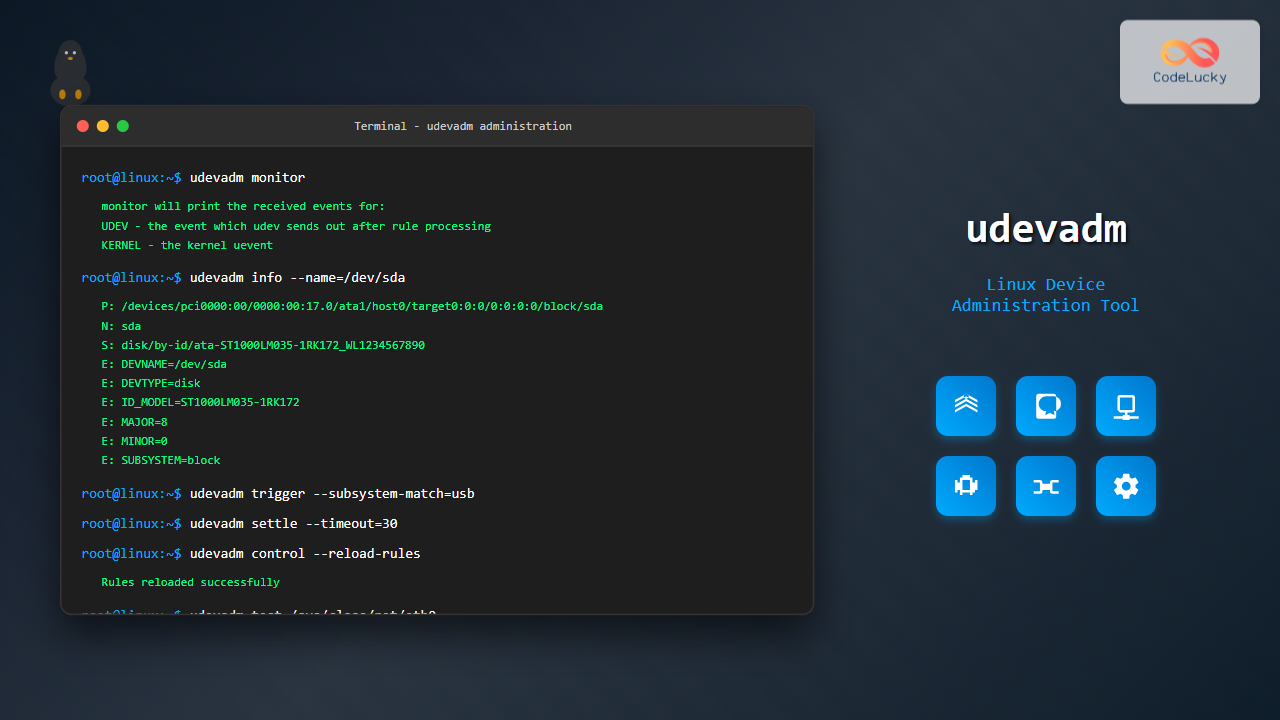
The udevadm command is a powerful administrative tool in Linux systems that manages the udev device manager. It serves as the primary interface for controlling udev daemon behavior, monitoring hardware events, and managing device rules. Whether you’re a system administrator troubleshooting hardware issues or a developer working with device management, understanding udevadm is essential for effective Linux system administration.
What is udevadm?
udevadm is a command-line utility that provides administrative control over the udev device manager in Linux systems. The udev (userspace device) system dynamically manages device nodes in the /dev directory, handles device events, and applies rules for device configuration. The udevadm tool allows you to:
- Monitor real-time device events
- Query device information and properties
- Test and validate udev rules
- Trigger device events manually
- Control udev daemon behavior
- Settle pending device events
Basic Syntax and Structure
The general syntax for udevadm follows this pattern:
udevadm [command] [options] [arguments]The main commands available in udevadm include:
info– Query device informationmonitor– Monitor device eventscontrol– Control udev daemonsettle– Wait for pending eventstrigger– Trigger device eventstest– Test udev rulestest-builtin– Test built-in commands
Essential udevadm Commands with Examples
1. Monitoring Device Events (udevadm monitor)
The monitor command is invaluable for real-time hardware troubleshooting and understanding device behavior:
udevadm monitorExample Output:
monitor will print the received events for:
UDEV - the event which udev sends out after rule processing
KERNEL - the kernel uevent

KERNEL[1692963234.123456] add      /devices/pci0000:00/0000:00:14.0/usb2/2-1 (usb)
KERNEL[1692963234.124567] add      /devices/pci0000:00/0000:00:14.0/usb2/2-1/2-1:1.0 (usb)
UDEV  [1692963234.156789] add      /devices/pci0000:00/0000:00:14.0/usb2/2-1 (usb)
UDEV  [1692963234.167890] add      /devices/pci0000:00/0000:00:14.0/usb2/2-1/2-1:1.0 (usb)
To monitor only kernel events:
udevadm monitor --kernelTo monitor only udev events:
udevadm monitor --udev2. Querying Device Information (udevadm info)
The info command provides detailed information about devices:
udevadm info --name=/dev/sdaExample Output:
P: /devices/pci0000:00/0000:00:17.0/ata1/host0/target0:0:0/0:0:0:0/block/sda
N: sda
S: disk/by-id/ata-ST1000LM035-1RK172_WL1234567890
S: disk/by-id/wwn-0x5000c500a1b2c3d4
S: disk/by-path/pci-0000:00:17.0-ata-1
E: DEVLINKS=/dev/disk/by-id/ata-ST1000LM035-1RK172_WL1234567890 /dev/disk/by-id/wwn-0x5000c500a1b2c3d4 /dev/disk/by-path/pci-0000:00:17.0-ata-1
E: DEVNAME=/dev/sda
E: DEVPATH=/devices/pci0000:00/0000:00:17.0/ata1/host0/target0:0:0/0:0:0:0/block/sda
E: DEVTYPE=disk
E: ID_ATA=1
E: ID_BUS=ata
E: ID_MODEL=ST1000LM035-1RK172
E: ID_SERIAL=ST1000LM035-1RK172_WL1234567890
E: MAJOR=8
E: MINOR=0
E: SUBSYSTEM=block
To query by device path:
udevadm info --path=/sys/class/net/eth0To get only device attributes:
udevadm info --attribute-walk --name=/dev/sda3. Triggering Device Events (udevadm trigger)
The trigger command manually triggers udev events, useful for reloading device rules:
# Trigger events for all devices
udevadm trigger

# Trigger events for specific subsystem
udevadm trigger --subsystem-match=block

# Trigger events with specific action
udevadm trigger --action=add
Example for USB devices:
udevadm trigger --subsystem-match=usb --action=add4. Settling Pending Events (udevadm settle)
The settle command waits for all pending udev events to complete:
# Wait for all events to settle
udevadm settle

# Wait with timeout (in seconds)
udevadm settle --timeout=30

# Wait for specific number of events
udevadm settle --seq-start=100 --seq-end=200
5. Testing Udev Rules (udevadm test)
The test command helps debug and validate udev rules:
udevadm test /sys/class/net/eth0Example Output:
calling: test
version 245
This program is for debugging only, it does not run any program
specified by a RUN key. It may show incorrect results, because
some values may be different, or not available at a simulation run.

Load module index
timestamp of '/etc/udev/rules.d' changed
Reading rules file: /lib/udev/rules.d/50-udev-default.rules
Reading rules file: /lib/udev/rules.d/60-persistent-storage.rules
Reading rules file: /lib/udev/rules.d/70-mouse.rules
...
ACTION=add
DEVPATH=/sys/class/net/eth0
SUBSYSTEM=net
...
run: 'sh -c 'test -e /proc/sys/kernel/hotplug && echo /sbin/udevd > /proc/sys/kernel/hotplug''
6. Controlling Udev Daemon (udevadm control)
The control command manages udev daemon behavior:
# Reload udev rules
udevadm control --reload

# Set log level
udevadm control --log-priority=debug

# Stop event execution
udevadm control --stop-exec-queue

# Start event execution
udevadm control --start-exec-queue

# Get daemon status
udevadm control --ping
Advanced udevadm Usage Scenarios
Hardware Troubleshooting
When troubleshooting hardware issues, combine multiple udevadm commands:
# Monitor events while plugging USB device
udevadm monitor --property &

# In another terminal, get device info
udevadm info --name=/dev/sdb --property

# Test rules for the device
udevadm test $(udevadm info --name=/dev/sdb --query=path)
Network Interface Management
For network interface management and troubleshooting:
# Get network interface information
udevadm info /sys/class/net/eth0

# Monitor network device events
udevadm monitor --subsystem-match=net

# Trigger network interface rules
udevadm trigger --subsystem-match=net --action=add
Storage Device Management
Managing storage devices with udevadm:
# List all block devices with properties
for device in /sys/class/block/*; do
    echo "Device: $(basename $device)"
    udevadm info --path="$device" --property | grep -E "(DEVNAME|ID_MODEL|ID_SERIAL)"
    echo "---"
done
Working with Udev Rules
udevadm helps create and test custom udev rules effectively:
Creating Custom Rules
First, identify device attributes:
udevadm info --attribute-walk --name=/dev/sdbCreate a rule file in /etc/udev/rules.d/:
# /etc/udev/rules.d/99-custom-usb.rules
SUBSYSTEM=="block", ATTRS{idVendor}=="1234", ATTRS{idProduct}=="5678", SYMLINK+="my-usb-drive"
Test the rule:
udevadm test /sys/block/sdbReload rules and trigger:
udevadm control --reload-rules
udevadm trigger --name-match=sdb
Debugging Rules
Enable debug logging for rule testing:
udevadm control --log-priority=debug
udevadm test --action=add /sys/block/sdb
Performance Optimization with udevadm
Event Processing Optimization
Monitor event processing performance:
# Check queue status
udevadm control --ping

# Monitor with timing information
udevadm monitor --property --timestamp
Batch Operations
For system initialization or bulk device management:
# Trigger all devices and wait for completion
udevadm trigger && udevadm settle --timeout=60
Common Use Cases and Solutions
USB Device Recognition Issues
# Monitor USB events
udevadm monitor --subsystem-match=usb

# Get USB device details
udevadm info --name=/dev/bus/usb/001/002 --attribute-walk

# Force USB device reinitialization
udevadm trigger --subsystem-match=usb --attr-match=idVendor=1234
Network Interface Naming
# Check current network interface rules
udevadm info /sys/class/net/eth0 | grep ID_NET_NAME

# Monitor network naming events
udevadm monitor --property | grep -E "(INTERFACE|ID_NET_NAME)"
Disk Mount Issues
# Check disk device properties
udevadm info --name=/dev/sdc --property | grep -E "(ID_FS|DEVLINKS)"

# Test disk-related rules
udevadm test /sys/block/sdc
Best Practices and Tips
Monitoring Best Practices
- Use
--propertyflag with monitor for detailed event information - Filter events by subsystem to reduce noise
- Always use
settleafter triggering events in scripts - Set appropriate timeouts to prevent hanging
Rule Testing Guidelines
- Always test rules with
udevadm testbefore applying - Use verbose output for debugging complex rules
- Test both add and remove actions
- Validate symlinks and permissions after rule application
System Integration
# Create a monitoring script
#!/bin/bash
# monitor-hardware.sh

echo "Starting hardware monitoring..."
udevadm monitor --property | while read line; do
    if [[ $line == *"ACTION=add"* ]]; then
        echo "$(date): New device added - $line" >> /var/log/hardware-events.log
    fi
done
Troubleshooting Common Issues
Permission Problems
Most udevadm commands require root privileges. Use sudo when needed:
sudo udevadm control --reload-rules
sudo udevadm trigger
Service Dependencies
Ensure udev service is running:
systemctl status systemd-udevd
systemctl restart systemd-udevd
Rule Syntax Errors
Check rule syntax with test command:
udevadm test --action=add /sys/block/sda 2>&1 | grep -i errorConclusion
The udevadm command is an indispensable tool for Linux system administrators and developers working with hardware device management. Its comprehensive feature set enables effective monitoring, troubleshooting, and configuration of device behavior through the udev system.
Key takeaways for mastering udevadm:
- Use
monitorfor real-time hardware event tracking - Leverage
infofor detailed device property investigation - Apply
testfor rule validation and debugging - Utilize
triggerandsettlefor controlled device management - Combine commands for comprehensive hardware troubleshooting workflows
Whether you’re managing servers, workstations, or embedded systems, understanding udevadm will significantly enhance your ability to handle Linux device management challenges effectively. Practice with these examples and gradually incorporate udevadm into your system administration toolkit for robust hardware management capabilities.
Related Posts
udev Command Linux: Complete Guide to Dynamic Device Management
The udev (userspace device manager) is a crucial component of modern Linux systems that handles dynamic device management. Unlike traditional...

mdev Command Linux: Complete Guide to Minimal Device Manager Configuration
The mdev command is a lightweight device manager for Linux systems, particularly popular in embedded environments and minimal distributions. As...

hotplug Linux: Complete Guide to Hardware Hotplug Event Handling and Management
Hardware hotplug functionality in Linux enables the dynamic addition and removal of hardware components without requiring system restarts. This powerful...
devfs Linux: Complete Guide to Device Filesystem Management
The Device Filesystem (devfs) represents a revolutionary approach to device management in Linux systems, providing dynamic creation and removal of...
devtmpfs Linux: Complete Guide to Device Temporary Filesystem Management
The devtmpfs (Device Temporary Filesystem) is a crucial component of modern Linux systems that revolutionizes how device nodes are managed...

Device Drivers in Operating System: Complete Guide to Hardware Abstraction Layer
Device drivers serve as the critical bridge between your operating system and hardware components, forming what's known as the Hardware...
mdadm Command Linux: Complete Guide to Managing Software RAID Arrays
The mdadm (Multiple Device Administrator) command is a powerful Linux utility for managing software RAID arrays. It provides comprehensive functionality...
lsblk Command Linux: Complete Guide to List and Manage Block Devices
The lsblk command is an essential Linux utility that displays information about block devices in a tree-like format. Whether you're...
modprobe Command Linux: Complete Guide to Load and Manage Kernel Modules
The modprobe command is one of the most powerful tools in Linux system administration for managing kernel modules. Whether you're...
insmod Command Linux: Complete Guide to Insert Kernel Modules
The insmod command is a fundamental Linux utility that allows system administrators and developers to insert kernel modules into the...
sysctl Command Linux: Complete Guide to Kernel Parameter Configuration
The sysctl command is a powerful Linux utility that allows system administrators to view, modify, and configure kernel parameters at...
Input Output Systems: Complete Guide to Device Management and I/O Operations
Input/Output (I/O) systems form the critical bridge between a computer's internal processing capabilities and the external world. These systems manage...





