
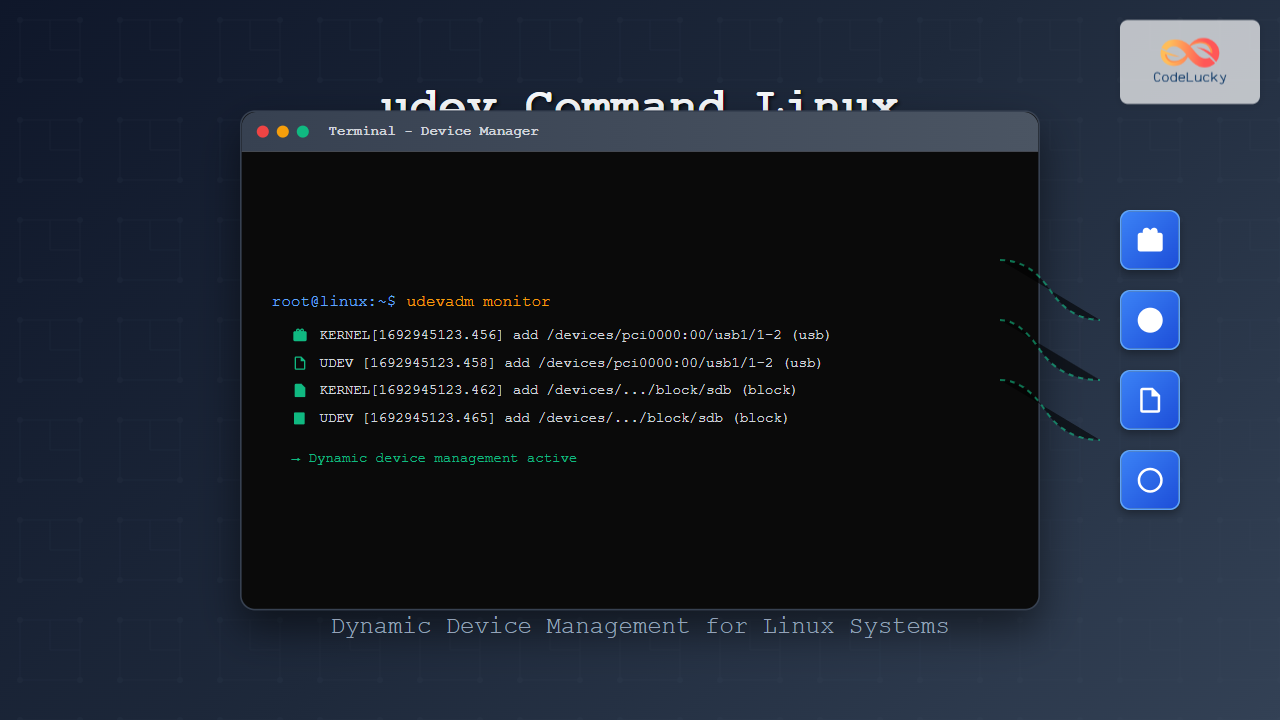
The udev (userspace device manager) is a crucial component of modern Linux systems that handles dynamic device management. Unlike traditional static device files, udev creates and manages device nodes dynamically as hardware is detected, providing a flexible and efficient way to handle device events in real-time.
What is udev in Linux?
udev is a device manager for the Linux kernel that manages device nodes in the /dev directory. It replaced the older devfs and static device files, providing several advantages:
- Dynamic device creation: Creates device files only when hardware is present
- Consistent device naming: Provides predictable device names regardless of detection order
- Event-driven architecture: Responds to kernel events when devices are added or removed
- Rule-based configuration: Uses flexible rules to determine device properties and actions
udev Architecture and Components
The udev system consists of several key components working together:
Core Components
| Component | Description | Location |
|---|---|---|
| udevd | Main daemon that processes events | /usr/lib/systemd/systemd-udevd |
| udevadm | Command-line tool for udev management | /usr/bin/udevadm |
| Rules files | Configuration files defining device behavior | /etc/udev/rules.d/, /usr/lib/udev/rules.d/ |
| Helper scripts | Programs executed by udev rules | /usr/lib/udev/ |
Essential udevadm Commands
The udevadm command is the primary interface for interacting with udev. Here are the most important subcommands:
1. Monitoring Device Events
Monitor real-time device events as they occur:
# Monitor all udev events
sudo udevadm monitor

# Monitor specific subsystems
sudo udevadm monitor --subsystem-match=block
sudo udevadm monitor --subsystem-match=usb
Example Output:
KERNEL[1234567.890] add      /devices/pci0000:00/0000:00:14.0/usb2/2-1 (usb)
UDEV  [1234567.892] add      /devices/pci0000:00/0000:00:14.0/usb2/2-1 (usb)
KERNEL[1234567.895] add      /devices/pci0000:00/0000:00:14.0/usb2/2-1/2-1:1.0 (usb)
UDEV  [1234567.897] add      /devices/pci0000:00/0000:00:14.0/usb2/2-1/2-1:1.0 (usb)
2. Device Information Query
Get detailed information about specific devices:
# Get device information by device path
udevadm info /dev/sda1

# Get device information with attributes
udevadm info --attribute-walk --path=/sys/block/sda

# Query by device name
udevadm info --query=all --name=/dev/sda1
Example Output:
P: /devices/pci0000:00/0000:00:17.0/ata1/host0/target0:0:0/0:0:0:0/block/sda/sda1
N: sda1
S: disk/by-id/ata-Samsung_SSD_850_EVO_250GB_S21PNXAG123456-part1
S: disk/by-partuuid/12345678-1234-1234-1234-123456789abc
S: disk/by-path/pci-0000:00:17.0-ata-1-part1
S: disk/by-uuid/12345678-abcd-1234-5678-123456789abc
E: DEVLINKS=/dev/disk/by-id/ata-Samsung_SSD_850_EVO_250GB_S21PNXAG123456-part1
E: DEVNAME=/dev/sda1
E: DEVPATH=/devices/pci0000:00/0000:00:17.0/ata1/host0/target0:0:0/0:0:0:0/block/sda/sda1
E: DEVTYPE=partition
3. Testing and Triggering Events
Test udev rules and trigger events manually:
# Test rules for a device
udevadm test /sys/block/sda

# Trigger events for all devices
sudo udevadm trigger

# Trigger events for specific subsystem
sudo udevadm trigger --subsystem-match=block

# Wait for event processing to complete
udevadm settle
Understanding udev Rules
udev rules are the heart of device management, written in files with .rules extension. Rules are processed in lexicographical order.
Rule File Structure
Rules files are located in:
/usr/lib/udev/rules.d/– System default rules/etc/udev/rules.d/– Local administrator rules (higher priority)
Rule Syntax
Each rule consists of match conditions and assignment operators:
# Basic syntax
MATCH_KEY=="value", MATCH_KEY!="value", ASSIGN_KEY="value", ASSIGN_KEY+="value"
Common Match Keys
| Key | Description | Example |
|---|---|---|
KERNEL |
Kernel device name | KERNEL=="sda*" |
SUBSYSTEM |
Device subsystem | SUBSYSTEM=="block" |
ATTR{} |
Device attribute | ATTR{size}=="1000000" |
ENV{} |
Environment variable | ENV{ID_VENDOR}=="Samsung" |
ACTION |
Event action | ACTION=="add" |
Common Assignment Keys
| Key | Description | Example |
|---|---|---|
NAME |
Device node name | NAME="my-device" |
SYMLINK |
Create symbolic links | SYMLINK+="my-link" |
OWNER |
Device owner | OWNER="user" |
GROUP |
Device group | GROUP="disk" |
MODE |
Device permissions | MODE="0660" |
RUN |
Execute program | RUN+="/usr/local/bin/script.sh" |
Practical udev Rule Examples
Example 1: USB Device Auto-Mount
Create a rule to automatically mount USB storage devices:
# File: /etc/udev/rules.d/80-usb-automount.rules
ACTION=="add", KERNEL=="sd[a-z][0-9]", SUBSYSTEM=="block", ENV{ID_FS_TYPE}!="", \
  RUN+="/usr/local/bin/usb-mount.sh %k"

ACTION=="remove", KERNEL=="sd[a-z][0-9]", SUBSYSTEM=="block", \
  RUN+="/usr/local/bin/usb-unmount.sh %k"
Example 2: Network Interface Naming
Assign consistent names to network interfaces:
# File: /etc/udev/rules.d/70-network.rules
SUBSYSTEM=="net", ACTION=="add", ATTR{address}=="aa:bb:cc:dd:ee:ff", NAME="lan0"
SUBSYSTEM=="net", ACTION=="add", ATTR{address}=="11:22:33:44:55:66", NAME="wifi0"
Example 3: Custom Device Permissions
Set specific permissions for serial devices:
# File: /etc/udev/rules.d/99-serial-permissions.rules
KERNEL=="ttyUSB*", GROUP="dialout", MODE="0664"
KERNEL=="ttyACM*", GROUP="dialout", MODE="0664"
Example 4: Device-Specific Actions
Execute scripts when specific devices are connected:
# File: /etc/udev/rules.d/90-my-device.rules
ACTION=="add", ATTRS{idVendor}=="1234", ATTRS{idProduct}=="5678", \
  SYMLINK+="my-special-device", \
  RUN+="/usr/local/bin/device-setup.sh"
Advanced udev Configuration
Persistent Device Naming
udev automatically creates persistent names for storage devices:
# View persistent device links
ls -la /dev/disk/by-*

# by-id: Hardware-specific identifiers
/dev/disk/by-id/ata-Samsung_SSD_850_EVO_250GB_S21PNXAG123456 -> ../../sda

# by-uuid: Filesystem UUID
/dev/disk/by-uuid/12345678-abcd-1234-5678-123456789abc -> ../../sda1

# by-path: Physical connection path
/dev/disk/by-path/pci-0000:00:17.0-ata-1 -> ../../sda
Creating Custom Helper Scripts
Example helper script for USB device management:
#!/bin/bash
# File: /usr/local/bin/usb-mount.sh

DEVICE="/dev/$1"
MOUNTPOINT="/mnt/usb-$1"

# Create mount point
mkdir -p "$MOUNTPOINT"

# Mount device
mount "$DEVICE" "$MOUNTPOINT"

# Set permissions
chmod 755 "$MOUNTPOINT"

# Log the action
echo "$(date): Mounted $DEVICE to $MOUNTPOINT" >> /var/log/usb-automount.log
Debugging and Troubleshooting
Common Debugging Commands
# Check udev daemon status
systemctl status systemd-udevd

# View udev logs
journalctl -u systemd-udevd -f

# Test specific rule file
udevadm test-builtin net_id /sys/class/net/eth0

# Reload udev rules
sudo udevadm control --reload-rules
Rule Testing and Validation
# Test rules for a specific device
udevadm test /sys/block/sda/sda1

# Check rule syntax
udevadm verify /etc/udev/rules.d/80-my-rules.rules

# Simulate device events
udevadm trigger --verbose --dry-run --subsystem-match=block
Performance Optimization
Best Practices for Rule Writing
- Use specific matches: Avoid overly broad patterns that match many devices
- Order rules properly: Use appropriate numbering (10-99) for rule precedence
- Minimize external program calls: Reduce RUN+= actions for better performance
- Use GOTO labels: Skip unnecessary rule processing with LABEL and GOTO
# Example of optimized rule with GOTO
SUBSYSTEM!="block", GOTO="my_rules_end"
KERNEL!="sd*", GOTO="my_rules_end"

# Your specific rules here
ACTION=="add", KERNEL=="sda*", RUN+="/usr/local/bin/script.sh"

LABEL="my_rules_end"
Monitoring Performance
# Monitor udev processing time
udevadm monitor --property | grep -E "(TIME|USEC)"

# Check event queue
udevadm control --property UDEV_LOG=debug
Security Considerations
Safe Rule Practices
- Validate input: Always validate device attributes before using them
- Restrict permissions: Use appropriate file permissions for device nodes
- Secure script execution: Ensure helper scripts are properly secured
- Avoid world-writable devices: Be cautious with MODE assignments
# Example of secure rule
ACTION=="add", KERNEL=="ttyUSB*", \
  ATTRS{idVendor}=="1234", ATTRS{idProduct}=="5678", \
  GROUP="mygroup", MODE="0660", \
  RUN+="/usr/local/bin/secure-script.sh"
Common Use Cases and Solutions
1. Consistent Network Interface Names
# File: /etc/udev/rules.d/70-persistent-net.rules
SUBSYSTEM=="net", ACTION=="add", DRIVERS=="?*", \
ATTR{address}=="00:11:22:33:44:55", ATTR{dev_id}=="0x0", \
ATTR{type}=="1", NAME="eth0"
2. Custom Device Symlinks
# Create meaningful device links
KERNEL=="sd*", ATTRS{serial}=="ABC123", SYMLINK+="backup-drive"
KERNEL=="ttyUSB*", ATTRS{product}=="Arduino", SYMLINK+="arduino"
3. Automated System Actions
# Automatically configure devices
ACTION=="add", SUBSYSTEM=="backlight", \
RUN+="/usr/local/bin/set-brightness.sh 50"
Conclusion
The udev system provides powerful and flexible device management capabilities for Linux systems. By understanding its architecture, mastering the udevadm command, and writing effective rules, you can automate device handling, ensure consistent naming, and improve system reliability.
Key takeaways for effective udev usage:
- Use
udevadm monitorto understand device events in real-time - Write specific, well-tested rules to avoid unintended consequences
- Leverage persistent device naming for reliable system configuration
- Monitor performance and debug issues systematically
- Follow security best practices when creating custom rules
With these skills, you’ll be able to create robust device management solutions that adapt dynamically to your system’s hardware configuration changes.
Related Posts

udevadm Command Linux: Complete Guide to Device Management and Udev Administration
The udevadm command is a powerful administrative tool in Linux systems that manages the udev device manager. It serves as...

mdev Command Linux: Complete Guide to Minimal Device Manager Configuration
The mdev command is a lightweight device manager for Linux systems, particularly popular in embedded environments and minimal distributions. As...
devfs Linux: Complete Guide to Device Filesystem Management
The Device Filesystem (devfs) represents a revolutionary approach to device management in Linux systems, providing dynamic creation and removal of...
devtmpfs Linux: Complete Guide to Device Temporary Filesystem Management
The devtmpfs (Device Temporary Filesystem) is a crucial component of modern Linux systems that revolutionizes how device nodes are managed...

hotplug Linux: Complete Guide to Hardware Hotplug Event Handling and Management
Hardware hotplug functionality in Linux enables the dynamic addition and removal of hardware components without requiring system restarts. This powerful...
lsblk Command Linux: Complete Guide to List and Manage Block Devices
The lsblk command is an essential Linux utility that displays information about block devices in a tree-like format. Whether you're...

Device Drivers in Operating System: Complete Guide to Hardware Abstraction Layer
Device drivers serve as the critical bridge between your operating system and hardware components, forming what's known as the Hardware...
dkms Command Linux: Complete Guide to Dynamic Kernel Module Support
Dynamic Kernel Module Support (DKMS) is a powerful framework that automatically rebuilds kernel modules when you install a new kernel...
Input Output Systems: Complete Guide to Device Management and I/O Operations
Input/Output (I/O) systems form the critical bridge between a computer's internal processing capabilities and the external world. These systems manage...
loop Command Linux: Complete Guide to Loop Device Management and Block Device Control
The loop command in Linux is a powerful utility for managing loop devices, which are virtual block devices that allow...

dracut Command Linux: Complete Guide to Initial RAM Filesystem Creation and Management
The dracut command is a powerful utility in Linux systems that creates initial RAM disk (initramfs) images used during the...
pvcreate Command Linux: Complete Guide to Creating Physical Volumes for LVM
The pvcreate command is a fundamental tool in Linux Logical Volume Management (LVM) that initializes storage devices as physical volumes....





