
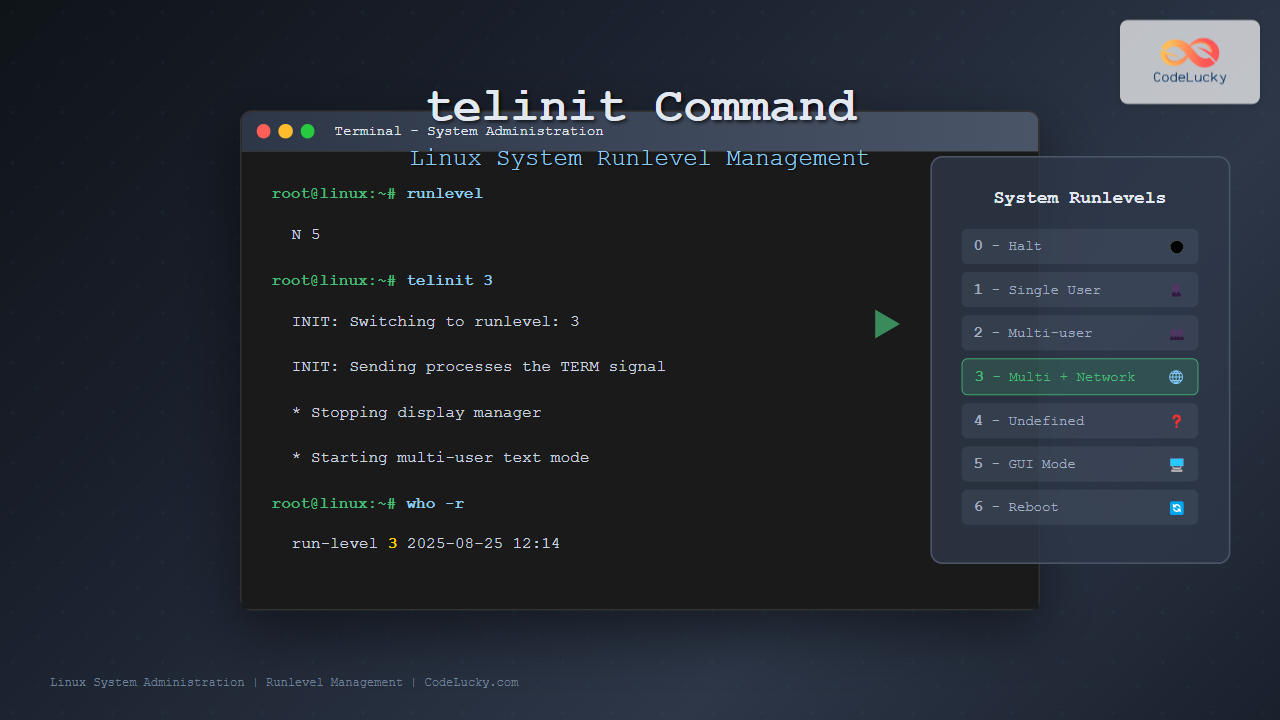
The telinit command is a powerful Linux utility that allows system administrators to change the current runlevel of a Linux system. Understanding how to use telinit effectively is crucial for managing system states, controlling services, and performing maintenance tasks safely.
What is the telinit Command?
The telinit command (short for “tell init”) is used to communicate with the init process and request a change in the system’s runlevel. It serves as the primary interface for switching between different operational modes of a Linux system, each representing a specific set of running services and system capabilities.
In modern Linux distributions, telinit works with both traditional SysV init systems and systemd, making it a versatile tool for system administration across different Linux environments.
Understanding Linux Runlevels
Before diving into the telinit command syntax, it’s essential to understand what runlevels represent:
- Runlevel 0: System halt/shutdown
- Runlevel 1: Single-user mode (rescue mode)
- Runlevel 2: Multi-user mode without networking (Debian/Ubuntu)
- Runlevel 3: Multi-user mode with networking (text mode)
- Runlevel 4: Undefined (user-defined)
- Runlevel 5: Multi-user mode with networking and GUI
- Runlevel 6: System reboot
Basic Syntax and Options
The basic syntax for the telinit command is straightforward:
telinit [OPTIONS] RUNLEVELCommon Options
-t SECONDS: Set timeout for killing processes before changing runlevel-f: Force the change without asking init to cleanly shutdown-e VAR=VALUE: Set environment variable for the init process
Checking Current Runlevel
Before changing runlevels, you should check your current system state using the runlevel command:
$ runlevel
N 5
This output shows that the previous runlevel was not set (N) and the current runlevel is 5 (multi-user graphical mode).
You can also use the who -r command:
$ who -r
         run-level 5  2025-08-25 12:10
Practical Examples of telinit Usage
Example 1: Switching to Single-User Mode
To switch to single-user mode for system maintenance:
$ sudo telinit 1This command will:
- Stop all multi-user services
- Terminate user sessions
- Switch to single-user mode
- Provide root access without password (on console)
Example 2: Switching to Multi-User Text Mode
To switch from graphical mode to text-only multi-user mode:
$ sudo telinit 3Expected behavior:
- GUI services will stop
- System remains in multi-user mode
- Network services continue running
- Text-based login prompts appear
Example 3: Switching to Graphical Mode
To switch from text mode to graphical interface:
$ sudo telinit 5This will start the display manager and graphical environment.
Example 4: System Shutdown
To gracefully shutdown the system:
$ sudo telinit 0This initiates a controlled shutdown sequence, stopping all services before powering off.
Example 5: System Reboot
To restart the system:
$ sudo telinit 6The system will perform a clean reboot, stopping services and restarting.
Using telinit with Timeout
You can specify a timeout period when changing runlevels to give processes more time to shut down gracefully:
$ sudo telinit -t 30 1This command switches to runlevel 1 with a 30-second timeout for process termination.
telinit vs Other System Control Commands
Comparison with systemctl
In systemd-based systems, you can achieve similar results using systemctl:
| telinit Command | systemctl Equivalent | Purpose |
|---|---|---|
telinit 0 |
systemctl poweroff |
Shutdown system |
telinit 1 |
systemctl rescue |
Single-user mode |
telinit 3 |
systemctl isolate multi-user.target |
Multi-user text mode |
telinit 5 |
systemctl isolate graphical.target |
Graphical mode |
telinit 6 |
systemctl reboot |
Reboot system |
Interactive Example: Runlevel Switching Scenario
Let’s walk through a complete scenario where you need to perform system maintenance:
Step 1: Check Current State
$ runlevel
N 5

$ who
user1    pts/0        2025-08-25 10:30
user2    pts/1        2025-08-25 11:15
Step 2: Warn Users
$ sudo wall "System maintenance in 5 minutes. Please save your work."Step 3: Switch to Single-User Mode
$ sudo telinit 1Output you might see:
INIT: Switching to runlevel: 1
INIT: Sending processes the TERM signal
INIT: Sending processes the KILL signal
* Stopping system logging daemon rsyslog
* Stopping network connection manager
* Starting single-user mode
Step 4: Perform Maintenance
At this point, you’re in single-user mode and can perform maintenance tasks safely.
Step 5: Return to Normal Operation
# telinit 5Troubleshooting Common Issues
Permission Denied Errors
Always use sudo when executing telinit commands:
$ telinit 3
bash: /sbin/telinit: Permission denied

$ sudo telinit 3
# Works correctly
Service Hanging During Runlevel Change
If services don’t stop properly, use the force option:
$ sudo telinit -f 1Checking telinit Status
Monitor the transition process using:
$ sudo tail -f /var/log/syslog | grep INITSecurity Considerations
When using telinit, keep these security aspects in mind:
- Root Privileges: telinit requires root access, so always use sudo
- Single-User Mode: Runlevel 1 provides passwordless root access on console
- Service Dependencies: Changing runlevels affects service availability
- User Sessions: Active user sessions may be terminated abruptly
Best Practices
- Plan Ahead: Always inform users before changing runlevels
- Use Appropriate Timeouts: Allow sufficient time for graceful service shutdown
- Monitor Logs: Check system logs during and after runlevel changes
- Test in Development: Practice runlevel changes in non-production environments
- Have Recovery Plan: Know how to recover if something goes wrong
Modern Alternatives and Systemd Integration
While telinit remains functional in systemd environments, understanding modern alternatives is important:
Systemd Targets vs Runlevels
poweroff.target→ runlevel 0rescue.target→ runlevel 1multi-user.target→ runlevel 3graphical.target→ runlevel 5reboot.target→ runlevel 6
Conclusion
The telinit command remains an essential tool for Linux system administrators, providing a reliable method to change system runlevels and manage system states. Whether you’re performing maintenance, troubleshooting issues, or switching between different operational modes, understanding telinit helps you maintain better control over your Linux systems.
While newer systems may prefer systemctl commands, telinit’s simplicity and universal availability across different Linux distributions make it a valuable skill for any system administrator. Practice using telinit in safe environments to build confidence in managing system runlevels effectively.
Remember to always consider the impact of runlevel changes on users and services, plan transitions carefully, and maintain proper documentation of your system administration activities.
Related Posts
runlevel Command Linux: Complete Guide to Display Current and Previous System States
The runlevel command is a fundamental system administration tool in Linux that displays the current and previous system runlevels. Understanding...

init Command Linux: Complete Guide to Process Control and System Initialization
The init command in Linux serves as the cornerstone of system initialization and process control. As the first process started...

sysvinit Linux: Complete Guide to System V Initialization System
The System V initialization system (sysvinit) is a traditional init system that has been the backbone of Unix and Linux...
runit Linux: Complete Guide to Unix Init Scheme with Service Supervision
runit is a lightweight, cross-platform Unix init scheme with service supervision that provides a reliable alternative to traditional init systems....
service Command Linux: Complete Guide to Managing System Services
The service command is a fundamental tool in Linux system administration that allows you to manage system services and daemons...

rc-update Command Linux: Complete Guide to Managing OpenRC Services
The rc-update command is a powerful utility in Linux systems that use OpenRC as their init system, primarily found in...
sysctl Command Linux: Complete Guide to Kernel Parameter Configuration
The sysctl command is a powerful Linux utility that allows system administrators to view, modify, and configure kernel parameters at...
System Calls in Operating System: Complete Guide to User-Kernel Interface
System calls serve as the fundamental bridge between user applications and the operating system kernel, enabling programs to request services...

sv Command Linux: Master Runit Service Control and Management
The sv command is a powerful utility in Linux systems that serves as the primary interface for controlling services managed...
systemctl Command Linux: Complete Guide to Control Systemd Services
The systemctl command is the primary tool for controlling systemd services in modern Linux distributions. As the central management utility...

systemd Linux: Complete Guide to System and Service Manager
systemd is a powerful system and service manager that has become the default init system for most modern Linux distributions....

top Command Linux: Complete Guide to Real-Time Process Monitoring
The top command is one of the most essential tools in a Linux system administrator's arsenal. It provides real-time information...





