
Understanding System Recovery and Disaster Recovery Planning
System recovery and disaster recovery planning form the backbone of resilient IT infrastructure. In today’s digital landscape, organizations cannot afford prolonged downtime or data loss. A comprehensive disaster recovery plan ensures business continuity, protects valuable data, and maintains operational efficiency during unexpected events.
System recovery encompasses the processes and procedures to restore IT systems, applications, and data following a disruption. Disaster recovery planning is the strategic framework that defines how an organization will respond to and recover from various types of disasters, whether natural, technological, or human-induced.
Types of Disasters and Recovery Scenarios
Natural Disasters
- Earthquakes, floods, hurricanes, and fires
- Power outages and electrical storms
- Environmental hazards affecting data centers
Technological Disasters
- Hardware failures and system crashes
- Software corruption and compatibility issues
- Network infrastructure failures
- Cybersecurity incidents and ransomware attacks
Human-Related Incidents
- Accidental data deletion or configuration errors
- Insider threats and unauthorized access
- Physical security breaches

Key Components of Disaster Recovery Planning
Recovery Time Objective (RTO)
RTO defines the maximum acceptable time that systems can remain unavailable after a disaster. This metric directly impacts business operations and customer satisfaction.
Example: An e-commerce website might have an RTO of 2 hours, meaning the system must be restored within 2 hours to minimize revenue loss and customer impact.
Recovery Point Objective (RPO)
RPO represents the maximum amount of data loss that’s acceptable during a disaster, measured in time. It determines backup frequency and data replication strategies.
Example: A financial institution might set an RPO of 15 minutes, requiring continuous data replication to ensure minimal data loss during system failures.
Business Impact Analysis (BIA)
BIA identifies critical business processes, their dependencies, and the potential impact of disruptions. This analysis helps prioritize recovery efforts and allocate resources effectively.

Disaster Recovery Planning Process
Phase 1: Risk Assessment and Analysis
Begin by conducting a comprehensive risk assessment to identify potential threats and vulnerabilities:
# Risk Assessment Checklist
# 1. Physical Infrastructure Risks
- Data center location vulnerabilities
- Environmental hazards
- Power supply reliability
- Physical security measures

# 2. Technological Risks
- Hardware failure probabilities
- Software dependencies
- Network infrastructure resilience
- Cybersecurity threat landscape

# 3. Human Factor Risks
- Staff training and awareness levels
- Access control effectiveness
- Operational procedures compliance
Phase 2: Business Continuity Requirements
Define specific business continuity requirements based on organizational needs:
| System Category | RTO Target | RPO Target | Priority Level |
|---|---|---|---|
| Critical Production Systems | ≤ 1 hour | ≤ 15 minutes | Tier 1 |
| Business Applications | ≤ 4 hours | ≤ 1 hour | Tier 2 |
| Support Systems | ≤ 24 hours | ≤ 4 hours | Tier 3 |
| Archive Systems | ≤ 72 hours | ≤ 24 hours | Tier 4 |
Phase 3: Recovery Strategy Development
Develop comprehensive recovery strategies tailored to different disaster scenarios:
Hot Site Strategy
Maintains fully operational duplicate infrastructure with real-time data synchronization. Provides fastest recovery times but highest costs.
# Hot Site Configuration Example
recovery_site:
  type: "hot_site"
  location: "secondary_datacenter"
  replication:
    method: "synchronous"
    frequency: "real_time"
    bandwidth: "10Gbps"
  failover:
    automatic: true
    rto_target: "15_minutes"
    rpo_target: "0_seconds"
Warm Site Strategy
Partially configured infrastructure that requires setup time but offers balanced cost and recovery speed.
Cold Site Strategy
Basic infrastructure requiring significant setup time but minimal ongoing costs.

Implementation Best Practices
Backup and Data Protection Strategies
3-2-1 Backup Rule Implementation
Maintain 3 copies of critical data, store them on 2 different media types, and keep 1 copy offsite.
# Backup Strategy Implementation Script
#!/bin/bash

# Primary backup to local storage
rsync -av --delete /production/data/ /backup/local/

# Secondary backup to network storage
rsync -av --delete /production/data/ /backup/network/

# Offsite backup to cloud storage
aws s3 sync /backup/local/ s3://disaster-recovery-bucket/ \
    --storage-class STANDARD_IA \
    --server-side-encryption AES256

# Verify backup integrity
find /backup/local/ -name "*.md5" -exec md5sum -c {} \;
Automated Recovery Procedures
Implement automated recovery procedures to reduce RTO and minimize human error:
# Automated Recovery Script Example
import subprocess
import logging
import time

class DisasterRecoveryManager:
    def __init__(self):
        self.logger = logging.getLogger(__name__)

    def detect_failure(self):
        """Monitor system health and detect failures"""
        try:
            result = subprocess.run(['systemctl', 'is-active', 'critical-service'],
                                  capture_output=True, text=True)
            return result.returncode != 0
        except Exception as e:
            self.logger.error(f"Health check failed: {e}")
            return True

    def initiate_failover(self):
        """Initiate automated failover process"""
        self.logger.info("Initiating emergency failover...")

        # Stop failed services
        subprocess.run(['systemctl', 'stop', 'failed-service'])

        # Mount backup storage
        subprocess.run(['mount', '/dev/backup', '/recovery'])

        # Restore critical data
        subprocess.run(['rsync', '-av', '/recovery/data/', '/production/'])

        # Start services in recovery mode
        subprocess.run(['systemctl', start', 'recovery-service'])

        self.logger.info("Failover completed successfully")
Testing and Validation Procedures
Regular testing ensures recovery procedures work effectively when needed:
Recovery Testing Schedule
- Monthly: Backup restoration tests
- Quarterly: Partial system recovery drills
- Semi-annually: Full disaster recovery exercises
- Annually: Comprehensive DR plan review and update
Recovery Plan Documentation and Communication
Essential Documentation Components
Comprehensive documentation ensures smooth execution during high-stress situations:
| Document Type | Content | Update Frequency |
|---|---|---|
| Emergency Contact List | Key personnel, vendors, service providers | Monthly |
| Recovery Procedures | Step-by-step recovery instructions | Quarterly |
| System Dependencies | Application and infrastructure dependencies | Bi-annually |
| Recovery Site Information | Location details, access procedures, configurations | Quarterly |
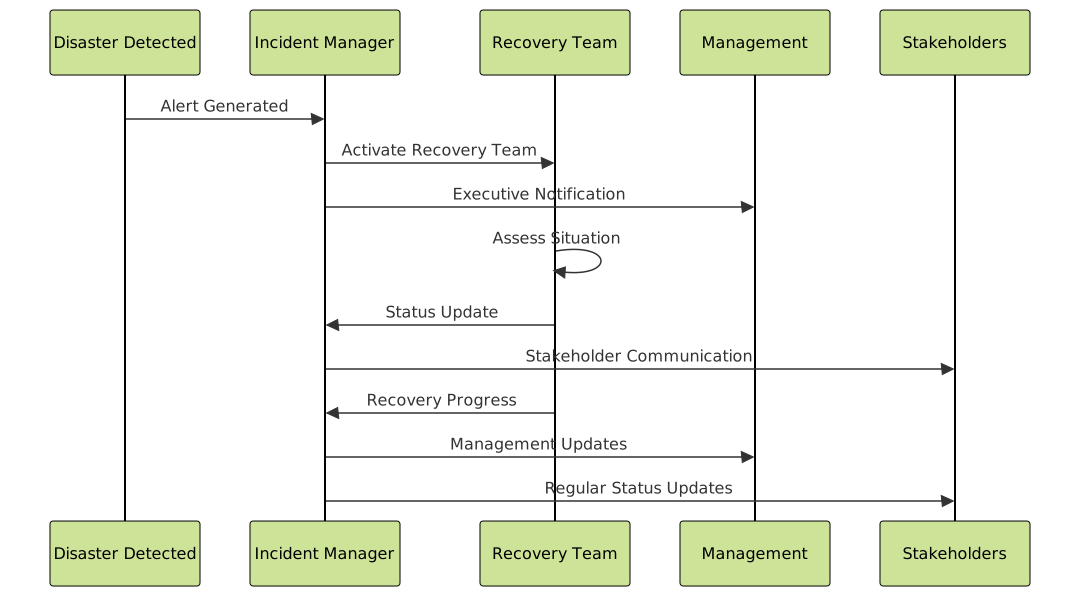
Communication Protocols
Technology Solutions and Tools
Enterprise Backup Solutions
Modern backup solutions provide comprehensive data protection and recovery capabilities:
- Veeam Backup & Replication: Comprehensive virtualization backup
- Commvault Complete Backup: Enterprise-grade data management
- Acronis Cyber Backup: Hybrid cloud backup solution
- AWS Backup: Centralized cloud backup service
Monitoring and Alerting Systems
# Monitoring Configuration Example
monitoring:
  health_checks:
    - name: "database_connectivity"
      endpoint: "tcp://db.internal:5432"
      interval: "30s"
      timeout: "5s"

    - name: "application_response"
      endpoint: "https://app.company.com/health"
      interval: "60s"
      expected_status: 200

  alerts:
    - trigger: "health_check_failure"
      escalation:
        - level: 1
          delay: "0m"
          notify: ["[email protected]"]
        - level: 2
          delay: "15m"
          notify: ["[email protected]"]
        - level: 3
          delay: "30m"
          notify: ["[email protected]"]
Cloud-Based Disaster Recovery
Cloud platforms offer scalable and cost-effective disaster recovery solutions:
AWS Disaster Recovery Strategies
- Backup and Restore: Cost-effective for non-critical workloads
- Pilot Light: Minimal version always running in cloud
- Warm Standby: Scaled-down but fully functional environment
- Multi-Site Active/Active: Full production capacity across regions
{
  "disaster_recovery_config": {
    "primary_region": "us-east-1",
    "recovery_region": "us-west-2",
    "replication": {
      "rds": {
        "cross_region_backup": true,
        "automated_backup_retention": 35
      },
      "s3": {
        "cross_region_replication": true,
        "versioning": true
      },
      "ec2": {
        "ami_backup_schedule": "daily",
        "snapshot_retention": 30
      }
    }
  }
}
Compliance and Regulatory Considerations
Disaster recovery planning must align with industry regulations and compliance requirements:
Common Regulatory Frameworks
- SOX (Sarbanes-Oxley): Financial data backup and recovery requirements
- HIPAA: Healthcare data protection and breach response
- GDPR: Data protection and privacy regulations
- ISO 27001: Information security management standards
Compliance Documentation Requirements
| Compliance Area | Documentation Required | Retention Period |
|---|---|---|
| Data Backup Procedures | Backup logs, restoration tests | 7 years |
| Incident Response | Incident reports, response timelines | 5 years |
| Recovery Testing | Test results, validation reports | 3 years |
| Staff Training | Training records, certifications | 3 years |
Measuring Disaster Recovery Effectiveness
Key Performance Indicators
Track essential metrics to evaluate and improve your disaster recovery capabilities:
- Mean Time to Recovery (MTTR): Average time to restore services
- Recovery Success Rate: Percentage of successful recovery attempts
- Data Loss Incidents: Frequency and volume of data loss events
- Test Completion Rate: Percentage of scheduled tests completed

Future Trends in Disaster Recovery
Emerging Technologies
Stay ahead of disaster recovery trends to maintain competitive advantage:
- AI-Powered Recovery: Machine learning for predictive failure analysis
- Container Orchestration: Kubernetes-based disaster recovery
- Edge Computing: Distributed recovery capabilities
- Immutable Infrastructure: Infrastructure as code for rapid deployment
Best Practices for Implementation
Successful disaster recovery planning requires ongoing commitment and regular updates. Start with critical systems, establish clear procedures, train your team thoroughly, and continuously test and refine your approach. Remember that disaster recovery is not a one-time project but an ongoing process that evolves with your organization’s needs and technological landscape.
By implementing comprehensive system recovery and disaster recovery planning, organizations can ensure business continuity, protect valuable data, and maintain customer confidence even in the face of unexpected disasters.





