
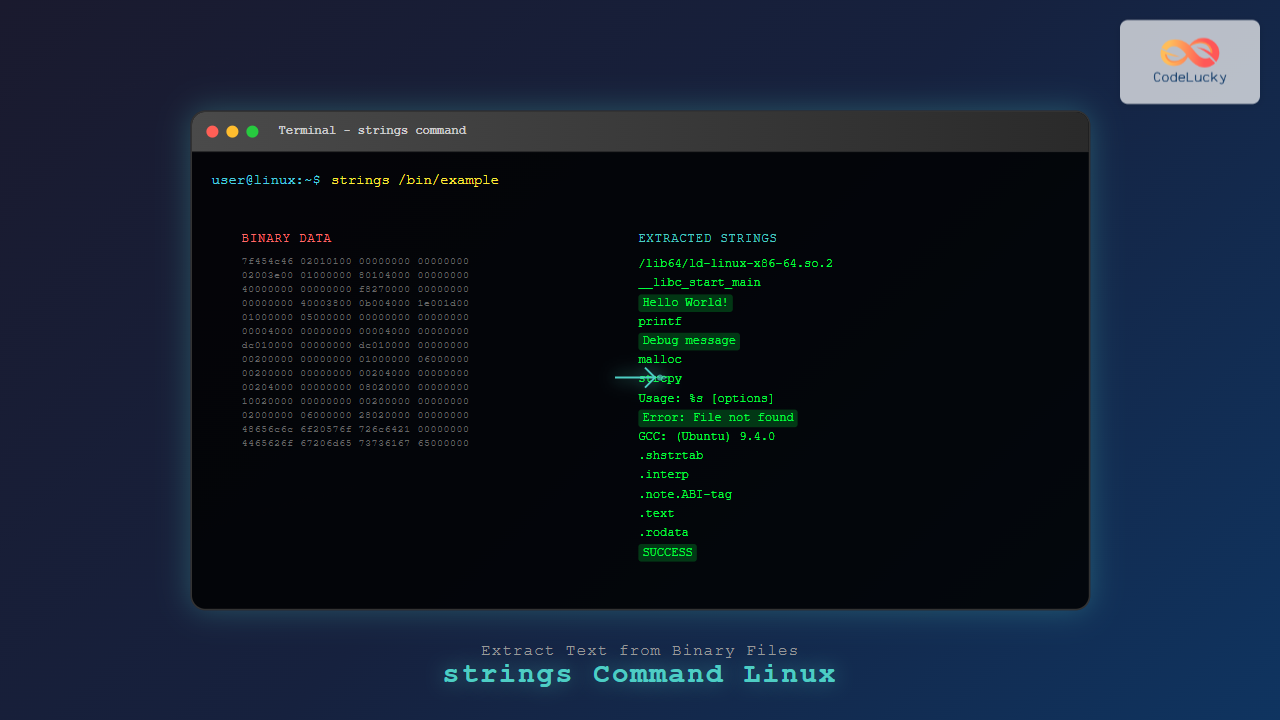
The strings command is a powerful Linux utility that extracts printable character sequences from binary files. Whether you’re analyzing executables, investigating suspicious files, or extracting embedded text from compiled programs, the strings command provides invaluable insights into file contents that aren’t immediately visible.
What is the strings Command?
The strings command searches through binary files to find sequences of printable characters, typically 4 or more characters long. It’s particularly useful for:
- Analyzing executable files and shared libraries
- Extracting error messages and debug information
- Investigating malware and suspicious files
- Finding hardcoded strings in compiled programs
- Recovering text from corrupted files
Basic Syntax and Installation
The strings command comes pre-installed on most Linux distributions as part of the GNU Binutils package. The basic syntax is:
strings [options] file...If strings isn’t available on your system, install it using:
# Ubuntu/Debian
sudo apt install binutils

# CentOS/RHEL/Fedora
sudo yum install binutils
# or
sudo dnf install binutils
Basic Usage Examples
Extracting Strings from an Executable
Let’s start with a simple example using the ls command binary:
strings /bin/lsThis command will output hundreds of lines including:
/lib64/ld-linux-x86-64.so.2
__cxa_finalize
__libc_start_main
setlocale
bindtextdomain
textdomain
__errno_location
strncmp
dcgettext
...
Usage: %s [OPTION]... [FILE]...
List information about the FILEs
cannot access %s
Finding Strings in a Custom Binary
Create a simple C program to demonstrate:
# Create a test program
cat > test.c << 'EOF'
#include <stdio.h>

int main() {
    char *message = "Hello from CodeLucky!";
    char *debug = "DEBUG: Application started";
    printf("%s\n", message);
    return 0;
}
EOF

# Compile it
gcc -o test test.c

# Extract strings
strings test
Output will include:
/lib64/ld-linux-x86-64.so.2
__cxa_finalize
__libc_start_main
puts
__stack_chk_fail
Hello from CodeLucky!
DEBUG: Application started
GCC: (Ubuntu 9.4.0-1ubuntu1~20.04.1) 9.4.0
Command Options and Parameters
Minimum String Length (-n)
Control the minimum length of strings to extract:
# Default minimum length (usually 4)
strings /bin/ls | head -5

# Extract strings with minimum length of 10
strings -n 10 /bin/ls | head -5

# Extract very short strings (minimum 2)
strings -n 2 /bin/ls | head -10
Encoding Options
Specify different character encodings:
# Single-byte characters (default)
strings -e s /bin/ls

# 16-bit big-endian
strings -e b /bin/ls

# 16-bit little-endian
strings -e l /bin/ls

# 32-bit big-endian
strings -e B /bin/ls

# 32-bit little-endian
strings -e L /bin/ls
Display File Offsets (-t)
Show the offset where each string was found:
# Display offsets in decimal
strings -t d /bin/ls | head -5

# Display offsets in hexadecimal
strings -t x /bin/ls | head -5

# Display offsets in octal
strings -t o /bin/ls | head -5
Example output with hexadecimal offsets:
    238 /lib64/ld-linux-x86-64.so.2
   1050 __cxa_finalize
   105f __libc_start_main
   1071 setlocale
   107b bindtextdomain
Advanced Usage Examples
Analyzing Shared Libraries
Extract strings from shared libraries to understand their functionality:
# Analyze libc
strings /lib/x86_64-linux-gnu/libc.so.6 | grep -i error | head -10

# Find version information
strings /lib/x86_64-linux-gnu/libc.so.6 | grep -i version | head -5
Investigating Configuration Files
Even binary configuration files may contain readable strings:
# Extract strings from a database file
strings /var/lib/mysql/database_name/table_name.MYD | head -20

# Analyze compiled configuration
strings /etc/ssl/certs/ca-certificates.crt | grep -i "certificate\|issuer" | head -10
Malware Analysis
Security professionals use strings for basic malware analysis:
# Look for suspicious URLs or IP addresses
strings suspicious_file | grep -E "http|ftp|[0-9]{1,3}\.[0-9]{1,3}\.[0-9]{1,3}\.[0-9]{1,3}"

# Find potential registry keys (Windows malware)
strings suspicious_file | grep -i "HKEY\|registry\|software"

# Look for file paths
strings suspicious_file | grep -E "^(/|C:\\\\|\\\\\\\\)"
Practical Use Cases
Debugging Compiled Programs
Extract debug information and error messages:
# Find error messages
strings your_program | grep -i "error\|warning\|fail"

# Look for debug information
strings your_program | grep -i "debug\|trace\|log"

# Find function names (if not stripped)
strings your_program | grep -E "^[a-zA-Z_][a-zA-Z0-9_]*$" | head -20
Reverse Engineering
Gather information about a program’s functionality:
# Find command-line options
strings program | grep -E "^-{1,2}[a-zA-Z]"

# Look for usage information
strings program | grep -i "usage\|help\|option"

# Find configuration file references
strings program | grep -E "\.(conf|cfg|ini|xml|json)$"
File Recovery
Extract readable content from partially corrupted files:
# Extract text from a corrupted document
strings corrupted_file.doc > recovered_text.txt

# Find email addresses in corrupted files
strings corrupted_file | grep -E "[a-zA-Z0-9._%+-]+@[a-zA-Z0-9.-]+\.[a-zA-Z]{2,}"

# Look for URLs
strings corrupted_file | grep -E "https?://[^\s]+"
Combining strings with Other Commands
Using with grep for Pattern Matching
# Find IP addresses
strings file | grep -oE '[0-9]{1,3}\.[0-9]{1,3}\.[0-9]{1,3}\.[0-9]{1,3}'

# Find email addresses
strings file | grep -oE '[a-zA-Z0-9._%+-]+@[a-zA-Z0-9.-]+\.[a-zA-Z]{2,}'

# Find potential passwords or keys
strings file | grep -E "pass|key|secret|token" -i
Using with sort and uniq
# Get unique strings sorted alphabetically
strings file | sort | uniq

# Count occurrences of each string
strings file | sort | uniq -c | sort -nr | head -20

# Find most common strings
strings file | sort | uniq -c | sort -nr | head -10
Using with awk for Advanced Processing
# Extract strings of specific lengths
strings file | awk 'length($0) > 20 && length($0) < 50'

# Find strings containing numbers
strings file | awk '/[0-9]/ {print}'

# Format output with line numbers
strings file | awk '{printf "%d: %s\n", NR, $0}'
Performance Considerations
Handling Large Files
For large files, consider these approaches:
# Limit output with head
strings large_file | head -1000

# Search for specific patterns only
strings large_file | grep "pattern_of_interest"

# Use with pager for interactive browsing
strings large_file | less

# Save output to file for later analysis
strings large_file > strings_output.txt
Memory Usage Optimization
# Process files one at a time to save memory
for file in *.bin; do
    echo "Processing $file..."
    strings "$file" > "strings_${file%.bin}.txt"
done
Security Applications
Finding Hardcoded Credentials
# Look for potential credentials
strings binary | grep -iE "(password|passwd|pwd|key|secret|token|api)" | head -20

# Find database connection strings
strings binary | grep -iE "(database|db|sql|mysql|postgres|oracle)"

# Look for URLs with credentials
strings binary | grep -E "://[^/]*:[^/]*@"
Analyzing Network Communications
# Find network-related strings
strings binary | grep -iE "(http|ftp|tcp|udp|socket|port|address)" | head -15

# Look for domain names
strings binary | grep -oE "[a-zA-Z0-9.-]+\.[a-zA-Z]{2,}" | head -20

# Find potential C&C servers
strings malware_sample | grep -E "\.(com|net|org|ru|cn)\b" | head -10
Troubleshooting Common Issues
No Output or Limited Results
If strings produces no output or limited results:
# Try different encodings
strings -e l binary_file
strings -e b binary_file

# Reduce minimum string length
strings -n 2 binary_file

# Check if file is actually binary
file binary_file
Too Much Output
When dealing with excessive output:
# Increase minimum length
strings -n 8 noisy_binary | head -50

# Filter out common system strings
strings binary | grep -v -E "(lib64|libc|gcc|glibc)" | head -30

# Focus on specific patterns
strings binary | grep -E "[A-Z][a-z]+" | head -20
Best Practices
- Choose appropriate minimum length: Use
-nto filter noise while preserving meaningful strings - Combine with other tools: Use grep, awk, and sort for better analysis
- Consider encoding: Try different encoding options for international or Windows executables
- Save output: Store results in files for repeated analysis and comparison
- Use offsets: Include file offsets with
-tfor precise location identification
Alternative Tools
While strings is powerful, consider these alternatives for specific use cases:
- hexdump: For detailed binary analysis with hex output
- objdump: For analyzing object files and executables
- rabin2: Part of radare2, advanced binary analysis
- binwalk: For firmware analysis and embedded file extraction
Conclusion
The strings command is an essential tool for Linux system administrators, security professionals, and developers. It provides quick insights into binary files, helps with debugging, and serves as a first step in reverse engineering and malware analysis. By mastering its various options and combining it with other command-line tools, you can efficiently extract and analyze textual information from any binary file.
Whether you’re troubleshooting a compiled program, investigating a suspicious file, or simply exploring what’s inside a binary, the strings command offers a straightforward yet powerful solution for text extraction and analysis in the Linux environment.
Related Posts
hexdump Command Linux: Complete Guide to Display File Contents in Hexadecimal Format
The hexdump command is a powerful Linux utility that displays the contents of files in hexadecimal format, making it an...
file Command Advanced Linux: Master Detailed File Type Analysis and Detection
The file command is one of the most powerful and underutilized utilities in Linux for determining file types and analyzing...
size Command Linux: Display Section Sizes of Object Files and Executables
The size command is a powerful utility in Linux systems that displays the section sizes of object files, executables, and...
strip Command Linux: Complete Guide to Removing Symbols from Object Files
The strip command is a powerful Linux utility that removes symbols, debugging information, and other metadata from executable files, object...
readelf Command Linux: Complete Guide to ELF File Analysis and Debugging
The readelf command is an essential tool for Linux developers, system administrators, and security analysts who need to examine Executable...
nm Command Linux: Complete Guide to Display Symbol Tables from Object Files
The nm command is a powerful utility in Linux that displays the symbol table of object files, executables, shared libraries,...
grep Command in Linux: Complete Guide to Text Pattern Search and File Operations
The grep command is one of the most powerful and frequently used text processing utilities in Linux and Unix systems....
file Command in Linux: Complete Guide to Determine File Types and Formats
The file command is one of the most essential utilities in Linux for determining file types and formats. Unlike relying...

whereis Command Linux: Complete Guide to Locate Binary, Source and Manual Pages
The whereis command is a powerful Linux utility that helps system administrators and developers quickly locate binary executables, source files,...
ranlib Command Linux: Complete Guide to Generate Archive Index Files
The ranlib command is a crucial utility in Linux systems for managing static library archives. It generates an index for...
Regex in Linux: Complete Guide to Regular Expressions and Pattern Matching
Regular expressions (regex) are powerful pattern-matching tools that form the backbone of text processing in Linux systems. Whether you're searching...
od Command Linux: Complete Guide to Octal Dump File Contents and Binary Analysis
The od (octal dump) command is a powerful Linux utility that displays file contents in various formats including octal, hexadecimal,...





