
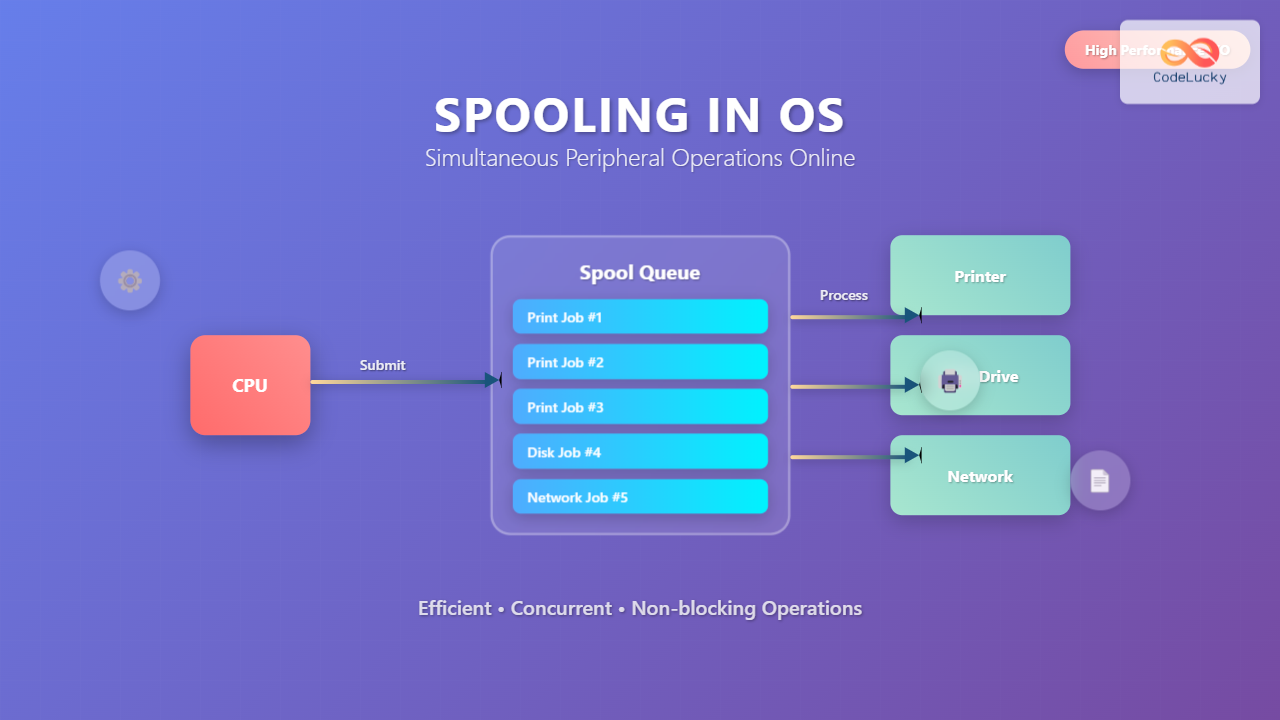
What is Spooling in Operating System?
Spooling (Simultaneous Peripheral Operations Online) is a fundamental technique in operating systems that enables efficient management of input/output operations by using intermediate storage to handle data transfer between high-speed devices (like CPU) and slower peripheral devices (like printers, disk drives).
The term “spool” originally came from the acronym SPOOL – Simultaneous Peripheral Operations Online, which describes the process of managing multiple I/O operations concurrently without blocking the main processing unit.

How Spooling Works
Spooling operates on a simple but effective principle: instead of directly sending data to slow peripheral devices, the operating system temporarily stores the data in a spool queue (usually on disk or in memory) and processes it asynchronously.
Key Components of Spooling System
- Spool Queue: A buffer area where jobs wait to be processed
- Spooler Process: System process that manages the queue and device communication
- Spool Directory: File system location where spooled data is temporarily stored
- Device Driver: Interface between spooler and actual hardware
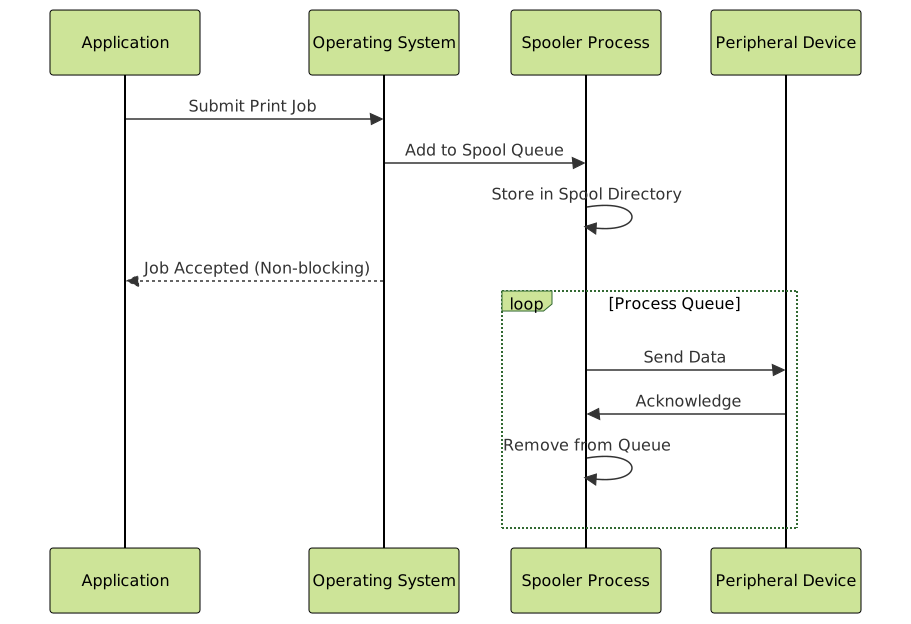
Types of Spooling
1. Print Spooling
The most common implementation of spooling is print spooling, where print jobs are queued and processed sequentially by the printer.
# Linux print spooling example
# Submit a print job
lpr document.pdf

# Check print queue
lpq

# Cancel a print job
lprm job_id

# Print spooler status
lpstat -t
Example Output:
$ lpq
Rank    Owner   Job     File(s)                         Total Size
active  john    125     document.pdf                    2048000 bytes
1st     alice   126     report.txt                      51200 bytes
2nd     bob     127     presentation.pptx               4096000 bytes
2. Disk Spooling
Used for managing disk I/O operations, especially in scenarios involving multiple processes accessing storage devices simultaneously.
3. Network Spooling
Manages network communication by queuing network requests and responses to optimize bandwidth utilization.
Spooling vs Buffering vs Caching
| Aspect | Spooling | Buffering | Caching |
|---|---|---|---|
| Purpose | Queue jobs for sequential processing | Temporary data storage during transfer | Store frequently accessed data |
| Location | Disk/Memory | Memory | Memory/Disk |
| Size | Variable (can be large) | Fixed small size | Variable |
| Processing | FIFO (First In, First Out) | FIFO | LRU/Other algorithms |
Advantages of Spooling
1. Improved System Performance
By decoupling fast processors from slow I/O devices, spooling prevents CPU blocking and improves overall system throughput.
2. Better Resource Utilization
Multiple processes can submit jobs simultaneously without waiting for device availability.
3. Job Prioritization
Spooling systems can implement priority queues for critical tasks.
# Python example: Simple print spooling simulation
import queue
import threading
import time

class PrintSpooler:
    def __init__(self):
        self.print_queue = queue.Queue()
        self.is_running = False

    def submit_job(self, job_name, data):
        job = {
            'name': job_name,
            'data': data,
            'timestamp': time.time()
        }
        self.print_queue.put(job)
        print(f"Job '{job_name}' added to spool queue")

    def process_queue(self):
        self.is_running = True
        while self.is_running:
            try:
                job = self.print_queue.get(timeout=1)
                print(f"Processing job: {job['name']}")
                # Simulate printing time
                time.sleep(2)
                print(f"Job '{job['name']}' completed")
                self.print_queue.task_done()
            except queue.Empty:
                continue

    def start_spooler(self):
        spooler_thread = threading.Thread(target=self.process_queue)
        spooler_thread.daemon = True
        spooler_thread.start()

# Usage example
spooler = PrintSpooler()
spooler.start_spooler()

# Submit multiple jobs
spooler.submit_job("Document1.pdf", "PDF content")
spooler.submit_job("Report.docx", "Word document")
spooler.submit_job("Image.jpg", "Image data")
Disadvantages of Spooling
1. Storage Overhead
Requires additional disk space or memory to store spooled jobs, which can become significant with large files.
2. Complexity
Adds complexity to the operating system with additional processes and management overhead.
3. Potential Delays
Jobs may experience delays if the queue becomes heavily loaded or if higher-priority jobs are submitted.

Real-World Implementation Examples
Windows Print Spooler Service
Windows implements print spooling through the Print Spooler service (spoolsv.exe), which manages all print operations in the system.
# Windows commands for print spooler management
# Check spooler service status
sc query spooler

# Stop print spooler
net stop spooler

# Start print spooler
net start spooler

# Clear print queue
del /q %systemroot%\system32\spool\printers\*.*
Linux CUPS (Common Unix Printing System)
Linux uses CUPS for print spooling, providing both command-line and web-based interfaces for job management.
# CUPS spooling commands
# Add printer to system
lpadmin -p printer_name -E -v device_uri

# Set default printer
lpadmin -d printer_name

# Check CUPS status
systemctl status cups

# View spool directory
ls -la /var/spool/cups/
Advanced Spooling Concepts
1. Multi-Level Spooling
Some systems implement multi-level spooling where jobs pass through multiple queues based on different criteria such as priority, job type, or destination device.

2. Distributed Spooling
In network environments, spooling can be distributed across multiple servers to handle large-scale printing and processing requirements.
3. Spooling Algorithms
Different scheduling algorithms can be implemented for spool queue management:
- FCFS (First Come, First Served): Simple FIFO processing
- Shortest Job First (SJF): Process smaller jobs first
- Priority Scheduling: Process based on job priority
- Round Robin: Time-sliced processing for fairness
Performance Optimization Techniques
1. Spool Directory Optimization
# Optimize spool directory performance
# Use separate disk partition for spooling
mount /dev/sdb1 /var/spool

# Set appropriate permissions
chmod 755 /var/spool
chown lp:lp /var/spool/cups

# Monitor spool directory usage
df -h /var/spool
du -sh /var/spool/cups/*
2. Memory vs Disk Spooling
For small jobs, memory spooling can significantly improve performance:
# Configuration example for memory-based spooling
spool_config = {
    'memory_threshold': 1024 * 1024,  # 1MB
    'use_memory_spool': True,
    'disk_spool_path': '/var/spool/custom',
    'max_memory_jobs': 50
}

def choose_spool_method(job_size):
    if job_size <= spool_config['memory_threshold']:
        return 'memory'
    else:
        return 'disk'
3. Queue Management Best Practices
- Regular cleanup: Remove completed job files
- Size limits: Implement maximum queue size to prevent overflow
- Monitoring: Track queue depth and processing times
- Load balancing: Distribute jobs across multiple devices
Troubleshooting Common Spooling Issues
1. Stuck Print Jobs
# Clear stuck print jobs in Linux
sudo systemctl stop cups
sudo rm /var/spool/cups/c*
sudo rm /var/spool/cups/d*
sudo systemctl start cups

# Windows equivalent
net stop spooler
del /q %windir%\system32\spool\printers\*.*
net start spooler
2. Spool Directory Full
# Check and clean spool directory
df -h /var/spool
find /var/spool -type f -mtime +7 -delete
logrotate /etc/logrotate.d/cups
3. Performance Issues
# Monitor spooling performance
iostat -x 1 5  # Check disk I/O
top -p $(pgrep cupsd)  # Monitor CUPS process
netstat -tulpn | grep :631  # Check CUPS network connections
Modern Spooling Applications
1. Cloud Print Services
Modern cloud printing services use distributed spooling to manage print jobs across geographic locations.
2. Big Data Processing
Systems like Apache Spark use spooling concepts for managing large-scale data processing pipelines.
3. Container Orchestration
Kubernetes and similar platforms implement job queuing mechanisms similar to traditional spooling.
# Kubernetes Job with queue-like behavior
apiVersion: batch/v1
kind: Job
metadata:
  name: print-job-processor
spec:
  parallelism: 3
  completions: 50
  template:
    spec:
      containers:
      - name: job-processor
        image: print-processor:latest
        command: ["process-spool-queue"]
      restartPolicy: Never
Security Considerations in Spooling
Spooling systems require careful security implementation to prevent unauthorized access and data breaches:
- Access Controls: Implement proper file permissions for spool directories
- Data Encryption: Encrypt sensitive spooled data
- Audit Logging: Log all spooling activities for security monitoring
- Resource Limits: Prevent denial-of-service attacks through queue flooding
# Secure spool directory configuration
chmod 750 /var/spool/cups
chown root:lp /var/spool/cups
setfacl -m u:cups:rwx /var/spool/cups
setfacl -m g:lpadmin:rwx /var/spool/cups
Future of Spooling Technology
As computing evolves, spooling concepts continue to adapt:
- Edge Computing: Distributed spooling for IoT devices
- Machine Learning: GPU job spooling for AI workloads
- Blockchain: Decentralized job queuing systems
- Serverless Computing: Event-driven spooling mechanisms
Understanding spooling remains crucial for system administrators, developers, and anyone working with operating systems, as it provides the foundation for efficient resource management and system performance optimization in both traditional and modern computing environments.
Related Posts
Multithreading in Operating Systems: Benefits, Challenges, and Implementation Guide
What is Multithreading in Operating Systems? Multithreading is a fundamental concept in modern operating systems that allows a single process...

Device Scheduling: Complete Guide to I/O Request Scheduling Algorithms
Device scheduling is a critical component of operating system design that determines how I/O requests are ordered and executed to...
Input Output Systems: Complete Guide to Device Management and I/O Operations
Input/Output (I/O) systems form the critical bridge between a computer's internal processing capabilities and the external world. These systems manage...

Buffering in Operating System: Complete Guide to Single, Double and Circular Buffer Implementation
What is Buffering in Operating System? Buffering in operating systems is a fundamental technique used to temporarily store data in...
Thread in Operating System: Lightweight Processes and Multithreading Explained
What are Threads in Operating Systems? A thread is the smallest unit of execution within a process that can be...

Multilevel Queue Scheduling: Multiple Priority Levels in Operating Systems
Introduction to Multilevel Queue Scheduling Multilevel queue scheduling is a sophisticated CPU scheduling algorithm used in operating systems to manage...
parallel Command Linux: Run Commands Concurrently for Maximum Efficiency
The parallel command in Linux is a powerful tool that allows you to execute multiple commands simultaneously, dramatically improving efficiency...
Producer Consumer Problem: Complete Guide to Bounded Buffer Implementation with Code Examples
The Producer Consumer Problem, also known as the bounded buffer problem, is one of the most fundamental synchronization problems in...
Operating System Functions: Core Components and System Responsibilities
An operating system (OS) serves as the fundamental software layer that manages computer hardware resources and provides essential services to...

C++ Futures and Promises: Asynchronous Programming
In today's fast-paced world of software development, efficient and responsive applications are crucial. C++ offers powerful tools for asynchronous programming...
Virtual CPU Scheduling: Complete Guide to Time-sharing Physical Processors
Virtual CPU scheduling is the cornerstone of modern operating systems, enabling multiple processes to share limited physical processors efficiently. This...

Critical Section Problem: Complete Guide to Mutual Exclusion Solutions in Operating Systems
What is the Critical Section Problem? The critical section problem is a fundamental challenge in operating systems where multiple processes...





