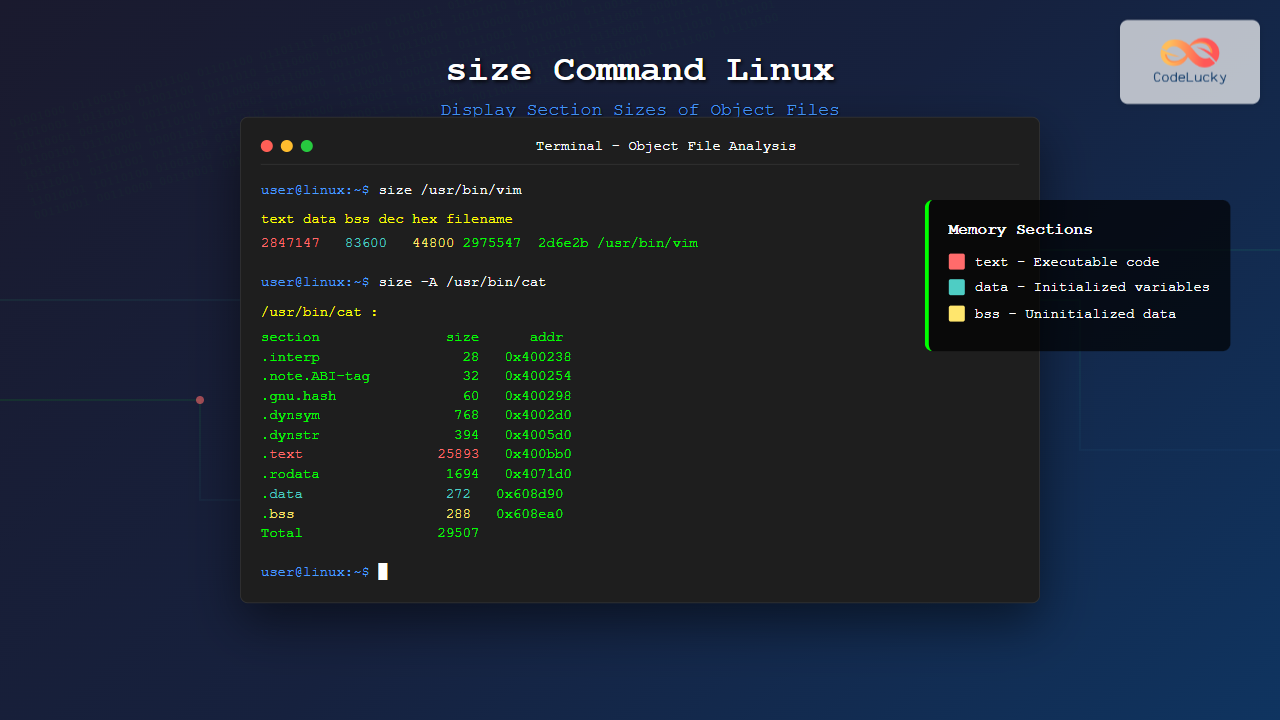
The size command is a powerful utility in Linux systems that displays the section sizes of object files, executables, and libraries. This essential tool helps developers and system administrators analyze memory usage, optimize code, and understand how programs utilize system resources.
What is the size Command?
The size command reads one or more object files and displays the sizes of their various sections. It’s particularly useful for examining compiled programs, shared libraries, and object files to understand their memory footprint and structure.
Basic Syntax
size [options] [file...]Understanding ELF File Sections
Before diving into examples, it’s important to understand the main sections that the size command analyzes:
- text: Contains the executable code
- data: Contains initialized global and static variables
- bss: Contains uninitialized global and static variables
Basic Usage Examples
Analyzing a Simple Executable
Let’s start with examining a basic executable:
$ size /usr/bin/lsOutput:
   text    data     bss     dec     hex filename
 133251    4864    4616  142731   22d7b /usr/bin/ls
This output shows:
- text: 133,251 bytes of executable code
- data: 4,864 bytes of initialized data
- bss: 4,616 bytes of uninitialized data
- dec: 142,731 total bytes in decimal
- hex: 22d7b total bytes in hexadecimal
Examining Multiple Files
$ size /usr/bin/cat /usr/bin/grep /usr/bin/findOutput:
   text    data     bss     dec     hex filename
  27891    1328     288   29507    7363 /usr/bin/cat
 183107    3152    1024  187283   25bd3 /usr/bin/grep
 284738    5456    2368  292562   476f2 /usr/bin/find
Command Options and Flags
Berkeley Format (-B or –format=berkeley)
This is the default format, showing text, data, and bss sections:
$ size -B /usr/bin/vimOutput:
   text    data     bss     dec     hex filename
2847147   83600   44800 2975547  2d6e2b /usr/bin/vim
SysV Format (-A or –format=sysv)
This format provides detailed information about all sections:
$ size -A /usr/bin/catOutput:
/usr/bin/cat  :
section               size      addr
.interp                 28   0x400238
.note.ABI-tag           32   0x400254
.note.gnu.build-id      36   0x400274
.gnu.hash               60   0x400298
.dynsym                768   0x4002d0
.dynstr                394   0x4005d0
.gnu.version            64   0x40075a
.gnu.version_r          80   0x40079c
.rela.dyn              192   0x4007ec
.rela.plt              456   0x4008ac
.init                   26   0x400a78
.plt                   320   0x400a90
.text                25893   0x400bb0
.fini                    9   0x4071c5
.rodata                1694   0x4071d0
.eh_frame_hdr           156   0x407840
.eh_frame               588   0x4078dc
.init_array               8   0x608b00
.fini_array               8   0x608b08
.dynamic                464   0x608b10
.got                      8   0x608ce0
.got.plt                168   0x608ce8
.data                   272   0x608d90
.bss                    288   0x608ea0
Total                 29507
Radix Options
Display sizes in different number bases:
# Octal format
$ size -o /usr/bin/cat
Output:
   text    data     bss     oct     hex filename
  27891    1328     288   71603    7363 /usr/bin/cat
# Hexadecimal format
$ size -x /usr/bin/catOutput:
   text    data     bss     dec     hex filename
   6cf3     530     120    7363    7363 /usr/bin/cat
Decimal Format (-d)
$ size -d /usr/bin/catOutput:
   text    data     bss     dec     hex filename
  27891    1328     288   29507    7363 /usr/bin/cat
Advanced Usage Scenarios
Analyzing Shared Libraries
$ size /lib/x86_64-linux-gnu/libc.so.6Output:
   text    data     bss     dec     hex filename
1824143   45312   13624 1883079  1cc0b7 /lib/x86_64-linux-gnu/libc.so.6
Examining Object Files
When working with compiled object files:
$ gcc -c hello.c
$ size hello.o
Output:
   text    data     bss     dec     hex filename
     89       0       0      89      59 hello.o
Sorting Output
While the size command doesn’t have built-in sorting, you can combine it with other tools:
$ size /usr/bin/* | sort -k4 -n | tail -5This sorts files by total size (decimal column) and shows the largest 5:
   text    data     bss     dec     hex filename
1247299   49136    7936 1304371  13e5d3 /usr/bin/python3.9
1824143   45312   13624 1883079  1cc0b7 /usr/bin/dpkg
2463747   63584    8320 2535651  26b7e3 /usr/bin/git
2847147   83600   44800 2975547  2d6e2b /usr/bin/vim
4521299  183648   36096 4741043  485d53 /usr/bin/gcc
Practical Applications
Code Optimization
Use size to monitor how code changes affect memory usage:
# Before optimization
$ size myprogram
   text    data     bss     dec     hex filename
  45678    2340    1024   49042    bf92 myprogram

# After optimization
$ size myprogram
   text    data     bss     dec     hex filename
  42156    2340    1024   45520    b1f0 myprogram
Library Comparison
Compare different versions or implementations:
$ size /usr/lib/x86_64-linux-gnu/libssl.so.1.1 /usr/lib/x86_64-linux-gnu/libssl.so.3Embedded Development
For embedded systems with memory constraints:
$ size firmware.elf
   text    data     bss     dec     hex filename
  32768    1024    4096   37888    9400 firmware.elf
Integration with Build Systems
Using with Make
Add size analysis to your Makefile:
analyze: $(TARGET)
	@echo "Memory usage analysis:"
	@size $(TARGET)
	@echo "Text section uses $$(size $(TARGET) | tail -1 | awk '{print $$1}') bytes"
Continuous Integration
Monitor binary size in CI/CD pipelines:
#!/bin/bash
MAX_SIZE=1048576  # 1MB limit
CURRENT_SIZE=$(size myapp | tail -1 | awk '{print $4}')

if [ $CURRENT_SIZE -gt $MAX_SIZE ]; then
    echo "Error: Binary size ($CURRENT_SIZE) exceeds limit ($MAX_SIZE)"
    exit 1
fi
Troubleshooting Common Issues
File Not Found Errors
$ size nonexistent
size: nonexistent: No such file
Invalid File Format
$ size textfile.txt
size: textfile.txt: file format not recognized
Permission Issues
$ size /restricted/file
size: /restricted/file: Permission denied
Best Practices
- Regular Monitoring: Include size analysis in your development workflow
- Version Tracking: Compare sizes across different versions of your software
- Memory Planning: Use size information for embedded system memory allocation
- Optimization Validation: Verify that code optimizations actually reduce binary size
Related Commands
nm: List symbols in object filesobjdump: Display information about object filesreadelf: Display information about ELF filesstrip: Remove symbols from object files
Conclusion
The size command is an invaluable tool for developers and system administrators working with compiled code. Whether you’re optimizing applications for embedded systems, monitoring memory usage in large applications, or simply understanding how your code translates to binary format, mastering the size command will enhance your development and analysis capabilities.
By incorporating size analysis into your development workflow, you can make informed decisions about code optimization, memory allocation, and system resource planning. The command’s simplicity belies its power in providing crucial insights into your programs’ memory footprint.
Related Posts
readelf Command Linux: Complete Guide to ELF File Analysis and Debugging
The readelf command is an essential tool for Linux developers, system administrators, and security analysts who need to examine Executable...
nm Command Linux: Complete Guide to Display Symbol Tables from Object Files
The nm command is a powerful utility in Linux that displays the symbol table of object files, executables, shared libraries,...
objdump Command Linux: Complete Guide to Display Object File Information
The objdump command is a powerful utility in Linux systems that allows developers and system administrators to examine the contents...
getrlimit Command Linux: Complete Guide to System Resource Limits Management
The getrlimit system call in Linux is a fundamental tool for retrieving information about resource limits imposed on processes. Understanding...
strings Command Linux: Extract and Analyze Text from Binary Files
The strings command is a powerful Linux utility that extracts printable character sequences from binary files. Whether you're analyzing executables,...
file Command Advanced Linux: Master Detailed File Type Analysis and Detection
The file command is one of the most powerful and underutilized utilities in Linux for determining file types and analyzing...
strip Command Linux: Complete Guide to Removing Symbols from Object Files
The strip command is a powerful Linux utility that removes symbols, debugging information, and other metadata from executable files, object...
type Command Linux: Complete Guide to Display Command Type and Location
The type command is an essential Linux utility that helps you identify the nature and location of commands in your...
du Command Linux: Display Directory Size and Disk Usage Explained with Examples
The du (disk usage) command in Linux is a powerful tool that allows users to measure directory size, analyze disk...

free Command in Linux: Monitor Memory Usage and Swap Space Efficiently
The free command is one of the most essential utilities in Linux for monitoring system memory usage and swap space....

Process in Operating System: Complete Guide to Definition, States and Lifecycle
What is a Process in Operating System? A process is a program in execution that consists of the program code...
ltrace Command Linux: Complete Guide to Trace Library Calls and Debug Programs
The ltrace command is a powerful debugging and analysis tool in Linux that allows you to trace library calls made...