What is Serverless Computing?
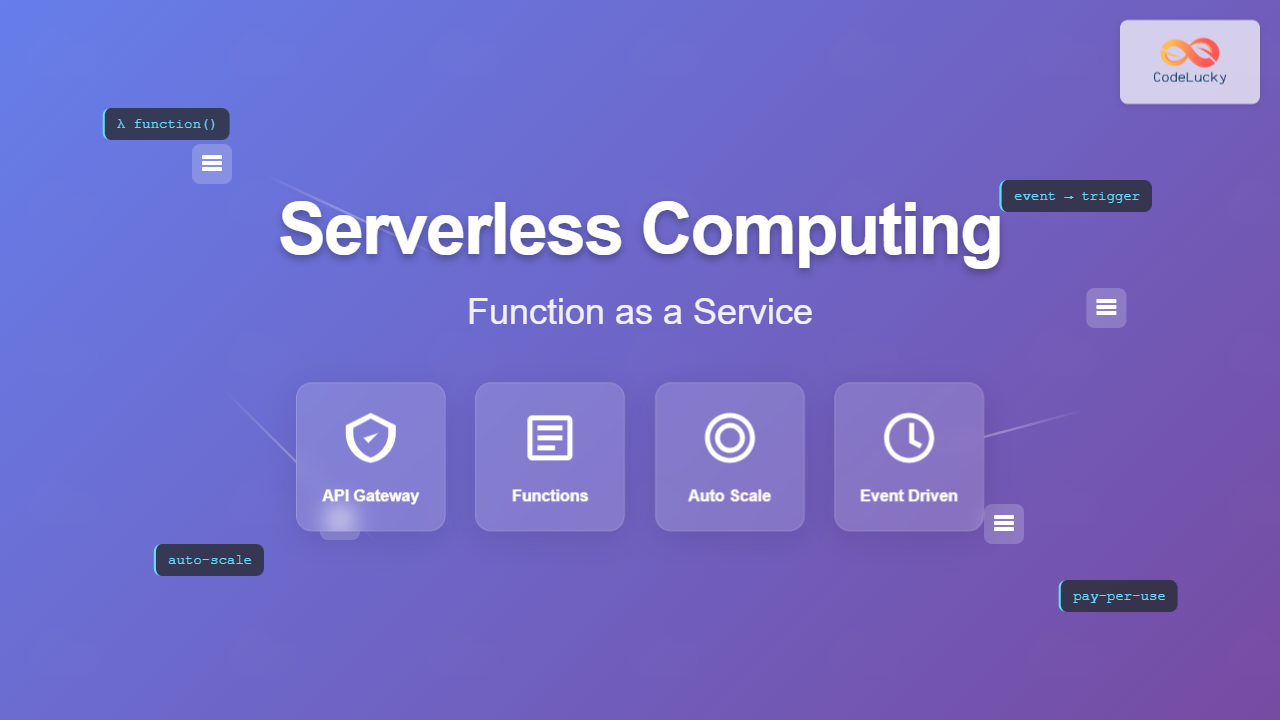
Serverless computing is a cloud execution model where developers can build and run applications without managing the underlying server infrastructure. Despite its name, servers still exist, but the cloud provider handles all server management, scaling, and maintenance automatically.
Function as a Service (FaaS) is the core component of serverless computing, allowing developers to deploy individual functions that execute in response to events. These functions are stateless, ephemeral, and automatically scale based on demand.

Key Characteristics of Serverless Computing
Event-Driven Architecture
Serverless functions execute in response to specific events such as HTTP requests, database changes, file uploads, or scheduled triggers. This event-driven nature makes serverless ideal for reactive applications.
Automatic Scaling
Functions automatically scale from zero to thousands of concurrent executions based on incoming requests. When no requests are present, no resources are consumed, making it highly cost-effective.
Pay-per-Execution
You only pay for the actual compute time used during function execution, measured in milliseconds. This granular billing model eliminates costs associated with idle server time.
Stateless Design
Each function execution is independent and stateless. Any persistent data must be stored in external services like databases or storage systems.
Popular FaaS Platforms
| Platform | Provider | Runtime Support | Max Execution Time | Memory Limit |
|---|---|---|---|---|
| AWS Lambda | Amazon Web Services | Node.js, Python, Java, C#, Go, Ruby | 15 minutes | 10,240 MB |
| Azure Functions | Microsoft Azure | C#, JavaScript, F#, Java, Python | 10 minutes (Consumption) | 1.5 GB |
| Google Cloud Functions | Google Cloud Platform | Node.js, Python, Go, Java | 9 minutes | 8 GB |
| Vercel Functions | Vercel | Node.js, Python, Go, Ruby | 10 seconds (Hobby) | 1 GB |
Serverless Architecture Patterns
1. API Backend Pattern
Create RESTful APIs using serverless functions to handle HTTP requests. Each endpoint can be implemented as a separate function.
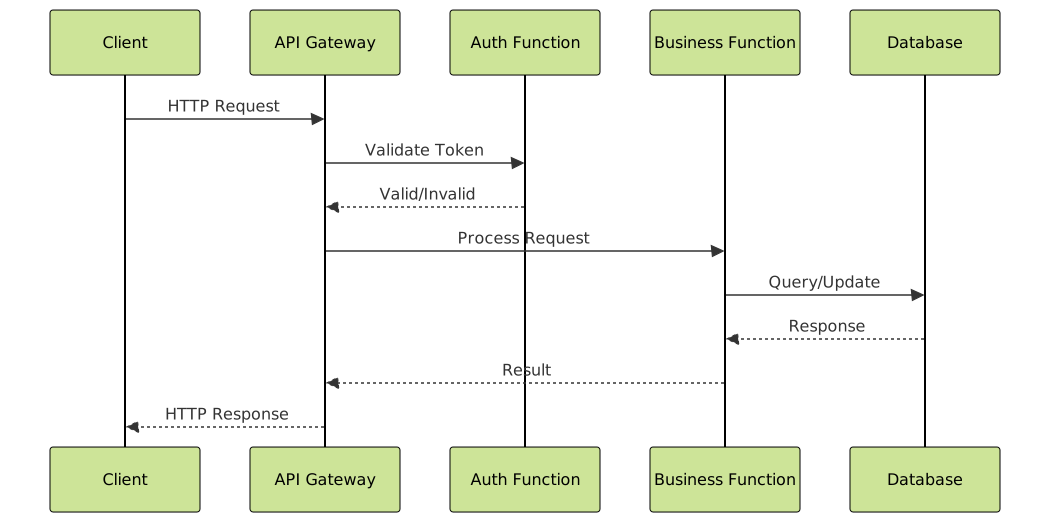
Example: Simple API Endpoint
// AWS Lambda Function for User Management API
exports.handler = async (event) => {
    const { httpMethod, pathParameters, body } = event;

    try {
        switch (httpMethod) {
            case 'GET':
                return await getUser(pathParameters.id);
            case 'POST':
                return await createUser(JSON.parse(body));
            case 'PUT':
                return await updateUser(pathParameters.id, JSON.parse(body));
            case 'DELETE':
                return await deleteUser(pathParameters.id);
            default:
                return {
                    statusCode: 405,
                    body: JSON.stringify({ error: 'Method not allowed' })
                };
        }
    } catch (error) {
        return {
            statusCode: 500,
            body: JSON.stringify({ error: error.message })
        };
    }
};

async function getUser(userId) {
    // Database query logic
    const user = await db.users.findById(userId);
    return {
        statusCode: 200,
        headers: {
            'Content-Type': 'application/json',
            'Access-Control-Allow-Origin': '*'
        },
        body: JSON.stringify(user)
    };
}
2. Event Processing Pattern
Process events from various sources like message queues, file uploads, or database changes in real-time.
import json
import boto3
from PIL import Image
import io

def lambda_handler(event, context):
    s3 = boto3.client('s3')

    # Process S3 upload event
    for record in event['Records']:
        bucket = record['s3']['bucket']['name']
        key = record['s3']['object']['key']

        if key.lower().endswith(('.jpg', '.jpeg', '.png')):
            # Generate thumbnail
            response = s3.get_object(Bucket=bucket, Key=key)
            image = Image.open(io.BytesIO(response['Body'].read()))

            # Create thumbnail
            thumbnail = image.copy()
            thumbnail.thumbnail((200, 200), Image.LANCZOS)

            # Save thumbnail
            buffer = io.BytesIO()
            thumbnail.save(buffer, format='JPEG')
            buffer.seek(0)

            thumbnail_key = f"thumbnails/{key}"
            s3.put_object(
                Bucket=bucket,
                Key=thumbnail_key,
                Body=buffer.getvalue(),
                ContentType='image/jpeg'
            )

    return {
        'statusCode': 200,
        'body': json.dumps('Thumbnails generated successfully')
    }
3. Scheduled Task Pattern
Execute functions on a schedule for batch processing, data cleanup, or periodic maintenance tasks.
// Daily report generation function
exports.handler = async (event) => {
    const AWS = require('aws-sdk');
    const dynamodb = new AWS.DynamoDB.DocumentClient();
    const ses = new AWS.SES();

    try {
        // Calculate date range for yesterday
        const yesterday = new Date();
        yesterday.setDate(yesterday.getDate() - 1);
        const dateString = yesterday.toISOString().split('T')[0];

        // Query daily metrics
        const params = {
            TableName: 'UserActivity',
            KeyConditionExpression: 'date = :date',
            ExpressionAttributeValues: {
                ':date': dateString
            }
        };

        const result = await dynamodb.query(params).promise();

        // Generate report
        const report = generateDailyReport(result.Items);

        // Send email report
        await sendEmailReport(report, dateString);

        return {
            statusCode: 200,
            body: JSON.stringify({
                message: 'Daily report generated successfully',
                date: dateString,
                recordsProcessed: result.Items.length
            })
        };
    } catch (error) {
        console.error('Error generating report:', error);
        throw error;
    }
};
Serverless Development Lifecycle

Local Development Setup
Use frameworks like the Serverless Framework, AWS SAM, or Azure Functions Core Tools for local development and testing.
# serverless.yml configuration
service: user-management-api

provider:
  name: aws
  runtime: nodejs18.x
  region: us-east-1
  environment:
    USERS_TABLE: ${self:service}-users-${self:provider.stage}

functions:
  getUser:
    handler: handlers/users.get
    events:
      - http:
          path: users/{id}
          method: get
          cors: true

  createUser:
    handler: handlers/users.create
    events:
      - http:
          path: users
          method: post
          cors: true

  processImage:
    handler: handlers/images.process
    events:
      - s3:
          bucket: user-uploads
          event: s3:ObjectCreated:*
          rules:
            - suffix: .jpg

resources:
  Resources:
    UsersTable:
      Type: AWS::DynamoDB::Table
      Properties:
        TableName: ${self:provider.environment.USERS_TABLE}
        BillingMode: PAY_PER_REQUEST
        AttributeDefinitions:
          - AttributeName: id
            AttributeType: S
        KeySchema:
          - AttributeName: id
            KeyType: HASH
Benefits of Serverless Computing
Cost Efficiency
- Pay-per-use billing: Only pay for actual execution time
- No idle costs: Zero charges when functions aren’t running
- Reduced operational overhead: No server maintenance costs
Scalability
- Automatic scaling: Handles traffic spikes without configuration
- Zero to scale: Instantly available when needed
- Concurrent execution: Multiple instances run simultaneously
Developer Productivity
- Focus on code: No infrastructure management required
- Faster deployment: Deploy individual functions independently
- Built-in monitoring: Automatic logging and metrics collection
Challenges and Limitations
Cold Start Latency
When a function hasn’t been invoked recently, the platform needs time to initialize the execution environment, causing additional latency for the first request.
// Mitigation: Connection pooling and warm-up strategies
let dbConnection;

exports.handler = async (event) => {
    // Reuse existing connection if available
    if (!dbConnection) {
        dbConnection = await createDatabaseConnection();
    }

    try {
        const result = await processRequest(event, dbConnection);
        return {
            statusCode: 200,
            body: JSON.stringify(result)
        };
    } catch (error) {
        // Don't close connection on error to maintain warm state
        console.error('Request failed:', error);
        return {
            statusCode: 500,
            body: JSON.stringify({ error: 'Internal server error' })
        };
    }
};
Vendor Lock-in
Each cloud provider has different APIs, deployment methods, and feature sets, making migration between platforms challenging.
Debugging and Monitoring
Distributed function execution can make debugging more complex. Implement comprehensive logging and distributed tracing.
const AWS = require('aws-sdk');
const AWSXRay = require('aws-xray-sdk-core');

// Enable X-Ray tracing
const aws = AWSXRay.captureAWS(AWS);

exports.handler = async (event, context) => {
    const segment = AWSXRay.getSegment();

    try {
        // Add metadata for tracing
        segment.addMetadata('request', {
            userId: event.pathParameters?.id,
            method: event.httpMethod,
            timestamp: Date.now()
        });

        const result = await processUserRequest(event);

        // Log success metrics
        console.log('Request processed successfully', {
            userId: event.pathParameters?.id,
            duration: Date.now() - context.getRemainingTimeInMillis()
        });

        return result;
    } catch (error) {
        // Enhanced error logging
        console.error('Function execution failed', {
            error: error.message,
            stack: error.stack,
            event: JSON.stringify(event),
            requestId: context.awsRequestId
        });

        throw error;
    }
};
Best Practices for Serverless Development
Function Design
- Single responsibility: Each function should have one clear purpose
- Stateless design: Store state in external services, not in function memory
- Idempotency: Functions should produce the same result when called multiple times
- Error handling: Implement comprehensive error handling and retry logic
Performance Optimization
- Minimize cold starts: Keep functions warm with scheduled invocations
- Optimize memory allocation: Right-size memory for optimal cost-performance
- Connection reuse: Reuse database connections between invocations
- Reduce package size: Minimize deployment package size for faster starts
Security Considerations
- Least privilege access: Grant minimal required permissions
- Environment variables: Use secure parameter stores for sensitive data
- Input validation: Validate and sanitize all function inputs
- Network security: Use VPC configurations when needed

Real-World Use Cases
E-commerce Platform
An online shopping platform uses serverless functions for various microservices:
- Product catalog API: Serverless functions serve product information
- Payment processing: Secure payment handling with automatic scaling
- Order notifications: Event-driven email and SMS notifications
- Inventory updates: Real-time inventory synchronization
IoT Data Processing
Process sensor data from thousands of IoT devices:
- Data ingestion: Functions receive and validate sensor readings
- Real-time analytics: Process streaming data for immediate insights
- Anomaly detection: Identify unusual patterns in sensor data
- Alert generation: Trigger notifications based on thresholds
Future of Serverless Computing
Serverless computing continues to evolve with new capabilities and improvements:
Edge Computing Integration
Functions deployed closer to users for reduced latency and improved performance. Services like AWS Lambda@Edge and Cloudflare Workers enable global distribution of serverless functions.
Container-based Serverless
Platforms like AWS Fargate and Azure Container Instances provide serverless container execution, combining the benefits of containers with serverless scaling.
Improved Cold Start Performance
Cloud providers continuously optimize cold start times through better resource allocation, pre-warmed execution environments, and improved runtime efficiency.
Getting Started with Serverless
Step 1: Choose Your Platform
Select a cloud provider based on your requirements, existing infrastructure, and team expertise.
Step 2: Set Up Development Environment
Install necessary tools and frameworks for local development and deployment.
Step 3: Build Your First Function
Start with a simple function like a basic API endpoint or event processor.
Step 4: Implement Monitoring
Set up logging, metrics, and alerting to monitor function performance and errors.
Step 5: Scale and Optimize
Monitor performance metrics and optimize functions for cost and performance.
Serverless computing and Function as a Service represent a significant shift in how we build and deploy applications. By abstracting away infrastructure management, developers can focus on writing business logic while benefiting from automatic scaling, cost efficiency, and reduced operational overhead. As the technology continues to mature, serverless architectures will become increasingly prevalent in modern application development.