
Introduction to Server Virtualization
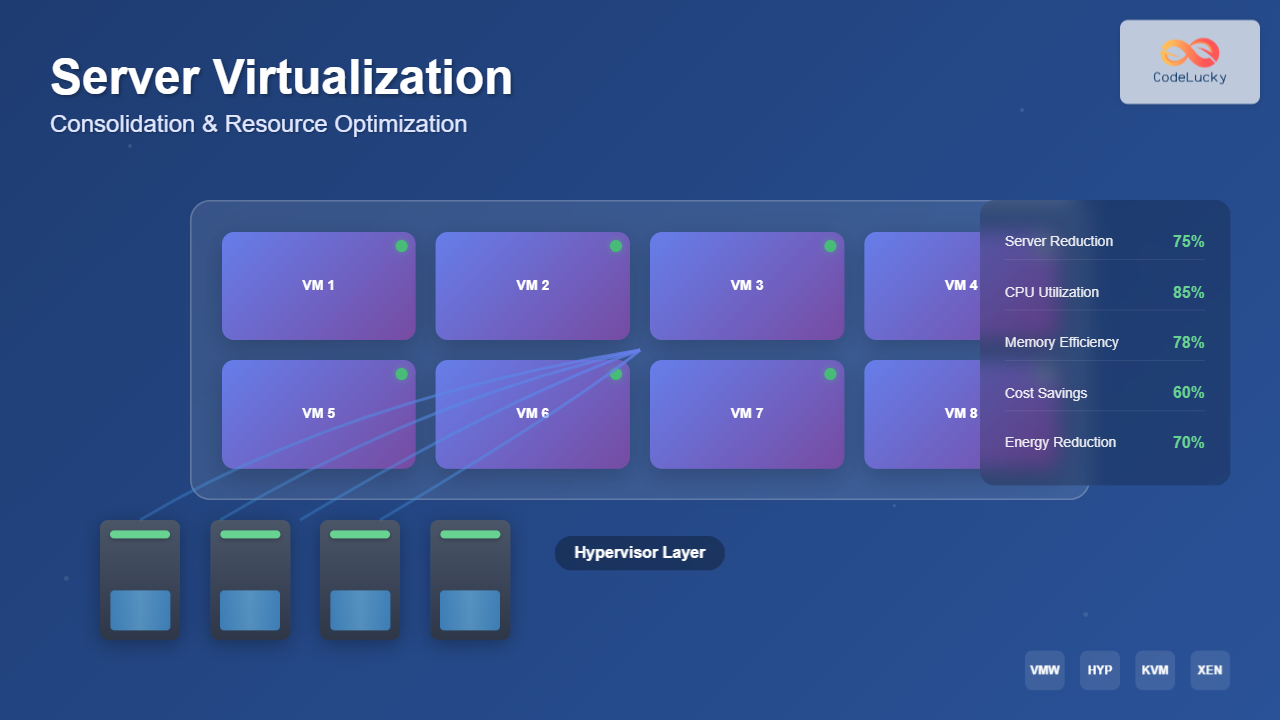
Server virtualization is a revolutionary technology that enables multiple virtual machines (VMs) to run on a single physical server, dramatically transforming how organizations manage their IT infrastructure. By abstracting the physical hardware layer, virtualization allows administrators to create isolated computing environments that share the same underlying resources while maintaining complete separation and security.
This technology has become the backbone of modern data centers, enabling unprecedented levels of efficiency, scalability, and cost reduction. Understanding server virtualization is crucial for system administrators, IT professionals, and organizations looking to optimize their infrastructure investments.

Understanding Server Consolidation
Server consolidation is the process of combining multiple physical servers into fewer, more powerful machines using virtualization technology. This approach addresses the common problem of server sprawl, where organizations accumulate numerous underutilized physical servers over time.
Benefits of Server Consolidation
Cost Reduction: Consolidation significantly reduces hardware costs, power consumption, cooling requirements, and data center space. Organizations typically see 50-70% reduction in total cost of ownership when implementing proper consolidation strategies.
Improved Resource Utilization: Physical servers often run at 10-15% CPU utilization, while virtualized environments can achieve 60-80% utilization rates through dynamic resource allocation.
Simplified Management: Managing fewer physical servers reduces administrative overhead, maintenance complexity, and the number of potential failure points in your infrastructure.
Consolidation Ratios and Planning
The consolidation ratio represents how many virtual machines can effectively run on a single physical host. Common ratios include:
- Conservative Approach: 4:1 to 8:1 ratio for mission-critical applications
- Moderate Approach: 10:1 to 15:1 ratio for general business applications
- Aggressive Approach: 20:1 or higher for development and testing environments
# Example consolidation calculation

Physical Servers: 40

Target Consolidation Ratio: 10:1

Required Virtual Hosts: 40 ÷ 10 = 4 physical servers

Space Savings: 36 servers (90% reduction)
Resource Optimization Techniques
Effective resource optimization ensures maximum utilization of available hardware while maintaining performance and reliability standards. This involves careful planning and implementation of various techniques.
CPU Optimization
CPU Oversubscription: Most applications don’t continuously use 100% CPU capacity. Virtualization platforms allow oversubscription ratios of 2:1 to 4:1, meaning you can allocate more virtual CPUs than physical cores available.
CPU Affinity and NUMA Awareness: Modern processors use Non-Uniform Memory Access (NUMA) architecture. Proper CPU scheduling ensures virtual machines access local memory and CPU cores, reducing latency and improving performance.
# VMware vSphere CPU Configuration Example

CPU Cores per VM: 2-4 vCPUs

CPU Reservation: 50% of allocated vCPUs

CPU Limit: 80% to prevent resource hogging

CPU Shares: High (2000) for critical VMs
Memory Optimization
Memory Overcommitment: Virtualization platforms use techniques like transparent page sharing, memory ballooning, and compression to allocate more virtual memory than physically available.
Memory Reservation Strategies:
- Conservative: Reserve 100% of allocated memory for critical applications
- Moderate: Reserve 50-75% for production workloads
- Aggressive: Reserve 25-50% for development environments

Storage Optimization
Thin Provisioning: Allocate storage space dynamically as needed rather than pre-allocating full capacity. This technique can achieve 30-50% storage savings in typical environments.
Storage Tiering: Implement automated tiering systems that move frequently accessed data to high-performance storage and archive cold data to lower-cost tiers.
# Storage Optimization Example

Traditional Allocation: 100 VMs × 100GB = 10TB

Thin Provisioned: 100 VMs × 40GB average = 4TB

Storage Savings: 60% reduction
Types of Hypervisors
Hypervisors are the fundamental software layer that enables virtualization. Understanding the different types helps in selecting the appropriate solution for specific requirements.
Type 1 Hypervisors (Bare Metal)
Type 1 hypervisors run directly on physical hardware without requiring a host operating system. They provide superior performance and are ideal for production environments.
Popular Type 1 Hypervisors:
- VMware vSphere/ESXi: Enterprise-grade platform with advanced features
- Microsoft Hyper-V: Integrated with Windows Server environments
- Citrix XenServer: Open-source foundation with commercial support
- KVM: Linux kernel-based virtualization solution
Type 2 Hypervisors (Hosted)
Type 2 hypervisors run on top of a conventional operating system, making them suitable for development, testing, and desktop virtualization scenarios.
Common Type 2 Solutions:
- VMware Workstation/Fusion: Professional desktop virtualization
- Oracle VirtualBox: Free, cross-platform virtualization
- Parallels Desktop: Mac-focused virtualization solution

Implementation Best Practices
Successful virtualization implementation requires careful planning, proper resource allocation, and ongoing optimization to achieve maximum benefits.
Capacity Planning
Assessment Phase: Analyze current server utilization, application requirements, and growth projections. Use tools like Microsoft Assessment and Planning Toolkit or VMware Capacity Planner.
Resource Sizing Guidelines:
| Workload Type | CPU (cores) | Memory (GB) | Storage (GB) |
|---|---|---|---|
| Web Server | 2-4 | 4-8 | 50-100 |
| Database Server | 4-8 | 16-32 | 200-500 |
| Application Server | 2-6 | 8-16 | 100-200 |
| Domain Controller | 2 | 4-8 | 60-120 |
High Availability and Disaster Recovery
Clustering: Implement host clustering to provide automatic failover capabilities. Most enterprise virtualization platforms support 2-64 node clusters.
Live Migration: Enable seamless movement of running virtual machines between hosts for maintenance and load balancing without service interruption.
Backup Strategies: Implement image-based backups that capture entire virtual machine states, enabling rapid recovery and reduced recovery time objectives (RTO).
# High Availability Configuration Example

Cluster Nodes: 4 hosts

Failover Capacity: N+1 (25% reserved)

Maximum VMs per Host: 20

Total VM Capacity: 60 VMs

Reserved Capacity: 20 VMs
Performance Monitoring and Optimization
Continuous monitoring ensures optimal performance and helps identify bottlenecks before they impact service delivery.
Key Performance Indicators
CPU Metrics:
- CPU Ready Time: Should be less than 5% (10ms per second)
- CPU Utilization: Target 70-80% for optimal efficiency
- CPU Co-Stop: Monitor for SMP virtual machines
Memory Metrics:
- Memory Utilization: Host memory usage below 90%
- Memory Ballooning: Minimal ballooning indicates healthy memory allocation
- Memory Swapping: Should be near zero for production systems
Storage Metrics:
- IOPS Performance: Monitor read/write operations per second
- Latency: Keep storage latency below 20ms for optimal performance
- Queue Depth: Avoid storage queue saturation

Advanced Virtualization Technologies
Containerization vs Traditional Virtualization
While traditional virtualization virtualizes entire machines, containerization virtualizes the operating system, providing lightweight isolation with minimal overhead.
Container Advantages:
- Faster startup times (seconds vs minutes)
- Lower resource overhead (MB vs GB)
- Higher density (100s vs 10s per host)
- Improved portability across environments
Use Case Comparison:
| Scenario | Traditional VM | Containers |
|---|---|---|
| Legacy Applications | Recommended | Limited |
| Microservices | Possible | Ideal |
| Multi-OS Requirements | Excellent | Limited |
| Resource Efficiency | Good | Excellent |
Nested Virtualization
Nested virtualization allows running hypervisors inside virtual machines, enabling complex testing scenarios and cloud-based virtualization services. This technology requires hardware support and careful resource planning.
# Nested Virtualization Requirements

Hardware: Intel VT-x/AMD-V with EPT/NPT

Host CPU: 4+ cores recommended

Host Memory: 16+ GB minimum

Storage: High-performance SSD recommended

Network: Adequate bandwidth for multiple layers
Security Considerations
Virtualization introduces unique security challenges that require specialized approaches and tools to maintain robust protection.
Hypervisor Security
Hypervisor Hardening: Apply security patches promptly, disable unnecessary services, and implement role-based access control with principle of least privilege.
Network Segmentation: Use virtual switches and VLANs to isolate different security zones and prevent lateral movement between virtual machines.
VM Escape Prevention: While rare, VM escape vulnerabilities can allow attackers to break out of virtual machine boundaries. Keep hypervisors updated and implement defense-in-depth strategies.
Compliance and Governance
Virtual Machine Sprawl Control: Implement approval workflows and lifecycle management to prevent unauthorized VM creation and resource waste.
Audit and Compliance: Maintain detailed logs of virtual machine activities, configuration changes, and resource usage for compliance reporting and security analysis.

Future Trends and Considerations
The virtualization landscape continues evolving with emerging technologies and changing business requirements driving new innovations and approaches.
Edge Computing Integration
Edge computing brings virtualization closer to data sources and end-users, reducing latency and improving performance for IoT and real-time applications. This trend requires lightweight virtualization solutions optimized for resource-constrained environments.
Artificial Intelligence and Machine Learning
AI-driven optimization tools are beginning to automate resource allocation, predict capacity requirements, and optimize performance based on workload patterns and historical data.
Hybrid and Multi-Cloud Strategies
Organizations increasingly adopt hybrid cloud approaches, combining on-premises virtualization with public cloud services. This requires seamless integration, workload portability, and consistent management across environments.
Conclusion
Server virtualization has transformed modern IT infrastructure by enabling unprecedented levels of efficiency, flexibility, and cost optimization. Through proper consolidation strategies and resource optimization techniques, organizations can achieve significant improvements in server utilization, reduce operational costs, and improve service delivery.
Success with virtualization requires careful planning, ongoing monitoring, and continuous optimization. By understanding the different hypervisor types, implementing best practices, and staying current with emerging technologies, IT professionals can maximize the benefits of their virtualization investments.
As technology continues evolving with trends like edge computing, AI optimization, and hybrid cloud strategies, virtualization remains a cornerstone of efficient IT infrastructure management. The principles and practices outlined in this guide provide a solid foundation for implementing and managing successful virtualization environments.
Related Posts
Virtual I/O: Complete Guide to Device Virtualization Techniques and Implementation
Introduction to Virtual I/O and Device Virtualization Virtual Input/Output (Virtual I/O) represents one of the most critical components in modern...
Desktop Virtualization: Complete VDI Implementation Guide for Modern Enterprises
Introduction to Desktop Virtualization Desktop virtualization represents a paradigm shift in how organizations deliver computing resources to end users. By...
Cloud Operating System: Complete Guide to Virtualized Infrastructure Management
Cloud Operating Systems represent a paradigm shift in how we manage and orchestrate computing resources across distributed environments. Unlike traditional...
Network Virtualization: Complete Guide to SDN and NFV Technologies
Network virtualization has revolutionized modern IT infrastructure by decoupling network functions from physical hardware, enabling unprecedented flexibility and efficiency. This...
Virtual Machine in Operating System: Complete Guide to Hardware Virtualization Technology
What is a Virtual Machine in Operating System? A Virtual Machine (VM) is a software-based emulation of a physical computer...
Storage Virtualization: Complete Guide to Abstract Storage Resources in Modern Computing
Storage virtualization represents one of the most critical technologies in modern computing infrastructure, enabling organizations to abstract physical storage resources...

Migration in Virtual Machines: Complete Guide to Live Migration Process
Virtual machine live migration represents one of the most critical capabilities in modern virtualization environments, enabling seamless movement of running...
Virtual Machine Monitor: Complete Guide to Resource Management and Isolation
A Virtual Machine Monitor (VMM), also known as a hypervisor, is a critical software layer that creates and manages virtual...
Full Virtualization: Complete Hardware Abstraction and Implementation Guide
Full virtualization represents one of the most significant breakthroughs in modern computing, enabling complete hardware abstraction that allows multiple operating...
Virtual Memory in Virtualization: Memory Overcommitment Strategies and Implementation
Introduction to Memory Overcommitment Memory overcommitment is a fundamental virtualization technique that allows hypervisors to allocate more virtual memory to...
Container Virtualization: Complete Guide to OS-level Virtualization Technology
Container virtualization represents a revolutionary approach to application deployment and resource management through OS-level virtualization. Unlike traditional hardware virtualization, containers...
Hypervisor Types: Complete Guide to Type 1 and Type 2 Virtualization
Virtualization has revolutionized modern computing, allowing multiple operating systems to run simultaneously on a single physical machine. At the heart...





