
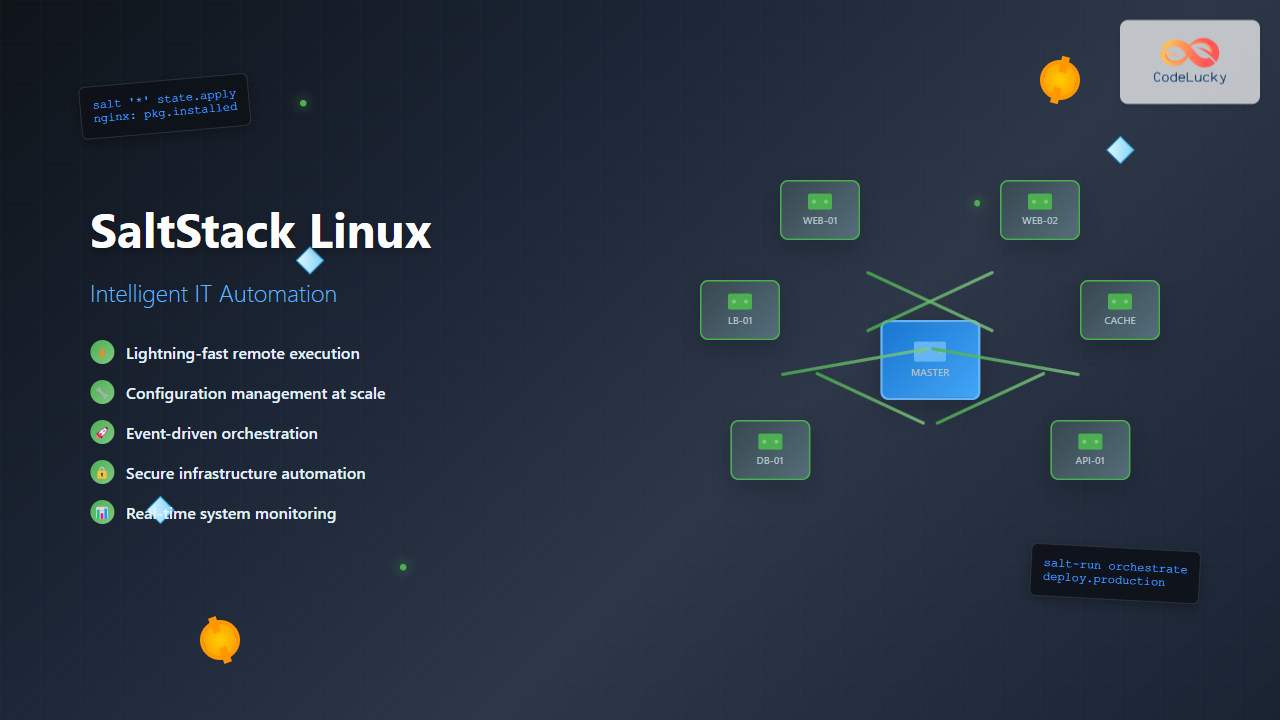
SaltStack has revolutionized the way system administrators and DevOps engineers manage infrastructure at scale. As a powerful configuration management and remote execution tool, SaltStack enables intelligent IT automation across Linux environments, making it an essential skill for modern infrastructure management.
What is SaltStack?
SaltStack, commonly referred to as Salt, is an open-source configuration management and orchestration tool that uses a master-minion architecture to manage thousands of servers simultaneously. Built on Python and leveraging ZeroMQ for communication, SaltStack provides fast, scalable, and secure infrastructure automation.
Key Features of SaltStack
- Speed and Scalability: Can manage thousands of systems simultaneously
- Event-driven Architecture: Real-time monitoring and reaction capabilities
- Flexible Communication: Multiple communication patterns including push and pull
- Cross-platform Support: Works across Linux, Windows, and Unix systems
- Extensible: Rich ecosystem of modules and custom extensions
SaltStack Architecture Overview
Understanding SaltStack’s architecture is crucial for effective implementation:
Master-Minion Model
The traditional SaltStack deployment consists of:
- Salt Master: Central management server that sends commands and configurations
- Salt Minions: Nodes that receive and execute commands from the master
- Salt Keys: Cryptographic keys for secure communication
Masterless Configuration
For smaller deployments or isolated systems, SaltStack can operate in masterless mode where configurations are applied locally.
Installing SaltStack on Linux
Installing on Ubuntu/Debian
# Add SaltStack repository
curl -fsSL https://packages.broadcom.com/artifactory/api/security/keypairs/SaltProjectKey/public | sudo apt-key add -
echo "deb https://packages.broadcom.com/artifactory/saltproject-deb/ stable main" | sudo tee /etc/apt/sources.list.d/saltstack.list

# Update package list
sudo apt update

# Install Salt Master
sudo apt install salt-master

# Install Salt Minion
sudo apt install salt-minion
Installing on CentOS/RHEL/Fedora
# Add SaltStack repository
sudo rpm --import https://packages.broadcom.com/artifactory/api/security/keypairs/SaltProjectKey/public

# Create repository file
sudo tee /etc/yum.repos.d/saltstack.repo << 'EOF'
[saltstack]
name=SaltStack repo for RHEL/CentOS
baseurl=https://packages.broadcom.com/artifactory/saltproject-rpm/
enabled=1
gpgcheck=1
gpgkey=https://packages.broadcom.com/artifactory/api/security/keypairs/SaltProjectKey/public
EOF

# Install packages
sudo yum install salt-master salt-minion
Basic SaltStack Configuration
Configuring the Salt Master
The main configuration file is located at /etc/salt/master:
# Basic master configuration
interface: 0.0.0.0
publish_port: 4505
ret_port: 4506
worker_threads: 5
file_roots:
  base:
    - /srv/salt/states
pillar_roots:
  base:
    - /srv/salt/pillar
Configuring Salt Minions
Minion configuration is stored in /etc/salt/minion:
# Basic minion configuration
master: 192.168.1.100
id: web-server-01
log_level: info
startup_states: highstate
Starting Services
# Start and enable Salt Master
sudo systemctl start salt-master
sudo systemctl enable salt-master

# Start and enable Salt Minion
sudo systemctl start salt-minion
sudo systemctl enable salt-minion

# Check service status
sudo systemctl status salt-master
sudo systemctl status salt-minion
Key Management and Authentication
Managing Minion Keys
# List all keys
sudo salt-key -L

# Accept a specific minion key
sudo salt-key -a web-server-01

# Accept all pending keys
sudo salt-key -A

# Delete a minion key
sudo salt-key -d web-server-01

# Reject a key
sudo salt-key -r suspicious-minion
Example Output
$ sudo salt-key -L
Accepted Keys:
web-server-01
web-server-02
database-01
Denied Keys:
Unaccepted Keys:
web-server-03
Rejected Keys:
Basic Salt Commands and Remote Execution
Testing Connectivity
# Test all minions
sudo salt '*' test.ping

# Test specific minion
sudo salt 'web-server-01' test.ping

# Test minions matching pattern
sudo salt 'web-*' test.ping
System Information Gathering
# Get system information
sudo salt '*' grains.items

# Get specific grain information
sudo salt '*' grains.item os osrelease

# Get disk usage
sudo salt '*' disk.usage

# Get memory information
sudo salt '*' status.meminfo
Package Management
# Update package lists
sudo salt '*' pkg.refresh_db

# Install packages
sudo salt '*' pkg.install nginx

# Remove packages
sudo salt '*' pkg.remove apache2

# List installed packages
sudo salt '*' pkg.list_pkgs
SaltStack States: Infrastructure as Code
Understanding Salt States
Salt States are declarative representations of system states written in YAML. They define how systems should be configured and maintained.
Creating Your First State File
Create /srv/salt/states/webserver.sls:
nginx:
  pkg.installed: []
  service.running:
    - enable: True
    - require:
      - pkg: nginx

/var/www/html/index.html:
  file.managed:
    - contents: |
        <html>
        <body>
        <h1>Welcome to our SaltStack managed server!</h1>
        <p>This server is managed by SaltStack.</p>
        </body>
        </html>
    - makedirs: True
    - require:
      - pkg: nginx

/etc/nginx/sites-available/default:
  file.managed:
    - contents: |
        server {
            listen 80 default_server;
            listen [::]:80 default_server;
            root /var/www/html;
            index index.html index.htm;
            server_name _;
            location / {
                try_files $uri $uri/ =404;
            }
        }
    - require:
      - pkg: nginx
    - watch_in:
      - service: nginx
Applying States
# Apply a specific state
sudo salt '*' state.apply webserver

# Apply all states (highstate)
sudo salt '*' state.highstate

# Test state application without making changes
sudo salt '*' state.apply webserver test=True
Advanced State Management
Using Templates with Jinja2
Create /srv/salt/states/nginx-template.sls:
nginx:
  pkg.installed: []
  service.running:
    - enable: True
    - require:
      - pkg: nginx

/etc/nginx/nginx.conf:
  file.managed:
    - source: salt://templates/nginx.conf.j2
    - template: jinja
    - context:
        worker_processes: {{ grains['num_cpus'] }}
        worker_connections: 1024
    - require:
      - pkg: nginx
    - watch_in:
      - service: nginx
Create the template file /srv/salt/templates/nginx.conf.j2:
user www-data;
worker_processes {{ worker_processes }};
pid /run/nginx.pid;

events {
    worker_connections {{ worker_connections }};
    use epoll;
}

http {
    include /etc/nginx/mime.types;
    default_type application/octet-stream;

    access_log /var/log/nginx/access.log;
    error_log /var/log/nginx/error.log;

    include /etc/nginx/sites-enabled/*;
}
State Dependencies and Ordering
mysql-server:
  pkg.installed: []
  service.running:
    - name: mysql
    - enable: True
    - require:
      - pkg: mysql-server

mysql-secure-installation:
  cmd.run:
    - name: |
        mysql -u root << 'EOF'
        DELETE FROM mysql.user WHERE User='';
        DELETE FROM mysql.user WHERE User='root' AND Host NOT IN ('localhost', '127.0.0.1', '::1');
        DROP DATABASE test;
        FLUSH PRIVILEGES;
        EOF
    - require:
      - service: mysql-server
    - unless: test -f /etc/mysql/.secured

/etc/mysql/.secured:
  file.touch:
    - require:
      - cmd: mysql-secure-installation
Pillar System: Secure Data Management
Understanding Pillars
Pillars provide a secure way to store and distribute sensitive data to minions. Unlike grains, pillar data is only available to authorized minions.
Creating Pillar Data
Create /srv/salt/pillar/users.sls:
users:
  admin:
    name: admin
    password: $6$rounds=656000$YQKvB8K5Qy8b$X7KvB8K5Qy8bX7K
    shell: /bin/bash
    home: /home/admin
    groups:
      - sudo
      - docker
  developer:
    name: dev
    password: $6$rounds=656000$ZRLwC9L6Rz9c$Y8LwC9L6Rz9cY8L
    shell: /bin/bash
    home: /home/dev
    groups:
      - developers

database:
  host: db.internal.com
  port: 3306
  username: appuser
  password: "{{ salt['random.get_str'](32) }}"
Top File for Pillar Assignment
Create /srv/salt/pillar/top.sls:
base:
  'web-*':
    - users
    - database
  'db-*':
    - database
  '*':
    - common
Using Pillar Data in States
Create /srv/salt/states/user-management.sls:
{% for username, user in pillar.get('users', {}).items() %}
{{ username }}:
  user.present:
    - name: {{ user.name }}
    - password: {{ user.password }}
    - shell: {{ user.shell }}
    - home: {{ user.home }}
    - groups: {{ user.groups }}
    - createhome: True
{% endfor %}
Targeting and Grain System
Understanding Grains
Grains are static information about minions that can be used for targeting and decision-making in states.
Viewing Grain Information
# List all grains
sudo salt 'web-server-01' grains.items

# Get specific grain
sudo salt '*' grains.get os

# Get multiple grains
sudo salt '*' grains.get os,osrelease,mem_total
Custom Grains
Create /etc/salt/grains on minions:
environment: production
role: webserver
datacenter: us-west-1
application: ecommerce
Advanced Targeting
# Target by grain
sudo salt -G 'os:Ubuntu' test.ping

# Target by compound matching
sudo salt -C 'G@os:Ubuntu and G@role:webserver' cmd.run 'uptime'

# Target by regular expression
sudo salt -E 'web-server-[0-9]+' test.ping

# Target by list
sudo salt -L 'web-server-01,web-server-02,db-server-01' test.ping

# Target by subnet
sudo salt -S '192.168.1.0/24' test.ping
Event System and Reactors
Monitoring Events
# Listen to all events
sudo salt-run state.event pretty=True

# Listen to specific event tags
sudo salt-run state.event pretty=True tag='salt/minion/*/start'
Creating Custom Events
# Send custom event from minion
sudo salt 'web-server-01' event.send 'custom/app/deployed' '{"version": "1.2.3", "status": "success"}'
Setting Up Reactors
Add to /etc/salt/master:
reactor:
  - 'salt/minion/*/start':
    - /srv/reactor/minion-start.sls
  - 'custom/app/deployed':
    - /srv/reactor/app-deployed.sls
Create /srv/reactor/minion-start.sls:
highstate_run:
  local.state.highstate:
    - tgt: {{ data['id'] }}

send_notification:
  local.cmd.run:
    - tgt: notification-server
    - arg:
      - 'echo "Minion {{ data["id"] }} started and configured" | mail -s "Salt Alert" [email protected]'
Orchestration and Multi-System Coordination
Understanding Orchestration
Orchestration allows you to coordinate actions across multiple systems in a specific order.
Creating an Orchestration File
Create /srv/salt/orchestration/deploy-app.sls:
update_database:
  salt.state:
    - tgt: 'db-*'
    - sls: database.migrate

deploy_backend:
  salt.state:
    - tgt: 'api-*'
    - sls: application.backend
    - require:
      - salt: update_database

update_frontend:
  salt.state:
    - tgt: 'web-*'
    - sls: application.frontend
    - require:
      - salt: deploy_backend

restart_load_balancer:
  salt.function:
    - name: service.restart
    - tgt: 'lb-*'
    - arg:
      - nginx
    - require:
      - salt: update_frontend

notify_team:
  salt.function:
    - name: cmd.run
    - tgt: 'notification-server'
    - arg:
      - 'curl -X POST https://hooks.slack.com/... -d "payload={\"text\":\"Deployment completed successfully\"}"'
    - require:
      - salt: restart_load_balancer
Running Orchestration
# Run orchestration
sudo salt-run state.orchestrate orchestration.deploy-app

# Run with specific pillar data
sudo salt-run state.orchestrate orchestration.deploy-app pillar='{"version": "1.3.0"}'
Advanced Configuration Management
Environment Management
Configure multiple environments in /etc/salt/master:
file_roots:
  base:
    - /srv/salt/states/common
  production:
    - /srv/salt/states/production
    - /srv/salt/states/common
  staging:
    - /srv/salt/states/staging
    - /srv/salt/states/common

pillar_roots:
  base:
    - /srv/salt/pillar/common
  production:
    - /srv/salt/pillar/production
    - /srv/salt/pillar/common
  staging:
    - /srv/salt/pillar/staging
    - /srv/salt/pillar/common
Using Environments
# Apply states from specific environment
sudo salt '*' state.apply webserver saltenv=production

# Get pillar data from specific environment
sudo salt '*' pillar.items saltenv=staging
Security Best Practices
Key Rotation
# Generate new master keys
sudo salt-key --gen-keys=master

# Rotate minion keys
sudo salt '*' saltutil.regen_keys
Access Control
Configure external authentication in /etc/salt/master:
external_auth:
  pam:
    developers:
      - 'dev-*':
        - test.*
        - pkg.*
    admins:
      - '*':
        - '*'

publisher_acl:
  developers:
    - 'dev-*':
      - test.*
      - pkg.install
  admins:
    - '*':
      - '*'
Monitoring and Troubleshooting
Logging Configuration
Configure detailed logging in /etc/salt/master:
log_level: info
log_file: /var/log/salt/master
log_level_logfile: debug

# Enable specific log areas
log_granular_levels:
  'salt.loaded.int.module.publish': debug
  'salt.utils.process': info
Debugging Commands
# Run salt with debug output
sudo salt '*' test.ping -l debug

# Check minion connectivity
sudo salt-run manage.status

# List active jobs
sudo salt-run jobs.active

# Get job results
sudo salt-run jobs.lookup_jid 20240826195730123456

# Sync modules to minions
sudo salt '*' saltutil.sync_all
Performance Monitoring
# Monitor system performance
sudo salt '*' status.loadavg
sudo salt '*' status.cpustats
sudo salt '*' status.meminfo
sudo salt '*' status.diskstats

# Check Salt processes
sudo salt '*' ps.pgrep salt-minion
Integration with Other Tools
Git Integration
Configure Git fileserver backend:
fileserver_backend:
  - git
  - roots

gitfs_remotes:
  - https://github.com/company/salt-states.git:
    - branch: master
  - https://github.com/company/salt-formulas.git:
    - branch: production
    - root: formulas
Docker Integration
# Manage Docker containers
docker_nginx:
  docker_container.running:
    - name: nginx-web
    - image: nginx:latest
    - port_bindings:
      - "80:80"
      - "443:443"
    - volume_bindings:
      - "/srv/www:/usr/share/nginx/html:ro"
    - environment:
      - NGINX_HOST: example.com

# Build Docker images
docker_build_app:
  docker_image.present:
    - name: company/webapp:latest
    - build: /srv/docker/webapp/
    - dockerfile: Dockerfile
Performance Optimization
Master Configuration Tuning
# Optimize for large deployments
worker_threads: 16
timeout: 60
gather_job_timeout: 60
ret_port: 4506
publish_port: 4505

# Enable caching
pillar_cache: True
pillar_cache_ttl: 3600

# Optimize file serving
file_buffer_size: 1048576
Minion Optimization
# Optimize minion performance
multiprocessing: True
acceptance_wait_time: 10
acceptance_wait_time_max: 60
random_reauth_delay: 60

# Reduce network traffic
grains_cache: True
grains_cache_expiration: 300
Salt Formulas and Community Resources
Using Salt Formulas
Salt formulas are pre-written states for common applications:
# Clone popular formulas
git clone https://github.com/saltstack-formulas/apache-formula.git /srv/formulas/apache
git clone https://github.com/saltstack-formulas/mysql-formula.git /srv/formulas/mysql

# Include in file_roots
file_roots:
  base:
    - /srv/salt/states
    - /srv/formulas/apache
    - /srv/formulas/mysql
Using Apache Formula
# In your state file
include:
  - apache

apache_config:
  apache_site.enabled:
    - name: mysite
    - config: |
        <VirtualHost *:80>
            ServerName example.com
            DocumentRoot /var/www/html
        </VirtualHost>
Conclusion
SaltStack provides a powerful, scalable solution for intelligent IT automation on Linux systems. From simple package management to complex multi-system orchestration, Salt’s event-driven architecture and flexible configuration management capabilities make it an invaluable tool for modern infrastructure management.
The combination of states, pillars, grains, and the event system creates a comprehensive automation platform that can adapt to any infrastructure requirement. Whether managing a handful of servers or thousands of nodes, SaltStack’s speed, security, and scalability ensure efficient operations.
As you continue your SaltStack journey, remember to leverage the active community, extensive documentation, and growing ecosystem of formulas to accelerate your automation initiatives. Regular practice with the concepts covered in this guide will help you master this powerful automation tool and transform your Linux infrastructure management.
Related Posts

Kubernetes Linux: Complete Guide to Container Orchestration Platform
Kubernetes has revolutionized how we deploy, manage, and scale containerized applications on Linux systems. As the leading container orchestration platform,...
ManageEngine Linux: Complete Network Monitoring Solutions Guide
Network monitoring is crucial for maintaining optimal performance and security in Linux environments. ManageEngine provides powerful network monitoring solutions specifically...

Zookeeper Linux: Complete Guide to Centralized Service Configuration Management
Apache Zookeeper is a centralized service for maintaining configuration information, naming, providing distributed synchronization, and providing group services in distributed...
nomad Linux: Complete Guide to HashiCorp’s Workload Orchestrator
What is HashiCorp Nomad? HashiCorp Nomad is a simple yet powerful workload orchestrator that enables organizations to deploy and manage...
Sensu Linux: Complete Monitoring Framework Guide for System Administrators
Sensu is a powerful, open-source monitoring framework designed to monitor servers, services, application health, and business KPIs. Built with modern...

serf Linux: Complete Guide to Decentralized Cluster Membership and Service Discovery
Serf is a powerful decentralized solution for cluster membership, failure detection, and orchestration that runs on Linux systems. Unlike traditional...
LibreNMS Linux: Complete Network Monitoring System Setup and Configuration Guide
LibreNMS is a powerful, open-source network monitoring platform that provides comprehensive visibility into network infrastructure. Built on PHP and MySQL,...

whatsup Linux: Complete Network Monitoring and System Administration Guide
whatsup is a powerful network monitoring and system administration tool for Linux that provides real-time insights into network connectivity, system...

Spiceworks Linux: Complete Network Monitoring and Management Guide
Spiceworks is a powerful, free IT network monitoring and management platform that has revolutionized how system administrators handle their infrastructure....
Zenoss Linux: Complete Guide to IT Infrastructure Monitoring and Management
What is Zenoss and Why Use it on Linux? Zenoss is a powerful, open-source IT infrastructure monitoring platform that provides...

mesos Linux: Complete Guide to Distributed Systems Kernel and Cluster Management
Apache Mesos is a powerful distributed systems kernel that abstracts CPU, memory, storage, and other compute resources across machines, enabling...
SNMP Command Linux: Complete Guide to Simple Network Management Protocol Configuration and Usage
Introduction to SNMP Command in Linux Simple Network Management Protocol (SNMP) is a fundamental protocol used for monitoring and managing...





