
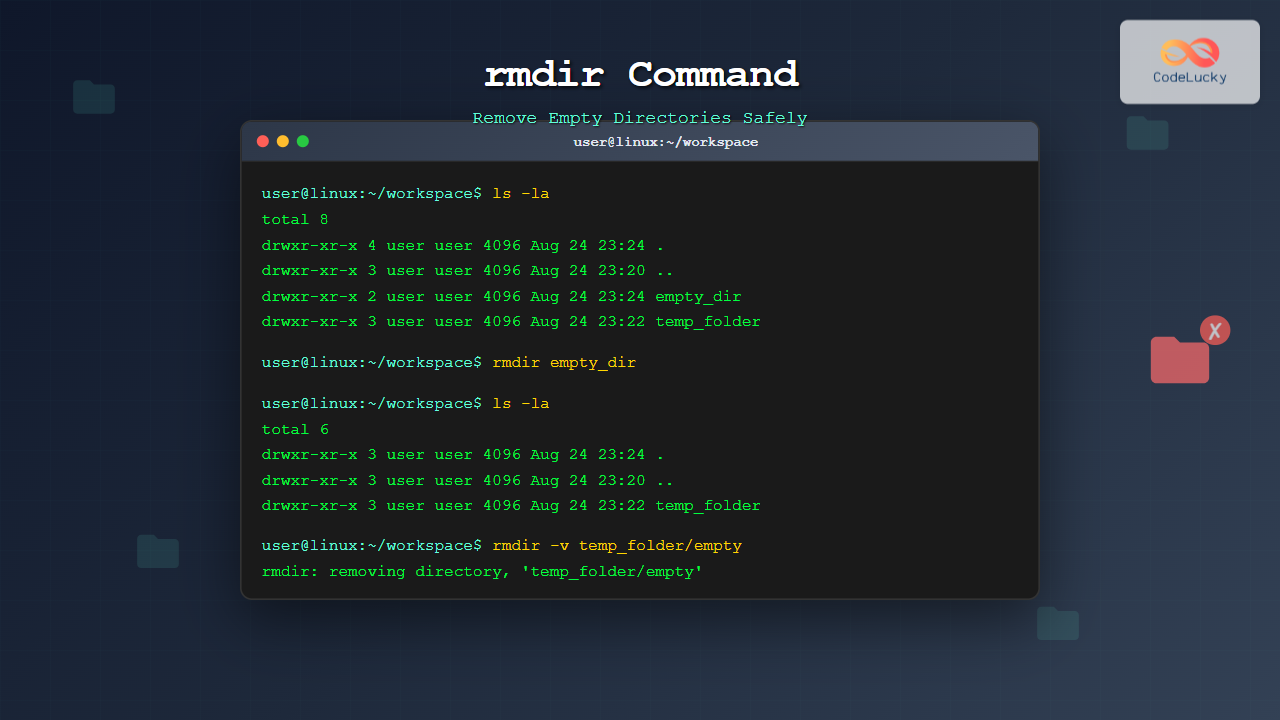
The rmdir command is a fundamental Linux utility designed specifically for removing empty directories. Unlike the more powerful rm -r command, rmdir provides a safer approach by only allowing deletion of directories that contain no files or subdirectories, preventing accidental data loss.
Understanding the rmdir Command
The rmdir command stands for “remove directory” and is part of the GNU coreutils package found on virtually all Linux distributions. Its primary purpose is to remove empty directories from the filesystem while maintaining data integrity through its built-in safety mechanisms.
Basic Syntax
rmdir [OPTIONS] DIRECTORY...The command accepts one or more directory names as arguments and various options to modify its behavior.
Basic Usage Examples
Removing a Single Empty Directory
Let’s start with the most basic usage:
$ mkdir test_dir
$ rmdir test_dir
If successful, this command produces no output and returns to the shell prompt. You can verify the directory was removed:
$ ls -la test_dir
ls: cannot access 'test_dir': No such file or directory
Attempting to Remove a Non-Empty Directory
When you try to remove a directory containing files, rmdir will fail:
$ mkdir sample_dir
$ touch sample_dir/file1.txt
$ rmdir sample_dir
rmdir: failed to remove 'sample_dir': Directory not empty
This safety feature prevents accidental deletion of important data.
Removing Multiple Empty Directories
You can specify multiple directories in a single command:
$ mkdir dir1 dir2 dir3
$ rmdir dir1 dir2 dir3
All three directories will be removed if they’re empty.
Command Options and Flags
The –ignore-fail-on-non-empty Option
This option suppresses error messages when attempting to remove non-empty directories:
$ mkdir test_dir
$ touch test_dir/file.txt
$ rmdir --ignore-fail-on-non-empty test_dir
The command will fail silently without displaying an error message.
The -p (–parents) Option
This powerful option removes parent directories if they become empty after removing the specified directory:
$ mkdir -p parent/child/grandchild
$ rmdir -p parent/child/grandchild
This removes grandchild, then child (if empty), then parent (if empty), creating a cascading removal effect.
Example with partial success:
$ mkdir -p parent/child/grandchild
$ touch parent/file.txt
$ rmdir -p parent/child/grandchild
rmdir: failed to remove 'parent': Directory not empty
The command removes grandchild and child but stops at parent because it contains file.txt.
The -v (–verbose) Option
Display a message for each directory processed:
$ mkdir dir1 dir2
$ rmdir -v dir1 dir2
rmdir: removing directory, 'dir1'
rmdir: removing directory, 'dir2'
Practical Use Cases
Cleaning Up Temporary Directories
After completing a project, you might want to clean up empty temporary directories:
$ find /tmp -type d -empty -name "temp_*" -exec rmdir {} \;This finds all empty directories starting with “temp_” in /tmp and removes them.
Build System Cleanup
Remove empty build directories after compilation:
$ rmdir -p build/debug/obj build/release/obj 2>/dev/nullThe 2>/dev/null suppresses error messages for non-empty directories.
Version Control Cleanup
Clean up empty directories that might remain after git operations:
$ find . -type d -empty -not -path "./.git/*" -exec rmdir {} \; 2>/dev/nullError Handling and Troubleshooting
Common Error Messages
“Directory not empty” – The most common error occurs when trying to remove directories containing files:
$ mkdir test_dir
$ echo "content" > test_dir/hidden_file
$ rmdir test_dir
rmdir: failed to remove 'test_dir': Directory not empty
Solution: Check for hidden files and subdirectories:
$ ls -la test_dir
total 4
drwxr-xr-x 2 user user 4096 Aug 24 23:15 .
drwxr-xr-x 3 user user 4096 Aug 24 23:15 ..
-rw-r--r-- 1 user user    8 Aug 24 23:15 hidden_file
Permission Denied
This error occurs when you don’t have write permissions on the parent directory:
$ rmdir test_dir
rmdir: failed to remove 'test_dir': Permission denied
Solution: Check and modify permissions or use sudo if appropriate.
Advanced Techniques
Combining with Other Commands
Remove all empty directories in a directory tree:
$ find /path/to/directory -type d -empty -deleteOr using rmdir for more control:
$ find /path/to/directory -type d -empty -exec rmdir {} \;Batch Operations with Scripts
Create a script to safely clean up project directories:
#!/bin/bash
for dir in */; do
    if [ -d "$dir" ] && [ -z "$(ls -A "$dir")" ]; then
        rmdir -v "$dir"
    fi
done
Safety Best Practices
Always Verify Before Removal
Before removing directories, especially when using scripts:
$ ls -la directory_name
$ rmdir directory_name
Use Verbose Mode for Important Operations
When performing batch operations, use the verbose flag:
$ rmdir -v dir1 dir2 dir3Test with Non-Critical Directories First
When using complex find commands or scripts, test with temporary directories first.
Comparing rmdir with rm -d
The rm command also has a -d option for removing empty directories:
$ rm -d empty_directoryHowever, rmdir is specifically designed for this purpose and provides clearer intent in scripts and commands.
Integration with File Managers
Many graphical file managers use rmdir internally when you delete empty folders. Understanding the command helps troubleshoot GUI deletion issues.
Performance Considerations
The rmdir command is lightweight and efficient for its specific purpose. For large-scale directory cleanup operations, combining it with find provides better performance than individual commands.
Conclusion
The rmdir command is an essential tool for safe directory management in Linux. Its built-in safety mechanisms prevent accidental data loss while providing flexibility through various options. Whether you’re cleaning up temporary files, managing build systems, or maintaining organized directory structures, mastering rmdir enhances your Linux command-line efficiency.
Remember that rmdir‘s strength lies in its simplicity and safety. For more complex directory removal tasks involving non-empty directories, consider using rm -r with appropriate caution, but for empty directory management, rmdir remains the optimal choice.
Related Posts
rm Command in Linux: Complete Guide to Delete Files and Directories Safely
The rm command is one of the most powerful and potentially dangerous commands in Linux. It stands for "remove" and...
wipe Command Linux: Complete Guide to Secure File Deletion and Data Wiping
The wipe command in Linux is a powerful utility designed for secure file deletion that goes far beyond the standard...
shred Command Linux: Complete Guide to Securely Delete Files and Protect Data
When you delete files in Linux using the standard rm command, the data isn't actually removed from your storage device....
mkdir Command Linux: Complete Guide to Creating Directories and Subdirectories
The mkdir command is one of the most fundamental and frequently used commands in Linux for creating directories. Whether you're...
umount Command Linux: Complete Guide to Safely Unmounting Filesystems
The umount command is an essential Linux utility that allows you to safely disconnect filesystems from the directory tree. Whether...

Java Delete Files: Removing Files from System
Java provides robust file handling capabilities, including the ability to delete files from the system. Whether you're cleaning up temporary...
du Command Linux: Display Directory Size and Disk Usage Explained with Examples
The du (disk usage) command in Linux is a powerful tool that allows users to measure directory size, analyze disk...

ls Command in Linux: Complete Guide to List Files and Directories with Examples
The ls command is one of the most fundamental and frequently used commands in Linux and Unix-like operating systems. It...
unset Command Linux: Complete Guide to Remove Variables and Functions Efficiently
The unset command in Linux is a powerful built-in shell utility that allows you to remove variables and functions from...
cp Command Linux: Copy Files and Directories with Examples and Best Practices
The cp command is one of the most fundamental and frequently used commands in Linux systems. It allows you to...
mv Command in Linux: Complete Guide to Moving and Renaming Files
The mv command is one of the most fundamental and frequently used commands in Linux systems. Whether you're a system...

chown Command Linux: Master File and Directory Ownership Management
The chown command is one of the most fundamental tools in Linux system administration, allowing users to change file and...





