
The readelf command is an essential tool for Linux developers, system administrators, and security analysts who need to examine Executable and Linkable Format (ELF) files. This powerful utility allows you to inspect the internal structure of executables, shared libraries, object files, and core dumps without executing them.
What is the readelf Command?
readelf is a GNU binutils program that displays information about ELF (Executable and Linkable Format) files. Unlike other tools like objdump, readelf is specifically designed to read ELF files and provides detailed information about their structure, headers, sections, symbols, and more.
Key Features of readelf:
- Display ELF file headers and section information
- Show symbol tables and relocation entries
- Examine program headers and segments
- Analyze dynamic linking information
- Inspect debugging information
- Cross-platform compatibility
Basic Syntax and Options
The basic syntax of the readelf command is:
readelf [options] elf-file(s)Essential Options:
| Option | Long Form | Description |
|---|---|---|
-h |
--file-header |
Display ELF file header |
-S |
--section-headers |
Display section headers |
-s |
--symbols |
Display symbol table |
-l |
--program-headers |
Display program headers |
-d |
--dynamic |
Display dynamic section |
-r |
--relocs |
Display relocations |
-a |
--all |
Display all available information |
Examining ELF File Headers
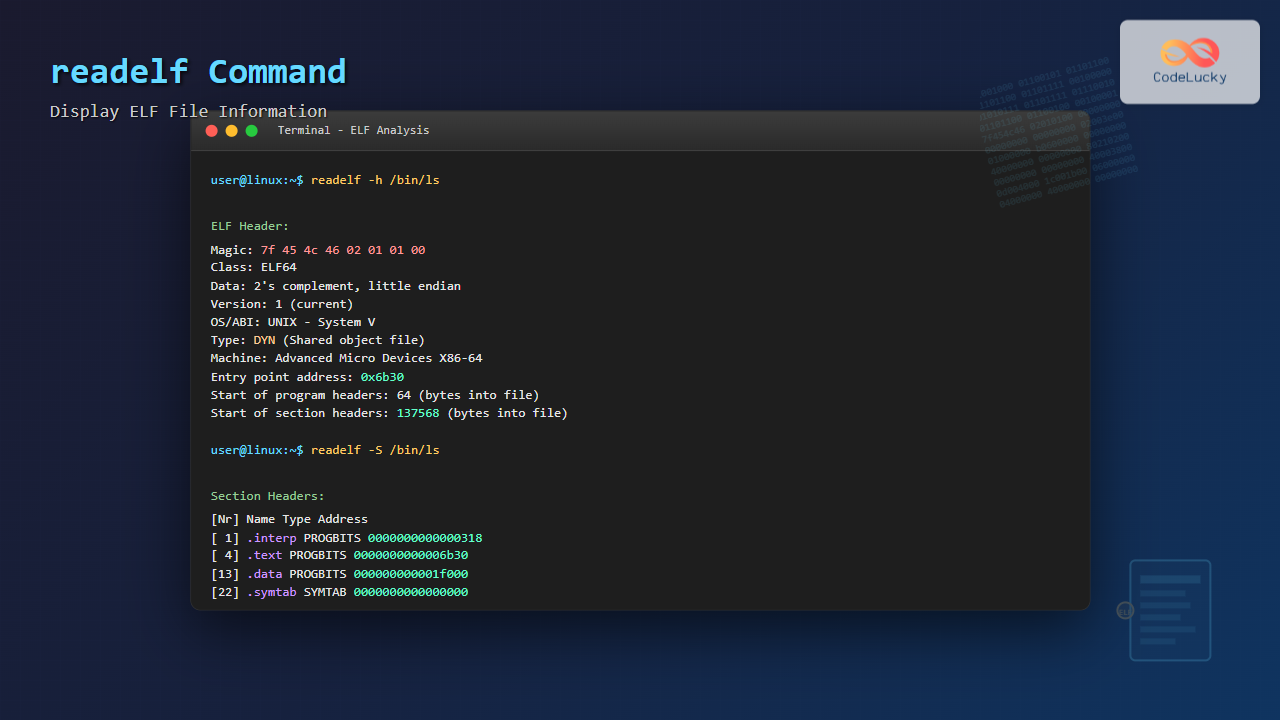
The ELF header contains crucial metadata about the file. Use the -h option to display this information:
readelf -h /bin/lsSample Output:
ELF Header:
  Magic:   7f 45 4c 46 02 01 01 00 00 00 00 00 00 00 00 00
  Class:                             ELF64
  Data:                              2's complement, little endian
  Version:                           1 (current)
  OS/ABI:                            UNIX - System V
  ABI Version:                       0
  Type:                              DYN (Shared object file)
  Machine:                           Advanced Micro Devices X86-64
  Version:                           0x1
  Entry point address:               0x6b30
  Start of program headers:          64 (bytes into file)
  Start of section headers:          137568 (bytes into file)
  Flags:                             0x0
  Size of this header:               64 (bytes)
  Size of program headers:           56 (bytes)
  Number of program headers:         13
  Size of section headers:           64 (bytes)
  Number of section headers:         28
  Section header string table index: 27
Understanding Header Fields:
- Magic: ELF file signature (7f 45 4c 46 = DEL + “ELF”)
- Class: 32-bit (ELF32) or 64-bit (ELF64) architecture
- Data: Byte order (little or big endian)
- Type: File type (executable, shared library, object file)
- Machine: Target architecture
- Entry point: Address where execution begins
Analyzing Section Headers
Sections contain the actual data and code. Use -S to examine section headers:
readelf -S /bin/lsSample Output:
Section Headers:
  [Nr] Name              Type             Address           Offset
       Size              EntSize          Flags  Link  Info  Align
  [ 0]                   NULL             0000000000000000  00000000
       0000000000000000  0000000000000000           0     0     0
  [ 1] .interp           PROGBITS         0000000000000318  00000318
       000000000000001c  0000000000000000   A       0     0     1
  [ 2] .note.gnu.property NOTE             0000000000000338  00000338
       0000000000000020  0000000000000000   A       0     0     8
  [ 3] .note.gnu.build-i NOTE             0000000000000358  00000358
       0000000000000024  0000000000000000   A       0     0     4
  [ 4] .note.ABI-tag     NOTE             000000000000037c  0000037c
       0000000000000020  0000000000000000   A       0     0     4
  [ 5] .gnu.hash         GNU_HASH         00000000000003a0  000003a0
       0000000000000038  0000000000000000   A       6     0     8
Important Section Types:
- .text: Contains executable code
- .data: Initialized global variables
- .bss: Uninitialized global variables
- .rodata: Read-only data (constants)
- .symtab: Symbol table
- .strtab: String table
- .dynamic: Dynamic linking information
Inspecting Symbol Tables
Symbol tables contain information about functions, variables, and other symbols. Use -s to display them:
readelf -s /bin/lsSample Output:
Symbol table '.dynsym' contains 140 entries:
   Num:    Value          Size Type    Bind   Vis      Ndx Name
     0: 0000000000000000     0 NOTYPE  LOCAL  DEFAULT  UND
     1: 0000000000000000     0 FUNC    GLOBAL DEFAULT  UND strcoll@GLIBC_2.2.5
     2: 0000000000000000     0 FUNC    GLOBAL DEFAULT  UND __cxa_finalize@GLIBC_2.2.5
     3: 0000000000000000     0 FUNC    GLOBAL DEFAULT  UND endgrent@GLIBC_2.2.5
     4: 0000000000000000     0 FUNC    GLOBAL DEFAULT  UND strcmp@GLIBC_2.2.5
Symbol Information Fields:
- Value: Symbol address or offset
- Size: Symbol size in bytes
- Type: FUNC (function), OBJECT (variable), etc.
- Bind: LOCAL, GLOBAL, or WEAK binding
- Vis: Symbol visibility
- Ndx: Section index where symbol is defined
Examining Program Headers
Program headers describe how the program should be loaded into memory. Use -l to view them:
readelf -l /bin/lsSample Output:
Program Headers:
  Type           Offset             VirtAddr           PhysAddr
                 FileSiz            MemSiz              Flags  Align
  PHDR           0x0000000000000040 0x0000000000000040 0x0000000000000040
                 0x00000000000002d8 0x00000000000002d8  R      0x8
  INTERP         0x0000000000000318 0x0000000000000318 0x0000000000000318
                 0x000000000000001c 0x000000000000001c  R      0x1
      [Requesting program interpreter: /lib64/ld-linux-x86-64.so.2]
  LOAD           0x0000000000000000 0x0000000000000000 0x0000000000000000
                 0x0000000000003010 0x0000000000003010  R      0x1000
Program Header Types:
- LOAD: Loadable segment
- DYNAMIC: Dynamic linking information
- INTERP: Program interpreter path
- NOTE: Auxiliary information
- PHDR: Program header table
Analyzing Dynamic Section
The dynamic section contains information needed for dynamic linking. Use -d to examine it:
readelf -d /bin/lsSample Output:
Dynamic section at offset 0x1de20 contains 30 entries:
  Tag        Type                         Name/Value
 0x0000000000000001 (NEEDED)             Shared library: [libselinux.so.1]
 0x0000000000000001 (NEEDED)             Shared library: [libc.so.6]
 0x000000000000001d (RUNPATH)            Library runpath: [/usr/lib/x86_64-linux-gnu]
 0x000000000000000c (INIT)               0x5000
 0x000000000000000d (FINI)               0x1a554
Advanced readelf Usage
Examining Relocations
Relocations show how addresses are adjusted during linking:
readelf -r program.oDisplaying Notes
Notes contain additional metadata:
readelf -n /bin/lsShowing All Information
Use -a for comprehensive analysis:
readelf -a /bin/ls | lessPractical Use Cases
1. Debugging Linking Issues
Identify missing libraries and symbols:
# Check required libraries
readelf -d myprogram | grep NEEDED

# Find undefined symbols
readelf -s myprogram | grep UND
2. Security Analysis
Examine security features:
# Check for stack canaries and position independence
readelf -s /bin/ls | grep -E "(stack_chk|__stack_smash)"

# Verify ASLR support
readelf -h /bin/ls | grep Type
3. Architecture Verification
Confirm target architecture:
readelf -h binary_file | grep -E "(Class|Machine)"4. Analyzing Core Dumps
Extract information from core dumps:
readelf -n core.dumpComparing readelf with Other Tools
| Tool | Best For | Key Difference |
|---|---|---|
readelf |
ELF structure analysis | ELF-specific, detailed headers |
objdump |
Disassembly and code analysis | Multi-format support, assembly output |
nm |
Symbol listing | Simple symbol extraction |
ldd |
Dynamic dependencies | Runtime dependency resolution |
Tips and Best Practices
Efficient Analysis Workflow:
- Start with
readelf -hfor basic file information - Use
readelf -Sto understand section layout - Examine symbols with
readelf -sfor specific issues - Check dynamic dependencies with
readelf -d - Use
grepandlessfor filtering large outputs
Common Troubleshooting Commands:
# Find entry point and architecture
readelf -h binary | grep -E "(Entry|Machine|Class)"

# List all shared library dependencies
readelf -d binary | grep NEEDED

# Find specific symbols
readelf -s binary | grep "symbol_name"

# Check section sizes
readelf -S binary | grep -E "(\.text|\.data|\.bss)"
Conclusion
The readelf command is an indispensable tool for understanding ELF file structure and behavior. Whether you’re debugging linking problems, analyzing security features, or examining binary compatibility, readelf provides the detailed information needed for effective troubleshooting and analysis.
By mastering the various options and understanding ELF file structure, you can leverage readelf to solve complex system programming challenges, optimize application performance, and ensure binary security. Remember to combine readelf with other tools like objdump, nm, and ldd for comprehensive binary analysis.
Practice using readelf on different types of ELF files—executables, shared libraries, and object files—to become proficient in binary analysis and debugging techniques that are essential for advanced Linux system administration and software development.
Related Posts
size Command Linux: Display Section Sizes of Object Files and Executables
The size command is a powerful utility in Linux systems that displays the section sizes of object files, executables, and...
objdump Command Linux: Complete Guide to Display Object File Information
The objdump command is a powerful utility in Linux systems that allows developers and system administrators to examine the contents...
strings Command Linux: Extract and Analyze Text from Binary Files
The strings command is a powerful Linux utility that extracts printable character sequences from binary files. Whether you're analyzing executables,...
nm Command Linux: Complete Guide to Display Symbol Tables from Object Files
The nm command is a powerful utility in Linux that displays the symbol table of object files, executables, shared libraries,...
file Command Advanced Linux: Master Detailed File Type Analysis and Detection
The file command is one of the most powerful and underutilized utilities in Linux for determining file types and analyzing...
hexdump Command Linux: Complete Guide to Display File Contents in Hexadecimal Format
The hexdump command is a powerful Linux utility that displays the contents of files in hexadecimal format, making it an...
ltrace Command Linux: Complete Guide to Trace Library Calls and Debug Programs
The ltrace command is a powerful debugging and analysis tool in Linux that allows you to trace library calls made...
od Command Linux: Complete Guide to Octal Dump File Contents and Binary Analysis
The od (octal dump) command is a powerful Linux utility that displays file contents in various formats including octal, hexadecimal,...
debugfs Command Linux: Complete Guide to Debug Ext2/3/4 Filesystems
The debugfs command is a powerful interactive filesystem debugger for ext2, ext3, and ext4 filesystems in Linux. It provides low-level...
ranlib Command Linux: Complete Guide to Generate Archive Index Files
The ranlib command is a crucial utility in Linux systems for managing static library archives. It generates an index for...

stat Command Linux: Complete Guide to Display File and Filesystem Status Information
The stat command is a powerful Linux utility that displays detailed information about files and filesystems. Unlike basic commands like...
file Command in Linux: Complete Guide to Determine File Types and Formats
The file command is one of the most essential utilities in Linux for determining file types and formats. Unlike relying...





