The ranlib command is a crucial utility in Linux systems for managing static library archives. It generates an index for archive files, making symbol lookups faster and more efficient during the linking process. This comprehensive guide will walk you through everything you need to know about the ranlib command, from basic syntax to advanced usage scenarios.
What is ranlib Command?
The ranlib command generates an index to the contents of an archive file, specifically static libraries (files with .a extension). This index acts as a symbol table that helps the linker quickly locate symbols within the archive, significantly improving compilation and linking performance.
When you create a static library using the ar command, the resulting archive may not have an index. The ranlib command adds this missing piece, creating a table of contents that maps symbol names to their locations within the archive.
Basic Syntax and Options
The basic syntax of the ranlib command is straightforward:
ranlib [options] archive_fileCommon Options
- -D: Use zero for timestamps and uids/gids (for deterministic archives)
- -t: Update only the archive’s timestamp
- -v or –verbose: Verbose output showing what ranlib is doing
- -V or –version: Display version information
- –help: Show help information
Creating and Managing Static Libraries
Before diving into ranlib examples, let’s understand how static libraries are created and why ranlib is necessary.
Step 1: Creating Object Files
First, let’s create some sample C files to demonstrate the process:
# math_functions.c
int add(int a, int b) {
    return a + b;
}

int multiply(int a, int b) {
    return a * b;
}

# string_functions.c
int string_length(const char* str) {
    int len = 0;
    while (str[len] != '\0') {
        len++;
    }
    return len;
}

void string_copy(char* dest, const char* src) {
    int i = 0;
    while (src[i] != '\0') {
        dest[i] = src[i];
        i++;
    }
    dest[i] = '\0';
}
Compile these into object files:
$ gcc -c math_functions.c -o math_functions.o
$ gcc -c string_functions.c -o string_functions.o
Step 2: Creating an Archive
Now create a static library using the ar command:
$ ar rcs libmyutils.a math_functions.o string_functions.oAt this point, the archive exists but may not have a proper index. This is where ranlib comes in.
Using ranlib Command
Basic ranlib Usage
Apply ranlib to our created library:
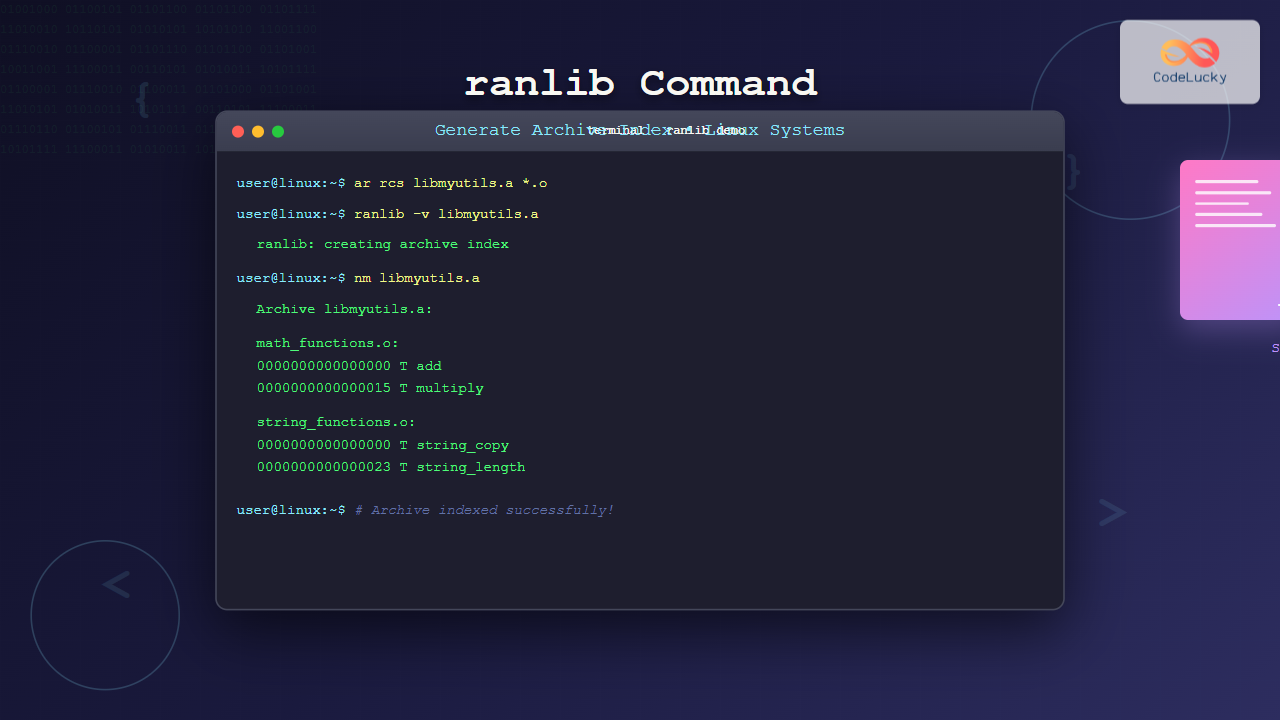
$ ranlib libmyutils.aThis command runs silently by default. To see what it’s doing, use the verbose option:
$ ranlib -v libmyutils.a
ranlib: creating archive index
Verifying the Archive Index
You can verify that the index was created by examining the archive contents:
$ ar -t libmyutils.a
math_functions.o
string_functions.o

$ nm libmyutils.a
Archive libmyutils.a:

math_functions.o:
0000000000000000 T add
0000000000000015 T multiply

string_functions.o:
0000000000000000 T string_copy
0000000000000023 T string_length
Advanced ranlib Usage
Deterministic Archives
For reproducible builds, you might want deterministic archives. Use the -D option:
$ ranlib -D libmyutils.aThis ensures that timestamps and user/group IDs are set to zero, making the archive content deterministic regardless of when or by whom it was created.
Updating Archive Timestamps
Sometimes you only need to update the archive’s timestamp without regenerating the entire index:
$ ranlib -t libmyutils.aPractical Examples and Use Cases
Example 1: Building a Complete Library
Let’s create a more comprehensive example with multiple source files:
# Create multiple object files
$ gcc -c *.c

# Create archive without index
$ ar rc libcomplete.a *.o

# Add index with ranlib
$ ranlib -v libcomplete.a
ranlib: creating archive index

# Verify the library works
$ gcc -L. -lmycomplete main.c -o myprogram
Example 2: Makefile Integration
Here’s how ranlib typically appears in a Makefile:
OBJECTS = math_functions.o string_functions.o
LIBRARY = libmyutils.a

$(LIBRARY): $(OBJECTS)
	ar rcs $@ $^
	ranlib $@

%.o: %.c
	gcc -c $< -o $@

clean:
	rm -f *.o $(LIBRARY)
Example 3: Cross-Platform Considerations
For cross-platform development, you might need to specify the target architecture:
# For different architectures
$ arm-linux-gnueabihf-ranlib libmyutils.a
$ x86_64-linux-gnu-ranlib libmyutils.a
When ranlib is Necessary
Understanding when you need ranlib is crucial:
Modern ar vs. Traditional ar
Modern versions of ar (GNU ar) automatically create an index when you use the ‘s’ option (e.g., ar rcs). However, ranlib is still useful in these scenarios:
- Working with archives created by older or different versions of ar
- Processing archives from different systems
- Ensuring compatibility across different toolchains
- Updating existing archives that lack proper indexing
Checking if an Archive has an Index
You can check if an archive already has an index:
$ ar -t libmyutils.a | head -1
# If the first line shows a symbol table, the archive is indexed
Common Issues and Troubleshooting
Permission Issues
If you encounter permission errors:
$ ranlib libmyutils.a
ranlib: can't open file: libmyutils.a (Permission denied)
Solution: Check file permissions and ensure you have write access:
$ ls -la libmyutils.a
$ chmod u+w libmyutils.a
$ ranlib libmyutils.a
Archive Format Issues
If ranlib reports format issues:
$ ranlib badarchive.a
ranlib: badarchive.a: file format not recognized
This usually means the file isn’t a valid archive. Verify with:
$ file badarchive.a
$ ar -t badarchive.a
Performance Considerations
The ranlib command provides several performance benefits:
- Faster Linking: Indexed archives allow the linker to quickly locate symbols
- Reduced Memory Usage: The linker doesn’t need to scan the entire archive
- Better Scalability: Performance improvements are more noticeable with larger libraries
Benchmarking Example
Here’s how you might measure the impact:
# Without index
$ ar rc large_lib.a *.o
$ time gcc -L. -llarge_lib main.c -o test1

# With index
$ ranlib large_lib.a
$ time gcc -L. -llarge_lib main.c -o test2
Integration with Build Systems
CMake Integration
# In CMakeLists.txt
add_library(myutils STATIC ${SOURCES})
add_custom_command(TARGET myutils POST_BUILD
    COMMAND ranlib $
    COMMENT "Indexing static library")
Autotools Integration
# In Makefile.am
lib_LIBRARIES = libmyutils.a
libmyutils_a_SOURCES = math_functions.c string_functions.c

# Autotools automatically handles ranlib
Best Practices
Follow these best practices when using ranlib:
- Always Index New Archives: Run ranlib on newly created archives for optimal performance
- Automate in Build Scripts: Include ranlib in your build automation
- Use Verbose Mode for Debugging: The -v option helps when troubleshooting build issues
- Consider Deterministic Builds: Use -D for reproducible builds in CI/CD environments
- Verify Archive Integrity: Always test that your indexed libraries work correctly
Alternative Tools and Modern Approaches
While ranlib remains important, be aware of alternatives:
- GNU ar with ‘s’ option: Automatically creates indexes
- llvm-ranlib: LLVM’s implementation for cross-platform development
- Shared Libraries: Consider .so files for better memory usage and updates
Conclusion
The ranlib command is a fundamental tool for managing static libraries in Linux systems. While modern build tools often automate its usage, understanding ranlib helps you troubleshoot linking issues, optimize build performance, and maintain compatibility across different systems.
Remember that proper archive indexing can significantly improve build times, especially in large projects with multiple static libraries. Whether you’re maintaining legacy code or building new applications, ranlib remains an essential part of the Linux developer’s toolkit.
By following the examples and best practices outlined in this guide, you’ll be well-equipped to effectively use ranlib in your development workflow, ensuring efficient and reliable static library management.
Related Posts
nm Command Linux: Complete Guide to Display Symbol Tables from Object Files
The nm command is a powerful utility in Linux that displays the symbol table of object files, executables, shared libraries,...
ldd Command Linux: Display Shared Library Dependencies
The ldd command is an essential Linux utility that displays the shared library dependencies of executable files and shared libraries....

ar Command Linux: Complete Guide to Archive File Management
The ar command in Linux is a powerful archiving utility primarily used for creating and managing archive files, especially static...
ldconfig Command Linux: Complete Guide to Dynamic Linker Configuration
The ldconfig command is a fundamental Linux system administration tool that configures the dynamic linker's runtime bindings for shared libraries....
strings Command Linux: Extract and Analyze Text from Binary Files
The strings command is a powerful Linux utility that extracts printable character sequences from binary files. Whether you're analyzing executables,...
readelf Command Linux: Complete Guide to ELF File Analysis and Debugging
The readelf command is an essential tool for Linux developers, system administrators, and security analysts who need to examine Executable...
size Command Linux: Display Section Sizes of Object Files and Executables
The size command is a powerful utility in Linux systems that displays the section sizes of object files, executables, and...
objdump Command Linux: Complete Guide to Display Object File Information
The objdump command is a powerful utility in Linux systems that allows developers and system administrators to examine the contents...

zip Command Linux: Complete Guide to Creating ZIP Archives with Examples
The zip command in Linux is a powerful utility for creating compressed archives and managing files efficiently. Whether you're backing...
strip Command Linux: Complete Guide to Removing Symbols from Object Files
The strip command is a powerful Linux utility that removes symbols, debugging information, and other metadata from executable files, object...
file Command Advanced Linux: Master Detailed File Type Analysis and Detection
The file command is one of the most powerful and underutilized utilities in Linux for determining file types and analyzing...

locate Command in Linux: Fast File Search Using Database Indexing
The locate command is one of Linux's most efficient file search utilities, offering lightning-fast results by leveraging a pre-built database...