
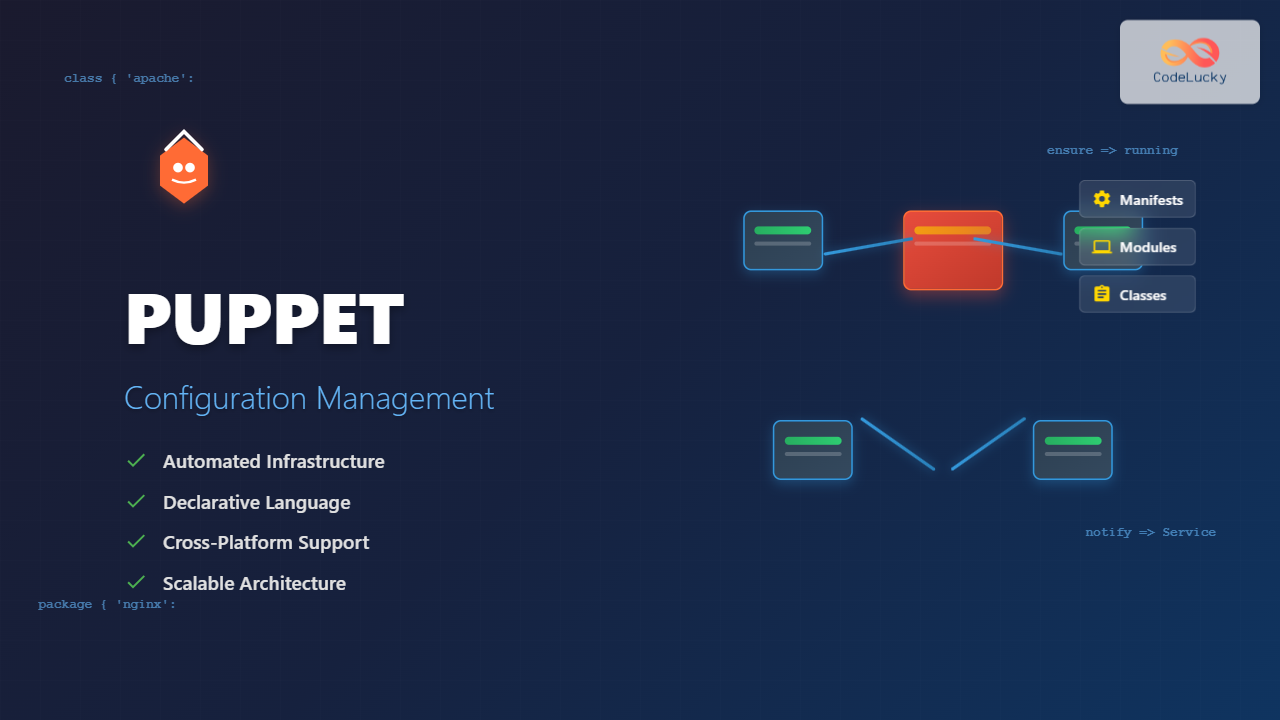
Puppet is a powerful configuration management tool that revolutionizes how system administrators manage Linux infrastructure. By automating system configuration, software installation, and service management across multiple servers, Puppet ensures consistency, reduces manual errors, and scales operations efficiently.
What is Puppet Configuration Management?
Puppet is an open-source configuration management system that uses a declarative language to define system configurations. Instead of writing scripts that describe how to configure a system, Puppet allows you to describe the desired end state, and it automatically determines the steps needed to achieve that state.
Key Benefits of Puppet
- Declarative Configuration: Define what you want, not how to achieve it
- Idempotent Operations: Safe to run multiple times without side effects
- Cross-Platform Support: Manage Linux, Windows, and macOS systems
- Scalability: Handle thousands of nodes from a central server
- Version Control: Track configuration changes over time
Installing Puppet on Linux
Installing Puppet Server (Master)
First, install Puppet Server on your master node. For Ubuntu/Debian systems:
# Download Puppet repository package
wget https://apt.puppetlabs.com/puppet7-release-focal.deb
sudo dpkg -i puppet7-release-focal.deb
sudo apt update

# Install Puppet Server
sudo apt install puppetserver

# Configure memory allocation (optional)
sudo nano /etc/default/puppetserver
# Modify JAVA_ARGS="-Xms2g -Xmx2g" based on your system

# Start and enable Puppet Server
sudo systemctl start puppetserver
sudo systemctl enable puppetserver
For CentOS/RHEL systems:
# Install Puppet repository
sudo rpm -Uvh https://yum.puppetlabs.com/puppet7-release-el-8.noarch.rpm

# Install Puppet Server
sudo yum install puppetserver

# Start and enable service
sudo systemctl start puppetserver
sudo systemctl enable puppetserver
Installing Puppet Agent
On client nodes, install the Puppet agent:
# Ubuntu/Debian
sudo apt install puppet-agent

# CentOS/RHEL
sudo yum install puppet-agent

# Add Puppet to PATH
export PATH="/opt/puppetlabs/bin:$PATH"
echo 'export PATH="/opt/puppetlabs/bin:$PATH"' >> ~/.bashrc
Puppet Architecture and Components
Master-Agent Architecture
Puppet follows a client-server model:
- Puppet Master (Server): Stores configurations and serves them to agents
- Puppet Agent: Runs on managed nodes, applies configurations
- Certificate Authority: Manages SSL certificates for secure communication
- PuppetDB: Stores configuration data and reports
Core Puppet Concepts
Manifests: Files containing Puppet code with .pp extension
Resources: Basic units that describe system components
Classes: Collections of resources grouped together
Modules: Reusable packages of manifests, files, and templates
Facts: System information collected from nodes
Writing Your First Puppet Manifest
Basic Manifest Structure
Create a simple manifest to manage a file:
# /etc/puppetlabs/code/environments/production/manifests/site.pp

file { '/tmp/hello.txt':
  ensure  => present,
  content => "Hello from Puppet!\n",
  owner   => 'root',
  group   => 'root',
  mode    => '0644',
}
When applied, this manifest ensures:
Notice: Applied catalog in 0.02 seconds
Notice: /Stage[main]/Main/File[/tmp/hello.txt]/ensure: created
Managing Packages
Install and manage software packages:
# Install Apache web server
package { 'apache2':
  ensure => installed,
}

# On CentOS/RHEL, use 'httpd' instead
package { 'httpd':
  ensure => installed,
}

# Install specific version
package { 'nginx':
  ensure => '1.18.0-6ubuntu14.4',
}
Managing Services
Control system services:
service { 'apache2':
  ensure     => running,
  enable     => true,
  hasrestart => true,
  hasstatus  => true,
}
Resource Dependencies
Define relationships between resources:
package { 'apache2':
ensure => installed,
}
service { 'apache2':
ensure => running,
enable => true,
require => Package['apache2'],
}
file { '/var/www/html/index.html':
ensure => present,
content => 'Welcome to Puppet-managed Apache!
',
notify => Service['apache2'],
}Working with Puppet Classes
Defining Classes
Create reusable configuration blocks:
# /etc/puppetlabs/code/environments/production/manifests/webserver.pp

class webserver {
  package { 'apache2':
    ensure => installed,
  }

  service { 'apache2':
    ensure  => running,
    enable  => true,
    require => Package['apache2'],
  }

  file { '/var/www/html/index.html':
    ensure  => present,
    content => template('webserver/index.html.erb'),
    notify  => Service['apache2'],
  }
}
Using Classes
Apply classes to nodes:
# In site.pp
node 'web01.example.com' {
  include webserver
}

# Or with parameters
node 'web02.example.com' {
  class { 'webserver':
    document_root => '/var/www/mysite',
  }
}
Parameterized Classes
Make classes flexible with parameters:
class webserver (
  $package_name = 'apache2',
  $service_name = 'apache2',
  $document_root = '/var/www/html',
) {
  package { $package_name:
    ensure => installed,
  }

  service { $service_name:
    ensure  => running,
    enable  => true,
    require => Package[$package_name],
  }
}
Creating Puppet Modules
Module Structure
Generate a module skeleton:
cd /etc/puppetlabs/code/environments/production/modules
puppet module generate mycompany-webserver
This creates the following structure:
webserver/
├── manifests/
│   └── init.pp
├── files/
├── templates/
├── lib/
├── facts.d/
├── examples/
└── spec/
Module Manifest Example
Create a comprehensive web server module:
# modules/webserver/manifests/init.pp

class webserver (
  $package_ensure = 'installed',
  $service_ensure = 'running',
  $service_enable = true,
  $document_root = '/var/www/html',
  $server_name = $::fqdn,
) {

  # Install web server package
  package { 'apache2':
    ensure => $package_ensure,
  }

  # Manage main configuration file
  file { '/etc/apache2/sites-available/000-default.conf':
    ensure  => present,
    content => template('webserver/vhost.conf.erb'),
    notify  => Service['apache2'],
    require => Package['apache2'],
  }

  # Ensure service is running
  service { 'apache2':
    ensure  => $service_ensure,
    enable  => $service_enable,
    require => Package['apache2'],
  }
}
Using Templates
Create dynamic configuration files:
# modules/webserver/templates/vhost.conf.erb

<VirtualHost *:80>
    ServerAdmin webmaster@<%= @server_name %>
    DocumentRoot <%= @document_root %>
    ServerName <%= @server_name %>

    ErrorLog ${APACHE_LOG_DIR}/error.log
    CustomLog ${APACHE_LOG_DIR}/access.log combined
</VirtualHost>
Node Classification and Facts
Using Facts
Puppet automatically collects system information:
# View all facts
puppet facts

# Use facts in manifests
if $facts['os']['family'] == 'Debian' {
  $package_name = 'apache2'
} elsif $facts['os']['family'] == 'RedHat' {
  $package_name = 'httpd'
}
Custom Facts
Create custom facts for your environment:
# /etc/puppetlabs/facter/facts.d/datacenter.txt
datacenter=us-west-1
environment=production
Or create executable fact scripts:
#!/bin/bash
# /etc/puppetlabs/facter/facts.d/custom_facts.sh

echo "application_version=2.1.0"
echo "backup_schedule=nightly"
Advanced Puppet Features
Conditional Statements
Use conditionals for flexible configurations:
case $facts['os']['family'] {
  'Debian': {
    $package_name = 'apache2'
    $service_name = 'apache2'
    $config_file = '/etc/apache2/apache2.conf'
  }
  'RedHat': {
    $package_name = 'httpd'
    $service_name = 'httpd'
    $config_file = '/etc/httpd/conf/httpd.conf'
  }
  default: {
    fail("Unsupported operating system: ${facts['os']['family']}")
  }
}
Arrays and Iteration
Work with multiple resources efficiently:
$packages = ['vim', 'curl', 'wget', 'htop']

$packages.each |String $package| {
  package { $package:
    ensure => installed,
  }
}

# Or using traditional syntax
package { ['vim', 'curl', 'wget', 'htop']:
  ensure => installed,
}
Hiera for Data Management
Separate configuration data from code:
# /etc/puppetlabs/code/environments/production/data/common.yaml
---
webserver::package_ensure: 'latest'
webserver::document_root: '/var/www/html'
ntp_servers:
  - 'pool.ntp.org'
  - 'time.google.com'
Use Hiera data in manifests:
$ntp_servers = lookup('ntp_servers', Array[String], 'first', [])

$ntp_servers.each |String $server| {
  # Configure NTP server
}
Puppet Agent Configuration
Configuring Agent to Connect to Master
Edit the Puppet agent configuration:
# /etc/puppetlabs/puppet/puppet.conf

[main]
certname = client01.example.com
server = puppet.example.com
environment = production
runinterval = 30m

[agent]
report = true
pluginsync = true
Certificate Management
On the agent, request a certificate:
puppet agent --test --verboseOn the master, sign the certificate:
# List certificate requests
puppetserver ca list

# Sign specific certificate
puppetserver ca sign --certname client01.example.com

# Sign all pending certificates
puppetserver ca sign --all
Testing and Validation
Syntax Validation
Validate Puppet manifests before applying:
# Check syntax
puppet parser validate /path/to/manifest.pp

# Dry run (noop mode)
puppet agent --test --noop

# Detailed dry run output
puppet agent --test --noop --verbose
Puppet Development Kit (PDK)
Use PDK for module development:
# Install PDK
wget https://pm.puppetlabs.com/cgi-bin/pdk_download.cgi?dist=ubuntu&rel=20.04&arch=amd64&ver=latest -O pdk.deb
sudo dpkg -i pdk.deb

# Create new module
pdk new module mymodule

# Validate module
pdk validate

# Run unit tests
pdk test unit
Monitoring and Reporting
Puppet Reports
Enable reporting in puppet.conf:
[agent]
report = true
reports = store,log

[master]
reports = store,puppetdb
Viewing Reports
Check recent Puppet runs:
# View last report
puppet agent --test --verbose

# Check report files
ls -la /opt/puppetlabs/server/data/puppetserver/reports/
Best Practices
Code Organization
- Use modules: Organize code into reusable modules
- Environment separation: Use different environments for dev/staging/production
- Version control: Store all Puppet code in Git
- Documentation: Comment your code and maintain README files
Security Considerations
# Restrict file permissions
file { '/etc/secure-config.conf':
  ensure => present,
  owner  => 'root',
  group  => 'root',
  mode   => '0600',
  content => sensitive('sensitive_data_here'),
}
Performance Optimization
- Use cached catalogs: Reduce master load
- Implement load balancing: Multiple Puppet masters for large environments
- Optimize fact collection: Disable unnecessary facts
- Use PuppetDB: Improve query performance
Troubleshooting Common Issues
Certificate Issues
Clean and regenerate certificates:
# On agent
puppet ssl clean

# On master
puppetserver ca clean --certname client01.example.com

# Generate new certificate
puppet agent --test
Debugging Puppet Runs
Increase verbosity for troubleshooting:
puppet agent --test --debug --verboseCommon Error Resolution
Connection refused: Check firewall rules and service status
Certificate verify failed: Time synchronization issues
Could not retrieve catalog: Syntax errors in manifests
Conclusion
Puppet transforms Linux system administration by providing declarative configuration management, ensuring consistency across your infrastructure. From simple file management to complex multi-tier applications, Puppet scales with your needs while maintaining reliability and auditability.
Start with basic manifests and gradually adopt advanced features like modules, Hiera, and custom facts. The investment in learning Puppet pays dividends through reduced manual work, improved system reliability, and faster deployment cycles.
As your infrastructure grows, Puppet’s robust architecture and extensive ecosystem make it an invaluable tool for modern DevOps practices, enabling infrastructure as code and continuous delivery pipelines.
Related Posts

Chef Linux: Complete Infrastructure Automation Platform Guide for DevOps
Chef is a powerful infrastructure automation platform that transforms the way organizations manage their Linux environments. As a configuration management...
Ansible Linux: Complete Guide to IT Automation and Configuration Management
Ansible has revolutionized the way IT professionals manage infrastructure, making complex automation tasks simple and efficient. As an agentless automation...

foreman Linux: Complete Lifecycle Management for Enterprise Infrastructure
Foreman is a powerful open-source lifecycle management tool that revolutionizes how system administrators handle infrastructure provisioning, configuration management, and monitoring....
Katello Linux: Complete Guide to Enterprise Content and Configuration Management
Introduction to Katello Linux Katello is a powerful open-source content and configuration management platform that serves as the upstream project...

Spacewalk Linux: Complete Systems Management Solution Guide
Spacewalk is a powerful open-source systems management solution that enables administrators to efficiently manage multiple Linux systems from a centralized...
herd Command Linux: Complete Guide to Managing Shepherd Services
The herd command in Linux is a powerful utility designed for managing Shepherd services, particularly in the context of Laravel...
Vagrant Linux: Complete Guide to Development Environment Management
Vagrant revolutionizes development environment management by providing a consistent, reproducible way to create and manage virtual development environments. This comprehensive...

Zookeeper Linux: Complete Guide to Centralized Service Configuration Management
Apache Zookeeper is a centralized service for maintaining configuration information, naming, providing distributed synchronization, and providing group services in distributed...

SaltStack Linux: Complete Guide to Intelligent IT Automation and Configuration Management
SaltStack has revolutionized the way system administrators and DevOps engineers manage infrastructure at scale. As a powerful configuration management and...
nomad Linux: Complete Guide to HashiCorp’s Workload Orchestrator
What is HashiCorp Nomad? HashiCorp Nomad is a simple yet powerful workload orchestrator that enables organizations to deploy and manage...

launchd Linux: Understanding the Service Management Framework for System Administrators
The launchd service management framework has become an essential tool for Linux system administrators who need robust process and service...
runit Linux: Complete Guide to Unix Init Scheme with Service Supervision
runit is a lightweight, cross-platform Unix init scheme with service supervision that provides a reliable alternative to traditional init systems....





