
System migrations are critical undertakings that can make or break your business operations. Whether you’re moving to the cloud, upgrading legacy systems, or consolidating platforms, the decision to handle migrations in-house or hire professional migration services can significantly impact your project’s success, timeline, and budget.
Understanding Professional Migration Services
Professional migration services encompass specialized consulting and implementation support for moving data, applications, and entire IT infrastructures from one environment to another. These services combine technical expertise, proven methodologies, and risk mitigation strategies to ensure smooth transitions with minimal business disruption.

Types of Migration Services
Cloud Migration Services
Cloud migrations involve moving applications, data, and infrastructure from on-premises environments to cloud platforms like AWS, Azure, or Google Cloud. Professional cloud migration services typically include:
- Assessment and planning: Evaluating current infrastructure and designing cloud architecture
- Application modernization: Refactoring applications for cloud-native environments
- Data migration: Secure transfer of databases and file systems
- Security implementation: Establishing cloud security protocols and compliance
- Performance optimization: Tuning applications for cloud performance
Database Migration Services
Database migrations require specialized knowledge of different database systems and their compatibility issues. Professional services include:
- Schema conversion and optimization
- Data transformation and cleansing
- Performance tuning for target databases
- Zero-downtime migration strategies
- Post-migration validation and testing
Legacy System Modernization
Modernizing legacy systems often requires understanding obsolete technologies and bridging them with modern platforms. Services include:
- Legacy code analysis and documentation
- Architecture redesign and modernization
- API development for system integration
- User interface modernization
- Training and knowledge transfer
When to Consider Professional Migration Services
Complexity Indicators
Several factors indicate when professional expertise becomes essential rather than optional:

Technical Complexity Factors
High complexity migrations that warrant professional services include:
- Multiple interdependent systems requiring simultaneous migration
- Custom-built applications with undocumented code
- Legacy databases with non-standard schemas
- Real-time systems requiring zero-downtime migrations
- Compliance-heavy environments (healthcare, finance, government)
Business Impact Considerations
The business impact of migration failure should guide your decision:
| Impact Level | Downtime Tolerance | Revenue at Risk | Recommendation |
|---|---|---|---|
| Critical | < 1 hour | > $100K/hour | Professional Services Required |
| High | 1-8 hours | $10K-100K/hour | Professional Services Recommended |
| Medium | 8-24 hours | $1K-10K/hour | Evaluate Internal Capabilities |
| Low | > 24 hours | < $1K/hour | Consider In-House |
Benefits of Professional Migration Services
Risk Mitigation
Professional migration services significantly reduce project risks through:
- Proven methodologies: Battle-tested processes that minimize failure points
- Experience with edge cases: Knowledge of uncommon issues and their solutions
- Comprehensive testing: Multi-stage validation processes
- Rollback strategies: Detailed contingency plans for quick recovery
Time and Resource Optimization
Expert services often complete migrations faster than internal teams due to:
- Specialized tools and automation frameworks
- Parallel processing capabilities
- Dedicated focus without competing priorities
- Pre-built integration patterns and templates
Knowledge Transfer and Training
Professional services provide valuable knowledge transfer including:
- Best practices documentation
- Staff training on new systems
- Operational procedures and runbooks
- Performance monitoring and troubleshooting guides
Cost-Benefit Analysis Framework

Hidden Costs of DIY Migration
In-house migrations often incur hidden costs that organizations overlook:
- Learning curve expenses: Time spent researching and learning new technologies
- Tool licensing: Migration tools, monitoring software, and testing platforms
- Extended timelines: Longer projects due to inexperience and competing priorities
- Rework costs: Fixing issues discovered after initial implementation
- Opportunity costs: Core team members diverted from strategic initiatives
Selecting the Right Migration Partner
Evaluation Criteria
When choosing professional migration services, evaluate providers based on:
| Criteria | Weight | Key Questions |
|---|---|---|
| Technical Expertise | High | Do they have experience with your specific technology stack? |
| Industry Experience | High | Have they completed similar migrations in your industry? |
| Methodology | Medium | Do they follow proven migration frameworks? |
| Support Model | Medium | What level of post-migration support do they provide? |
| Cost Structure | Medium | Are costs transparent with clear deliverables? |
Red Flags to Avoid
Be cautious of migration service providers who:
- Promise unrealistic timelines or guarantee zero downtime without proper assessment
- Lack specific experience with your technology stack
- Cannot provide detailed migration methodology documentation
- Offer significantly lower prices without clear justification
- Have poor references or cannot provide case studies
Migration Best Practices
Pre-Migration Planning
Successful migrations require thorough planning regardless of whether you use professional services:
- Comprehensive inventory: Document all systems, dependencies, and data flows
- Risk assessment: Identify potential failure points and mitigation strategies
- Success criteria: Define measurable goals and acceptance criteria
- Communication plan: Keep stakeholders informed throughout the process
Execution Best Practices
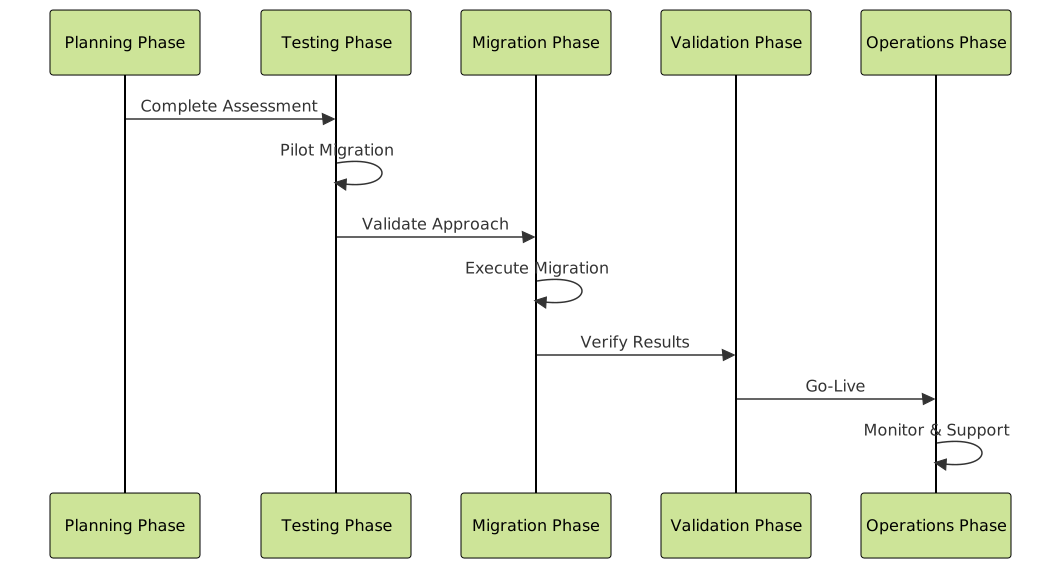
Key execution principles include:
- Phased approach: Break complex migrations into manageable phases
- Parallel testing: Run old and new systems simultaneously during transition
- Automated validation: Use scripts to verify data integrity and functionality
- Rollback readiness: Maintain ability to quickly revert if issues arise
Post-Migration Considerations
Performance Monitoring
Establish comprehensive monitoring for the new environment:
- Application performance metrics
- Database query performance
- User experience monitoring
- Security event logging
- Cost optimization tracking (for cloud migrations)
Optimization Opportunities
Post-migration optimization often yields significant benefits:
- Performance tuning: Optimize configurations for the new environment
- Cost optimization: Right-size resources and eliminate waste
- Security hardening: Implement environment-specific security measures
- Process improvement: Update operational procedures for new systems
Making the Final Decision
The decision to hire professional migration services should be based on a comprehensive evaluation of your organization’s capabilities, risk tolerance, and strategic objectives. Consider professional services when:
- Migration complexity exceeds internal expertise
- Business impact of failure is significant
- Timeline requirements are aggressive
- Internal resources are constrained
- Long-term success requires specialized knowledge
Remember that migration is not just a technical project—it’s a business transformation that affects operations, productivity, and competitive advantage. Professional migration services can provide the expertise, methodology, and risk mitigation necessary to ensure your migration project delivers the expected business value while minimizing disruption to your operations.
Whether you choose to handle migration internally or engage professional services, thorough planning, clear communication, and commitment to best practices remain essential for success. The investment in professional expertise often pays dividends through reduced risk, faster implementation, and better long-term outcomes.





