
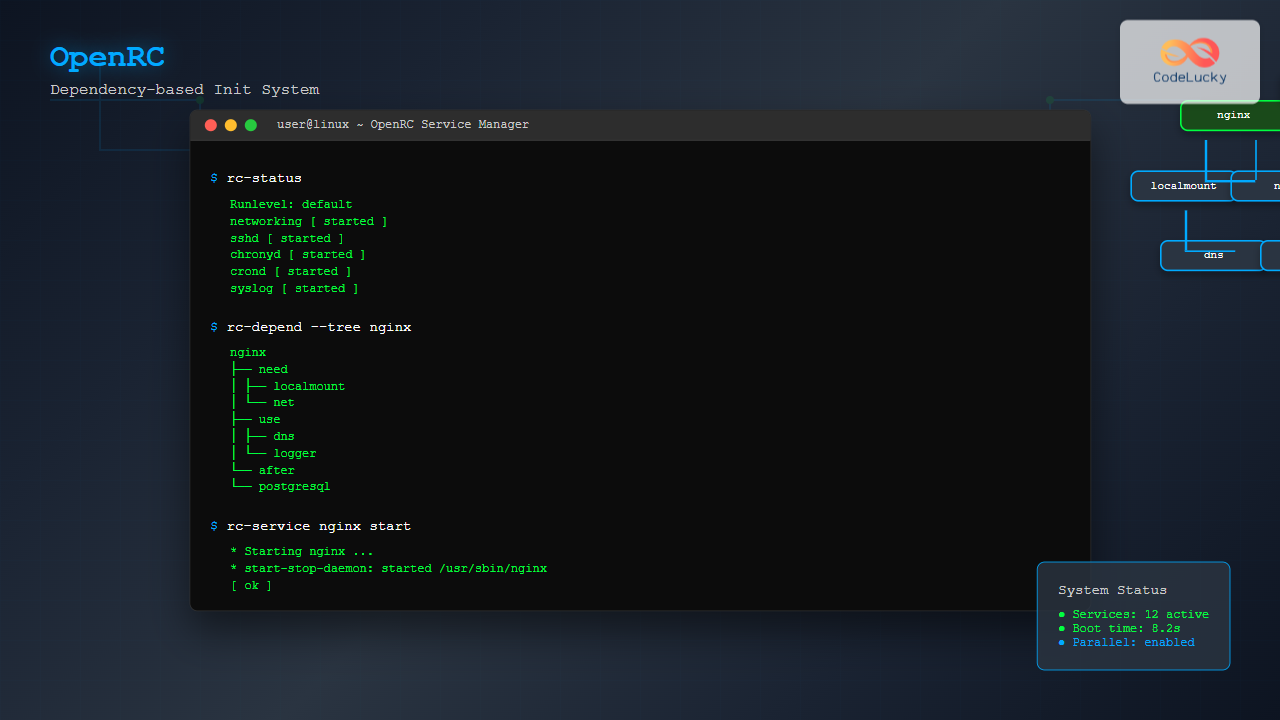
OpenRC is a lightweight, dependency-based init system that serves as an alternative to systemd and SysV init. Originally developed for Gentoo Linux, OpenRC has gained popularity across various distributions, particularly Alpine Linux, due to its simplicity, flexibility, and efficient resource usage.
What is OpenRC?
OpenRC stands for “Open Run Control” and represents a modern approach to system initialization and service management. Unlike traditional SysV init systems, OpenRC provides dependency-based service management, parallel service startup, and comprehensive logging capabilities while maintaining a smaller footprint than systemd.
Key Features of OpenRC
- Dependency-based service management: Services start based on their dependencies rather than fixed sequence numbers
- Parallel service startup: Independent services can start simultaneously, reducing boot times
- Cross-platform compatibility: Works on Linux, BSD, and other Unix-like systems
- Lightweight design: Minimal resource overhead compared to heavier init systems
- Flexible configuration: Easy-to-understand configuration files and service scripts
- Comprehensive logging: Detailed service startup and runtime logging
OpenRC Architecture and Components
OpenRC consists of several core components that work together to manage system initialization and services:
Core Components
- rc: The main init script that orchestrates the boot process
- runscript: The service management framework
- rc-status: Tool for monitoring service states
- rc-update: Service runlevel management utility
- rc-service: Service control interface
Directory Structure
/etc/init.d/          # Service scripts
/etc/runlevels/       # Runlevel directories
/etc/conf.d/          # Service configuration files
/var/lib/openrc/      # Runtime state information
/usr/share/openrc/    # OpenRC system files
Installation and Setup
Installing OpenRC on Different Distributions
On Alpine Linux (pre-installed):
# OpenRC comes pre-installed on Alpine Linux
apk info openrc
On Gentoo Linux:
# OpenRC is the default init system
emerge --ask sys-apps/openrc
On Debian/Ubuntu (alternative installation):
sudo apt update
sudo apt install openrc
Basic Configuration
After installation, configure OpenRC by editing the main configuration file:
# Edit the main OpenRC configuration
sudo nano /etc/rc.conf
Key configuration options include:
# Parallel startup (recommended)
rc_parallel="YES"

# Logging level
rc_logger="YES"

# Interactive mode for troubleshooting
rc_interactive="NO"

# Shell to use
rc_shell="/bin/sh"
Understanding Runlevels
OpenRC uses runlevels to organize services into different system states. The default runlevels include:
- sysinit: System initialization services
- boot: Basic system services required for operation
- default: Normal multi-user services
- shutdown: Services needed during system shutdown
Viewing Current Runlevel
# Check current runlevel
rc-status

# Example output:
Runlevel: default
 acpid                     [  started  ]
 chronyd                   [  started  ]
 crond                     [  started  ]
 networking                [  started  ]
 sshd                      [  started  ]
 syslog                    [  started  ]
Managing Runlevels
# List all runlevels
ls /etc/runlevels/

# Switch to a different runlevel
sudo rc-update add service_name runlevel_name
sudo rc-update del service_name runlevel_name
Service Management with OpenRC
Basic Service Operations
OpenRC provides intuitive commands for managing services:
# Start a service
sudo rc-service nginx start

# Stop a service
sudo rc-service nginx stop

# Restart a service
sudo rc-service nginx restart

# Check service status
rc-service nginx status

# Reload service configuration
sudo rc-service nginx reload
Adding and Removing Services
# Add service to default runlevel
sudo rc-update add nginx default

# Remove service from runlevel
sudo rc-update del nginx default

# Show services in all runlevels
rc-update show

# Show services in specific runlevel
rc-update show default
Service Status Information
# Detailed status of all services
rc-status --all

# Status of specific runlevel
rc-status boot

# Show unused services
rc-status --unused

# Show services with dependencies
rc-status --list
Creating Custom OpenRC Services
Basic Service Script Structure
OpenRC service scripts are shell scripts with specific functions. Here’s a template for creating a custom service:
#!/sbin/openrc-run

# Service description
description="My Custom Application Service"

# Define the command to run
command="/usr/local/bin/myapp"
command_args="--daemon --config /etc/myapp/config.conf"
command_user="myapp:myapp"
pidfile="/var/run/myapp.pid"

# Dependencies
depend() {
    need net
    after logger
    before nginx
}

# Pre-start function
start_pre() {
    checkpath --directory --owner myapp:myapp --mode 0755 /var/run/myapp
    checkpath --file --owner myapp:myapp --mode 0644 /var/log/myapp.log
}

# Post-start function
start_post() {
    einfo "MyApp service started successfully"
}

# Pre-stop function
stop_pre() {
    einfo "Stopping MyApp service gracefully"
}
Advanced Service Script Example
Here’s a more complex example for a web application service:
#!/sbin/openrc-run

description="Node.js Web Application"
command="/usr/bin/node"
command_args="/opt/webapp/app.js"
command_user="webapp:webapp"
command_background="yes"
pidfile="/var/run/webapp.pid"
start_stop_daemon_args="--stdout /var/log/webapp/stdout.log --stderr /var/log/webapp/stderr.log"

depend() {
    need net localmount
    after postgresql redis
    before nginx
}

start_pre() {
    # Create necessary directories
    checkpath --directory --owner webapp:webapp --mode 0755 /var/run/webapp
    checkpath --directory --owner webapp:webapp --mode 0755 /var/log/webapp

    # Verify configuration
    if [ ! -f /opt/webapp/config.json ]; then
        eerror "Configuration file not found: /opt/webapp/config.json"
        return 1
    fi

    # Check database connectivity
    if ! su webapp -c "pg_isready -h localhost"; then
        eerror "Database is not ready"
        return 1
    fi
}

start_post() {
    # Wait for service to be ready
    local timeout=30
    local count=0

    while [ $count -lt $timeout ]; do
        if curl -s http://localhost:3000/health > /dev/null; then
            einfo "WebApp is ready and responding"
            return 0
        fi
        sleep 1
        count=$((count + 1))
    done

    eerror "WebApp failed to start within $timeout seconds"
    return 1
}

stop_post() {
    # Cleanup temporary files
    rm -f /tmp/webapp-*
    einfo "WebApp cleanup completed"
}

reload() {
    ebegin "Reloading WebApp configuration"
    kill -HUP $(cat $pidfile)
    eend $?
}
Dependency Management
Understanding Dependencies
OpenRC’s dependency system ensures services start in the correct order. The main dependency types are:
- need: Hard dependency – service cannot start without this
- use: Soft dependency – will use if available
- want: Optional dependency – starts if present
- after: Ordering dependency – start after this service
- before: Ordering dependency – start before this service
- provide: Virtual service provision
Example Dependency Configuration
depend() {
    # Must have network and local filesystems
    need net localmount

    # Use DNS if available
    use dns

    # Start after system logger
    after logger

    # Start before web server
    before apache2 nginx

    # Provide database service
    provide database
}
Viewing Service Dependencies
# Show dependency tree
rc-depend --tree

# Show dependencies for specific service
rc-depend --depend nginx

# Show what services depend on a service
rc-depend --rdepend postgresql
Advanced OpenRC Features
Service Configuration Files
Service-specific configurations are stored in /etc/conf.d/:
# /etc/conf.d/nginx
# Configuration for nginx service

# Additional command line arguments
NGINX_OPTS="-g 'daemon off;'"

# Configuration file location
NGINX_CONFIG="/etc/nginx/nginx.conf"

# User and group
NGINX_USER="nginx"
NGINX_GROUP="nginx"

# PID file location
NGINX_PIDFILE="/var/run/nginx.pid"
Service Monitoring and Supervision
OpenRC provides built-in supervision capabilities:
#!/sbin/openrc-run

description="Supervised Application"
command="/usr/local/bin/myapp"
supervisor="supervise-daemon"
supervise_daemon_args="--respawn-delay 5 --respawn-max 10"
command_user="myapp:myapp"

# Automatically restart on failure
respawn_delay=5
respawn_max=10
Service Hooks and Events
OpenRC supports hooks that execute at specific service lifecycle events:
# /etc/local.d/service-hook.start
#!/bin/sh

# This script runs when entering any runlevel
echo "System entering runlevel: $RC_RUNLEVEL" >> /var/log/runlevel.log

# Example: Start monitoring daemon
if [ "$RC_RUNLEVEL" = "default" ]; then
    /usr/local/bin/start-monitoring
fi
Troubleshooting OpenRC
Common Issues and Solutions
Service fails to start:
# Check service status and logs
rc-service problematic_service status
tail -f /var/log/rc.log

# Run service in debug mode
RC_DEBUG=yes rc-service problematic_service start
Dependency issues:
# Check dependency tree
rc-depend --tree problematic_service

# Force start (bypass dependencies)
rc-service --nodeps problematic_service start
Boot issues:
# Enable interactive boot mode
# Add to kernel command line: rc_interactive=yes

# Or edit /etc/rc.conf
rc_interactive="YES"
Debugging Service Scripts
# Test service script syntax
sh -n /etc/init.d/service_name

# Run service with verbose output
RC_VERBOSE=yes rc-service service_name start

# Enable service debugging
# Add to service script:
# set -x  # Enable debug output
Performance Optimization
Parallel Service Startup
Enable parallel startup for faster boot times:
# /etc/rc.conf
rc_parallel="YES"

# Set maximum parallel jobs
rc_max_jobs="4"
Service Optimization
# Optimize service dependencies
depend() {
    # Use 'after' instead of 'need' where possible
    after logger networking

    # Use 'use' for optional dependencies
    use dns
}

# Enable service caching
rc_cache_services="YES"
Migration and Compatibility
Migrating from systemd
When migrating from systemd to OpenRC, consider these mapping equivalents:
# systemd → OpenRC command equivalents
systemctl start service    → rc-service service start
systemctl stop service     → rc-service service stop
systemctl enable service   → rc-update add service default
systemctl disable service  → rc-update del service default
systemctl status service   → rc-service service status
systemctl list-units       → rc-status
Converting systemd Service Files
Basic conversion from systemd unit file to OpenRC script:
# systemd unit file
[Unit]
Description=My Service
After=network.target

[Service]
Type=simple
User=myuser
ExecStart=/usr/bin/myservice
Restart=always

[Install]
WantedBy=multi-user.target
Equivalent OpenRC script:
#!/sbin/openrc-run

description="My Service"
command="/usr/bin/myservice"
command_user="myuser"
command_background="yes"
pidfile="/var/run/myservice.pid"
supervisor="supervise-daemon"

depend() {
    after net
}
Best Practices and Security
Security Considerations
- Run services with minimal privileges: Always specify appropriate user/group
- Secure file permissions: Use proper permissions for service scripts and configuration files
- Validate inputs: Check configuration files and dependencies before starting services
- Use proper PID file locations: Store PID files in appropriate directories with correct permissions
# Example security-focused service script
#!/sbin/openrc-run

description="Secure Web Service"
command="/usr/local/bin/webservice"
command_user="webservice:webservice"
pidfile="/var/run/webservice/webservice.pid"

# Security settings
umask=022
capabilities="cap_net_bind_service"

start_pre() {
    # Create secure runtime directory
    checkpath --directory --owner webservice:webservice --mode 0750 /var/run/webservice

    # Validate configuration
    if [ ! -f /etc/webservice/config.yml ]; then
        eerror "Configuration file missing"
        return 1
    fi

    # Check file permissions
    if [ "$(stat -c %a /etc/webservice/config.yml)" != "640" ]; then
        eerror "Configuration file has incorrect permissions"
        return 1
    fi
}
Monitoring and Logging
# Enable comprehensive logging
# /etc/rc.conf
rc_logger="YES"
rc_log_path="/var/log/rc.log"

# Service-specific logging
start_stop_daemon_args="--stdout-logger 'logger -t myservice' --stderr-logger 'logger -t myservice -p daemon.err'"
Conclusion
OpenRC provides a robust, lightweight alternative to heavier init systems while maintaining simplicity and flexibility. Its dependency-based approach, parallel service startup, and comprehensive service management capabilities make it an excellent choice for both desktop and server environments. Whether you’re managing a small Alpine Linux container or a complex Gentoo server, OpenRC offers the tools and flexibility needed for effective system initialization and service management.
By mastering OpenRC’s service management, dependency resolution, and advanced features, you can build efficient, reliable systems that start quickly and manage services effectively. The examples and best practices covered in this guide provide a solid foundation for implementing OpenRC in production environments.
Related Posts

rc-update Command Linux: Complete Guide to Managing OpenRC Services
The rc-update command is a powerful utility in Linux systems that use OpenRC as their init system, primarily found in...
runit Linux: Complete Guide to Unix Init Scheme with Service Supervision
runit is a lightweight, cross-platform Unix init scheme with service supervision that provides a reliable alternative to traditional init systems....

systemd Linux: Complete Guide to System and Service Manager
systemd is a powerful system and service manager that has become the default init system for most modern Linux distributions....

launchd Linux: Understanding the Service Management Framework for System Administrators
The launchd service management framework has become an essential tool for Linux system administrators who need robust process and service...

shepherd Linux: Complete Guide to GNU Guix Service Manager
The shepherd is GNU Guix's native service manager, designed to provide a robust and flexible alternative to traditional init systems...
upstart Linux: Complete Guide to Event-Based System Initialization
The upstart initialization system revolutionized Linux system startup processes by introducing event-based service management. Unlike traditional SysV init systems that...
service Command Linux: Complete Guide to Managing System Services
The service command is a fundamental tool in Linux system administration that allows you to manage system services and daemons...

init Command Linux: Complete Guide to Process Control and System Initialization
The init command in Linux serves as the cornerstone of system initialization and process control. As the first process started...

sysvinit Linux: Complete Guide to System V Initialization System
The System V initialization system (sysvinit) is a traditional init system that has been the backbone of Unix and Linux...

sv Command Linux: Master Runit Service Control and Management
The sv command is a powerful utility in Linux systems that serves as the primary interface for controlling services managed...
systemctl Command Linux: Complete Guide to Control Systemd Services
The systemctl command is the primary tool for controlling systemd services in modern Linux distributions. As the central management utility...
s6 Linux: Complete Guide to Small and Secure Service Manager
The s6 service manager represents a revolutionary approach to Linux process supervision, offering a lightweight and secure alternative to traditional...





