Operating system licensing models fundamentally shape how we interact with technology, influencing everything from development costs to security protocols. The choice between open source and proprietary operating systems affects millions of users worldwide, from individual developers to enterprise corporations managing vast IT infrastructures.
Understanding Operating System Licensing Models
Operating system licensing determines how software can be used, modified, and distributed. These licensing frameworks establish the legal foundation for software ownership, user rights, and development practices that directly impact innovation, security, and cost structures.

Open Source Operating Systems: Freedom and Transparency
Open source operating systems provide users with complete access to source code, enabling unlimited customization, modification, and redistribution. This transparency creates a collaborative development environment where thousands of contributors continuously improve the software.
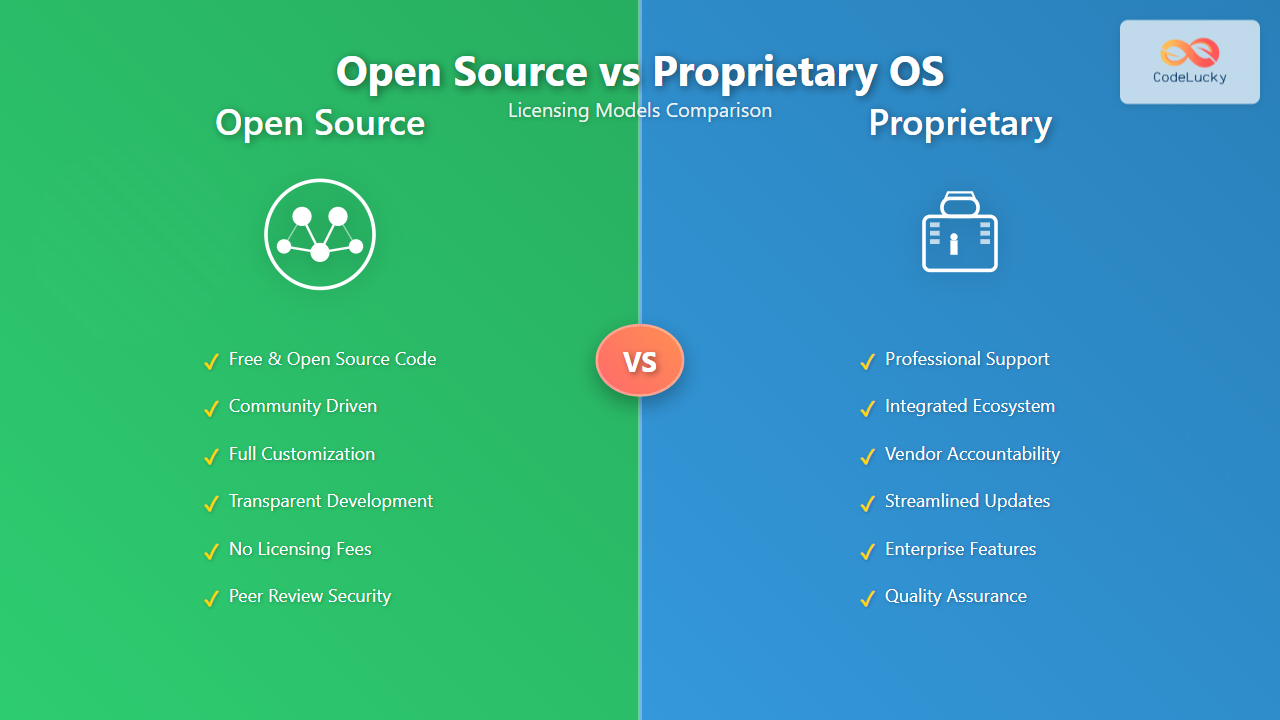
Key Characteristics of Open Source OS
- Source Code Availability: Complete access to underlying code for examination and modification
- Community Development: Distributed development model with global contributor base
- Free Distribution: No licensing fees for installation or redistribution
- Customization Freedom: Users can modify and adapt the system for specific needs
- Transparency: All changes and updates are publicly visible
Popular Open Source Operating Systems
Linux Distributions
Ubuntu: User-friendly distribution with strong community support and regular release cycles. Ubuntu follows a predictable six-month release schedule with Long Term Support (LTS) versions every two years.
Red Hat Enterprise Linux (RHEL): Enterprise-focused distribution offering commercial support while maintaining open source principles. RHEL provides certified hardware compatibility and professional services.
CentOS: Community-driven rebuild of RHEL source code, providing enterprise-class stability without licensing costs.
BSD Family
FreeBSD: Known for advanced networking capabilities and ZFS filesystem support. FreeBSD emphasizes performance and security for server environments.
OpenBSD: Security-focused operating system with proactive security measures and comprehensive code auditing.
Open Source Licensing Models

GNU General Public License (GPL)
The GPL ensures that derivative works remain open source, creating a “copyleft” effect that preserves software freedom. Linux kernel uses GPL v2, requiring that any modifications or derivative works be released under the same license.
Key GPL Requirements:
- Source code must be made available
- Derivative works must use GPL license
- Cannot combine GPL code with proprietary code
- Users must receive copy of license
MIT and BSD Licenses
Permissive licenses allowing incorporation into proprietary software with minimal restrictions. These licenses require attribution but permit commercial use and modification without source code disclosure requirements.
Proprietary Operating Systems: Control and Innovation
Proprietary operating systems maintain closed source code with development controlled by specific organizations. These systems generate revenue through licensing fees while providing integrated user experiences and professional support services.
Key Characteristics of Proprietary OS
- Closed Source Code: Source code remains confidential and inaccessible to users
- Centralized Development: Single organization controls development roadmap and features
- Licensing Fees: Users pay for installation and usage rights
- Integrated Ecosystem: Seamless integration with related software and services
- Professional Support: Official technical support and warranty coverage
Major Proprietary Operating Systems
Microsoft Windows
Windows 11 Pro: Latest enterprise version with advanced security features, domain joining capabilities, and BitLocker encryption. Windows licensing includes per-device or per-user models with volume discounts for organizations.
Windows Server 2022: Server operating system with hyper-converged infrastructure support, advanced security features, and cloud integration capabilities.
Apple macOS
macOS Ventura: Desktop operating system tightly integrated with Apple hardware and ecosystem. macOS licensing restricts installation to Apple-manufactured hardware through End User License Agreement.
Commercial Unix Systems
IBM AIX: Enterprise Unix system optimized for Power Systems hardware with advanced virtualization and reliability features.
Oracle Solaris: High-performance Unix system with integrated virtualization, advanced security features, and optimized database performance.
Comparative Analysis: Security Implications
Security approaches differ significantly between open source and proprietary operating systems, each offering distinct advantages and potential vulnerabilities.

Open Source Security Advantages
Transparency and Peer Review: Open source code enables security researchers worldwide to identify vulnerabilities quickly. The “many eyes make all bugs shallow” principle allows rapid detection and resolution of security issues.
Rapid Response: Security patches can be developed and deployed immediately without waiting for vendor approval or release cycles. Critical vulnerabilities often receive patches within hours of discovery.
No Hidden Backdoors: Complete source code visibility ensures no hidden functionality or surveillance capabilities exist within the system.
Proprietary Security Advantages
Coordinated Security: Vendors can coordinate security updates across entire ecosystems, ensuring compatibility and comprehensive protection. Microsoft’s Patch Tuesday provides predictable security update cycles.
Professional Security Teams: Dedicated security teams with extensive resources focus exclusively on identifying and resolving vulnerabilities.
Integrated Security Features: Built-in security tools like Windows Defender, BitLocker, and macOS FileVault provide comprehensive protection without additional software requirements.
Cost Analysis: Total Cost of Ownership
Understanding the true cost of operating systems requires analyzing licensing fees, support costs, training requirements, and long-term maintenance expenses.
Open Source Cost Factors
| Cost Category | Open Source | Considerations |
|---|---|---|
| Initial Licensing | $0 | No licensing fees for software acquisition |
| Support | $50-500/year per system | Optional commercial support available |
| Training | $1,000-5,000 per administrator | Higher initial learning curve |
| Maintenance | Internal resources | Requires skilled internal staff |
Proprietary Cost Factors
| Cost Category | Proprietary | Considerations |
|---|---|---|
| Initial Licensing | $100-500 per user/device | Upfront licensing costs required |
| Support | Included with license | Professional support included |
| Training | $500-2,000 per administrator | Lower learning curve, familiar interfaces |
| Maintenance | Vendor responsibility | Updates and patches provided by vendor |
Enterprise Deployment Scenarios
Different organizational requirements favor either open source or proprietary solutions based on specific needs, compliance requirements, and existing infrastructure.

Open Source Success Stories
Google: Runs millions of servers on customized Linux distributions, demonstrating massive scalability and cost efficiency. Google’s infrastructure relies heavily on open source technologies for search, cloud services, and data processing.
Netflix: Uses FreeBSD for content delivery networks, handling billions of streaming requests daily. Open source flexibility enables custom optimizations for video streaming workloads.
Financial Institutions: Many banks use Red Hat Enterprise Linux for trading systems and risk management applications, benefiting from stability, security, and cost predictability.
Proprietary Success Stories
Enterprise Environments: Large corporations often standardize on Windows Server and Active Directory for centralized management, security policies, and integrated collaboration tools.
Creative Industries: Media production companies rely on macOS for video editing, audio production, and graphic design workflows, leveraging integrated professional software ecosystems.
Government Agencies: Many government organizations use Windows environments for standardized desktop computing, benefiting from comprehensive support and security certifications.
Development and Innovation Models
The fundamental difference in development approaches between open source and proprietary systems creates distinct innovation patterns and feature evolution paths.
Open Source Development
Community-Driven Innovation: Features emerge from diverse user needs and developer interests. Linux kernel development involves thousands of contributors from hundreds of organizations worldwide.
Rapid Iteration: New features can be implemented and tested quickly without corporate approval processes. Experimental features often appear in development branches before official releases.
Diverse Perspectives: Global contributor base brings varied expertise and use cases, resulting in robust and flexible solutions.
Proprietary Development
Strategic Direction: Features align with corporate strategy and market positioning. Apple’s macOS development focuses on integration with hardware and ecosystem services.
User Experience Consistency: Centralized design ensures consistent user interfaces and behavior across system components.
Market-Driven Features: Development priorities reflect market research and customer feedback through formal channels.
Licensing Compliance and Legal Considerations
Understanding licensing obligations helps organizations avoid legal issues and ensure proper software usage across their infrastructure.
Open Source Compliance
Attribution Requirements: Most open source licenses require proper attribution and license inclusion when redistributing software.
Copyleft Obligations: GPL and similar licenses require sharing modifications when distributing derivative works, affecting commercial software development.
Patent Considerations: Some licenses include patent grants and retaliation clauses that affect intellectual property strategies.
Proprietary Compliance
License Auditing: Organizations must track and manage license usage to avoid compliance violations and associated penalties.
Usage Restrictions: EULAs often restrict installation methods, virtualization, and transfer rights.
Audit Rights: Vendors typically retain rights to audit license usage and impose penalties for non-compliance.
Future Trends and Considerations
The operating system landscape continues evolving with cloud computing, containerization, and edge computing influencing licensing models and deployment strategies.

Emerging Licensing Models
Open Core: Companies provide open source foundations with proprietary enterprise features, combining community development with commercial revenue streams.
Subscription-Based Open Source: Organizations like Red Hat offer subscription services for open source software, providing support, certification, and additional tools.
Cloud-First Licensing: Operating systems optimized specifically for cloud deployment with usage-based pricing models.
Making the Right Choice
Selecting between open source and proprietary operating systems requires careful evaluation of organizational needs, technical capabilities, budget constraints, and long-term strategic goals.
Choose Open Source When:
- Budget constraints are significant
- Customization requirements are extensive
- Internal technical expertise is available
- Transparency and control are priorities
- Vendor independence is important
Choose Proprietary When:
- Integrated ecosystem benefits are valuable
- Professional support is essential
- Compliance certifications are required
- User familiarity reduces training costs
- Risk mitigation through vendor warranties is important
The decision between open source and proprietary operating systems ultimately depends on balancing technical requirements, financial constraints, and organizational capabilities. Both models continue evolving to meet changing user needs, ensuring that organizations have viable options regardless of their specific requirements. Success with either approach requires understanding the implications of licensing choices and aligning them with long-term technological and business strategies.