
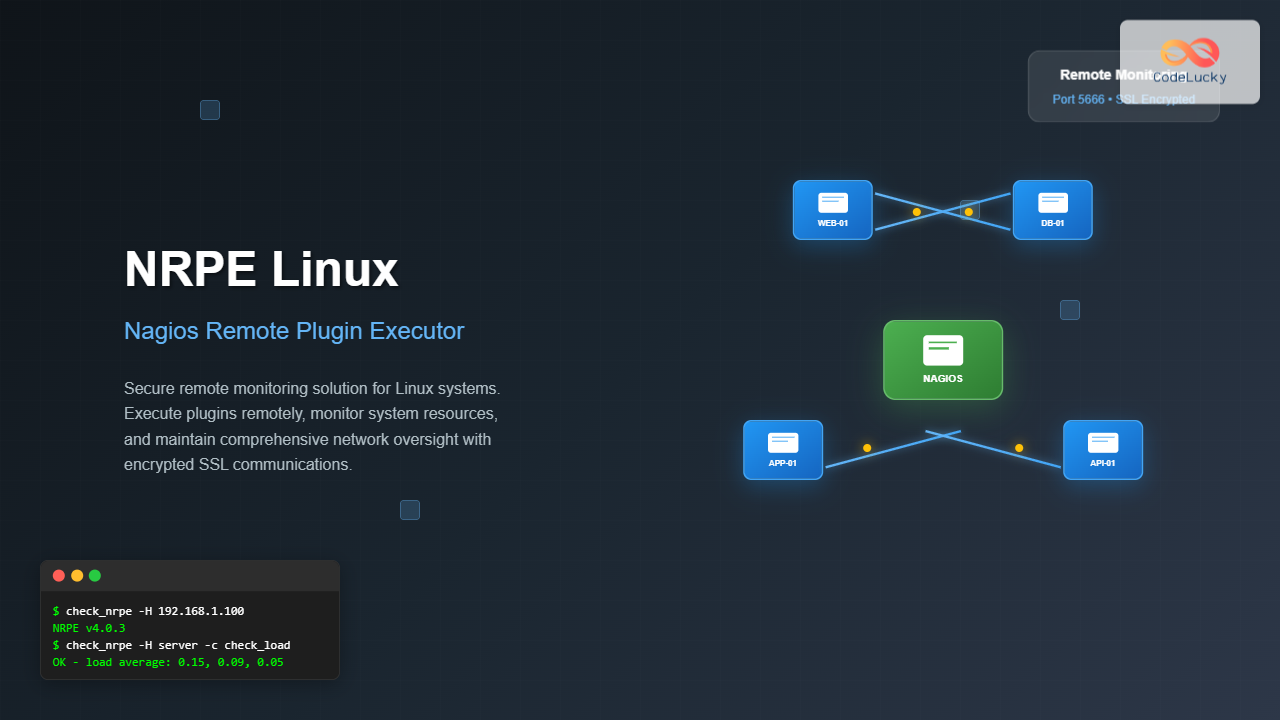
NRPE (Nagios Remote Plugin Executor) is a crucial component in the Nagios monitoring ecosystem that enables remote execution of monitoring plugins on Linux and Unix systems. This powerful tool allows system administrators to monitor remote hosts without requiring SNMP or other protocols, providing direct access to system resources and custom checks.
What is NRPE?
NRPE consists of two main components: the NRPE daemon that runs on remote hosts and the check_nrpe plugin that executes on the Nagios monitoring server. The daemon listens for requests from authorized monitoring servers, executes the requested plugins locally, and returns the results.
- Direct system monitoring without SNMP overhead
- Custom plugin execution capabilities
- Secure SSL-encrypted communications
- Flexible configuration options
Installing NRPE on Linux
Ubuntu/Debian Installation
# Update package repository
sudo apt update

# Install NRPE daemon and plugins
sudo apt install nagios-nrpe-server nagios-plugins-basic nagios-plugins-standard

# Start and enable NRPE service
sudo systemctl start nagios-nrpe-server
sudo systemctl enable nagios-nrpe-server
CentOS/RHEL Installation
# Install EPEL repository
sudo yum install epel-release

# Install NRPE and plugins
sudo yum install nrpe nagios-plugins-all

# Start and enable NRPE service
sudo systemctl start nrpe
sudo systemctl enable nrpe
Source Installation
For custom installations or latest versions:
# Create nagios user
sudo useradd nagios

# Download and compile NRPE
wget https://github.com/NagiosEnterprises/nrpe/archive/nrpe-4.0.3.tar.gz
tar -xzf nrpe-4.0.3.tar.gz
cd nrpe-nrpe-4.0.3/

# Configure and compile
./configure --enable-command-args --enable-ssl
make all
sudo make install-all

# Install systemd service
sudo make install-daemon-config
NRPE Configuration
Main Configuration File
The primary configuration file is located at /etc/nagios/nrpe.cfg:
# NRPE Configuration File
# Main server configuration

# Process ID file
pid_file=/var/run/nrpe/nrpe.pid

# Port number (default is 5666)
server_port=5666

# Address to bind to (0.0.0.0 for all interfaces)
server_address=0.0.0.0

# Allowed hosts (comma-separated list)
allowed_hosts=127.0.0.1,::1,10.0.1.100,192.168.1.50

# Don't blame NRPE for being insecure
dont_blame_nrpe=0

# Allow bash command substitution
allow_bash_command_substitution=0

# Command timeout
command_timeout=60

# Connection timeout
connection_timeout=300
Command Definitions
Define custom commands in the configuration file:
# System load check
command[check_load]=/usr/lib/nagios/plugins/check_load -w 15,10,5 -c 30,25,20

# Disk usage check
command[check_disk]=/usr/lib/nagios/plugins/check_disk -w 20% -c 10% -p /

# Memory usage check
command[check_memory]=/usr/lib/nagios/plugins/check_mem.pl -f -w 80 -c 90

# Process count check
command[check_procs]=/usr/lib/nagios/plugins/check_procs -w 250 -c 400 -s RSZDT

# Custom service check
command[check_apache]=/usr/lib/nagios/plugins/check_procs -c 1:4 -C apache2

# Check specific log file
command[check_log]=/usr/lib/nagios/plugins/check_log -F /var/log/messages -O /tmp/messages.old -q "ERROR"
SSL Configuration
Enable SSL encryption for secure communications:
# SSL configuration in nrpe.cfg
ssl_version=TLSv1.2+
ssl_use_adh=0
ssl_cert_file=/etc/ssl/certs/nrpe-cert.pem
ssl_privatekey_file=/etc/ssl/private/nrpe-key.pem
ssl_cacert_file=/etc/ssl/certs/ca-cert.pem
ssl_ciphers=ALL:!MD5:@STRENGTH
Generate SSL certificates:
# Generate private key and certificate
sudo openssl req -new -x509 -days 365 -nodes \
  -out /etc/ssl/certs/nrpe-cert.pem \
  -keyout /etc/ssl/private/nrpe-key.pem

# Set proper permissions
sudo chmod 600 /etc/ssl/private/nrpe-key.pem
sudo chown nagios:nagios /etc/ssl/private/nrpe-key.pem
Testing NRPE Configuration
Local Testing
# Test NRPE daemon locally
/usr/lib/nagios/plugins/check_nrpe -H localhost

# Expected output:
NRPE v4.0.3
# Test specific command
/usr/lib/nagios/plugins/check_nrpe -H localhost -c check_load
# Expected output:
OK - load average: 0.15, 0.09, 0.05|load1=0.150;15.000;30.000;0; load5=0.090;10.000;25.000;0; load15=0.050;5.000;20.000;0;Remote Testing
From the Nagios monitoring server:
# Test remote NRPE connection
/usr/lib/nagios/plugins/check_nrpe -H 192.168.1.100

# Test with specific command
/usr/lib/nagios/plugins/check_nrpe -H 192.168.1.100 -c check_disk
Advanced NRPE Usage
Command Arguments
Enable command arguments by setting dont_blame_nrpe=1:
# Configuration allowing arguments
command[check_disk_arg]=/usr/lib/nagios/plugins/check_disk -w $ARG1$ -c $ARG2$ -p $ARG3$

# Usage from monitoring server
check_nrpe -H remote_host -c check_disk_arg -a 20% 10% /home
Custom Plugin Scripts
Create custom monitoring scripts:
#!/bin/bash
# /usr/lib/nagios/plugins/check_custom_service.sh

SERVICE_NAME="$1"
PROCESS_COUNT=$(ps aux | grep "$SERVICE_NAME" | grep -v grep | wc -l)

if [ $PROCESS_COUNT -gt 0 ]; then
    echo "OK - $SERVICE_NAME is running ($PROCESS_COUNT processes)"
    exit 0
else
    echo "CRITICAL - $SERVICE_NAME is not running"
    exit 2
fi
# Make script executable
sudo chmod +x /usr/lib/nagios/plugins/check_custom_service.sh
# Add to NRPE configuration
command[check_custom]=/usr/lib/nagios/plugins/check_custom_service.sh $ARG1$NRPE Security Configuration
Firewall Configuration
# UFW (Ubuntu/Debian)
sudo ufw allow 5666/tcp
sudo ufw reload

# Firewalld (CentOS/RHEL)
sudo firewall-cmd --permanent --add-port=5666/tcp
sudo firewall-cmd --reload

# iptables
sudo iptables -A INPUT -p tcp --dport 5666 -s MONITORING_SERVER_IP -j ACCEPT
SELinux Configuration (RHEL/CentOS)
# Allow NRPE network connections
sudo setsebool -P nagios_run_sudo 1

# Custom SELinux policy if needed
sudo semanage port -a -t nagios_port_t -p tcp 5666
Troubleshooting NRPE
Common Issues and Solutions
# Check if NRPE is running
sudo systemctl status nrpe

# Verify port is listening
sudo netstat -tlnp | grep 5666

# Check firewall rules
sudo iptables -L | grep 5666# Increase timeout in nrpe.cfg
connection_timeout=300
# Check network connectivity
telnet remote_host 5666
# Verify allowed_hosts configuration
grep allowed_hosts /etc/nagios/nrpe.cfgDebug Mode
Run NRPE in debug mode for troubleshooting:
# Stop the service
sudo systemctl stop nrpe

# Run in debug mode
sudo /usr/bin/nrpe -c /etc/nagios/nrpe.cfg -d

# Check log files
sudo tail -f /var/log/messages | grep nrpe
Performance Optimization
Configuration Tuning
# Optimize for high-load environments
server_address=192.168.1.100  # Bind to specific interface
max_packet_age=30              # Packet age threshold
command_timeout=30             # Reduce command timeout
connection_timeout=60          # Reduce connection timeout

# Enable keep-alive
tcp_keepalive=1
Resource Monitoring
# Monitor NRPE performance
command[check_nrpe_procs]=/usr/lib/nagios/plugins/check_procs -C nrpe -c 1:5

# Monitor memory usage
command[check_nrpe_mem]=/usr/lib/nagios/plugins/check_proc_mem.sh nrpe 100 200
Integration with Nagios Core
Host Configuration
Configure remote hosts in Nagios:
# /etc/nagios/conf.d/remote-host.cfg
define host {
    use                     linux-server
    host_name               webserver-01
    alias                   Web Server 01
    address                 192.168.1.100
    check_command           check-host-alive
    max_check_attempts      5
    notification_interval   30
    notification_period     24x7
}
Service Definitions
# Service checks using NRPE
define service {
    use                     generic-service
    host_name               webserver-01
    service_description     Load Average
    check_command           check_nrpe!check_load
}

define service {
    use                     generic-service
    host_name               webserver-01
    service_description     Disk Usage
    check_command           check_nrpe!check_disk
}
Best Practices
- Use SSL encryption for all communications
- Restrict
allowed_hoststo specific monitoring servers - Disable command arguments unless absolutely necessary
- Regularly update NRPE and plugins
- Use strong SSL ciphers and disable weak protocols
- Set appropriate timeout values
- Use efficient plugin scripts
- Monitor NRPE daemon resource usage
- Implement proper logging and rotation
- Regular maintenance and cleanup
Conclusion
NRPE is an essential tool for comprehensive Linux system monitoring, providing secure and efficient remote plugin execution capabilities. By following the configuration guidelines and best practices outlined in this guide, you can implement a robust monitoring infrastructure that scales with your environment’s needs.
Remember to regularly update your NRPE installation, monitor its performance, and review your security configurations to maintain optimal monitoring capabilities across your Linux infrastructure.
Related Posts
check_mk Linux: Complete Guide to Nagios-Based System Monitoring
check_mk is a powerful monitoring system built on top of Nagios that simplifies infrastructure monitoring with automated service discovery and...
nagiosxi Linux: Complete Enterprise Network Monitoring Guide with Commands and Configuration
NagiosXI represents the pinnacle of enterprise network monitoring solutions on Linux systems, offering comprehensive infrastructure oversight with advanced alerting, reporting,...
nagios Linux: Complete Infrastructure Monitoring System Setup Guide
Introduction to Nagios Nagios is one of the most popular open-source infrastructure monitoring systems available for Linux environments. Originally developed...
nsca Linux: Complete Guide to Nagios Service Check Acceptor Setup and Configuration
What is NSCA (Nagios Service Check Acceptor)? NSCA (Nagios Service Check Acceptor) is a powerful Linux daemon that allows remote...
adagios Linux: Complete Guide to Web-Based Nagios Configuration Management
Managing Nagios configurations can be complex and time-consuming, especially when dealing with multiple hosts and services. adagios revolutionizes this process...
thruk Linux: Comprehensive Monitoring Web Interface for Network Infrastructure
Thruk is a powerful web-based monitoring interface designed primarily for Nagios and compatible monitoring systems. As a comprehensive frontend solution,...

centreon Linux: Complete IT Infrastructure Monitoring Solution Guide
Centreon is a powerful, open-source IT infrastructure monitoring platform built on top of Nagios Core. It provides a comprehensive web-based...

op5 Linux: Complete Network Monitoring Solution Guide
op5 Linux is a comprehensive network monitoring solution built on top of the proven Nagios monitoring engine. This enterprise-grade platform...

mod_gearman Linux: Complete Guide to Distributing Nagios Checks Across Multiple Servers
mod_gearman is a powerful Nagios module that enables you to distribute monitoring checks across multiple servers using the Gearman job...

ndoutils Linux: Complete Guide to Nagios Data Output Utilities
The Nagios Data Output Utilities (ndoutils) serve as a crucial bridge between your Nagios monitoring system and database storage, enabling...

icinga Linux: Complete Network Monitoring System Guide for System Administrators
Icinga is a powerful open-source network monitoring system that helps system administrators monitor network resources, notify users of outages, and...

Paessler Linux: Complete Guide to Network Monitoring with PRTG on Linux Systems
Network monitoring is crucial for maintaining optimal performance and security in Linux environments. Paessler PRTG Network Monitor offers comprehensive monitoring...





