
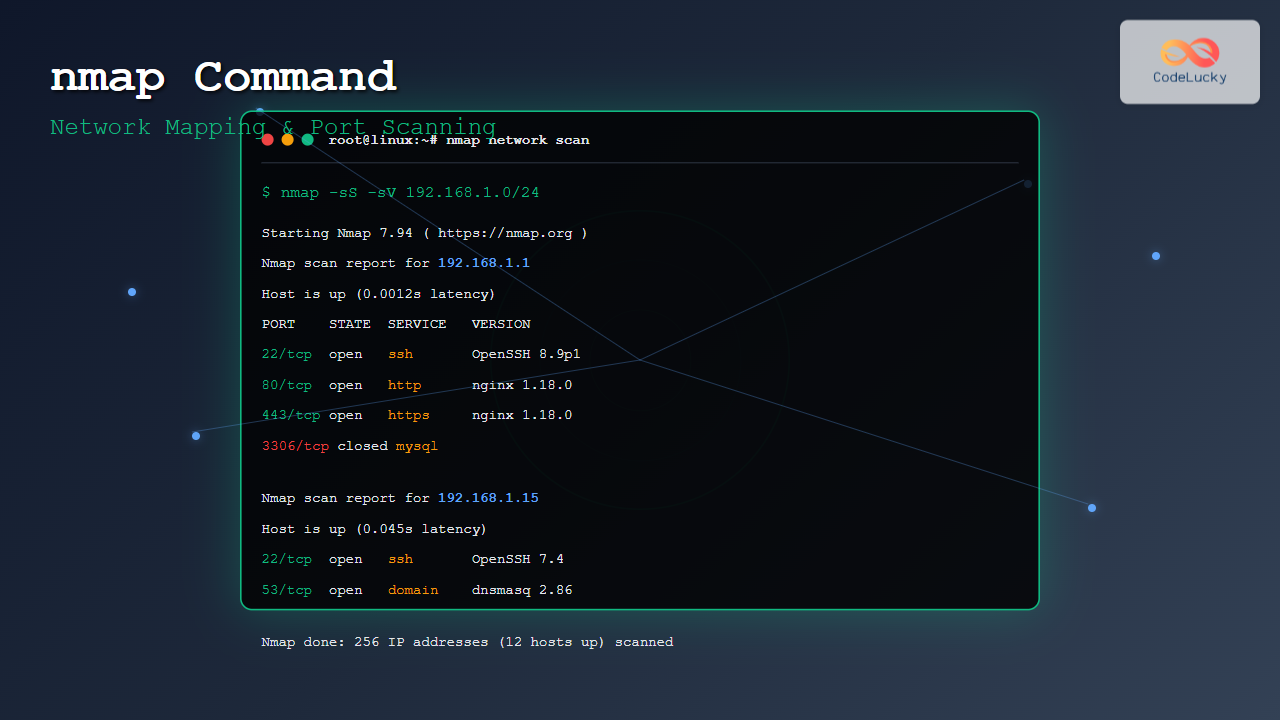
The nmap (Network Mapper) command is one of the most powerful and versatile network discovery and security auditing tools available in Linux. Whether you’re a system administrator managing network infrastructure, a security professional conducting penetration tests, or a developer troubleshooting network connectivity, nmap provides essential capabilities for network exploration and security assessment.
What is nmap?
nmap is an open-source network scanner that uses raw IP packets to determine what hosts are available on a network, what services those hosts are offering, what operating systems they are running, what type of packet filters/firewalls are in use, and dozens of other characteristics.
Key Features of nmap:
- Host Discovery: Identify active devices on a network
- Port Scanning: Determine open, closed, and filtered ports
- Service Detection: Identify running services and their versions
- Operating System Detection: Fingerprint target operating systems
- Scriptable Interaction: Use NSE (Nmap Scripting Engine) for advanced tasks
- Network Mapping: Create comprehensive network topology maps
Installing nmap
Most Linux distributions include nmap in their package repositories. Here’s how to install it on popular distributions:
Ubuntu/Debian:
sudo apt update
sudo apt install nmap
CentOS/RHEL/Fedora:
# For CentOS/RHEL
sudo yum install nmap

# For Fedora
sudo dnf install nmap
Arch Linux:
sudo pacman -S nmapBasic nmap Syntax
The basic syntax of nmap is straightforward:
nmap [Scan Type] [Options] [Target Specification]Let’s explore the fundamental components:
Target Specification
You can specify targets in various formats:
# Single IP address
nmap 192.168.1.1

# Hostname
nmap google.com

# IP range
nmap 192.168.1.1-254

# CIDR notation
nmap 192.168.1.0/24

# Multiple targets
nmap 192.168.1.1 192.168.1.5 google.com
Host Discovery Techniques
Before scanning ports, nmap needs to determine which hosts are alive. Here are the primary host discovery methods:
Ping Scan (-sn)
Performs host discovery without port scanning:
nmap -sn 192.168.1.0/24Sample Output:
Starting Nmap 7.94 ( https://nmap.org ) at 2025-08-25 06:28 IST
Nmap scan report for 192.168.1.1
Host is up (0.0012s latency).
Nmap scan report for 192.168.1.15
Host is up (0.045s latency).
Nmap scan report for 192.168.1.105
Host is up (0.032s latency).
Nmap done: 256 IP addresses (3 hosts up) scanned in 2.84 seconds
ARP Ping (-PR)
Uses ARP requests for local network discovery:
nmap -PR 192.168.1.0/24TCP SYN Ping (-PS)
Sends TCP SYN packets to specified ports:
nmap -PS22,80,443 192.168.1.0/24Port Scanning Techniques
nmap offers various scanning techniques, each with specific advantages and use cases:
TCP SYN Scan (-sS)
The default and most popular scan type, also known as “half-open” scanning:
nmap -sS 192.168.1.1Sample Output:
Starting Nmap 7.94 ( https://nmap.org ) at 2025-08-25 06:28 IST
Nmap scan report for 192.168.1.1
Host is up (0.0010s latency).
Not shown: 996 closed ports
PORT    STATE SERVICE
22/tcp  open  ssh
53/tcp  open  domain
80/tcp  open  http
443/tcp open  https

Nmap done: 1 IP address (1 host up) scanned in 0.12 seconds
TCP Connect Scan (-sT)
Completes the full TCP three-way handshake:
nmap -sT 192.168.1.1UDP Scan (-sU)
Scans UDP ports (slower but important for comprehensive assessment):
nmap -sU 192.168.1.1Comprehensive TCP and UDP Scan
nmap -sS -sU 192.168.1.1Service and Version Detection
nmap can identify services running on open ports and determine their versions:
Service Detection (-sV)
nmap -sV 192.168.1.1Sample Output:
Starting Nmap 7.94 ( https://nmap.org ) at 2025-08-25 06:28 IST
Nmap scan report for 192.168.1.1
Host is up (0.0012s latency).
Not shown: 996 closed ports
PORT    STATE SERVICE VERSION
22/tcp  open  ssh     OpenSSH 8.9p1 Ubuntu 3ubuntu0.1 (Ubuntu Linux; protocol 2.0)
53/tcp  open  domain  dnsmasq 2.86
80/tcp  open  http    nginx 1.18.0 (Ubuntu)
443/tcp open  https   nginx 1.18.0 (Ubuntu)
Service Info: OS: Linux; CPE: cpe:/o:linux:linux_kernel

Nmap done: 1 IP address (1 host up) scanned in 6.42 seconds
Aggressive Service Detection
nmap -sV --version-intensity 9 192.168.1.1Operating System Detection
nmap can attempt to identify the target’s operating system:
nmap -O 192.168.1.1Sample Output:
Starting Nmap 7.94 ( https://nmap.org ) at 2025-08-25 06:28 IST
Nmap scan report for 192.168.1.1
Host is up (0.0011s latency).
Not shown: 996 closed ports
PORT    STATE SERVICE
22/tcp  open  ssh
53/tcp  open  domain
80/tcp  open  http
443/tcp open  https

Device type: general purpose
Running: Linux 4.X|5.X
OS CPE: cpe:/o:linux:linux_kernel:4 cpe:/o:linux:linux_kernel:5
OS details: Linux 4.15 - 5.8
Network Distance: 1 hop

Nmap done: 1 IP address (1 host up) scanned in 2.15 seconds
Advanced Scanning Options
Aggressive Scan (-A)
Combines OS detection, version detection, script scanning, and traceroute:
nmap -A 192.168.1.1Fast Scan (-F)
Scans only the 100 most common ports:
nmap -F 192.168.1.1Specific Port Ranges
# Scan specific ports
nmap -p 22,80,443 192.168.1.1

# Scan port range
nmap -p 1-1000 192.168.1.1

# Scan all ports
nmap -p- 192.168.1.1

# Scan specific UDP ports
nmap -sU -p 53,161,162 192.168.1.1
Timing and Performance
nmap provides timing templates to control scan speed and stealth:
Timing Templates
-T0(Paranoid): Very slow, for IDS evasion-T1(Sneaky): Slow, for IDS evasion-T2(Polite): Slower to use less bandwidth-T3(Normal): Default timing-T4(Aggressive): Faster, assumes good network-T5(Insane): Very fast, may miss results
# Fast scan
nmap -T4 -F 192.168.1.0/24

# Stealth scan
nmap -T1 -sS 192.168.1.1
Nmap Scripting Engine (NSE)
NSE allows nmap to perform advanced tasks using Lua scripts:
Default Scripts
nmap -sC 192.168.1.1Specific Script Categories
# Vulnerability scripts
nmap --script vuln 192.168.1.1

# Discovery scripts
nmap --script discovery 192.168.1.1

# Authentication scripts
nmap --script auth 192.168.1.1
Individual Scripts
# HTTP title grabbing
nmap --script http-title 192.168.1.1

# SSH version detection
nmap --script ssh2-enum-algos 192.168.1.1

# SMB enumeration
nmap --script smb-enum-shares 192.168.1.1
Output Formats
nmap supports various output formats for different needs:
Normal Output (-oN)
nmap -oN scan_results.txt 192.168.1.1XML Output (-oX)
nmap -oX scan_results.xml 192.168.1.1Grepable Output (-oG)
nmap -oG scan_results.gnmap 192.168.1.1All Formats (-oA)
nmap -oA scan_results 192.168.1.1Stealth and Evasion Techniques
Decoy Scanning (-D)
Uses decoy IP addresses to hide your real IP:
nmap -D 192.168.1.100,192.168.1.101,192.168.1.102 192.168.1.1Source Port Spoofing (–source-port)
nmap --source-port 53 192.168.1.1Fragmented Packets (-f)
nmap -f 192.168.1.1Practical Examples and Use Cases
Network Discovery
Discover all devices on your local network:
nmap -sn 192.168.1.0/24Web Server Assessment
Comprehensive scan of a web server:
nmap -sS -sV -O -A --script http-enum,http-headers,http-methods,http-title 192.168.1.100Database Server Scan
Scan common database ports:
nmap -sS -sV -p 1433,1521,3306,5432,27017 192.168.1.0/24Vulnerability Assessment
Run vulnerability detection scripts:
nmap -sS -sV --script vuln 192.168.1.1Sample Vulnerability Output:
Starting Nmap 7.94 ( https://nmap.org ) at 2025-08-25 06:28 IST
Nmap scan report for 192.168.1.1
Host is up (0.0012s latency).
Not shown: 996 closed ports
PORT    STATE SERVICE VERSION
22/tcp  open  ssh     OpenSSH 7.4 (protocol 2.0)
| ssh2-enum-algos:
|   kex_algorithms: (6)
|   server_host_key_algorithms: (4)
|   encryption_algorithms: (6)
|   mac_algorithms: (10)
|   compression_algorithms: (2)
80/tcp  open  http    Apache httpd 2.4.6
|_http-server-header: Apache/2.4.6 (CentOS)
| http-slowloris-check:
|   VULNERABLE:
|   Slowloris DOS attack
|     State: LIKELY VULNERABLE
|     IDs:  CVE:CVE-2007-6750
|       Slowloris tries to keep many connections to the target web server open and hold
|       them open as long as possible.
|     Disclosure date: 2009-09-17

Nmap done: 1 IP address (1 host up) scanned in 45.23 seconds
Common nmap Commands for Different Scenarios
Quick Network Survey
# Fast scan of most common ports
nmap -T4 -F 192.168.1.0/24

# Comprehensive scan of a single host
nmap -A -T4 192.168.1.1

# Scan for web servers
nmap -p 80,443,8080,8443 192.168.1.0/24
Security Assessment
# Complete security scan
nmap -sS -sU -T4 -A -v -PE -PP -PS80,443 -PA3389 -PU40125 -PY -g 53 --script "default or (discovery and safe)" 192.168.1.1

# Check for common vulnerabilities
nmap --script "vuln and safe" 192.168.1.1

# SSL/TLS assessment
nmap --script ssl-enum-ciphers -p 443 192.168.1.1
Best Practices and Considerations
Legal and Ethical Considerations
- Permission: Only scan networks you own or have explicit permission to test
- Rate Limiting: Use appropriate timing templates to avoid overwhelming targets
- Documentation: Keep detailed logs of your scanning activities
- Compliance: Ensure your scanning activities comply with organizational policies
Performance Optimization
- Use
-T4for faster scans on reliable networks - Limit port ranges when possible with
-p - Use
--max-hostgroupand--min-hostgroupfor large networks - Consider
--max-rateto limit packet transmission rate
Accuracy Improvements
- Use
-sVfor service version detection - Combine multiple scan types for comprehensive results
- Use appropriate NSE scripts for specific services
- Cross-reference results with other tools
Troubleshooting Common Issues
Permission Denied Errors
Some scan types require root privileges:
# Run with sudo for SYN scans
sudo nmap -sS 192.168.1.1

# Use TCP connect scan without root
nmap -sT 192.168.1.1
Firewall Blocking
If scans are being blocked:
# Try different scan techniques
nmap -sA 192.168.1.1  # ACK scan
nmap -sF 192.168.1.1  # FIN scan
nmap -sN 192.168.1.1  # NULL scan
Slow Scans
Optimize scan speed:
# Increase timing and limit scope
nmap -T4 -F --max-rate 1000 192.168.1.1
Integration with Other Tools
Combining with grep
# Find hosts with SSH open
nmap -p 22 192.168.1.0/24 | grep "22/tcp open"

# Extract only open ports
nmap 192.168.1.1 | grep "open"
XML Processing
# Generate XML and process with other tools
nmap -oX results.xml 192.168.1.0/24
# Process with custom scripts or import into databases
Conclusion
The nmap command is an indispensable tool for network administrators, security professionals, and anyone working with network infrastructure. Its versatility in host discovery, port scanning, service detection, and security assessment makes it a cornerstone of network reconnaissance and security auditing.
From simple ping sweeps to complex vulnerability assessments, nmap provides the functionality needed to understand and secure network environments. By mastering the various scan types, timing options, and scripting capabilities, you can efficiently gather network intelligence while maintaining stealth and avoiding detection.
Remember to always use nmap responsibly and ethically, ensuring you have proper authorization before scanning any network infrastructure. Regular practice with different nmap techniques will help you become proficient in network discovery and security assessment, making you more effective in your system administration or security role.
As networks continue to evolve and security threats become more sophisticated, nmap remains a reliable and powerful tool for understanding and protecting network infrastructure. Whether you’re conducting routine network maintenance, performing security audits, or investigating network issues, nmap provides the comprehensive scanning capabilities needed to get the job done effectively.
Related Posts
portsentry Linux: Complete Guide to Automated Port Scan Attack Detection and Prevention
Port scanning is one of the most common reconnaissance techniques used by attackers to identify vulnerable services on target systems....
netstat Command Linux: Complete Guide to Network Connection Monitoring
The netstat command is one of the most essential network monitoring tools in Linux systems. It provides comprehensive information about...

intermapper Linux: Complete Network Monitoring and Mapping Guide
What is InterMapper for Linux? InterMapper is a powerful network monitoring and mapping tool that provides real-time visibility into network...
Wireshark Command Linux: Complete Network Protocol Analyzer Guide
Wireshark is the world's most popular network protocol analyzer, providing deep visibility into network traffic and communication protocols. While most...
tcpdump Command Linux: Complete Guide to Network Packet Capture and Analysis
The tcpdump command is one of the most powerful network analysis tools available in Linux systems. It allows system administrators...
SNMP Command Linux: Complete Guide to Simple Network Management Protocol Configuration and Usage
Introduction to SNMP Command in Linux Simple Network Management Protocol (SNMP) is a fundamental protocol used for monitoring and managing...
nmcli Command Linux: Complete Guide to NetworkManager Command Line Tool
The nmcli (NetworkManager Command Line Interface) is a powerful command-line tool that allows you to control NetworkManager and configure network...

whatsup Linux: Complete Network Monitoring and System Administration Guide
whatsup is a powerful network monitoring and system administration tool for Linux that provides real-time insights into network connectivity, system...
ip Command Linux: Complete Guide to Advanced Network Configuration and Management
The ip command is one of the most powerful and versatile networking tools in Linux, serving as the modern replacement...
iptraf Command Linux: Complete Interactive Network Monitoring Guide
The iptraf command is a powerful console-based network monitoring utility for Linux systems that provides real-time IP LAN monitoring capabilities....
NetworkManager Linux: Complete Guide to Network Management Service
NetworkManager is a powerful network management service that provides automatic network detection and configuration for Linux systems. It simplifies network...

iptables Command Linux: Complete Guide to Configure Firewall Rules
The iptables command is one of the most powerful and essential tools for managing firewall rules in Linux systems. As...





