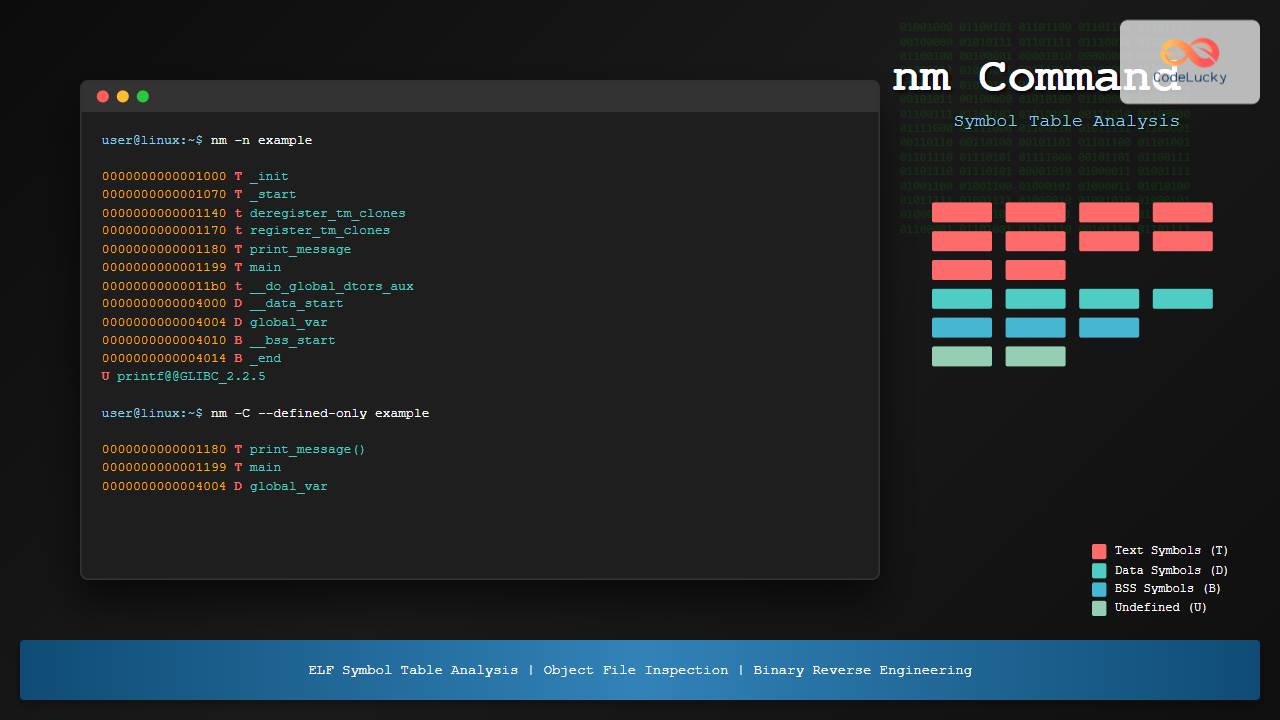
The nm command is a powerful utility in Linux that displays the symbol table of object files, executables, shared libraries, and archive files. This essential tool helps developers, system administrators, and security professionals analyze binary files, debug programs, and understand the structure of compiled code.
What is the nm Command?
The nm command (name list) extracts and displays symbols from binary files in formats like ELF (Executable and Linkable Format), COFF, and others. It reveals function names, variable names, their addresses, and symbol types, making it invaluable for reverse engineering, debugging, and binary analysis.
Basic Syntax
nm [options] [file...]If no file is specified, nm operates on the file a.out by default.
Understanding Symbol Types
The nm command displays symbols with single-letter codes indicating their type:
- A – Absolute symbol
- B/b – Uninitialized data (BSS) – uppercase for global, lowercase for local
- D/d – Initialized data – uppercase for global, lowercase for local
- T/t – Text (code) section – uppercase for global, lowercase for local
- U – Undefined symbol
- W/w – Weak symbol
- R/r – Read-only data
- N – Debug symbol
Basic Examples
Let’s start with a simple C program to demonstrate nm usage:
// example.c
#include <stdio.h>

int global_var = 42;
static int static_var = 10;

void print_message() {
    printf("Hello from nm command example!\n");
}

int main() {
    print_message();
    return 0;
}
Compile the program:
gcc -o example example.cNow use nm to examine the symbols:
$ nm exampleSample output:
0000000000004010 B __bss_start
0000000000004010 b completed.0
                 w __cxa_finalize@GLIBC_2.2.5
0000000000004000 D __data_start
0000000000004000 W data_start
0000000000001140 t deregister_tm_clones
00000000000011b0 t __do_global_dtors_aux
0000000000003e10 d __do_global_dtors_aux_fini_array_entry
0000000000004008 D __dso_handle
0000000000003e18 d _DYNAMIC
0000000000004010 D _edata
0000000000004014 B _end
0000000000001248 T _fini
00000000000011f0 t frame_dummy
0000000000003e08 d __frame_dummy_init_array_entry
0000000000002150 r __FRAME_END__
0000000000004004 D global_var
0000000000003000 r _IO_stdin_used
                 w _ITM_deregisterTMCloneTable
                 w _ITM_registerTMCloneTable
0000000000001000 T _init
0000000000001070 T _start
0000000000001199 T main
0000000000001030 t __x86_64_linux_gnu_init_array
0000000000001180 T print_message
                 U printf@GLIBC_2.2.5
0000000000001170 t register_tm_clones
0000000000004000 D __TMC_END__
Common nm Command Options
-A or –print-file-name
Display the filename before each symbol:
$ nm -A example
example:0000000000004010 B __bss_start
example:0000000000004010 b completed.0
example:                 w __cxa_finalize@GLIBC_2.2.5
example:0000000000004000 D __data_start
-D or –dynamic
Display dynamic symbols instead of normal symbols:
$ nm -D example
                 w __cxa_finalize
                 w __gmon_start__
                 w _ITM_deregisterTMCloneTable
                 w _ITM_registerTMCloneTable
                 U libc_start_main
                 U printf
-g or –extern-only
Display only global (external) symbols:
$ nm -g example
0000000000004010 B __bss_start
                 w __cxa_finalize@GLIBC_2.2.5
0000000000004000 D __data_start
0000000000004000 W data_start
0000000000004008 D __dso_handle
0000000000004010 D _edata
0000000000004014 B _end
0000000000001248 T _fini
0000000000004004 D global_var
-u or –undefined-only
Display only undefined symbols:
$ nm -u example
                 w __cxa_finalize@GLIBC_2.2.5
                 w _ITM_deregisterTMCloneTable
                 w _ITM_registerTMCloneTable
                 U printf@GLIBC_2.2.5
-n or –numeric-sort
Sort symbols by address numerically:
$ nm -n example | head -10
0000000000001000 T _init
0000000000001030 t __x86_64_linux_gnu_init_array
0000000000001070 T _start
0000000000001140 t deregister_tm_clones
0000000000001170 t register_tm_clones
0000000000001180 T print_message
0000000000001199 T main
00000000000011b0 t __do_global_dtors_aux
00000000000011f0 t frame_dummy
0000000000001248 T _fini
-C or –demangle
Demangle C++ symbols to make them readable. Let’s create a C++ example:
// cpp_example.cpp
#include <iostream>

class Calculator {
public:
    int add(int a, int b) {
        return a + b;
    }

    double multiply(double x, double y) {
        return x * y;
    }
};

int main() {
    Calculator calc;
    std::cout << calc.add(5, 3) << std::endl;
    return 0;
}
g++ -o cpp_example cpp_example.cppWithout demangling:
$ nm cpp_example | grep Calculator
0000000000001169 T _ZN10Calculator3addEii
0000000000001179 T _ZN10Calculator8multiplyEdd
With demangling:
$ nm -C cpp_example | grep Calculator
0000000000001169 T Calculator::add(int, int)
0000000000001179 T Calculator::multiply(double, double)
-S or –print-size
Display the size of symbols along with their addresses:
$ nm -S example | grep -E "(main|print_message)"
0000000000001199    25 T main
0000000000001180    25 T print_message
Advanced Usage Examples
Analyzing Shared Libraries
Examine symbols in system libraries:
$ nm -D /lib/x86_64-linux-gnu/libc.so.6 | head -10
                 w __cxa_finalize
                 w _ITM_deregisterTMCloneTable
                 w _ITM_registerTMCloneTable
0000000000028950 T __libc_start_main
000000000002a6b0 T abort
000000000007b2a0 T accept
000000000007b360 T accept4
000000000003f190 T access
Finding Specific Symbols
Search for specific function names:
$ nm /lib/x86_64-linux-gnu/libc.so.6 | grep printf
000000000004f4c0 T printf
000000000004f440 T fprintf
000000000005f810 T sprintf
000000000005f840 T snprintf
Combining with Other Commands
Count the number of functions in an executable:
$ nm example | grep " T " | wc -l
6
List all global variables:
$ nm example | grep " [BD] "
0000000000004010 B __bss_start
0000000000004000 D __data_start
0000000000004008 D __dso_handle
0000000000004010 D _edata
0000000000004014 B _end
0000000000004004 D global_var
Working with Archive Files
Create a static library and examine it:
# Create object files
gcc -c math_operations.c helper.c

# Create static library
ar rcs libmath.a math_operations.o helper.o

# Examine symbols in the archive
$ nm libmath.a
math_operations.o:
0000000000000000 T add
0000000000000010 T multiply
0000000000000020 T divide

helper.o:
0000000000000000 T print_result
0000000000000010 T validate_input
Using –defined-only
Display only defined symbols (excluding undefined ones):
$ nm --defined-only example | head -5
0000000000004010 B __bss_start
0000000000004010 b completed.0
0000000000004000 D __data_start
0000000000004000 W data_start
0000000000001140 t deregister_tm_clones
Practical Use Cases
1. Debugging Missing Symbols
When linking fails due to undefined symbols, use nm -u to identify missing functions:
$ nm -u myprogram
                 U some_missing_function
                 U another_undefined_symbol
2. Checking Library Dependencies
Verify what external functions a program requires:
$ nm -u example
                 w __cxa_finalize@GLIBC_2.2.5
                 U printf@GLIBC_2.2.5
3. Analyzing Binary Compatibility
Compare symbol tables between different versions of libraries to check compatibility.
4. Reverse Engineering
Extract function names and addresses from binaries for analysis:
$ nm -n suspicious_binary | grep " T " > functions.txtOutput Format Options
–format=posix
Use POSIX format for more structured output:
$ nm --format=posix example | head -5
__bss_start B 0000000000004010
completed.0 b 0000000000004010
__cxa_finalize@@GLIBC_2.2.5 w
__data_start D 0000000000004000
data_start W 0000000000004000
–format=bsd
Use BSD format (default on most systems):
$ nm --format=bsd example | head -5
0000000000004010 B __bss_start
0000000000004010 b completed.0
                 w __cxa_finalize@GLIBC_2.2.5
0000000000004000 D __data_start
0000000000004000 W data_start
Tips and Best Practices
- Use with objdump: Combine
nmwithobjdumpfor comprehensive binary analysis - Filter output: Use
grepto filter specific symbol types or names - Sort strategically: Use
-nfor address-based analysis,-vfor version sorting - Check strip status: If
nmshows few symbols, the binary might be stripped - Cross-platform analysis: Use appropriate
nmvariant for different architectures
Common Errors and Solutions
No Symbols Found
$ nm stripped_binary
nm: stripped_binary: no symbols
Solution: The binary has been stripped. Try using nm -D for dynamic symbols.
File Format Not Recognized
$ nm textfile.txt
nm: textfile.txt: file format not recognized
Solution: Ensure you’re running nm on a valid binary file.
Integration with Development Workflow
The nm command integrates well into build scripts and CI/CD pipelines:
#!/bin/bash
# Check for unwanted symbols in release builds
if nm -u myapp | grep -q debug; then
    echo "Debug symbols found in release build!"
    exit 1
fi
Conclusion
The nm command is an indispensable tool for anyone working with compiled code in Linux environments. Whether you’re debugging linking issues, analyzing binaries for security purposes, or optimizing code organization, nm provides the insights needed to understand the internal structure of executable files and libraries.
Master these nm command techniques to enhance your system administration, development, and debugging capabilities. Regular practice with different file types and symbol analysis will make you proficient in binary analysis and troubleshooting complex linking issues.
Related Posts
size Command Linux: Display Section Sizes of Object Files and Executables
The size command is a powerful utility in Linux systems that displays the section sizes of object files, executables, and...
file Command Advanced Linux: Master Detailed File Type Analysis and Detection
The file command is one of the most powerful and underutilized utilities in Linux for determining file types and analyzing...
strings Command Linux: Extract and Analyze Text from Binary Files
The strings command is a powerful Linux utility that extracts printable character sequences from binary files. Whether you're analyzing executables,...
readelf Command Linux: Complete Guide to ELF File Analysis and Debugging
The readelf command is an essential tool for Linux developers, system administrators, and security analysts who need to examine Executable...
strip Command Linux: Complete Guide to Removing Symbols from Object Files
The strip command is a powerful Linux utility that removes symbols, debugging information, and other metadata from executable files, object...
objdump Command Linux: Complete Guide to Display Object File Information
The objdump command is a powerful utility in Linux systems that allows developers and system administrators to examine the contents...
hexdump Command Linux: Complete Guide to Display File Contents in Hexadecimal Format
The hexdump command is a powerful Linux utility that displays the contents of files in hexadecimal format, making it an...
uname Command Linux: Complete Guide to Display System Information
The uname command is one of the most fundamental Linux utilities for retrieving system information. Whether you're a system administrator,...
od Command Linux: Complete Guide to Octal Dump File Contents and Binary Analysis
The od (octal dump) command is a powerful Linux utility that displays file contents in various formats including octal, hexadecimal,...
ranlib Command Linux: Complete Guide to Generate Archive Index Files
The ranlib command is a crucial utility in Linux systems for managing static library archives. It generates an index for...
type Command Linux: Complete Guide to Display Command Type and Location
The type command is an essential Linux utility that helps you identify the nature and location of commands in your...
mibs Linux: Complete Guide to Management Information Base Files and SNMP Monitoring
Management Information Base (MIB) files are essential components in Linux system administration and network monitoring. These structured databases define the...