
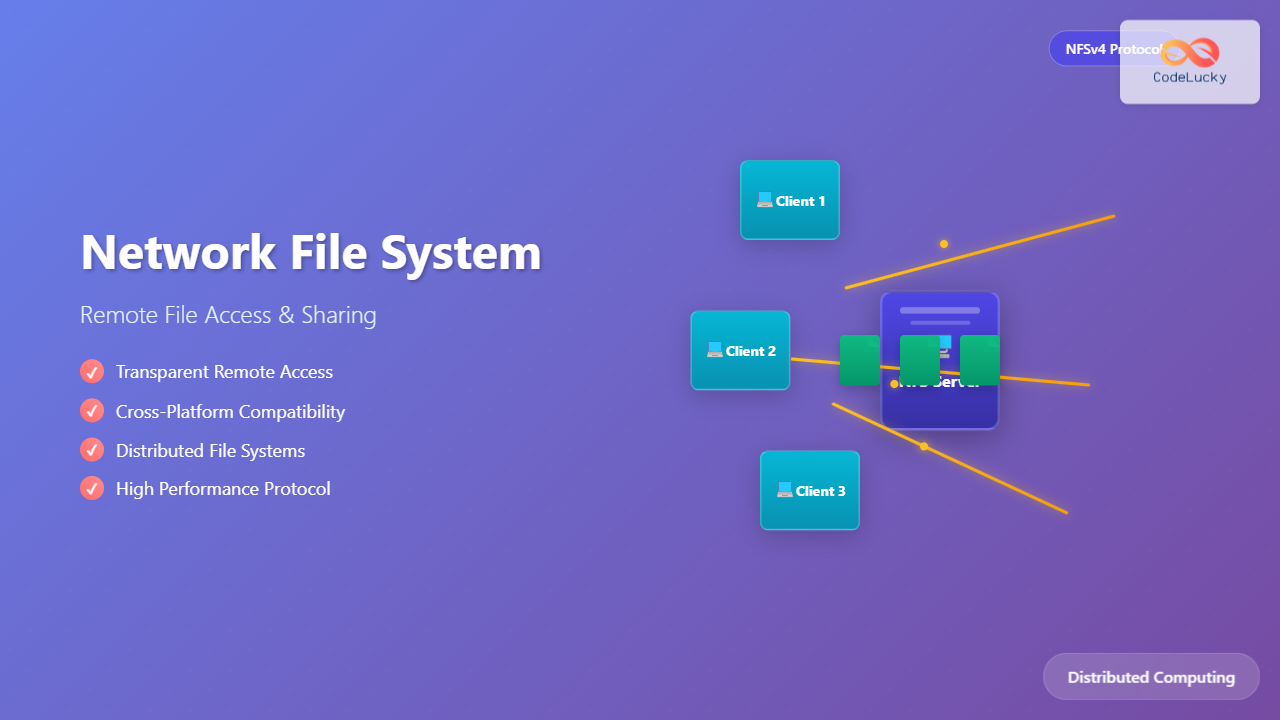
What is Network File System (NFS)?
Network File System (NFS) is a distributed file system protocol that allows users to access files over a computer network much like they would access local storage. Developed by Sun Microsystems in 1984, NFS enables seamless file sharing between different systems, making remote directories appear and behave as if they were locally mounted.
NFS operates on a client-server architecture where one machine (server) shares its directories, and other machines (clients) mount these shared directories to access files remotely. This transparency allows applications to work with remote files without modification, as the network access is handled at the operating system level.

NFS Architecture and Components
Core Components
The NFS architecture consists of several key components working together to provide transparent file access:
- NFS Client: Software running on client machines that handles remote file system requests
- NFS Server: Service running on server machines that processes client requests and manages file access
- RPC (Remote Procedure Call): Communication mechanism that enables client-server interaction
- XDR (External Data Representation): Standard for encoding data in a machine-independent format
- Portmapper/Rpcbind: Service that maps RPC program numbers to network port numbers
NFS Protocol Versions
NFS has evolved through several versions, each addressing limitations and adding new features:
| Version | Year | Key Features | Limitations |
|---|---|---|---|
| NFSv2 | 1989 | Basic file operations, UDP transport | 32-bit file sizes, stateless protocol |
| NFSv3 | 1995 | 64-bit file sizes, TCP support, better error handling | Still stateless, limited security |
| NFSv4 | 2003 | Stateful protocol, integrated security, compound operations | More complex implementation |
| NFSv4.1 | 2010 | Parallel NFS (pNFS), sessions, better performance | Increased complexity |
How NFS Works: The Communication Process
Understanding the NFS communication process is crucial for implementing and troubleshooting NFS deployments. The process involves several steps from initial mount to file operations.
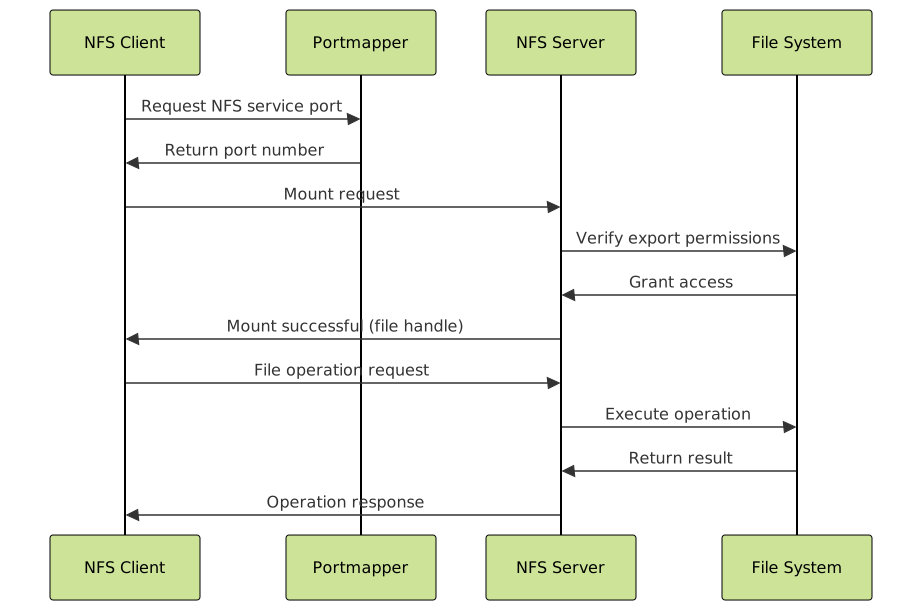
Mount Process
The NFS mount process establishes the initial connection between client and server:
- Service Discovery: Client contacts portmapper to find NFS service port
- Mount Request: Client sends mount request to NFS server
- Authentication: Server verifies client permissions
- File Handle Assignment: Server returns unique file handle for the exported directory
- Local Mount: Client mounts the remote directory locally
File Operations
Once mounted, file operations are transparently handled by the NFS client:
# Example: Client accessing remote file
$ ls /mnt/nfs-share/documents/
report.pdf  presentation.pptx  spreadsheet.xlsx

# Behind the scenes NFS operations:
# 1. Client translates 'ls' to NFS READDIR request
# 2. Server processes request on actual file system
# 3. Server returns directory contents via NFS protocol
# 4. Client displays results to user
NFS Implementation: Setting Up File Sharing
Server Configuration
Setting up an NFS server involves configuring exports and starting necessary services:
# Install NFS server packages (Ubuntu/Debian)
sudo apt update
sudo apt install nfs-kernel-server

# Create directory to share
sudo mkdir -p /srv/nfs/shared
sudo chown nobody:nogroup /srv/nfs/shared
sudo chmod 755 /srv/nfs/shared

# Configure exports in /etc/exports
echo "/srv/nfs/shared 192.168.1.0/24(rw,sync,no_subtree_check)" | sudo tee -a /etc/exports

# Export the shared directories
sudo exportfs -arv

# Start and enable NFS services
sudo systemctl start nfs-kernel-server
sudo systemctl enable nfs-kernel-server

# Verify exports
sudo exportfs -v
Client Configuration
Configuring NFS clients to access shared directories:
# Install NFS client packages
sudo apt install nfs-common

# Create mount point
sudo mkdir -p /mnt/nfs-share

# Mount NFS share
sudo mount -t nfs 192.168.1.100:/srv/nfs/shared /mnt/nfs-share

# Verify mount
df -h | grep nfs
192.168.1.100:/srv/nfs/shared  20G  2.1G   17G  12% /mnt/nfs-share

# Test file operations
echo "Hello NFS" | sudo tee /mnt/nfs-share/test.txt
cat /mnt/nfs-share/test.txt
Hello NFS

# Configure permanent mount in /etc/fstab
echo "192.168.1.100:/srv/nfs/shared /mnt/nfs-share nfs defaults 0 0" | sudo tee -a /etc/fstab
NFS Export Options and Security
Export Configuration Options
NFS exports support various options to control access and behavior:
| Option | Description | Example Usage |
|---|---|---|
| rw/ro | Read-write or read-only access | /share 192.168.1.0/24(ro) |
| sync/async | Synchronous or asynchronous writes | /share 192.168.1.0/24(rw,sync) |
| no_root_squash | Allow root access from clients | /share 192.168.1.10(rw,no_root_squash) |
| no_subtree_check | Disable subtree checking for performance | /share *(rw,no_subtree_check) |
| secure | Require connections from privileged ports | /share 192.168.1.0/24(rw,secure) |
Security Considerations
NFS security requires careful configuration to prevent unauthorized access:

# Security-focused NFS export configuration
# /etc/exports example with security options
/secure/data 192.168.1.0/24(rw,sync,no_subtree_check,root_squash,secure)
/public/readonly *(ro,sync,no_subtree_check,all_squash,anonuid=65534,anongid=65534)

# Firewall configuration for NFS
sudo ufw allow from 192.168.1.0/24 to any port 2049
sudo ufw allow from 192.168.1.0/24 to any port 111

# NFSv4 with Kerberos authentication
# /etc/default/nfs-kernel-server
NEED_SVCGSSD=yes

# Mount with Kerberos security
sudo mount -t nfs -o sec=krb5 server.example.com:/secure /mnt/secure
Performance Optimization and Tuning
Network and I/O Optimization
Optimizing NFS performance requires attention to both network and storage factors:
# Client-side performance tuning
# Mount with performance options
sudo mount -t nfs -o rsize=32768,wsize=32768,hard,intr,timeo=14,retrans=2 \
    server:/export /mnt/nfs

# Adjust read-ahead for better sequential performance
echo 15 | sudo tee /sys/class/bdi/0:*/read_ahead_kb

# Server-side tuning
# Increase NFS daemon threads
echo "RPCNFSDCOUNT=16" | sudo tee -a /etc/default/nfs-kernel-server

# Network buffer tuning
echo 'net.core.rmem_max = 16777216' | sudo tee -a /etc/sysctl.conf
echo 'net.core.wmem_max = 16777216' | sudo tee -a /etc/sysctl.conf
sudo sysctl -p
Monitoring and Troubleshooting
Effective monitoring helps identify and resolve NFS performance issues:
# Monitor NFS statistics
nfsstat -c  # Client statistics
nfsstat -s  # Server statistics

# Example output interpretation
$ nfsstat -c
Client rpc stats:
calls      retrans    authrefresh
1547841    0          1547841

Client nfs v3:
null       getattr    setattr    lookup     access     readlink
0       0% 387451  25% 1247    0% 589438  38% 156447  10% 23      0%

# Check mount information
cat /proc/mounts | grep nfs
server:/export /mnt/nfs nfs rw,relatime,vers=3,rsize=32768,wsize=32768

# Debug NFS issues
sudo tcpdump -i eth0 port 2049  # Capture NFS traffic
rpcinfo -p server_ip             # Check RPC services
showmount -e server_ip           # List exported directories
Advanced NFS Features and Use Cases
NFSv4 and Modern Features
NFSv4 introduces significant improvements over earlier versions:
- Compound Operations: Multiple operations in single RPC call
- Strong Security: Integrated Kerberos and ACL support
- Stateful Protocol: Better error recovery and locking
- UTF-8 Support: International character sets
# NFSv4 specific configuration
# /etc/exports for NFSv4
/exports 192.168.1.0/24(rw,fsid=0,no_subtree_check,sync)
/exports/home 192.168.1.0/24(rw,nohide,no_subtree_check,sync)

# Client mount for NFSv4
sudo mount -t nfs -o vers=4 server.example.com:/ /mnt/nfs4

# NFSv4 ACL example
nfs4_getfacl /mnt/nfs4/file.txt
# A::OWNER@:rwxtTnNcCy
# A::GROUP@:rxtny
# A::EVERYONE@:rtncy

nfs4_setfacl -a A::user@domain:rwx /mnt/nfs4/file.txt
High Availability and Clustering
NFS can be configured for high availability in enterprise environments:

NFS vs Alternative File Sharing Solutions
Understanding when to choose NFS over other solutions:
| Protocol | Best Use Case | Advantages | Disadvantages |
|---|---|---|---|
| NFS | Unix/Linux environments, high performance | Native integration, excellent performance | Limited Windows support, security complexity |
| SMB/CIFS | Mixed Windows/Linux environments | Windows native, good authentication | Performance overhead, protocol complexity |
| SSHFS | Secure remote access, small files | Built-in encryption, simple setup | Performance limitations, SSH dependency |
| FTP/SFTP | File transfer, not mounting | Universal support, simple protocol | Not transparent, manual operations |
Real-World Implementation Examples
Development Environment Setup
Common scenario: Shared development environment with centralized code storage:
# Development server export configuration
/srv/development 10.0.0.0/8(rw,sync,no_subtree_check,no_root_squash)
/srv/builds 10.0.0.0/8(ro,sync,no_subtree_check)

# Developer workstation mount script
#!/bin/bash
# mount-dev-shares.sh

# Create mount points
sudo mkdir -p /mnt/{dev-code,builds}

# Mount development shares
sudo mount -t nfs -o rsize=32768,wsize=32768 \
    dev-server:/srv/development /mnt/dev-code

sudo mount -t nfs -o ro,rsize=32768 \
    dev-server:/srv/builds /mnt/builds

echo "Development shares mounted successfully"
ls -la /mnt/dev-code
Backup and Archive Solution
Using NFS for centralized backup storage:
# Backup server configuration
# /etc/exports
/backup/servers 192.168.100.0/24(rw,sync,no_subtree_check,root_squash)

# Client backup script
#!/bin/bash
# daily-backup.sh

BACKUP_SERVER="backup.internal.com"
BACKUP_PATH="/backup/servers/$(hostname)"
LOCAL_MOUNT="/mnt/backup"

# Mount backup share
sudo mkdir -p $LOCAL_MOUNT
sudo mount -t nfs $BACKUP_SERVER:/backup/servers $LOCAL_MOUNT

# Create server-specific directory
sudo mkdir -p "$LOCAL_MOUNT/$(hostname)/$(date +%Y-%m-%d)"

# Perform backup
sudo rsync -av --exclude='/proc' --exclude='/sys' --exclude='/dev' \
    / "$LOCAL_MOUNT/$(hostname)/$(date +%Y-%m-%d)/"

# Cleanup old backups (keep 7 days)
sudo find "$LOCAL_MOUNT/$(hostname)" -type d -mtime +7 -exec rm -rf {} \;

# Unmount
sudo umount $LOCAL_MOUNT
Troubleshooting Common NFS Issues
Connection Problems
Systematic approach to diagnosing NFS connectivity issues:
# Step 1: Check network connectivity
ping nfs-server.example.com

# Step 2: Verify NFS services are running
rpcinfo -p nfs-server.example.com
# Should show portmapper, nfs, mountd services

# Step 3: Check firewall rules
sudo iptables -L | grep -E "(2049|111)"
sudo ufw status

# Step 4: Test mount with verbose output
sudo mount -v -t nfs nfs-server.example.com:/export /mnt/test

# Step 5: Check system logs
sudo journalctl -u nfs-server
tail -f /var/log/syslog | grep nfs
Performance Issues
Diagnosing and resolving NFS performance problems:
# Monitor NFS operations
iostat -x 1  # Check disk I/O
iftop        # Monitor network traffic
nfsiostat 1  # NFS-specific I/O statistics

# Performance test
time dd if=/dev/zero of=/mnt/nfs/testfile bs=1M count=100
# Compare with local filesystem performance

# Common solutions:
# 1. Adjust rsize/wsize
sudo mount -o remount,rsize=65536,wsize=65536 /mnt/nfs

# 2. Use TCP instead of UDP
sudo mount -o remount,proto=tcp /mnt/nfs

# 3. Enable caching
sudo mount -o remount,cache=rw /mnt/nfs
Future of NFS and Emerging Technologies
NFS continues to evolve with modern infrastructure needs:
- Container Integration: NFS as persistent storage for Kubernetes
- Cloud-Native NFS: Managed NFS services in cloud platforms
- Performance Improvements: NVMe over Fabrics integration
- Security Enhancements: Better encryption and authentication methods
# Kubernetes NFS integration example
apiVersion: v1
kind: PersistentVolume
metadata:
  name: nfs-pv
spec:
  capacity:
    storage: 10Gi
  accessModes:
    - ReadWriteMany
  nfs:
    server: nfs-server.example.com
    path: /srv/kubernetes/storage
  persistentVolumeReclaimPolicy: Retain
Network File System remains a cornerstone technology for distributed file access, offering unmatched transparency and performance for Unix-like systems. While newer technologies emerge, NFS’s simplicity, reliability, and deep integration with operating systems ensure its continued relevance in modern infrastructure. Proper implementation, security configuration, and performance tuning enable NFS to meet the demanding requirements of contemporary distributed systems and cloud-native applications.
Related Posts

Distributed File System: Complete Guide to NFS, CIFS and Network Storage Solutions
A Distributed File System (DFS) allows multiple computers to access and share files over a network as if they were...
Distributed Operating System: Complete Guide to Network-based OS Architecture
What is a Distributed Operating System? A distributed operating system is a sophisticated software system that manages and coordinates multiple...

File System in Operating System: Complete Guide to Structure and Organization
Introduction to File Systems A file system is a fundamental component of any operating system that provides a structured way...
Directory Structure: Single-level, Two-level, and Tree Structure in Operating Systems
Understanding Directory Structures in Operating Systems Directory structures are fundamental components of file systems that organize and manage files in...
Windows File System: Complete NTFS Features and Implementation Guide
Introduction to NTFS File System NTFS (New Technology File System) is the default file system for modern Windows operating systems,...

NoMachine Linux: Complete Guide to Remote Desktop Access and Configuration
NoMachine is a powerful remote desktop solution that enables secure access to Linux systems from anywhere in the world. Unlike...

zfs Command Linux: Complete Guide to ZFS Filesystem Administration
The ZFS (Zettabyte File System) is a revolutionary filesystem that combines traditional filesystem capabilities with logical volume management, RAID functionality,...
File System Implementation: Boot Block, Super Block and Inodes Explained
Understanding File System Implementation File system implementation is a critical component of operating systems that manages how data is stored,...

File Locking Mechanisms: Complete Guide to Advisory and Mandatory Locking in Operating Systems
File locking mechanisms are essential components of modern operating systems that prevent data corruption and ensure data integrity when multiple...

File System Types: FAT32, NTFS, ext4 and Modern Linux Filesystems Explained
Understanding File Systems: The Foundation of Data Storage A file system is the method and data structure that an operating...
Copy-on-Write File System: Complete Guide to ZFS and Btrfs Implementation
Copy-on-Write (COW) file systems represent a revolutionary approach to data storage and management, fundamentally changing how operating systems handle file...
Storage Virtualization: Complete Guide to Abstract Storage Resources in Modern Computing
Storage virtualization represents one of the most critical technologies in modern computing infrastructure, enabling organizations to abstract physical storage resources...





