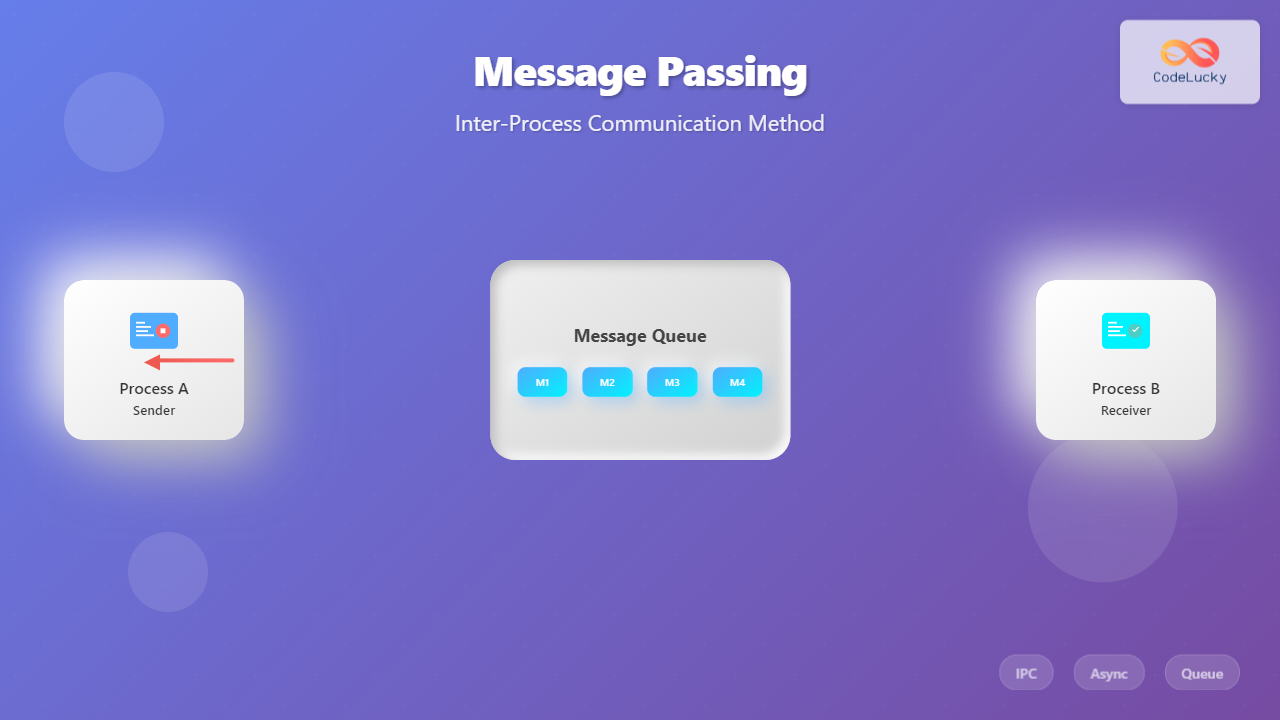
Message passing is a fundamental inter-process communication (IPC) mechanism that enables processes to exchange data and synchronize their activities in modern operating systems. Unlike shared memory approaches, message passing provides a clean abstraction where processes communicate by sending and receiving messages through well-defined channels.
What is Message Passing?
Message passing is a communication paradigm where processes exchange information by sending messages rather than sharing memory directly. This approach offers several advantages including better isolation, easier debugging, and natural support for distributed systems.

Core Components
- Sender Process: The process that initiates communication by sending a message
- Receiver Process: The process that receives and processes the message
- Message: The data unit being transmitted between processes
- Communication Channel: The medium through which messages are transmitted
Types of Message Passing
1. Direct Communication
In direct communication, processes explicitly name each other when sending and receiving messages. Each process must know the identity of the communication partner.
// Direct communication example
send(process_id, message);
receive(process_id, message);
Characteristics:
- Symmetric addressing: both sender and receiver name each other
- Asymmetric addressing: only sender names the receiver
- Limited scalability due to tight coupling
2. Indirect Communication
Indirect communication uses intermediate objects like mailboxes or message queues. Processes don’t need to know each other directly.
// Indirect communication example
send(mailbox_id, message);
receive(mailbox_id, message);
Message Passing Models
Synchronous Message Passing
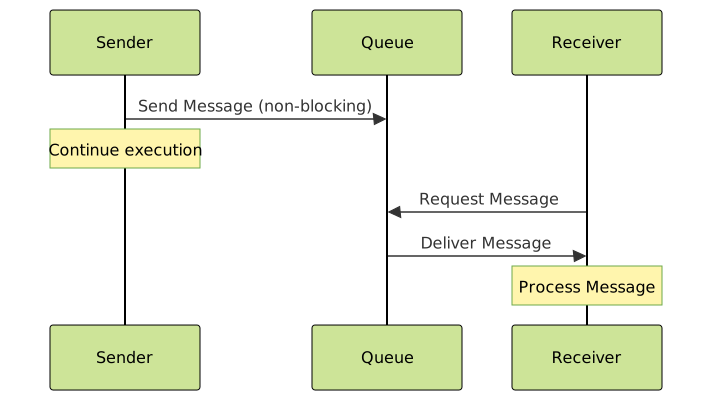
In synchronous (blocking) message passing, both sender and receiver operations are blocking calls. The sender blocks until the receiver accepts the message, and the receiver blocks until a message arrives.
# Synchronous message passing example
import queue
import threading

# Create a synchronous queue
sync_queue = queue.Queue()

def sender():
    message = "Hello from sender!"
    print("Sender: Sending message...")
    sync_queue.put(message)  # Blocks until message is received
    print("Sender: Message sent successfully!")

def receiver():
    print("Receiver: Waiting for message...")
    message = sync_queue.get()  # Blocks until message arrives
    print(f"Receiver: Received '{message}'")

# Start threads
t1 = threading.Thread(target=sender)
t2 = threading.Thread(target=receiver)
t1.start()
t2.start()
Output:
Receiver: Waiting for message...
Sender: Sending message...
Receiver: Received 'Hello from sender!'
Sender: Message sent successfully!
Asynchronous Message Passing
In asynchronous (non-blocking) message passing, the sender continues execution immediately after sending a message, without waiting for the receiver.
import asyncio
import time

async def async_sender(queue):
    message = "Async hello!"
    print("Async Sender: Sending message...")
    await queue.put(message)  # Non-blocking
    print("Async Sender: Continuing other work...")
    time.sleep(1)  # Simulate other work
    print("Async Sender: Work completed!")

async def async_receiver(queue):
    print("Async Receiver: Waiting for message...")
    message = await queue.get()
    print(f"Async Receiver: Received '{message}'")

async def main():
    queue = asyncio.Queue()

    # Run sender and receiver concurrently
    await asyncio.gather(
        async_sender(queue),
        async_receiver(queue)
    )

asyncio.run(main())
Message Queue Implementation
Message queues are the most common implementation of message passing systems. They provide buffered communication between processes.
FIFO Message Queue Example
#include
#include
#include
#include
#include

// Message structure
struct message {
    long msg_type;
    char msg_text[100];
};

// Sender process
void sender_process() {
    key_t key = ftok("msgqueue", 65);
    int msgid = msgget(key, 0666 | IPC_CREAT);

    struct message msg;
    msg.msg_type = 1;
    strcpy(msg.msg_text, "Hello from sender process!");

    msgsnd(msgid, &msg, sizeof(msg.msg_text), 0);
    printf("Sender: Message sent successfully\n");
}

// Receiver process
void receiver_process() {
    key_t key = ftok("msgqueue", 65);
    int msgid = msgget(key, 0666 | IPC_CREAT);

    struct message msg;
    msgrcv(msgid, &msg, sizeof(msg.msg_text), 1, 0);

    printf("Receiver: Received message: %s\n", msg.msg_text);

    // Clean up
    msgctl(msgid, IPC_RMID, NULL);
}
Advanced Message Passing Patterns
Request-Reply Pattern
The request-reply pattern implements two-way communication where a client sends a request and waits for a response from the server.
import time
import threading
from queue import Queue

class RequestReplySystem:
    def __init__(self):
        self.request_queue = Queue()
        self.response_queue = Queue()

    def client(self, request_data):
        # Send request
        request_id = time.time()
        request = {
            'id': request_id,
            'data': request_data,
            'response_queue': self.response_queue
        }

        print(f"Client: Sending request {request_id}")
        self.request_queue.put(request)

        # Wait for response
        while True:
            response = self.response_queue.get()
            if response['request_id'] == request_id:
                print(f"Client: Received response: {response['result']}")
                break

    def server(self):
        while True:
            request = self.request_queue.get()
            print(f"Server: Processing request {request['id']}")

            # Process request (simulate work)
            time.sleep(0.1)
            result = f"Processed: {request['data']}"

            # Send response
            response = {
                'request_id': request['id'],
                'result': result
            }
            request['response_queue'].put(response)

# Usage example
system = RequestReplySystem()

# Start server thread
server_thread = threading.Thread(target=system.server, daemon=True)
server_thread.start()

# Client requests
system.client("Process this data")
system.client("Another request")

Publisher-Subscriber Pattern
The pub-sub pattern enables one-to-many communication where publishers send messages to topics, and multiple subscribers can receive these messages.
from collections import defaultdict
import threading
import time

class PubSubSystem:
    def __init__(self):
        self.subscribers = defaultdict(list)
        self.lock = threading.Lock()

    def subscribe(self, topic, subscriber_id, callback):
        with self.lock:
            self.subscribers[topic].append({
                'id': subscriber_id,
                'callback': callback
            })
            print(f"Subscriber {subscriber_id} subscribed to {topic}")

    def publish(self, topic, message):
        with self.lock:
            subscribers = self.subscribers.get(topic, [])
            print(f"Publishing to {topic}: {message}")

            for subscriber in subscribers:
                try:
                    subscriber['callback'](topic, message)
                except Exception as e:
                    print(f"Error delivering to {subscriber['id']}: {e}")

# Example usage
pubsub = PubSubSystem()

def subscriber_callback(subscriber_id):
    def callback(topic, message):
        print(f"  [{subscriber_id}] Received from {topic}: {message}")
    return callback

# Subscribe to topics
pubsub.subscribe("news", "sub1", subscriber_callback("NewsReader"))
pubsub.subscribe("news", "sub2", subscriber_callback("NewsBot"))
pubsub.subscribe("alerts", "sub3", subscriber_callback("AlertSystem"))

# Publish messages
pubsub.publish("news", "Breaking: New OS release announced!")
pubsub.publish("alerts", "System maintenance scheduled")
pubsub.publish("news", "Performance improvements in latest update")
Message Passing in Distributed Systems
Message passing becomes even more critical in distributed environments where processes run on different machines connected by networks.
Network Message Passing Example
import socket
import json
import threading

class NetworkMessagePassing:
    def __init__(self, host='localhost', port=8888):
        self.host = host
        self.port = port
        self.socket = None

    def start_server(self):
        self.socket = socket.socket(socket.AF_INET, socket.SOCK_STREAM)
        self.socket.setsockopt(socket.SOL_SOCKET, socket.SO_REUSEADDR, 1)
        self.socket.bind((self.host, self.port))
        self.socket.listen(5)

        print(f"Server listening on {self.host}:{self.port}")

        while True:
            client_socket, address = self.socket.accept()
            client_thread = threading.Thread(
                target=self.handle_client,
                args=(client_socket, address)
            )
            client_thread.start()

    def handle_client(self, client_socket, address):
        print(f"Connected to {address}")

        try:
            while True:
                data = client_socket.recv(1024)
                if not data:
                    break

                message = json.loads(data.decode())
                print(f"Received from {address}: {message}")

                # Echo response
                response = {
                    'status': 'received',
                    'original': message,
                    'timestamp': time.time()
                }

                client_socket.send(json.dumps(response).encode())

        except Exception as e:
            print(f"Error handling client {address}: {e}")
        finally:
            client_socket.close()

    def send_message(self, message):
        try:
            client_socket = socket.socket(socket.AF_INET, socket.SOCK_STREAM)
            client_socket.connect((self.host, self.port))

            client_socket.send(json.dumps(message).encode())
            response = client_socket.recv(1024)

            print(f"Response: {json.loads(response.decode())}")
            client_socket.close()

        except Exception as e:
            print(f"Error sending message: {e}")

# Server usage (run in separate terminal)
# server = NetworkMessagePassing()
# server.start_server()

# Client usage
client = NetworkMessagePassing()
client.send_message({"type": "greeting", "content": "Hello Server!"})
client.send_message({"type": "request", "data": "Process this"})

Performance Considerations
Message Size and Throughput
The size of messages significantly impacts system performance. Large messages require more memory and network bandwidth, while small frequent messages may increase overhead.
import time
import sys

def benchmark_message_passing(message_sizes, num_messages=1000):
    from multiprocessing import Queue, Process

    results = {}

    for size in message_sizes:
        # Create test message
        test_message = 'x' * size

        def sender(queue, message, count):
            start_time = time.time()
            for i in range(count):
                queue.put(message)
            end_time = time.time()
            return end_time - start_time

        def receiver(queue, count):
            start_time = time.time()
            for i in range(count):
                queue.get()
            end_time = time.time()
            return end_time - start_time

        # Benchmark
        queue = Queue()

        start_total = time.time()

        sender_process = Process(target=sender, args=(queue, test_message, num_messages))
        receiver_process = Process(target=receiver, args=(queue, num_messages))

        sender_process.start()
        receiver_process.start()

        sender_process.join()
        receiver_process.join()

        end_total = time.time()
        total_time = end_total - start_total
        throughput = num_messages / total_time

        results[size] = {
            'total_time': total_time,
            'throughput': throughput,
            'avg_latency': total_time / num_messages
        }

        print(f"Message size {size} bytes:")
        print(f"  Total time: {total_time:.3f}s")
        print(f"  Throughput: {throughput:.2f} messages/second")
        print(f"  Average latency: {total_time/num_messages*1000:.3f}ms")
        print()

# Run benchmark
benchmark_message_passing([100, 1000, 10000, 100000])
Error Handling and Reliability
Robust message passing systems must handle various failure scenarios including message loss, duplication, and ordering issues.
Reliable Message Delivery
import time
import random
import threading
from enum import Enum

class MessageStatus(Enum):
    PENDING = "pending"
    SENT = "sent"
    ACKNOWLEDGED = "acknowledged"
    FAILED = "failed"

class ReliableMessageSystem:
    def __init__(self, max_retries=3, timeout=5.0):
        self.max_retries = max_retries
        self.timeout = timeout
        self.pending_messages = {}
        self.message_id_counter = 0
        self.lock = threading.Lock()

    def send_message_reliable(self, recipient, content):
        with self.lock:
            self.message_id_counter += 1
            message_id = self.message_id_counter

        message = {
            'id': message_id,
            'recipient': recipient,
            'content': content,
            'status': MessageStatus.PENDING,
            'attempts': 0,
            'timestamp': time.time()
        }

        self.pending_messages[message_id] = message

        # Start retry loop
        retry_thread = threading.Thread(
            target=self._retry_loop,
            args=(message_id,)
        )
        retry_thread.start()

        return message_id

    def _retry_loop(self, message_id):
        message = self.pending_messages[message_id]

        while message['attempts'] < self.max_retries:
            message['attempts'] += 1
            print(f"Attempt {message['attempts']}: Sending message {message_id}")

            # Simulate message sending (with potential failure)
            if self._simulate_send(message):
                message['status'] = MessageStatus.SENT
                print(f"Message {message_id} sent successfully")

                # Wait for acknowledgment
                if self._wait_for_ack(message_id):
                    message['status'] = MessageStatus.ACKNOWLEDGED
                    print(f"Message {message_id} acknowledged")
                    return
                else:
                    print(f"No acknowledgment for message {message_id}")
            else:
                print(f"Failed to send message {message_id}")

            # Wait before retry
            time.sleep(1)

        message['status'] = MessageStatus.FAILED
        print(f"Message {message_id} failed after {self.max_retries} attempts")

    def _simulate_send(self, message):
        # Simulate 70% success rate
        return random.random() > 0.3

    def _wait_for_ack(self, message_id):
        # Simulate acknowledgment with 80% success rate
        time.sleep(0.5)  # Simulate network delay
        return random.random() > 0.2

    def acknowledge_message(self, message_id):
        if message_id in self.pending_messages:
            self.pending_messages[message_id]['status'] = MessageStatus.ACKNOWLEDGED
            print(f"Acknowledged message {message_id}")

    def get_message_status(self, message_id):
        return self.pending_messages.get(message_id, {}).get('status')

# Example usage
system = ReliableMessageSystem()

# Send reliable messages
msg1 = system.send_message_reliable("[email protected]", "Important notification")
msg2 = system.send_message_reliable("[email protected]", "System alert")

# Check status after some time
time.sleep(10)
print(f"Message 1 status: {system.get_message_status(msg1)}")
print(f"Message 2 status: {system.get_message_status(msg2)}")
Real-World Applications
Microservices Communication
Modern microservices architectures heavily rely on message passing for service-to-service communication, enabling loose coupling and scalability.
Operating System Services
Many operating system services use message passing:
- Window Systems: GUI applications communicate with window managers through message passing
- Device Drivers: Kernel modules communicate with hardware through message-based protocols
- System Services: Services like print spoolers, network managers use message queues
Distributed Databases
Database systems use message passing for:
- Replication coordination
- Transaction management
- Distributed query processing
- Consistency maintenance
Best Practices
Design Guidelines
- Keep Messages Small: Large messages increase latency and memory usage
- Use Appropriate Patterns: Choose synchronous vs asynchronous based on requirements
- Handle Failures Gracefully: Implement proper error handling and retry mechanisms
- Consider Message Ordering: Some applications require ordered message delivery
- Monitor Performance: Track message throughput, latency, and error rates
Security Considerations
- Authentication: Verify sender identity
- Authorization: Control access to message channels
- Encryption: Protect sensitive message content
- Input Validation: Sanitize received messages
Conclusion
Message passing is a powerful and flexible IPC mechanism that provides clean abstraction for process communication. Its benefits of isolation, scalability, and natural distribution support make it essential for modern system design. Understanding different message passing patterns, implementation techniques, and best practices enables developers to build robust, scalable applications that effectively coordinate multiple processes and services.
Whether implementing simple producer-consumer systems or complex distributed microservices, message passing provides the foundation for reliable inter-process communication in today’s computing environments.
Related Posts

Socket Programming: Complete Guide to Network Inter-process Communication in Operating Systems
Socket programming forms the backbone of network communication in modern operating systems, enabling processes to communicate across different machines or...

Shared Memory: Complete Guide to IPC Through Memory Segments
Introduction to Shared Memory IPC Shared Memory is one of the most efficient Inter-Process Communication (IPC) mechanisms available in modern...

Multithreading in Operating Systems: Benefits, Challenges, and Implementation Guide
What is Multithreading in Operating Systems? Multithreading is a fundamental concept in modern operating systems that allows a single process...

Distributed Operating System: Complete Guide to Network-based OS Architecture
What is a Distributed Operating System? A distributed operating system is a sophisticated software system that manages and coordinates multiple...

Thread vs Process: Complete Guide to Differences and When to Use Each
Understanding the fundamental differences between threads and processes is crucial for system programming, application design, and performance optimization. While both...

Operating System Functions: Core Components and System Responsibilities
An operating system (OS) serves as the fundamental software layer that manages computer hardware resources and provides essential services to...

C Socket Programming: Network Communication Basics
In the world of modern computing, network communication is the backbone of countless applications and services. Whether you're building a...

Remote Procedure Call: Complete Guide to Distributed System Communication
Remote Procedure Call (RPC) is a fundamental communication protocol that enables programs to execute procedures or functions on remote systems...
Thread in Operating System: Lightweight Processes and Multithreading Explained
What are Threads in Operating Systems? A thread is the smallest unit of execution within a process that can be...

Process in Operating System: Complete Guide to Definition, States and Lifecycle
What is a Process in Operating System? A process is a program in execution that consists of the program code...

Critical Section Problem: Complete Guide to Mutual Exclusion Solutions in Operating Systems
What is the Critical Section Problem? The critical section problem is a fundamental challenge in operating systems where multiple processes...
Pipes in Operating System: Complete Guide to Anonymous and Named Pipes
Pipes are one of the most fundamental and widely used Inter-Process Communication (IPC) mechanisms in Unix-like operating systems. They provide...