
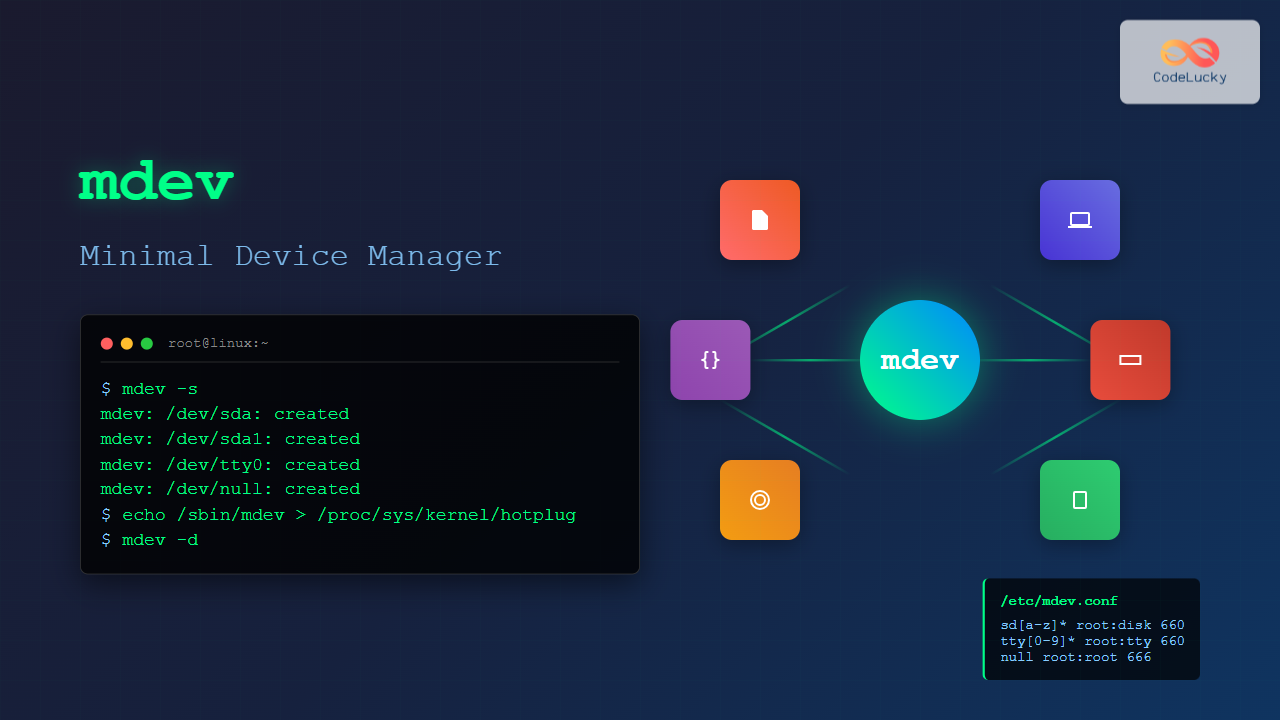
The mdev command is a lightweight device manager for Linux systems, particularly popular in embedded environments and minimal distributions. As a simpler alternative to udev, mdev provides essential device management functionality while maintaining a small footprint and fast performance.
What is mdev in Linux?
mdev is a minimal device manager that automatically creates and removes device nodes in the /dev directory when hardware devices are added or removed from the system. It’s part of the BusyBox toolkit and serves as a lightweight replacement for the more complex udev system.
Key Features of mdev
- Lightweight: Minimal memory and storage requirements
- Fast: Quick device detection and node creation
- Configurable: Supports custom rules and actions
- Hotplug support: Handles dynamic device insertion/removal
- Embedded-friendly: Perfect for resource-constrained systems
mdev vs udev: Understanding the Differences
| Feature | mdev | udev |
|---|---|---|
| Size | ~50KB | ~500KB+ |
| Complexity | Simple | Complex |
| Configuration | Single file | Multiple files/directories |
| Performance | Fast startup | Slower startup |
| Features | Basic | Advanced |
Installing and Enabling mdev
Installation on Different Distributions
Alpine Linux (default):
# mdev is pre-installed
apk add busybox-mdev-openrc
Debian/Ubuntu:
sudo apt update
sudo apt install busybox-static
CentOS/RHEL:
sudo yum install busybox
# or on newer versions
sudo dnf install busybox
Enabling mdev as Device Manager
To use mdev instead of udev, you need to configure it as the hotplug handler:
# Set mdev as the hotplug handler
echo /sbin/mdev > /proc/sys/kernel/hotplug

# Or make it persistent
echo 'kernel.hotplug = /sbin/mdev' >> /etc/sysctl.conf
Basic mdev Command Syntax
The basic syntax for the mdev command is:
mdev [OPTIONS]Common mdev Options
-s: Scan /sys and populate /dev (initial scan)-d: Daemon mode (handle hotplug events)-f: Stay in foreground (don’t daemonize)-v: Verbose output
Essential mdev Commands and Examples
1. Initial Device Scan
Populate the /dev directory with existing devices:
# Scan all devices and create nodes
sudo mdev -s
Expected Output:
# Creates device nodes like:
# /dev/sda, /dev/sda1, /dev/tty0, /dev/null, etc.
2. Verbose Device Scanning
Get detailed information during the scan process:
# Verbose scan showing device creation
sudo mdev -sv
Sample Output:
mdev: /dev/console: created
mdev: /dev/null: created
mdev: /dev/zero: created
mdev: /dev/random: created
mdev: /dev/sda: created
mdev: /dev/sda1: created
3. Running mdev in Daemon Mode
Start mdev to handle hotplug events continuously:
# Start mdev daemon
sudo mdev -d

# Or in foreground with verbose output
sudo mdev -fv
mdev Configuration File
mdev behavior is controlled by the /etc/mdev.conf configuration file. This file defines rules for device handling.
Configuration File Format
The format is:
device_regex user:group permissions [action]Basic mdev.conf Example
# Basic mdev.conf configuration
# Device        User:Group    Perms   Action

# Console devices
console         root:tty      600

# Null and zero devices
null            root:root     666
zero            root:root     666
random          root:root     444
urandom         root:root     444

# Hard drives
sd[a-z][0-9]*   root:disk     660

# TTY devices
tty             root:tty      666
tty[0-9]*       root:tty      660

# USB devices
usb             root:usb      664
Advanced mdev.conf with Actions
# Advanced configuration with actions
# Device        User:Group    Perms   Action

# Network interfaces
eth[0-9]+       root:netdev   664     @/etc/mdev/net.sh
wlan[0-9]+      root:netdev   664     @/etc/mdev/net.sh

# USB storage with mount action
sd[a-z][0-9]*   root:disk     660     */etc/mdev/storage.sh

# Input devices
input/.*        root:input    660

# Sound devices
snd/.*          root:audio    664     @/etc/mdev/sound.sh
Creating Custom mdev Rules
Rule Components Explained
Device Regex: Pattern to match device names
sd[a-z]*: Matches sda, sdb, sdc, etc.tty[0-9]+: Matches tty0, tty1, tty2, etc.input/.*: Matches all devices in input subdirectory
Permissions: Standard octal permissions
644: Read/write for owner, read for group and others660: Read/write for owner and group666: Read/write for everyone
Action Scripts
Create a network interface handler:
# /etc/mdev/net.sh
#!/bin/sh

case "$ACTION" in
    add)
        echo "Network device $MDEV added"
        # Configure network interface
        /sbin/ifconfig $MDEV up
        ;;
    remove)
        echo "Network device $MDEV removed"
        ;;
esac
Make the script executable:
sudo chmod +x /etc/mdev/net.shPractical Examples and Use Cases
Example 1: USB Storage Auto-mounting
Create an auto-mount script for USB devices:
# /etc/mdev/usb-mount.sh
#!/bin/sh

MOUNT_POINT="/mnt/usb"

case "$ACTION" in
    add)
        mkdir -p "$MOUNT_POINT/$MDEV"
        mount "/dev/$MDEV" "$MOUNT_POINT/$MDEV"
        echo "Mounted $MDEV to $MOUNT_POINT/$MDEV"
        ;;
    remove)
        umount "$MOUNT_POINT/$MDEV"
        rmdir "$MOUNT_POINT/$MDEV"
        echo "Unmounted $MDEV"
        ;;
esac
Add to mdev.conf:
sd[a-z][0-9]* root:disk 660 */etc/mdev/usb-mount.shExample 2: Custom Device Permissions
Set specific permissions for development devices:
# Development-friendly mdev.conf
# Device        User:Group      Perms   Action

# Serial devices for developers
ttyUSB[0-9]*    root:dialout    666
ttyACM[0-9]*    root:dialout    666

# GPIO and I2C for embedded development
gpiochip[0-9]*  root:gpio       664
i2c-[0-9]*      root:i2c        664

# Video devices for testing
video[0-9]*     root:video      666
Example 3: Logging Device Events
Create a logging script for device monitoring:
# /etc/mdev/logger.sh
#!/bin/sh

LOG_FILE="/var/log/mdev.log"
TIMESTAMP=$(date '+%Y-%m-%d %H:%M:%S')

echo "$TIMESTAMP: $ACTION device $MDEV ($DEVPATH)" >> "$LOG_FILE"

case "$ACTION" in
    add)
        logger "Device added: $MDEV"
        ;;
    remove)
        logger "Device removed: $MDEV"
        ;;
esac
Troubleshooting mdev Issues
Common Problems and Solutions
1. Devices not appearing in /dev
# Check if mdev is running
ps aux | grep mdev

# Manually trigger scan
sudo mdev -s

# Check sysfs
ls /sys/class/
2. Permission issues
# Check current permissions
ls -la /dev/device_name

# Verify mdev.conf syntax
sudo mdev -s -v
3. Hotplug not working
# Verify hotplug handler
cat /proc/sys/kernel/hotplug

# Should show: /sbin/mdev
echo /sbin/mdev > /proc/sys/kernel/hotplug
Debug Mode
Enable verbose debugging:
# Run mdev with maximum verbosity
sudo MDEV_LOG_LEVEL=debug mdev -sv

# Monitor kernel messages
dmesg | tail -f
Performance Optimization
Optimizing mdev for Speed
1. Minimize rules: Only include necessary device patterns
2. Use specific regex: Avoid overly broad patterns
3. Efficient scripts: Keep action scripts lightweight
# Good: Specific pattern
sd[a-z][1-9]    root:disk   660

# Less efficient: Too broad
.*              root:root   644
Memory Usage Monitoring
# Check mdev memory usage
ps -o pid,vsz,rss,comm -p $(pgrep mdev)

# Compare with system resources
free -h
Integration with Init Systems
OpenRC Integration
# /etc/init.d/mdev
#!/sbin/openrc-run

description="mdev device manager"
command="/sbin/mdev"
command_args="-d"
pidfile="/run/mdev.pid"

depend() {
    need localmount
    before bootmisc
}

start_pre() {
    # Initial device scan
    /sbin/mdev -s

    # Set hotplug handler
    echo /sbin/mdev > /proc/sys/kernel/hotplug
}
systemd Integration
# /etc/systemd/system/mdev.service
[Unit]
Description=mdev device manager
Before=sysinit.target

[Service]
Type=forking
ExecStartPre=/sbin/mdev -s
ExecStartPre=/bin/sh -c 'echo /sbin/mdev > /proc/sys/kernel/hotplug'
ExecStart=/sbin/mdev -d
PIDFile=/run/mdev.pid

[Install]
WantedBy=sysinit.target
Best Practices for mdev Usage
Security Considerations
- Minimal permissions: Use restrictive permissions by default
- Secure scripts: Validate input in action scripts
- User groups: Leverage groups for access control
# Secure mdev.conf example
# Restrictive by default
.*              root:root   600

# Specific exceptions
console         root:tty    600
null            root:root   666
zero            root:root   644
random          root:root   644
Maintenance Tips
- Regularly review and update mdev.conf
- Monitor log files for unusual activity
- Test configuration changes in non-production environments
- Keep action scripts simple and fast
Conclusion
The mdev command provides an excellent lightweight alternative to udev for Linux device management, especially in embedded and resource-constrained environments. Its simplicity, speed, and minimal footprint make it ideal for systems where efficiency is crucial.
By understanding mdev configuration, creating custom rules, and implementing proper action scripts, you can build a robust device management system that meets your specific requirements while maintaining optimal performance.
Whether you’re working with embedded Linux systems, containers, or simply prefer a minimalist approach to device management, mdev offers the essential functionality needed to handle dynamic device creation and removal effectively.
Related Posts
udev Command Linux: Complete Guide to Dynamic Device Management
The udev (userspace device manager) is a crucial component of modern Linux systems that handles dynamic device management. Unlike traditional...

udevadm Command Linux: Complete Guide to Device Management and Udev Administration
The udevadm command is a powerful administrative tool in Linux systems that manages the udev device manager. It serves as...

hotplug Linux: Complete Guide to Hardware Hotplug Event Handling and Management
Hardware hotplug functionality in Linux enables the dynamic addition and removal of hardware components without requiring system restarts. This powerful...
devtmpfs Linux: Complete Guide to Device Temporary Filesystem Management
The devtmpfs (Device Temporary Filesystem) is a crucial component of modern Linux systems that revolutionizes how device nodes are managed...
devfs Linux: Complete Guide to Device Filesystem Management
The Device Filesystem (devfs) represents a revolutionary approach to device management in Linux systems, providing dynamic creation and removal of...
mdadm Command Linux: Complete Guide to Managing Software RAID Arrays
The mdadm (Multiple Device Administrator) command is a powerful Linux utility for managing software RAID arrays. It provides comprehensive functionality...
lsblk Command Linux: Complete Guide to List and Manage Block Devices
The lsblk command is an essential Linux utility that displays information about block devices in a tree-like format. Whether you're...

Device Drivers in Operating System: Complete Guide to Hardware Abstraction Layer
Device drivers serve as the critical bridge between your operating system and hardware components, forming what's known as the Hardware...
Embedded Operating System: Complete Guide to Resource-Constrained Environments
Embedded operating systems form the backbone of countless devices we interact with daily, from smart home appliances to automotive control...
modprobe Command Linux: Complete Guide to Load and Manage Kernel Modules
The modprobe command is one of the most powerful tools in Linux system administration for managing kernel modules. Whether you're...

Hybrid Kernel: Complete Guide to Combining Micro and Monolithic Kernel Architectures
A hybrid kernel represents an evolutionary approach in operating system design that strategically combines elements from both microkernel and monolithic...
dkms Command Linux: Complete Guide to Dynamic Kernel Module Support
Dynamic Kernel Module Support (DKMS) is a powerful framework that automatically rebuilds kernel modules when you install a new kernel...
- What is mdev in Linux?
- mdev vs udev: Understanding the Differences
- Installing and Enabling mdev
- Basic mdev Command Syntax
- Essential mdev Commands and Examples
- mdev Configuration File
- Creating Custom mdev Rules
- Practical Examples and Use Cases
- Troubleshooting mdev Issues
- Performance Optimization
- Integration with Init Systems
- Best Practices for mdev Usage
- Conclusion





