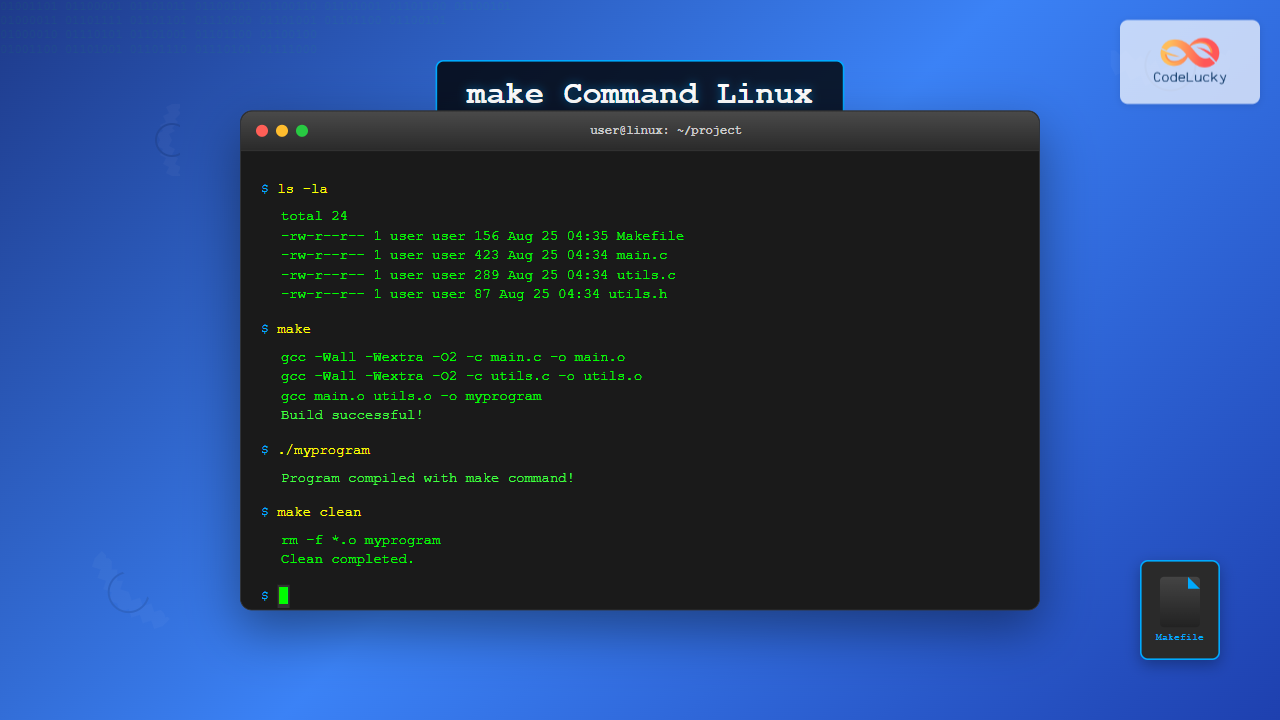
The make command is one of the most essential tools in Linux for building and compiling software from source code. Whether you’re a developer working on projects or a system administrator installing software, understanding make is crucial for effective Linux usage.
What is the make Command?
The make command is a build automation tool that reads instructions from a file called Makefile to compile and link programs. It determines which files need to be rebuilt based on their dependencies and timestamps, making the build process efficient and organized.
Key Features of make:
- Dependency management: Tracks file relationships and builds only what’s necessary
- Incremental builds: Rebuilds only modified files and their dependents
- Cross-platform compatibility: Works across different Unix-like systems
- Flexibility: Supports various programming languages and build processes
Basic Syntax and Usage
The basic syntax of the make command is:
make [options] [target]Common Options:
-f filename: Specify a different Makefile-j N: Run N jobs in parallel-n: Dry run (show what would be executed)-C directory: Change to directory before running-k: Continue on errors-s: Silent mode (suppress output)
Understanding Makefiles
A Makefile contains rules that define how to build your project. Each rule has the following structure:
target: dependencies
    command1
    command2
Basic Makefile Example:
# Simple C program Makefile
CC=gcc
CFLAGS=-Wall -g
TARGET=myprogram
SOURCES=main.c utils.c

$(TARGET): $(SOURCES)
    $(CC) $(CFLAGS) -o $(TARGET) $(SOURCES)

clean:
    rm -f $(TARGET)

install: $(TARGET)
    cp $(TARGET) /usr/local/bin/

.PHONY: clean install
Practical Examples
Example 1: Building a Simple C Program
Let’s create a simple C program and build it using make:
main.c:
#include <stdio.h>

int main() {
    printf("Hello, make command!\n");
    return 0;
}
Makefile:
CC=gcc
CFLAGS=-Wall -Wextra -std=c99
TARGET=hello
SOURCE=main.c

$(TARGET): $(SOURCE)
    $(CC) $(CFLAGS) -o $(TARGET) $(SOURCE)

clean:
    rm -f $(TARGET)

.PHONY: clean
Building the program:
$ make
gcc -Wall -Wextra -std=c99 -o hello main.c

$ ./hello
Hello, make command!
Example 2: Multi-file Project
For larger projects with multiple source files:
Project structure:
project/
├── src/
│   ├── main.c
│   ├── calculator.c
│   └── calculator.h
├── obj/
└── Makefile
Advanced Makefile:
CC=gcc
CFLAGS=-Wall -Wextra -O2
SRCDIR=src
OBJDIR=obj
TARGET=calculator

SOURCES=$(wildcard $(SRCDIR)/*.c)
OBJECTS=$(SOURCES:$(SRCDIR)/%.c=$(OBJDIR)/%.o)

$(TARGET): $(OBJECTS)
    $(CC) $(OBJECTS) -o $@

$(OBJDIR)/%.o: $(SRCDIR)/%.c
    @mkdir -p $(OBJDIR)
    $(CC) $(CFLAGS) -c $< -o $@

clean:
    rm -rf $(OBJDIR) $(TARGET)

debug: CFLAGS += -g -DDEBUG
debug: $(TARGET)

.PHONY: clean debug
Example 3: Using Variables and Functions
# Advanced Makefile with variables and functions
PROJECT_NAME := myapp
VERSION := 1.0.0
BUILD_DIR := build
SRC_DIR := src

# Automatic dependency generation
SOURCES := $(shell find $(SRC_DIR) -name '*.c')
OBJECTS := $(SOURCES:$(SRC_DIR)/%.c=$(BUILD_DIR)/%.o)
DEPENDS := $(OBJECTS:.o=.d)

CC := gcc
CFLAGS := -Wall -Wextra -MMD -MP
LDFLAGS := -lm

$(PROJECT_NAME): $(OBJECTS)
    $(CC) $(OBJECTS) -o $@ $(LDFLAGS)
    @echo "Build completed: $(PROJECT_NAME) v$(VERSION)"

$(BUILD_DIR)/%.o: $(SRC_DIR)/%.c
    @mkdir -p $(dir $@)
    $(CC) $(CFLAGS) -c $< -o $@

-include $(DEPENDS)

clean:
    rm -rf $(BUILD_DIR) $(PROJECT_NAME)

install: $(PROJECT_NAME)
    install -m 755 $(PROJECT_NAME) /usr/local/bin/

uninstall:
    rm -f /usr/local/bin/$(PROJECT_NAME)

.PHONY: clean install uninstall
Common make Targets
Standard Targets:
all: Build the main target (default)clean: Remove built filesinstall: Install the programuninstall: Remove installed filestest: Run testsdist: Create distribution package
Running Different Targets:
# Build the project
$ make

# Clean build artifacts
$ make clean

# Install the program
$ sudo make install

# Run tests
$ make test
Advanced make Features
Parallel Builds
Speed up compilation by running multiple jobs simultaneously:
# Use 4 parallel jobs
$ make -j4

# Use all available CPU cores
$ make -j$(nproc)
Conditional Compilation
# Makefile with conditional compilation
ifeq ($(DEBUG),1)
    CFLAGS += -g -DDEBUG
else
    CFLAGS += -O2 -DNDEBUG
endif

ifdef STATIC
    LDFLAGS += -static
endif
Pattern Rules
# Generic pattern rule for C files
%.o: %.c
    $(CC) $(CFLAGS) -c $< -o $@

# Pattern rule for different file types
$(BUILD_DIR)/%.o: $(SRC_DIR)/%.cpp
    $(CXX) $(CXXFLAGS) -c $< -o $@
Working with Existing Projects
Typical Build Process:
# Download source code
$ wget https://example.com/software-1.0.tar.gz
$ tar -xzf software-1.0.tar.gz
$ cd software-1.0

# Configure (if using autotools)
$ ./configure --prefix=/usr/local

# Build
$ make

# Test (optional)
$ make check

# Install
$ sudo make install
CMake Integration:
Many modern projects use CMake, which generates Makefiles:
$ mkdir build
$ cd build
$ cmake ..
$ make -j$(nproc)
$ sudo make install
Troubleshooting Common Issues
Missing Dependencies
# Error: missing header files
fatal error: stdio.h: No such file or directory

# Solution: Install development packages
$ sudo apt-get install build-essential  # Ubuntu/Debian
$ sudo yum groupinstall "Development Tools"  # CentOS/RHEL
Permission Issues
# Error: Permission denied
make: *** [install] Error 1

# Solution: Use sudo for installation
$ sudo make install
Parallel Build Failures
# If parallel builds fail, try sequential
$ make clean
$ make -j1
Best Practices
Makefile Organization:
- Use variables for compiler flags and paths
- Include
.PHONYtargets that don’t create files - Add dependency tracking for automatic rebuilds
- Provide helpful targets like
cleanandinstall
Debugging Makefiles:
# Show what make would do without executing
$ make -n

# Print variable values
$ make -p | grep VARIABLE_NAME

# Verbose output
$ make V=1
Alternative Build Systems
While make is traditional and widely used, consider these alternatives for modern projects:
- CMake: Cross-platform build system generator
- Ninja: Faster build system for large projects
- Meson: User-friendly build system
- Bazel: Scalable build system by Google
Conclusion
The make command remains an essential tool for building software on Linux systems. Understanding how to create and use Makefiles effectively will significantly improve your development workflow and ability to work with open-source projects. Start with simple Makefiles and gradually incorporate advanced features as your projects grow in complexity.
Practice with different types of projects, experiment with various make features, and always refer to the manual pages (man make) for detailed information about specific options and behaviors. Mastering make is a valuable skill that will serve you well throughout your Linux journey.
Related Posts

C Makefiles: Automating Compilation Process
In the world of C programming, efficiency is key. As projects grow larger and more complex, manually compiling each source...
source Command Linux: Execute Scripts and Load Functions Efficiently
The source command in Linux is a powerful built-in shell command that executes commands from a file within the current...
gcc Command Linux: Complete Guide to Compiling C Programs with Examples
The gcc (GNU Compiler Collection) is one of the most essential tools for C programmers working on Linux systems. This...
g++ Command Linux: Complete Guide to Compile C++ Programs Efficiently
The g++ command is one of the most essential tools for C++ developers working on Linux systems. As part of...
cp Command Linux: Copy Files and Directories with Examples and Best Practices
The cp command is one of the most fundamental and frequently used commands in Linux systems. It allows you to...
mkdir Command Linux: Complete Guide to Creating Directories and Subdirectories
The mkdir command is one of the most fundamental and frequently used commands in Linux for creating directories. Whether you're...

C Compilers: Choosing and Using Different C Compilers
C programming is a powerful and versatile language that has stood the test of time. One of the key components...
size Command Linux: Display Section Sizes of Object Files and Executables
The size command is a powerful utility in Linux systems that displays the section sizes of object files, executables, and...
export Command Linux: Complete Guide to Environment Variables Management
The export command is one of the most fundamental tools in Linux for managing environment variables. Whether you're a system...
ldconfig Command Linux: Complete Guide to Dynamic Linker Configuration
The ldconfig command is a fundamental Linux system administration tool that configures the dynamic linker's runtime bindings for shared libraries....
which Command Linux: Complete Guide to Locating Executable Commands in PATH
The which command is a fundamental Linux utility that helps you locate executable files in your system's PATH environment variable....
which Command Linux: Complete Guide to Finding Executable File Locations
The which command is one of the most fundamental utilities in Linux and Unix-like systems, designed to help users locate...